Tech 2 Purchase

Disclaimer: Links on this page pointing to Amazon, eBay and other sites may include affiliate code. If you click them and make a purchase, we may earn a small commission.

96-2D-Hoe

Full Access Member
Joined
Feb 14, 2019
Posts
529
Reaction score
409
But it's free! I don't have the replacement tech2 unit yet but thought I'd have a go at getting XP going and the tis2000 software installed. XP install giving me problems. I thought I could install it natively like I can on my desktop but it seems not. I'll get there.

 

Rocket Man

Mark
Supporting Member
Joined
Dec 25, 2014
Posts
26,678
Reaction score
52,943
Location
Oregon
But it's free! I don't have the replacement tech2 unit yet but thought I'd have a go at getting XP going and the tis2000 software installed. XP install giving me problems. I thought I could install it natively like I can on my desktop but it seems not. I'll get there.
You can run it in compatibility mode on Win7, no need to install XP. When you install it, right click on the .exe and select compatibility mode. At least I’m pretty sure that’s how to do it. I did it on my laptop before I decided to use Tech2win and upgrade to Win10.
 

swathdiver

Full Access Member
Joined
May 18, 2017
Posts
21,283
Reaction score
30,216
Location
Treasure Coast, Florida
I tried mine out today, but I think, MAYBE the candi module might be bad.View attachment 253124 View attachment 253125 View attachment 253126 View attachment 253127
I tried running trans codes for my work van. Kept getting this.
I scanned 1st without the module between the tech 2 and obd. I did get engine codes, but no trans codes. Then with the candi module in between. Is the candi needed to get the trans codes? I tried getting the tech 2 to test things--wouldn't do it. Am I doing something wrong? And how are you supposed to know what designation to use for the vehicle?

Never seen those messages before and they do not make sense either. Why would Tech2Win be on a Tech-2?
 

Rocket Man

Mark
Supporting Member
Joined
Dec 25, 2014
Posts
26,678
Reaction score
52,943
Location
Oregon
I tried mine out today, but I think, MAYBE the candi module might be bad.View attachment 253124 View attachment 253125 View attachment 253126 View attachment 253127
I tried running trans codes for my work van. Kept getting this.
I scanned 1st without the module between the tech 2 and obd. I did get engine codes, but no trans codes. Then with the candi module in between. Is the candi needed to get the trans codes? I tried getting the tech 2 to test things--wouldn't do it. Am I doing something wrong? And how are you supposed to know what designation to use for the vehicle?
Are you in programming or diagnostics? You need to be in diagnostics.
 

swathdiver

Full Access Member
Joined
May 18, 2017
Posts
21,283
Reaction score
30,216
Location
Treasure Coast, Florida
I think it was the angle of the pic I took. Actually a blue screen. When I turn it on it goes through the self tests so fast I can't read if they all passed.
Do I need the Candi module if I want to just run for codes and do tests?

What year is your work truck? You do not need the CANdi for your GMT800. The 900s and those with CAN bus architecture use the CANdi.
 

Rocket Man

Mark
Supporting Member
Joined
Dec 25, 2014
Posts
26,678
Reaction score
52,943
Location
Oregon
How can I do that?

It's an 05 Chevy Express van.
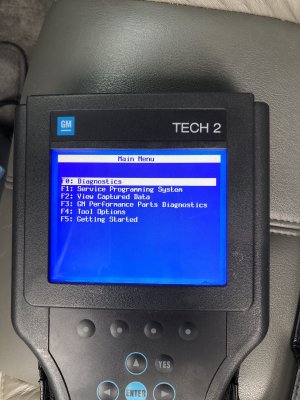
The very first menu after it does it’s self test has options for Diagnostics, Service Programming System, View Captured Data, Tool Options etc so choose Diagnostics.

image.jpg
 

Tonyrodz

Resident Resident
Joined
Feb 16, 2012
Posts
33,178
Reaction score
51,386
Location
Central Jersey
The very first menu after it does it’s self test has options for Diagnostics, Service Programming System, View Captured Data, Tool Options etc so choose Diagnostics.
Iirc, pretty sure I did do that. DAMN! I wish these things came with a user manual! I'll mess with it tomorrow, gonna be raining all day today.
How would you get it to do tests--like beep the horn, needle sweep on the cluster, trans solenoids etc? This is a great tool once it's figured out--or I should say once I figure it out!
 

Rocket Man

Mark
Supporting Member
Joined
Dec 25, 2014
Posts
26,678
Reaction score
52,943
Location
Oregon
Iirc, pretty sure I did do that. DAMN! I wish these things came with a user manual! I'll mess with it tomorrow, gonna be raining all day today.
How would you get it to do tests--like beep the horn, needle sweep on the cluster, trans solenoids etc? This is a great tool once it's figured out--or I should say once I figure it out!
That’s all under diagnostics.
 
Joined
Apr 11, 2018
Posts
7,124
Reaction score
14,375
Location
St. Louis
Yeah, it kept giving me that error message. Do you need the candi module to do that? I tried with and without it.
I don't think you need the Candi modual with an '05.

That said, having the Candi modual on if it's not needed shouldn't matter. If the vehicle doesn't need it, it won't use it.

Sent from my SM-G930V using Tapatalk
 

Tonyrodz

Resident Resident
Joined
Feb 16, 2012
Posts
33,178
Reaction score
51,386
Location
Central Jersey
I don't think you need the Candi modual with an '05.

That said, having the Candi modual on if it's not needed shouldn't matter. If the vehicle doesn't need it, it won't use it.

Sent from my SM-G930V using Tapatalk
Yeah, I tried both ways but really couldn't do much.
20200721_160736.jpg
20200721_160747.jpg
 
Joined
Apr 11, 2018
Posts
7,124
Reaction score
14,375
Location
St. Louis
Did you just get this? Make sure all the connections are plugged in good (bottom of unit, input of Candi, and OBD adapter). Also try seating the PCMCIA card into the other slot in the top of the unit.

Otherwise, it may just be a bad/defective unit
 

Rocket Man

Mark
Supporting Member
Joined
Dec 25, 2014
Posts
26,678
Reaction score
52,943
Location
Oregon
Yeah, I tried both ways but really couldn't do much.View attachment 253232 View attachment 253233
I would start by removing the CANdi module and trying it. If you need that module for your 05 which I don’t think you do, it looks like it’s trying to update it like David said which can only be done if it’s connected to a PC and you’ll have to figure out how to do that. Which software version was this Tech2 supposed to come with?
 

Tonyrodz

Resident Resident
Joined
Feb 16, 2012
Posts
33,178
Reaction score
51,386
Location
Central Jersey
Did you just get this? Make sure all the connections are plugged in good (bottom of unit, input of Candi, and OBD adapter). Also try seating the PCMCIA card into the other slot in the top of the unit.

Otherwise, it may just be a bad/defective unit
I did, bought it used, but at a reduced price because the guy wasn't sure it was 100% working correctly. Pretty honest. I'll try swapping the card around. Everything is snuggly plugged in, I triple checked that.
Says in the GM User Manual the Tech2 updates the software in the Candi when it's attached if it needs to. That could that be what you are seeing in your pics Tony.

http://www.auto-diagnostics.info/pdf/tech2_users_guide.pdf
I have no clue what I'm look at lol. I haven't connected it to any pc yet.
I would start by removing the CANdi module and trying it. If you need that module for your 05 which I don’t think you do, it looks like it’s trying to update it like David said which can only be done if it’s connected to a PC and you’ll have to figure out how to do that. Which software version was this Tech2 supposed to come with?
I've plugged into the obd with and without the candi module attached. Got the same error message both ways. It has the newest version--33.004. Do I really need to connect it for an update? All I want to do is use it to diagnose.
 

thompsoj22

Full Access Member
Joined
Jul 21, 2018
Posts
689
Reaction score
718
Location
california native "REPUBLICAN" high desert
Iirc, pretty sure I did do that. DAMN! I wish these things came with a user manual! I'll mess with it tomorrow, gonna be raining all day today.
How would you get it to do tests--like beep the horn, needle sweep on the cluster, trans solenoids etc? This is a great tool once it's figured out--or I should say once I figure it out!


It is like any other electronic device you purchase, Your ability to use it is anticipated and mandatory, The tech dweebs that design it cant percieve you not knowing exactly how to fix your problem right now and probably take joy in your frustration! But dont worry right now one of them is trying to figure out which button to push to cross the street and why the crossing display dosent resemble them so it must not be their turn yet!
 

96-2D-Hoe

Full Access Member
Joined
Feb 14, 2019
Posts
529
Reaction score
409
I did, bought it used, but at a reduced price because the guy wasn't sure it was 100% working correctly.
eBay? Are you still within the return period?

You said you got engine codes out of it. I got nothing from my bad one
 

Fless

Staff member
Moderator
Joined
Apr 2, 2017
Posts
16,283
Reaction score
33,662
Location
People's Republic of Colorado
Power it up using ONLY the AC adapter. No data cables. It should go through the POST (Power On Self Test) and tell you if it passed. If it doesn't pass the POST, it's defective.

EDIT: should look like this after POST, and make sure your software version is this one:

Tech2 screen_resized.jpg
 

Forum statistics

Threads
137,719
Posts
1,990,319
Members
102,710
Latest member
cdhpc2

Latest posts

Back
Top