Tech 2 Purchase

Disclaimer: Links on this page pointing to Amazon, eBay and other sites may include affiliate code. If you click them and make a purchase, we may earn a small commission.

TJ Baker

Full Access Member
Joined
Mar 5, 2018
Posts
245
Reaction score
268
Location
Colorado
No good. Connections still flaky. I have gotten away with it for my use as I only have older vehicles like your Envoy that only use 3 pins, Power, Ground, and class 2 serial data.

I have mapped out the wiring through the cable/adapter as a whole, and the wiring through the adapter alone. Have still to do the DLC cable itself without the adapter and will post that all up in a few just in case anyone wants to ring out their own cabling (and check my work) or maybe even be so bold as to make their own hard wired arrangement.
 

TJ Baker

Full Access Member
Joined
Mar 5, 2018
Posts
245
Reaction score
268
Location
Colorado
So this is where I got to in ringing out the DLC cable, the 19 pin Burndy to 16 pin OBD2, and then the assembled deal from Tech 2 to 16 pin OBD2. Got me all bumfuzzled a few times but I believe I got it all worked out right.

Screenshot_20210608-163629_Sheets.jpg
Screenshot_20210608-163733_Sheets.jpg
Screenshot_20210608-163838_Sheets.jpg


And if the imagery isn't clear enough go here....


TJ Baker

Full Access Member
Joined
Mar 5, 2018
Posts
245
Reaction score
268
Location
Colorado
I haven't had a chance to check continuity on my cables yet but I have a new OBD connector expected to be delivered today. I will be testing this all out soon.

I find it also curious that the OBD2 connection adapter also appears to have the wrong GM part# on it, giving the number of the loopback adapter. Either that or the documentation has it wrong!

What worked for me was to use a small jumper with alligator clips which allowed me to attach to the 16 pin OBD2 adapter, then use a backprobe (or needle & another small jumper) at the 26 pin end. This allows for manhandling the Burndy conection to check for intermittency.

It would be helpful if anyone checking theirs might verify my posted results above so that any necessary corrections can be made to the document.
 

George B

¯\_(ツ)_/¯
Joined
Feb 5, 2020
Posts
7,882
Reaction score
18,993
Location
Oconomowoc, Wisconsin 53066
I find it also curious that the OBD2 connection adapter also appears to have the wrong GM part# on it, giving the number of the loopback adapter. Either that or the documentation has it wrong!

What worked for me was to use a small jumper with alligator clips which allowed me to attach to the 16 pin OBD2 adapter, then use a backprobe (or needle & another small jumper) at the 26 pin end. This allows for manhandling the Burndy conection to check for intermittency.

It would be helpful if anyone checking theirs might verify my posted results above so that any necessary corrections can be made to the document.
I downloaded your .xls and intend to fill cells as I complete the testing. Not sure when I will get to doing this but it is on my list.
 

George B

¯\_(ツ)_/¯
Joined
Feb 5, 2020
Posts
7,882
Reaction score
18,993
Location
Oconomowoc, Wisconsin 53066
Received my new OBD plug end. Same issue exists with the Candi connection. Need to wiggle the connector between the tool and Candi to get the Candi connected. That is likely an issue with the plug on the Candi.
 

Sparksalot

Elite Member
Joined
Sep 20, 2020
Posts
6,775
Reaction score
20,587
Location
Bastrop County, Texas
Received my new OBD plug end. Same issue exists with the Candi connection. Need to wiggle the connector between the tool and Candi to get the Candi connected. That is likely an issue with the plug on the Candi.
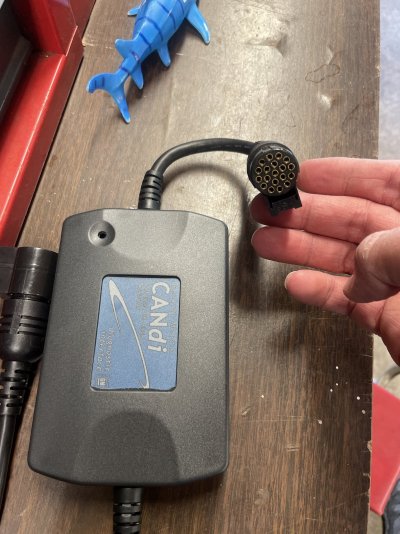
I’m almost positive we all know which connection you’re talking about, but would you mind posting a pic. Wide enough view we can see the candi module.
 

Sparksalot

Elite Member
Joined
Sep 20, 2020
Posts
6,775
Reaction score
20,587
Location
Bastrop County, Texas
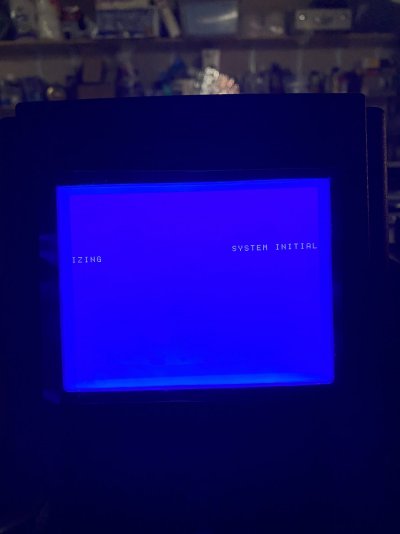
Here’s what I go through every time.

Initially, almost always wrapped.

POST is good.

no damn candi for you.
 

Attachments

  • BFC0BCD9-B6A8-4FD8-B83D-313B1FD10F29.jpeg
    BFC0BCD9-B6A8-4FD8-B83D-313B1FD10F29.jpeg
    100.9 KB · Views: 18
  • C928E2F7-4805-4C8A-BF75-5DC6AE575C2B.jpeg
    C928E2F7-4805-4C8A-BF75-5DC6AE575C2B.jpeg
    87.4 KB · Views: 23
  • 5B76893D-277E-41B3-BDCA-228849D5DDA2.jpeg
    5B76893D-277E-41B3-BDCA-228849D5DDA2.jpeg
    198.1 KB · Views: 20

Sparksalot

Elite Member
Joined
Sep 20, 2020
Posts
6,775
Reaction score
20,587
Location
Bastrop County, Texas
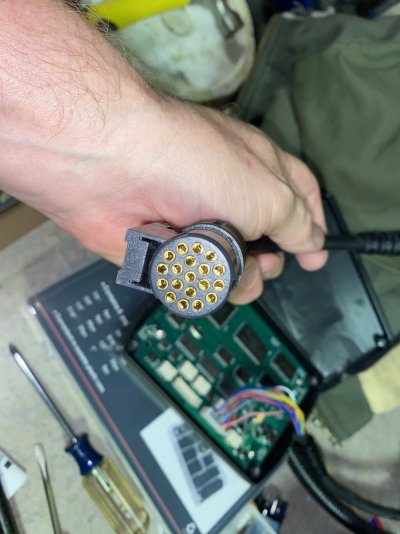
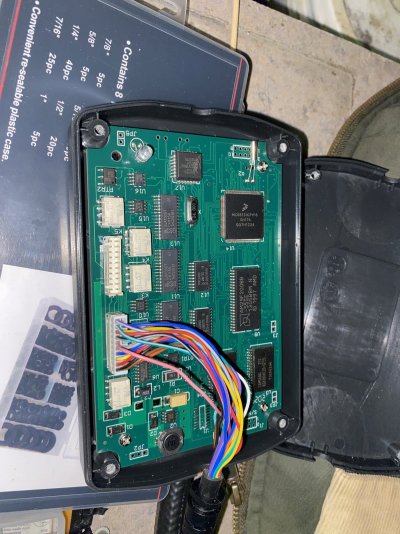
I opened candi. Nothing obvious. Front or back of PC board.

pulled and reset the cable terminals just to be sure no oxidation of the pins.
 

Attachments

  • 76CE6EFC-BE3D-4A53-9639-ECBB9EFD6803.jpeg
    76CE6EFC-BE3D-4A53-9639-ECBB9EFD6803.jpeg
    242.8 KB · Views: 16
  • DBFF99E5-E10C-408D-99F4-0B1FCDA0C359.jpeg
    DBFF99E5-E10C-408D-99F4-0B1FCDA0C359.jpeg
    378.2 KB · Views: 21

Fless

Staff member
Moderator
Joined
Apr 2, 2017
Posts
16,283
Reaction score
33,659
Location
People's Republic of Colorado
Curious, and apologize if I missed it, but have you tried powering the Tech 2 from AC power while attempting communication? If so, which power plug, the one on the Tech 2 or the one at the OBD connection?
 
Last edited:

Doubeleive

Wes
Supporting Member
Joined
Nov 7, 2017
Posts
30,521
Reaction score
47,949
Location
Stockton, Ca.
Same results connecting to the Envoy as before. Probably not the OBD adaptor/connector. WTF!
these are cheap re-pops for 1/10th the price of a real tech2 they cut corners, there is a video out there of a guy that explains the soldering points on these degrade because it is cheap solder, you might try some electronic contact cleaner? not sure
 

Rocket Man

Mark
Supporting Member
Joined
Dec 25, 2014
Posts
26,678
Reaction score
52,943
Location
Oregon
these are cheap re-pops for 1/10th the price of a real tech2 they cut corners, there is a video out there of a guy that explains the soldering points on these degrade because it is cheap solder, you might try some electronic contact cleaner? not sure
Whoa, didn’t know who dis, thought it was some newb with a beefy avatar. Dude do you even lift? :head3:
 

TJ Baker

Full Access Member
Joined
Mar 5, 2018
Posts
245
Reaction score
268
Location
Colorado
Same results connecting to the Envoy as before. Probably not the OBD adaptor/connector. WTF!


I find your Envoy issue truely curious. In particular because I also own an 02 GMT360. Your description of what happens with the security light and unknown driver message I expect to see with a hosed serial data line. But the cluster gauges going full scale upward is bizzare. A cluster reset drives the gauges down to the max. I have never seen nor can I duplicate an upswing on my frankenstein benchtop of PCM, BCM, Cluster, Ignition switch and whatever other random modules I throw on there.

The Envoy connects with no more than 3 wires, power, ground, and serial data. If the DLC cable and obd2 adapter are sound that points to a bad VCI I would have to guess
 

George B

¯\_(ツ)_/¯
Joined
Feb 5, 2020
Posts
7,882
Reaction score
18,993
Location
Oconomowoc, Wisconsin 53066
Curious, and apologize if I missed it, but have you tried powering the Tech 2 from AC power while attempting communication? If so, which power plug, the one on the Tech 2 or the one at the OBD connection?
Not using AC adapter. I was originally not using any additional power. Just the OBD port power. I have been trying out using the DC adapter attached at the OBD connector end of the cable with better results. Need to take note of what works best.
 

George B

¯\_(ツ)_/¯
Joined
Feb 5, 2020
Posts
7,882
Reaction score
18,993
Location
Oconomowoc, Wisconsin 53066
I find your Envoy issue truely curious. In particular because I also own an 02 GMT360. Your description of what happens with the security light and unknown driver message I expect to see with a hosed serial data line. But the cluster gauges going full scale upward is bizzare. A cluster reset drives the gauges down to the max. I have never seen nor can I duplicate an upswing on my frankenstein benchtop of PCM, BCM, Cluster, Ignition switch and whatever other random modules I throw on there.

The Envoy connects with no more than 3 wires, power, ground, and serial data. If the DLC cable and obd2 adapter are sound that points to a bad VCI I would have to guess
I’m sorry. I described that wrong. When the issue occurs the gauges all drop to zero not full scale. The security light comes on and the dic displays UNKNOWN DRIVER. I also note several U codes for loss of communication with several modules but I haven’t written them down. It always happens when the tech2 completes boot and flashes to the start screen. I have had luck with powering the tool with the aux power connected to the cable on the OBD end and allowing it to boot then plug into the truck and turn the key on. Sorry for the confusion.
 

Forum statistics

Threads
137,714
Posts
1,990,259
Members
102,705
Latest member
ZaZaZazzels

Latest posts

Back
Top