Is there a certain lightening HDMI cable that worked for you? I bought one and have sound but it’s not mirroring from my phone.I could, but I checked with Verizon and our unlimited data plan includes only 10gb of LTE hotspot, after that it’s throttled to unlimited 3g @ 600kbs...so no go.
looks like I’ll have to use the lightning hdmi cable option for now as it’s the only way to mirror the screen using the iPad’s LTE connectivity.

You are using an out of date browser. It may not display this or other websites correctly.
You should upgrade or use an alternative browser.
You should upgrade or use an alternative browser.
Question for those that have the Rear Media/Entertainment Package...
- Thread starter ebelp
- Start date
Disclaimer: Links on this page pointing to Amazon, eBay and other sites may include affiliate code. If you click them and make a purchase, we may earn a small commission.
Stbentoak
Full Access Member
- Joined
- Jul 20, 2020
- Posts
- 2,281
- Reaction score
- 2,772
The only thing I can say is only use genuine Apple cables purchased directly from them, This has been the difference for many people. "Compliant" or "Compatible" cables won't cut it.....
Stbentoak
Full Access Member
- Joined
- Jul 20, 2020
- Posts
- 2,281
- Reaction score
- 2,772
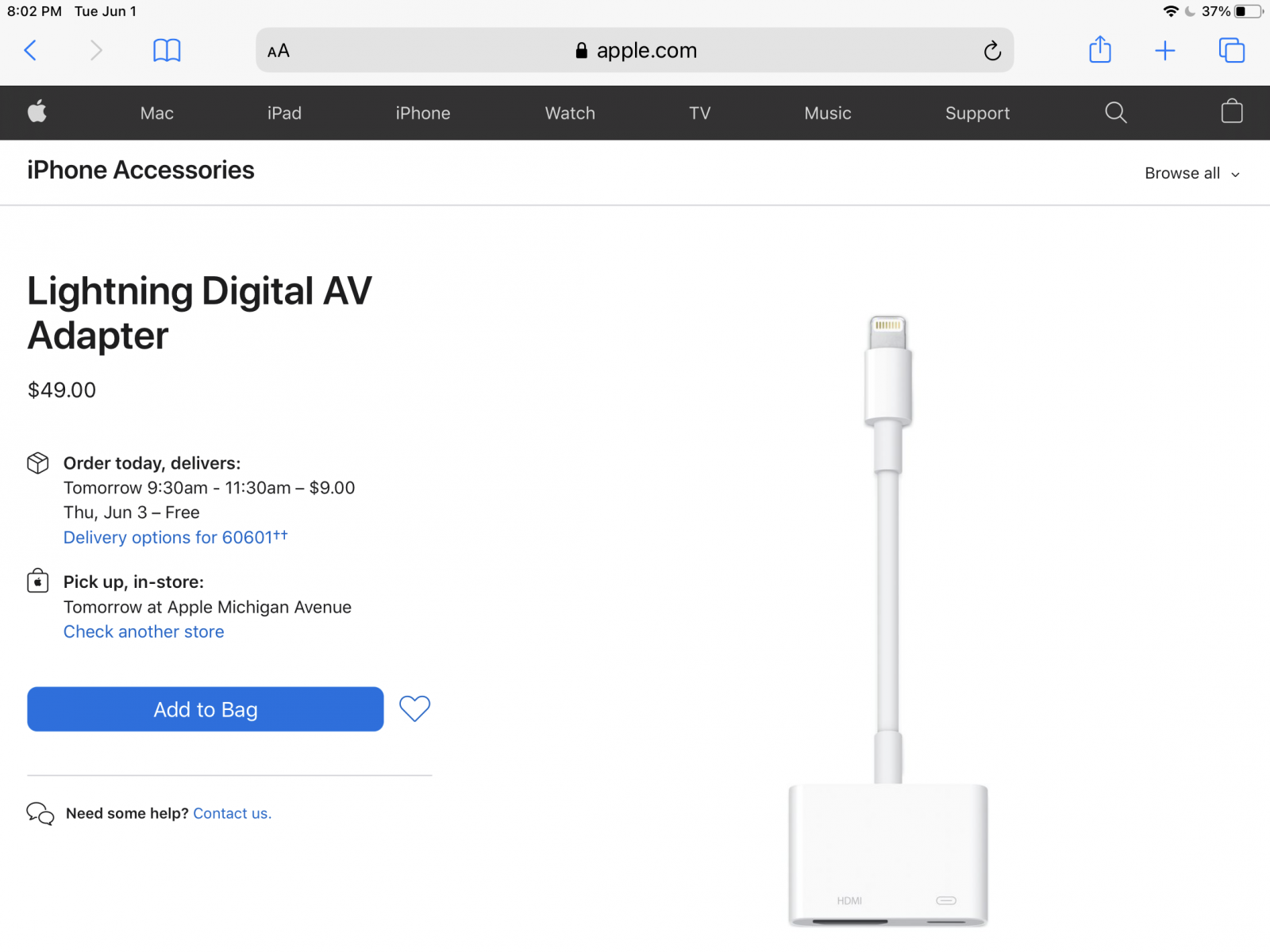
I bought this genuine Apple adapter and so far along with any generic HDMI cable, it seems to work fabulously. Plays anything straight off your iPad or iPhone. YouTube, Amazon prime, so far works on anything we have tried. Has to be the genuine Apple connector and is not cheap, but no substitutes, and it seems pretty good on its maiden voyage....
Stbentoak
Full Access Member
- Joined
- Jul 20, 2020
- Posts
- 2,281
- Reaction score
- 2,772
Double post. Sorry..
Thanks for your detailed review.Yes you need 2 fire sticks to watch 2 different shows. And yes the auto start/stop is only an issue with the power outlet, not HDMI/USB-C.
The implementation of this entertainment system is just stunningly awful. I didn't want it at all but circumstances led to getting it anyway. Perhaps if you are an Android user it's not bad- for Apple users, as others have echoed in here, it's terrible. Here's what I have seen work and not work so far.
1) An old Blu-ray player did work.
2) Vehicle would not recognize an active HDMI input on a new-ish Samsung blu-ray player.
3) Auto-stop must be turned off every time to not impact the power outlet in the rear. Learned this the hard way halfway thru a 1 hour car ride.
4) Aside from locking/turning off/muting the rear screens, you cannot control the rear screens from the front. I understand disabling this while driving but not being able to do this while parked is maddening. Requires self-sufficient rear passengers or parents having to help often.
5) I bought 2 fire sticks and the port anglers/shorter usb cord as recommended on page 4 (thx for that to the poster). A couple things to know about this solution I haven't seen posted here:
- if you want to plug 2 fire sticks in side by side, it's a bit of a tight fit since the cord plugged into the mini-usb adapter on the left stick will be a little in the way of the right stick
- do not set the sticks up in the car. It takes an absolute eternity. This could be 4g hotspot coverage in my driveway but it was a good 30 mins to have the 2 sticks simply download and install the latest firmware.
- The IR headsets that come with the vehicle were terrible. As someone else said, the range appears to be extremely short- even sitting in the 2nd row, they cut in and out a lot.
- Since I have young kids I bought them kid-sized bluetooth headsets (the IR headsets were too big for their heads). Pairing them to the screens was very easy. First time 'out' with them, one headset cut in and out a lot, the other was fine. I paired the headset to my phone, listened for a couple mins- no issues.
6) When using the short USB cord and plugging into USB-C, I get a 'this adapter is not providing adequate power' message when the Fire stick is powering up. You CAN continue past that but it makes me wonder if the stick is not charging... if it's not, this is not a good solution for longer car rides and will require frequent taking the stick out of the car to charge. Not ideal at all.
7) No stereo jack anywhere in the rear is a little surprising- not that big a deal but this is next to nothing cost-wise for GMC and it's reliable.
My dad's 2017 Tahoe with a drop-down screen/discs go in the front CD tray was, though it felt beyond antiquated when I used it last year, was MUCH better from a practicality perspective. This 2021 implementation is just total frustration.
I am disappointed in the system as well. In fact, If I could ask for a refund I would.
I got the ultimate package... is it supposed to come with infrared or Bluetooth headphones for the rear passengers?
straightg8
TYF Newbie
- Joined
- Aug 12, 2011
- Posts
- 3
- Reaction score
- 0
does the use of a Firestick require a data subscription on the vehicle's wifi? Or can the data come from my phone?View attachment 258861
Great minds think alike. I also bought the 90 degree USB-C adapter: https://amzn.to/2HHMY9Z
And a short cable: https://amzn.to/3jqjACU
Just a heads up with the HDMI adapters. They are 2 different adapters, facing different directions. In other words, even though it's a 2-pack, you can only use one of them.
straightg8
TYF Newbie
- Joined
- Aug 12, 2011
- Posts
- 3
- Reaction score
- 0
do you need to have the onstar data plan to make this work, or can all the data come from the phone?We took a trip this past weekend - about 14 hours driving. My boys used the Mi Box S for a majority of the trip, watching Disney+ streamed from my wife's phone. No issues. Just an update from my previous posts complaining of Chromecast issues.
You can use your phone hotspot.does the use of a Firestick require a data subscription on the vehicle's wifi? Or can the data come from my phone?
Phone hotspot works fine, fire stick, roku, etc don’t know the difference, it’s just a Wi-Fi signal to it.do you need to have the onstar data plan to make this work, or can all the data come from the phone?
straightg8
TYF Newbie
- Joined
- Aug 12, 2011
- Posts
- 3
- Reaction score
- 0
So using the phone hotspot, then both phone and Roku are connected to the truck's wifi as an ad-hoc connection, is that the configuration?Phone hotspot works fine, fire stick, roku, etc don’t know the difference, it’s just a Wi-Fi signal to it.
I connect our Rokus directly to the phones hotspot Wi-Fi, select HDMI input on the screen and they use the roku remote to pick YouTube, Prime, Netflix, whatever they want.So using the phone hotspot, then both phone and Roku are connected to the truck's wifi as an ad-hoc connection, is that the configuration?
Here is our setup. Thinking of actually getting the Roku Ultra instead even though overkill for the application but the Ultra connect via HDMI cable vs being a stick so it could be mounted to the side of the console more out of the way. I do worry that the kids will kick this setup when moving to the third row or something will shift on the floor and knock them. Or I guess I could just use an HDMI extender cable to move the stick to the side too.

Hi guys I know this is an older thread but you are so on top of this I wanted to circle back in the photo above .. have a 2021 z71 Tahoe and just ordered 2 fire sticks for the back… do I need. It the 2 pack of HDMI adaptors or can I just use the short cable? The fire stick needs an additionalView attachment 258861
Great minds think alike. I also bought the 90 degree USB-C adapter: https://amzn.to/2HHMY9Z
And a short cable: https://amzn.to/3jqjACU
Just a heads up with the HDMI adapters. They are 2 different adapters, facing different directions. In other words, even though it's a 2-pack, you can only use one of them.
Adaptor or can it just plug into the back USB port?
So I picked up an Apple cord as listed above and brand new HMDI cord and it doesn't work???I bought this genuine Apple adapter and so far along with any generic HDMI cable, it seems to work fabulously. Plays anything straight off your iPad or iPhone. YouTube, Amazon prime, so far works on anything we have tried. Has to be the genuine Apple connector and is not cheap, but no substitutes, and it seems pretty good on its maiden voyage....View attachment 280777
It's a 2021 and everything I read and watch says this setup should work but.......nothing!!
I've tried two different Iphones, an Ipad and even tried plugging a laptop directly into the HDMI and nothing works? The HDMI icon on the RSE screen does not change color or status. Also tried both ports, all the ways mentioned and nothing????
Any advice would be greatly appreciated!!
Similar threads
- Replies
- 1
- Views
- 5K
- Replies
- 1
- Views
- 10K
- Replies
- 11
- Views
- 26K


- Replies
- 98
- Views
- 110K


