Ultimate RSE (Rear Seat Entertainment) Setup!

Disclaimer: Links on this page pointing to Amazon, eBay and other sites may include affiliate code. If you click them and make a purchase, we may earn a small commission.

Edlee321

Member
Joined
Dec 9, 2021
Posts
43
Reaction score
25
I just got my 2022 Yukon last week, im very unhappy about the new crippled Android Automotive system, with no streaming apps offered on the play store, and most importantly removal of local USB Playback, which I am going to fight and call in every day till they add that feature back in the system, who wants to wait for fire stick to boot up every time, usb local playback was instant , and resumed every time we started our 2017 yukon we traded in.

The Rear Seat entertainment software is completely crippled now on 2022 builds, i would recommend not getting this truck if you use this system alot.
 
Last edited:

itsmike2k

TYF Newbie
Joined
Dec 12, 2021
Posts
12
Reaction score
3
I completely agree!! I too had a 17 and had a hard drive full of movies and shows for the kids.. My complaint on the 17 is you couldn't choose USB movies from the front screen, but would take that over no usb option at all!! Plus i could put a dvd in the front and play that if i wanted!! Really a big step backwards for GM RSE, there is no use for touch screens if you have to have a streaming device connected, you have to have a remote!?!?!?!!?! Such a disappointment!!!
 

CASTLEDFW15

Full Access Member
Joined
Aug 21, 2021
Posts
291
Reaction score
111
Location
North TX
Their is one major problem with my 22 Z71 RSE……Problem. Is it is apparently difficult to remove….I have no kids and my dog scratches the screen when he try’s to swipe left……..Classic, that never gets old. Personally I would remove, set aside in a protected area and leave until trade in. Starting to think I should have skipped the RSE and got the 6.2…..then again all I have to see is the $3.99.Gallon for Premium Unleaded and realize that maybe the RSE is not quite so bad after all……Monitors make a excellent coat hanger.
 

R32driver

Full Access Member
Joined
Nov 24, 2021
Posts
727
Reaction score
645
We are going to try out the roku setup later today when we head out on a 5 hour drive. I've had it setup for about a week but I do not let my kids stare at screens anytime we ride in the car. Long trips will be the exception so I'm not worried at all about 90 degree plugs and a clean looking install. With the 110 plug back there I'm going to hook up the Nintendo Switch also and I think that will work out quite well because it's such a small device.

Got to do whatever it takes to not have to hear "are we there yet?" for 5 hours. Time to see if this so far worthless $2500 system has an upside
 

MyTahoe91

TYF Newbie
Joined
Dec 24, 2021
Posts
14
Reaction score
0
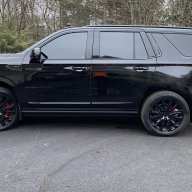
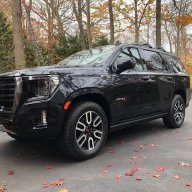
Hey guys! I’m a long time reader, but just officially joined the forum. We just traded in our 2016 Denali for a 2021 Denali. Since I received a few tips and inspiration from this thread, I wanted to put this together to hopefully help some other folks.

I’ll attach a few pics of our setup, explain it a bit, and link everything down below.

We have a Roku Express HD plugged into HDMI 1. I mounted this to the driver side of the console with double-sided sticky pads. It is low profile enough that it doesn’t seem to interfere with the seat at all. I went with this side because the older kid who will be operating the remote sits behind the driver. We signed up for the unlimited data plan for the in-vehicle WiFi for $15/month through Onstar/AT&T. It works great for the Roku and even an additional iPad connected to it at the same time, even in our small town. With the Roku, the kids can stream shows on Disney Now, Disney +, PBS Kids, Nick Jr., Netflix, Prime, etc. And the quality is great.

I also have a 500GB Sandisk SSD plugged into a USB-C port. I have about ~25 movies on the drive that can be viewed on either screen. The drive is formatted NTFS and works great. I used another sticky pad to stash it above the power plug, but it can also be held in place by the door for the plug.

We weren't really impacted by the removal of the DVD/Bluray drive. The only downside I have found so far is that you can no longer watch the RSE on the front screen when the vehicle is in park. We used that a good bit and are pretty disappointed.

Here is my part’s list:

Roku Express HD - https://www.amazon.com/gp/product/B07WVFCVJN/ref=ppx_yo_dt_b_search_asin_title?ie=UTF8&psc=1

Roku power cable - 12” Right angle micro USB to right angle USB A - https://www.amazon.com/gp/product/B07K4HTBSM/ref=ppx_yo_dt_b_asin_title_o04_s00?ie=UTF8&psc=1

Roku HDMI cable - 1.5’ Right angle to right angle - https://www.amazon.com/gp/product/B07332ZBXV/ref=ppx_yo_dt_b_asin_title_o04_s01?ie=UTF8&psc=1

Sandisk 500GB SSD - https://www.amazon.com/gp/product/B078SWJ3CF/ref=ppx_yo_dt_b_search_asin_title?ie=UTF8&psc=1

USB-C Cable for Sandisk - 8” right angle USB-C to right angle USB-C - https://www.amazon.com/gp/product/B07SN9DJ5G/ref=ppx_yo_dt_b_asin_title_o04_s00?ie=UTF8&psc=1

USB C to Lighting Cable for backseat iPad charging - https://www.amazon.com/gp/product/B07V31TX7B/ref=ppx_yo_dt_b_asin_title_o04_s01?ie=UTF8&psc=1

Double-sided sticky pads - https://www.amazon.com/gp/product/B08QTR2CF1/ref=ppx_yo_dt_b_asin_title_o04_s00?ie=UTF8&psc=1

Hope this help! Sure keeps the kiddos happy & entertained! Feel free to ask any questions and I'll do my best to answer!

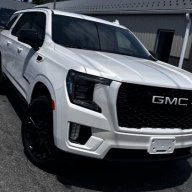
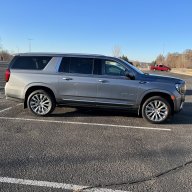
View attachment 273828 View attachment 273829 View attachment 273830 View attachment 273831

Thank for sharing. What software you used to download movie into the harddrive.
 

jorgetoro

Member
Joined
Aug 29, 2021
Posts
31
Reaction score
14
The screens on our 2022 Yukon had an interesting message when we first turned them on.
"Rear Media is Unable to Connect to Streaming Video Services Right Now
HDMI 1 and HDMI 2 can still be used.
If this problem persists, ask the driver to contact a vehicle dealer."

I'm wondering if GM is planning on adding streaming apps to the system and this error came up because the vehicles data wasn't connected yet. That would definitely be a nice option but I'm still not happy that they removed the options to connect a USB drive or share phone screens. I'm sure they are wanting to push customers to pay for data plans but as a Canadian it would be nice if they offered decent plans then.
This is probably their plan to make customers purchase wifi in the car.
 

KentuckyTahoe

TYF Newbie
Joined
Feb 26, 2021
Posts
6
Reaction score
0
Does anyone have a good Amazon link to a very short (like less than 10”) micro USB to USB-C for powering my Chromecast? Trying to eliminate running the Chromecast power cord into the USB outlet in the center console. Thanks in advance!
 

NYisles1

Full Access Member
Joined
Mar 16, 2016
Posts
274
Reaction score
162
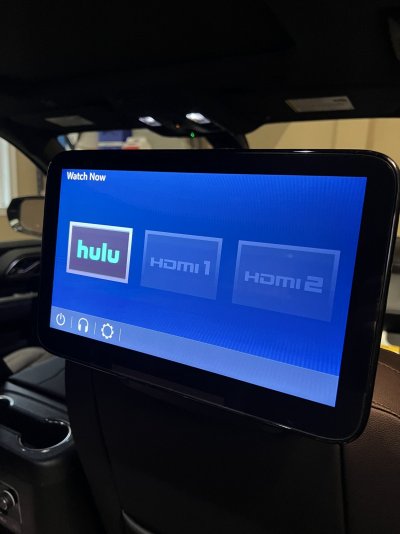
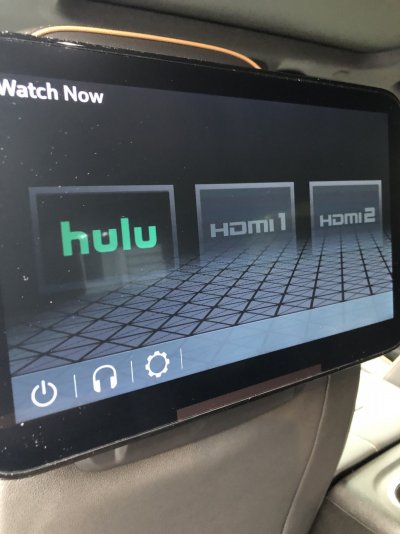
Hulu appeared on our 2022 Yukon rear screens this am
Thats the first I've heard of an app showing up when there had been none before--- did you notice an OTA update? Does the app actually work?

In the end we want more than one app but this would be a positive step if it came from an update.
 

kcb14214

Full Access Member
Joined
Mar 5, 2011
Posts
222
Reaction score
73
Agreed. Hoping more to come for sure. Really want the usb to work for our movie drive…
 

pjlynn

TYF Newbie
Joined
Jan 16, 2022
Posts
2
Reaction score
0
I just got my 2022 suburban and Hulu was preloaded, pic included.

I had prepared a roku because the dealership said it would be empty otherwise.

Is this an unannounced update? Are more apps to come native to the tablet screen?
 

Attachments

  • A3C4FF52-0425-4B0B-9219-4C58F26E895F.jpeg
    A3C4FF52-0425-4B0B-9219-4C58F26E895F.jpeg
    181.5 KB · Views: 38

NYisles1

Full Access Member
Joined
Mar 16, 2016
Posts
274
Reaction score
162
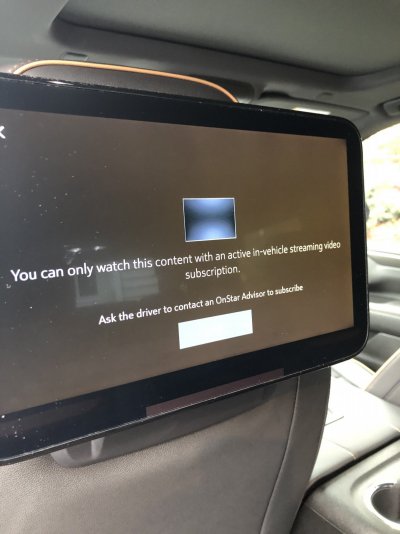
Like some others have posted - HULU appeared on my ‘22 Yukon today. However when clicking on it the message below appears. Haven’t had time to call onstar and see if this is something separate or why I couldn’t use my existing Hulu account. Will report back
 

Attachments

  • B11C2925-4C09-483A-9B2D-D2939AF6A982.jpeg
    B11C2925-4C09-483A-9B2D-D2939AF6A982.jpeg
    199.1 KB · Views: 57
  • 7129B22B-2ACC-40BA-9454-34594F433AD6.jpeg
    7129B22B-2ACC-40BA-9454-34594F433AD6.jpeg
    217.4 KB · Views: 52

tlockhart

Member
Joined
Mar 20, 2021
Posts
36
Reaction score
12
Like some others have posted - HULU appeared on my ‘22 Yukon today. However when clicking on it the message below appears. Haven’t had time to call onstar and see if this is something separate or why I couldn’t use my existing Hulu account. Will report back
Anyone know if this is an update the 21s will receive down the line?
 

NYisles1

Full Access Member
Joined
Mar 16, 2016
Posts
274
Reaction score
162
Like some others have posted - HULU appeared on my ‘22 Yukon today. However when clicking on it the message below appears. Haven’t had time to call onstar and see if this is something separate or why I couldn’t use my existing Hulu account. Will report back
Called onstar today on this. Spoke to 3 different reps and my call was disconnected twice. Terrible lol. One of the reps had never heard of Hulu so didn’t know what I was saying. Third person seemed to understand and said the RSE needs to be connected to the vehicle wifi. That actually makes sense. They had no clue how to do so however and I haven’t figured it out. Anybody get the newly born Hulu app to work?
 

pjlynn

TYF Newbie
Joined
Jan 16, 2022
Posts
2
Reaction score
0
Called onstar today on this. Spoke to 3 different reps and my call was disconnected twice. Terrible lol. One of the reps had never heard of Hulu so didn’t know what I was saying. Third person seemed to understand and said the RSE needs to be connected to the vehicle wifi. That actually makes sense. They had no clue how to do so however and I haven’t figured it out. Anybody get the newly born Hulu app to work?

Yes, mine works great. I do have Onstar Wi-Fi in the vehicle. The Hulu app connected with my personal Hulu account without an issue. Kids absolutely love it. They need to get Netflix, Disney+, etc to fill out the catalogue.
 

sodacitydenali

TYF Newbie
Joined
Jun 8, 2022
Posts
9
Reaction score
7
Can you not get a read and write player from Amazon and just plug it in as a stand alone DVD player?

I would guess this DVD player would not work. A standard DVD player outputs a video signal, for the display to show. That DVD player connects via USB, leading me to believe it probably outputs a sta dark usb data payload, and relies on your computer to process the input and display the video.

You could MAYBE burn video files to the disc, but you may as well get a removable hdd at that point.
 

Deuce16GMCs

Full Access Member
Joined
Aug 11, 2016
Posts
227
Reaction score
136
Does anyone know of the GM rear seat entertainment system let's you pair and use more than 1 Bluetooth headset?

Reason being I have 4 kids and notice that there no 3.5mm jacks.
 

Forum statistics

Threads
137,672
Posts
1,989,114
Members
102,675
Latest member
j_jerry79

Latest posts

Back
Top