Backup Camera non-OEM

Disclaimer: Links on this page pointing to Amazon, eBay and other sites may include affiliate code. If you click them and make a purchase, we may earn a small commission.

Larryjb

Full Access Member
Joined
Jul 21, 2016
Posts
1,168
Reaction score
1,089
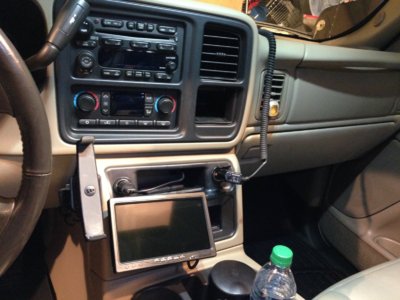
I'm planning to add a back up camera to my Tahoe soon. I want to keep the OEM stereo (I like the large buttons, and I hate touch screen in a vehicle), so I'll have to add a separate monitor and camera. I've searched this site and not found a whole lot on aftermarket monitors. I'm wondering if anyone has installed systems from www.rearviewsafety.com? I'm considering the following:

Monitor: https://www.rearviewsafety.com/safe...tors/3-5-flip-up-tft-lcd-digital-monitor.html

Camera: https://www.rearviewsafety.com/safe...-camera-with-infra-reds-model-rvs-6380-c.html

Larry
 

Project Denali

Full Access Member
Joined
Nov 30, 2016
Posts
148
Reaction score
150
The problem I see is that the aftermarket monitor runs off of RCA outputs. I'm not certain, but I believe the factory head unit does not have any RCA outputs. I'm running an aftermarket head unit so I'm not much help but you'll have to look into that for sure. Maybe you could find some sort of converter or adapater to make RCA's work with the factory radio.
 

mdhawk

Member
Joined
Jan 5, 2016
Posts
79
Reaction score
25
Location
Reading, PA
I did mine about a year ago, I bought everything separately. OEM camera, converter, wires, and pigtail for the back of my head unit. I must have searched and watched videos on this for weeks before I did it. Seems like the stand alone unit you're looking at should be simple enough. eBay has pigtails with RCA jacks to anything you can think of. One thing that helped me out was doing an image search on your head unit and see if you can find a picture that points out what everything goes to.
 
OP
OP
L

Larryjb

Full Access Member
Joined
Jul 21, 2016
Posts
1,168
Reaction score
1,089
I'm not running this into a factory monitor. I've purchased monitor separately.

I received the system late last week. The one thing I didn't anticipate was that the frame style license plate camera covers any validation stickers placed on the perimeter of the plate. Other frames that people have are notched out for the validation sticker. I will be exchanging this camera for another style. Unfortunately, the other style does not have the ir LEDs built into it, but the camera is good down to 0.1 Lux, which appears to be the best I've seen on the market, so it should be OK.

Larry
 
OP
OP
L

Larryjb

Full Access Member
Joined
Jul 21, 2016
Posts
1,168
Reaction score
1,089
It's small enough that it would be able to fit on the dash somewhere.

I'm not the kind of person that cares about things being stylish, or fitting in, or looking good. I care about functionality. Yes, flip up screen sitting on the dash might look "dorky", but if it saves me backing into something on a dark rainy night, it will be worth it.

I will explore other options, such as mounting it on top of the centre console, or even have it loose so I can pull it out when I need it. It should be often that I'd need it, mainly at night, and especially rainy nights.

Larry
 

MrBalll

Full Access Member
Joined
Feb 26, 2011
Posts
988
Reaction score
199
Location
West Texas
If you look around some more on here there are some topics where people put a little 3" monitor in that small deep pocket that is to the right of the AC controls and under the vent.
 
OP
OP
L

Larryjb

Full Access Member
Joined
Jul 21, 2016
Posts
1,168
Reaction score
1,089
I saw that thread. The monitor I've got is slightly larger so there wouldn't be any practical way to retrofit the monitor into that position. I thought of removing the cassette deck. Perhaps some time later, especially if I wish to get a different style of monitor. Right now I'm just getting a set up that works well.

The license plate frame style camera I got covers my validation decals, so I'm having to exchange to camera. The non-frame style doesn't have the illuminating LEDs, but apparently is good down to 0.1 lux so the regular backup lights should provide sufficient light.

Larry
 

David Paul

Full Access Member
Joined
Dec 28, 2015
Posts
359
Reaction score
173
Location
Central NJ
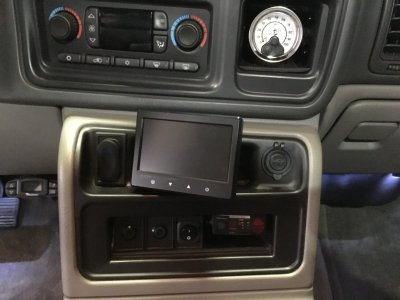
Here's where I put mine: IMG_0154.JPG
 

juggernaut

TYF Newbie
Joined
Dec 29, 2016
Posts
21
Reaction score
3
hey blue 04 z71 do you have a link for that kit. we need a back up camera bad and that would be the perfect place to put the scree.
 

inmypassatlife

Full Access Member
Joined
Feb 21, 2017
Posts
979
Reaction score
672
If you have no use for OnStar as I do, you can use this one and pick up a cam for 10-15 bucks from this site as well.

Screenshot_20170320-015219_zpseoizea1j.png
 

Fleetgeo

Full Access Member
Joined
Feb 14, 2017
Posts
125
Reaction score
46
Yea looks amazing @04z71 nice spot for that camera love that it looks factory I agree with @juggernaut do you have a link or where did you order it from would like to install that also
 

juggernaut

TYF Newbie
Joined
Dec 29, 2016
Posts
21
Reaction score
3
does that mirror screen when not in use act as a mirror or would the screen still be visible?
 

Blue 04 Z71

Full Access Member
Joined
Jun 12, 2016
Posts
102
Reaction score
30
Location
Reading PA
Sorry fellas that was a few years ago. The seller had a bunch and I bought 2. The one ended up being damaged in shipping and he let me keep it and refunded my money. So I have some spare parts to this one. Like I said this one will be going for sale as soon as I pull the trigger on a double din.

This one has a s video cable that you have to run
 
OP
OP
L

Larryjb

Full Access Member
Joined
Jul 21, 2016
Posts
1,168
Reaction score
1,089
The Rearview Safety System camera is working well. I had to get a camera with no LEDs, but the night vision camera has been excellent even when backing up on unlit roads.

I've only installed it on my wife's Explorer, so no pictures yet.
 

Forum statistics

Threads
138,114
Posts
1,999,421
Members
103,036
Latest member
Durobans
Back
Top