Burban22
Full Access Member
- Joined
- Jun 25, 2023
- Posts
- 179
- Reaction score
- 223
I’ve successfully swapped my ‘03 burb to efans thanks to this thread and @ScottyBoy!
For those of you that have a 2003 or 2004 GmT800 this is how I swapped mine. 2005 and up should already have efans.
You’ll need a tuner to enable electric fan controls in the engine computer. I had mine tuned a few years ago and they hand enabled electric fan control.
You will also need two ECM plug pins. Pull from junkyard ECM plug or acquire online. I just crimped them to the junkyard fan harness.

At the junkyard, I pulled the entire front harness out of a 2005 Yukon XL. I could’ve just stripped the fan harness there, but I just pulled the whole thing.
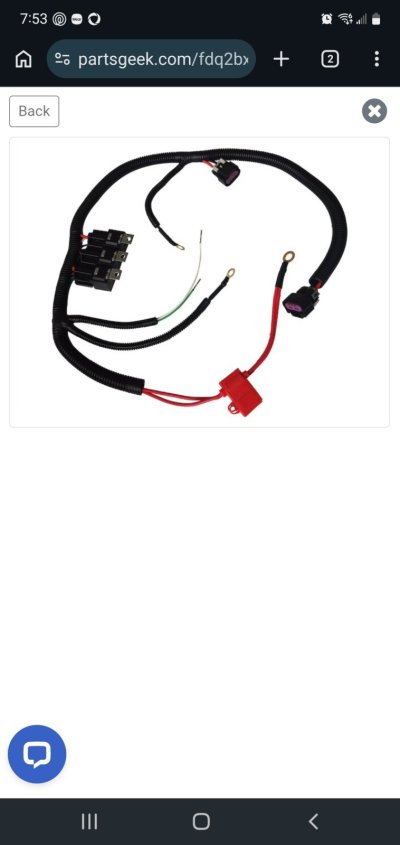
Here is what the fan harness will look like stripped away. Also make sure you grab the little fuse box for the fans.

The blue wire goes to the green computer connector pin 33.

The green wire goes to the blue computer connector pen 42.

I then ran the fan harness alongside the original front harness. Should’ve put the plastic tubing on before I did this but here it is.

I landed the positive wire for the fan harness here. This is 12 V from the battery all the time regardless of key on or off. This allows the fans to turn on automatically if needed when engine is hot and shut off.

Here’s the wire loom installed and zip-tied.

Found some rodent damage I didn’t have any of the liquid electrical tape and ran out of normal electrical tape so I just use some brown duct tape I had. It will be covered under the fuse box cover anyway. Maybe the mice won’t like the extra stickiness and fabric of this tape lol
The fuse box and relays for the electric fans fit right next to the main fuse box. I just had to remove a plug that was blocking the alignment slider.

The ground wire I just sandwiched between the metal bumper bracket and frame horn. I’ll go back and put a bolt through it but it’s super tight and seems to work fine.

All finished, much more room between the fans and engine versus the mechanical set up.


No, I don’t have a 6.0, just scored the engine cover at the local pick and pull.

For those of you that have a 2003 or 2004 GmT800 this is how I swapped mine. 2005 and up should already have efans.
You’ll need a tuner to enable electric fan controls in the engine computer. I had mine tuned a few years ago and they hand enabled electric fan control.
You will also need two ECM plug pins. Pull from junkyard ECM plug or acquire online. I just crimped them to the junkyard fan harness.
At the junkyard, I pulled the entire front harness out of a 2005 Yukon XL. I could’ve just stripped the fan harness there, but I just pulled the whole thing.
Here is what the fan harness will look like stripped away. Also make sure you grab the little fuse box for the fans.
The blue wire goes to the green computer connector pin 33.
The green wire goes to the blue computer connector pen 42.
I then ran the fan harness alongside the original front harness. Should’ve put the plastic tubing on before I did this but here it is.
I landed the positive wire for the fan harness here. This is 12 V from the battery all the time regardless of key on or off. This allows the fans to turn on automatically if needed when engine is hot and shut off.
Here’s the wire loom installed and zip-tied.
Found some rodent damage I didn’t have any of the liquid electrical tape and ran out of normal electrical tape so I just use some brown duct tape I had. It will be covered under the fuse box cover anyway. Maybe the mice won’t like the extra stickiness and fabric of this tape lol
The fuse box and relays for the electric fans fit right next to the main fuse box. I just had to remove a plug that was blocking the alignment slider.
The ground wire I just sandwiched between the metal bumper bracket and frame horn. I’ll go back and put a bolt through it but it’s super tight and seems to work fine.
All finished, much more room between the fans and engine versus the mechanical set up.
No, I don’t have a 6.0, just scored the engine cover at the local pick and pull.
Attachments


Last edited: