What did you do to your NNBS GMT900 Tahoe/Yukon Today?

Disclaimer: Links on this page pointing to Amazon, eBay and other sites may include affiliate code. If you click them and make a purchase, we may earn a small commission.

Sam Harris

Elite Member
Supporting Member
Joined
Sep 26, 2018
Posts
7,445
Reaction score
14,977
Location
Texas
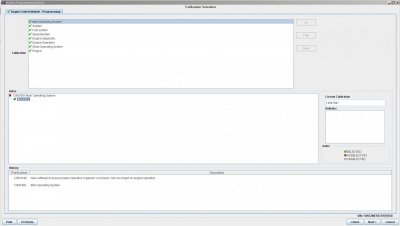
it's listed in the available sps part number when you enter the vin number into tis
it's #3 on the list under bcm, but it's not giving me the option shows practically everything else but that.

View attachment 226738
Are these all “updates” listed? If so, I think you might need to just update the main components first, like Operating System, and System.
 

Doubeleive

Wes
Supporting Member
Joined
Nov 7, 2017
Posts
30,552
Reaction score
48,007
Location
Stockton, Ca.
Would a different browser work? Or are you limited to a certain one?
I initially tried chrome but it wouldn't run or i was doing something wrong, switched to internet explorer and finally figured it out, it runs a virtual machine (java), don't even need to tis2000 software just need the tech2 or a compatible or a MDI connected to a serial port, I ran a 100ft Ethernet cable from m office out to the truck, took a little trial and error it finally communicated as a tech2 classic or something like that, it has to load the virtual machine every time if you back out for any reason.

 

Sam Harris

Elite Member
Supporting Member
Joined
Sep 26, 2018
Posts
7,445
Reaction score
14,977
Location
Texas
I initially tried chrome but it wouldn't run or i was doing something wrong, switched to internet explorer and finally figured it out, it runs a virtual machine (java), don't even need to tis2000 software just need the tech2 or a compatible or a MDI connected to a serial port, I ran a 100ft Ethernet cable from m office out to the truck, took a little trial and error it finally communicated as a tech2 classic or something like that, it has to load the virtual machine every time if you back out for any reason.
Hmm. What about the detailed summary? Anything useful there? Can you post that as well?
ETA: I’d also try Firefox if you haven’t yet.
 

Doubeleive

Wes
Supporting Member
Joined
Nov 7, 2017
Posts
30,552
Reaction score
48,007
Location
Stockton, Ca.
Are these all “updates” listed? If so, I think you might need to just update the main components first, like Operating System, and System.
if that were the case then that update should have already been done because I had them program my hvac controller just a few months ago and that goes thru the bcm just like everything else shown. i'm thinking it takes a different interface device. i'll find out tomorrow from the dealer when I pick there brain about it
 

Doubeleive

Wes
Supporting Member
Joined
Nov 7, 2017
Posts
30,552
Reaction score
48,007
Location
Stockton, Ca.
i'm going to hook it up again and see if it's under ecm or something but it shouldn't be since the bcm is what makes all the decisions, when you check the electrical system with the tech2 it's under bcm also
 

Doubeleive

Wes
Supporting Member
Joined
Nov 7, 2017
Posts
30,552
Reaction score
48,007
Location
Stockton, Ca.
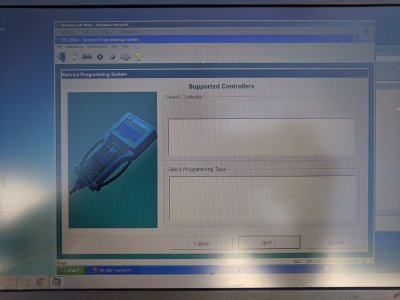
poked around in a few of the next sub menu's it's not there, it say's "supported controllers" at the top of the list so I am going to have to assume that either I cant do it from the "virtual machine" or the tech2 can't do it as a pass-thru, I will try the laptop again I couldn't get it to work right earlier.

sub menu.JPG
 

Sam Harris

Elite Member
Supporting Member
Joined
Sep 26, 2018
Posts
7,445
Reaction score
14,977
Location
Texas
poked around in a few of the next sub menu's it's not there, it say's "supported controllers" at the top of the list so I am going to have to assume that either I cant do it from the "virtual machine" or the tech2 can't do it as a pass-thru, I will try the laptop again I couldn't get it to work right earlier.

View attachment 226747
Get it. [emoji106]
 

Doubeleive

Wes
Supporting Member
Joined
Nov 7, 2017
Posts
30,552
Reaction score
48,007
Location
Stockton, Ca.
Went back to the laptop with tis 2000 loaded, retrieves the current calibrations, then just goes to a screen with no supported adapter's shown, can't go past there

IMG_20190714_173947.jpg
 

Rocket Man

Mark
Supporting Member
Joined
Dec 25, 2014
Posts
26,679
Reaction score
52,949
Location
Oregon
it's listed in the available sps part number when you enter the vin number into tis
it's #3 on the list under bcm, but it's not giving me the option shows practically everything else but that.

View attachment 226738
How did you get that to show up on the Tech 2? TIS web? I have the software installed on a laptop but never have connected online.
 

Doubeleive

Wes
Supporting Member
Joined
Nov 7, 2017
Posts
30,552
Reaction score
48,007
Location
Stockton, Ca.
How did you get that to show up on the Tech 2? TIS web? I have the software installed on a laptop but never have connected online.
when you go the tis website and enter your vin number it shows the most current "calibrations" available for your vin (software updates), then you take the tech2 and you can retrieve the current "calibrations" installed and compare them, I found out about that from a link on a different forum where a guy was having problems with his rvc system killing battery's and someone else mentioned there was a update. my current charging cal. is 22868669 and the newer one is 22935156. Normally you would never mess with it unless having problems like I am
 

kbuskill

***CAUTION*** I do my own stunts!
Joined
Mar 11, 2017
Posts
5,823
Reaction score
9,834
Location
NE. FL.
Went back to the laptop with tis 2000 loaded, retrieves the current calibrations, then just goes to a screen with no supported adapter's shown, can't go past there

View attachment 226750

As interesting as this quest of yours is, I feel that it should have it's own thread to preserve it for others in the future.

I understand that you are doing this to your truck today but we all know how this thread goes... once you figure out your solution, and I have no doubt you will because you are very tenacious, these posts will be lost in the middle of an ocean of posts.

Just my .02... best of luck, I'm rooting for ya.
 

Doubeleive

Wes
Supporting Member
Joined
Nov 7, 2017
Posts
30,552
Reaction score
48,007
Location
Stockton, Ca.
As interesting as this quest of yours is, I feel that it should have it's own thread to preserve it for others in the future.

I understand that you are doing this to your truck today but we all know how this thread goes... once you figure out your solution, and I have no doubt you will because you are very tenacious, these posts will be lost in the middle of an ocean of posts.

Just my .02... best of luck, I'm rooting for ya.
true, I will make a separate post about this whole mess after I get it straightened out, sorry for jacking the thread guys
 

kbuskill

***CAUTION*** I do my own stunts!
Joined
Mar 11, 2017
Posts
5,823
Reaction score
9,834
Location
NE. FL.
true, I will make a separate post about this whole mess after I get it straightened out, sorry for jacking the thread guys

I hope you didn't misunderstand... it's not that I have a problem with it being posted here as well... I just hate to see good info get lost in the midst of a monster thread.

I am very interested in what you are doing as I have been wanting to get a Tech2 and try out the reprogramming... more specifically the BCM as I would love to disable the bulb out warning for the turn signals so I could get rid of the resistors.

Please keep posting I was just suggesting a thread dedicated to this for posterity.
 

Rocket Man

Mark
Supporting Member
Joined
Dec 25, 2014
Posts
26,679
Reaction score
52,949
Location
Oregon
true, I will make a separate post about this whole mess after I get it straightened out, sorry for jacking the thread guys

I hope you didn't misunderstand... it's not that I have a problem with it being posted here as well... I just hate to see good info get lost in the midst of a monster thread.

I am very interested in what you are doing as I have been wanting to get a Tech2 and try out the reprogramming... more specifically the BCM as I would love to disable the bulb out warning for the turn signals so I could get rid of the resistors.

Please keep posting I was just suggesting a thread dedicated to this for posterity.

I agree, not a problem as far as thread jacking. I also am interested in being able to program modules with my Tech 2. I went through some trying times getting the tis2000 software to even load on the windows laptop I have only to find out I can’t really do anything with it. (I found out it only runs on XP so I had to load it in a virtual machine.) Psh.
 

Doubeleive

Wes
Supporting Member
Joined
Nov 7, 2017
Posts
30,552
Reaction score
48,007
Location
Stockton, Ca.
to me it appears from messing around with this a bit that the online java virtual machine works way better than than the tis2000 software (programming wise), but the tis2000 software can remote control the tech2 which I guess could come in handy in certain circumstances. the problem I ran into with the tis2000 was it would only select a vehicle up to 2008 and when I put my 2012 vin in it was invalid so I may work better for the older nbs trucks I don't know.
I'm leaning pretty heavy towards the charging/energy storage "calibration" being corrupt or something.
there is no bcm codes other than it lost communication with the bose amp but since I changed the head unit out that is to be expected.

as far turning off hyperblink and stuff like that it's going to take editing of the operating system which is a whole different ball game

I was just trying to save myself a $100 programming charge by the dealer, just turns out this particular part is not supported with the tech2 alone, I started looking at the tech2win adapters "vxdiag" that also work with tis2web but those are another $100+ I may get one just to see if does anything different

if nothing else at least if the drivers door switch or fuel pump control or any other misc stuff goes out I can program a new one for the next 24 months for free
 
Last edited:

swathdiver

Full Access Member
Joined
May 18, 2017
Posts
21,296
Reaction score
30,248
Location
Treasure Coast, Florida
!!!! Finally got the tech2 hooked up the PC and paid for the programming and it doesn't give the option to program the charging/energy storage, yet there is a update for it available

it's listed in the available sps part number when you enter the vin number into tis
it's #3 on the list under bcm, but it's not giving me the option shows practically everything else but that.

On the menu for my truck, the "charging info" section is withing the BCM menu. On the main screen after you build the truck, there is a menu option for Engine, BCM, Drivetrain and one for pulling codes across all modules. I select BCM and a whole new menu comes up but "charging" is not there as it resides under another BCM sub-menu. Could this be the case with yours on TIS2WEB?
 

Doubeleive

Wes
Supporting Member
Joined
Nov 7, 2017
Posts
30,552
Reaction score
48,007
Location
Stockton, Ca.
On the menu for my truck, the "charging info" section is withing the BCM menu. On the main screen after you build the truck, there is a menu option for Engine, BCM, Drivetrain and one for pulling codes across all modules. I select BCM and a whole new menu comes up but "charging" is not there as it resides under another BCM sub-menu. Could this be the case with yours on TIS2WEB?
Should be under body/bcm/charging or special functions, on tis2web for me there is no bcm option, I looked under ecm, sensor, rcdlr, and a couple others it just seems to not be a option
 

Forum statistics

Threads
137,762
Posts
1,991,456
Members
102,748
Latest member
veteran111

Latest posts

Back
Top