The Case for the Tech-2

Disclaimer: Links on this page pointing to Amazon, eBay and other sites may include affiliate code. If you click them and make a purchase, we may earn a small commission.

DougAMiller

Full Access Member
Joined
Mar 10, 2016
Posts
497
Reaction score
810
Location
Colorado
Does it have to be a laptop? In other words, do you NEED the computer and the scanner AT the vehicle at the time or can you use the tech2 as a go between from a desktop like the autocal for tuning?
There are two options for programming a module. One is to have the computer and Tech2 connected at the vehicle, and it is done all in one step (called passthrough mode). The second option is to connect the Tech2 to the vehicle and obtain the module information for the programming that you want to do, then you take the Tech2 to the computer (so no, it does not have to be a laptop), and once connected, use the TIS2000 menu to download the module software to the Tech2, and finally, take the Tech2 back to the vehicle to program the module. I've done it both ways, and passthrough is quicker, but the remote option isn't as tedious as it sounds.

 

DougAMiller

Full Access Member
Joined
Mar 10, 2016
Posts
497
Reaction score
810
Location
Colorado
Also I found out you have to install the TIS2000 on a laptop either running WinXP or in compatibility mode if it’s running Win7 or 10.
Yes, I run it on an older laptop that I have both Win7 and XP hard drives for. I just stick the XP drive in it when I want to use TIS2000. I have been wanting to see if it will work on the Win7 drive, but haven't tried it yet. I have a docking station for the laptop that has the old type serial port, which is what I have used to connect the Tech2, but I recently bought a USB-serial adapter so I don't have to use the dock. I haven't tried the adapter yet, it's a Sabrent brand which uses the Proliphic chip, but I'll try to test it soon and report on whether it works (I've heard some brands don't). The KeySpan adapter that James mentioned I believe uses a TI chip, which generally has very good compatibility.
 
Last edited:

HiHoeSilver

Away!
Joined
Feb 28, 2017
Posts
10,918
Reaction score
14,578
Location
Chicago
There are two options for programming a module. One is to have the computer and Tech2 connected at the vehicle, and it is done all in one step (called passthrough mode). The second option is to connect the Tech2 to the vehicle and obtain the module information for the programming that you want to do, then you take the Tech2 to the computer (so no, it does not have to be a laptop), and once connected, use the TIS2000 menu to download the module software to the Tech2, and finally, take the Tech2 back to the vehicle to program the module. I've done it both ways, and passthrough is quicker, but the remote option isn't as tedious as it sounds.

Thanks Doug. Exactly what I wondered.
 

Doubeleive

Wes
Supporting Member
Joined
Nov 7, 2017
Posts
30,698
Reaction score
48,334
Location
Stockton, Ca.
You really don't need a laptop unless you are planing on programming a calibration, otherwise all the software does is emulate the tech2, much easier to just use the tech2, I also ran tis2web on windows 7 64bit on my pc desktop by just running a Ethernet cable w/serial adapter out to the tech2 connected to the truck
 

Doubeleive

Wes
Supporting Member
Joined
Nov 7, 2017
Posts
30,698
Reaction score
48,334
Location
Stockton, Ca.
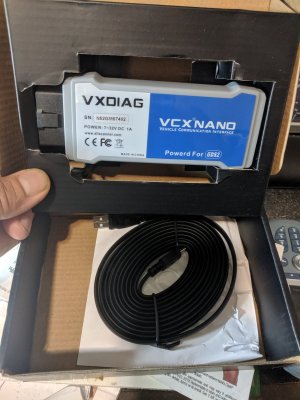
Got the vcxnano in today, and ordered a Dell venue 10 pro 5056 tablet that has a USB port and is running Windows 8 64 bit so gds2 and tech2win should both run on it

IMG_20190731_144350.jpg
 
OP
OP
swathdiver

swathdiver

Full Access Member
Joined
May 18, 2017
Posts
21,315
Reaction score
30,312
Location
Treasure Coast, Florida
Does it have to be a laptop? In other words, do you NEED the computer and the scanner AT the vehicle at the time or can you use the tech2 as a go between from a desktop like the autocal for tuning?

Only need laptop for programming or to download snapshot from Tech-2 to TIS2000 for viewing. The Tech-2 is handy in the car when driving. A laptop is cumbersome and a pain.

Edit: My browser is not updating and am missing posts until after I respond, like a "Johnny come lately"!
 

Doubeleive

Wes
Supporting Member
Joined
Nov 7, 2017
Posts
30,698
Reaction score
48,334
Location
Stockton, Ca.
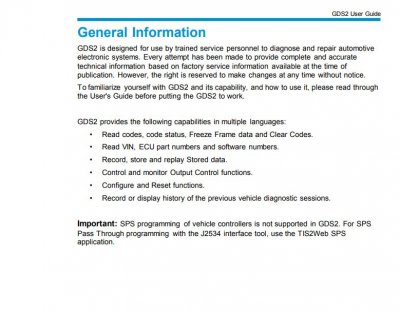
So tech2win is the emulator, right? Do you know how fully functional it is ( I imagine that's part of the experiment)? What's gds2?
Ya tech2win is the emulator, gds2 is a interface type (i think) I will find out what it can and can't do when I get the tablet, I bought this just as a experiment, maybe I can set it up and sell it for $350 like that other guy did, lol if nothing else I figured it might be nicer to use a touch tablet than a laptop or even the tech2

***I think some gm vehicles use the gds2 interface instead of the tech2

gds.JPG
 
OP
OP
swathdiver

swathdiver

Full Access Member
Joined
May 18, 2017
Posts
21,315
Reaction score
30,312
Location
Treasure Coast, Florida
Ya tech2win is the emulator, gds2 is a interface type (i think) I will find out what it can and can't do when I get the tablet, I bought this just as a experiment, maybe I can set it up and sell it for $350 like that other guy did, lol if nothing else I figured it might be nicer to use a touch tablet than a laptop or even the tech2

***I think some gm vehicles use the gds2 interface instead of the tech2

View attachment 227957


The MDI and MDI2 is the interface that replaces the Tech-2. GDS and GDS2 is the software used on the laptop/tablet.

The tablet would be so much handier, especially if it connects to the internet to download and program modules. Handier than the Tech-2 when driving around too! It is backwards compatible with older vehicles too if I remember right. Most GM platforms switched over to MDI/GDS around 2013-2014. K2s use this and not the Tech-2.
 

Doubeleive

Wes
Supporting Member
Joined
Nov 7, 2017
Posts
30,698
Reaction score
48,334
Location
Stockton, Ca.
The MDI and MDI2 is the interface that replaces the Tech-2. GDS and GDS2 is the software used on the laptop/tablet.

The tablet would be so much handier, especially if it connects to the internet to download and program modules. Handier than the Tech-2 when driving around too! It is backwards compatible with older vehicles too if I remember right. Most GM platforms switched over to MDI/GDS around 2013-2014. K2s use this and not the Tech-2.
should be but I will find out more once I get the tablet and software put on it, the adapter is obd2 only so best case scenario it will go back to 96
 

Doubeleive

Wes
Supporting Member
Joined
Nov 7, 2017
Posts
30,698
Reaction score
48,334
Location
Stockton, Ca.
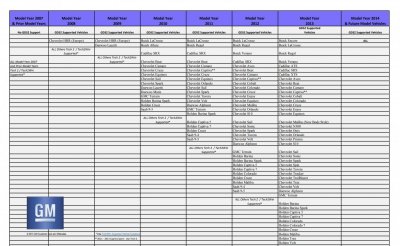
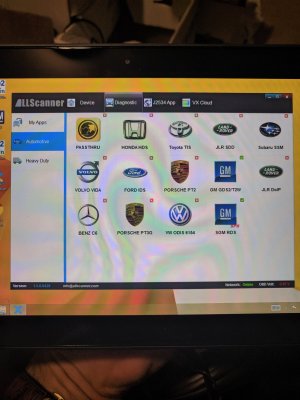
well looks like gds2 support starts with the HHR in 2008 (europe) only, all other previous vehicles are tech2 or tech2win only, good news it does work with the newer vehicles just not any suv's as of 2013, they started adding in more vehicles in 2010 but no suvs/pickups, some s10's and colorado's

gds1.JPG
 

Doubeleive

Wes
Supporting Member
Joined
Nov 7, 2017
Posts
30,698
Reaction score
48,334
Location
Stockton, Ca.
also found a little info tech2win does not perform all of the functions of a tech2, but no details, also found info saying gds2 does not work with any 2017 vehicles, so maybe they changed the platform in 2017?
 

Doubeleive

Wes
Supporting Member
Joined
Nov 7, 2017
Posts
30,698
Reaction score
48,334
Location
Stockton, Ca.
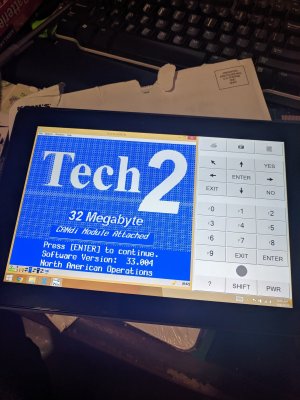
Got it installed and apparently working, note it was a pia since tech2win requires a license and it's not cheap $55 for 3 days, $500+ for a year, so I figured the included software with the vxdiag was hacked already, however now I am not sure since it took several tries, different versions I downloaded including a patch file and a couple more tries, I ended up with version 15.***, then I ran the included software again and it updated to 33.004 and gives me 42 days even if change the date.

IMG_20190804_080932.jpg
 

Rocket Man

Mark
Supporting Member
Joined
Dec 25, 2014
Posts
26,679
Reaction score
52,954
Location
Oregon
Got it installed and apparently working, note it was a pia since tech2win requires a license and it's not cheap $55 for 3 days, $500+ for a year, so I figured the included software with the vxdiag was hacked already, however now I am not sure since it took several tries, different versions I downloaded including a patch file and a couple more tries, I ended up with version 15.***, then I ran the included software again and it updated to 33.004 and gives me 42 days even if change the date.

View attachment 228109
That’s what I hate about the tis2000, it’s so confusing that it just makes me give up.
 

Doubeleive

Wes
Supporting Member
Joined
Nov 7, 2017
Posts
30,698
Reaction score
48,334
Location
Stockton, Ca.
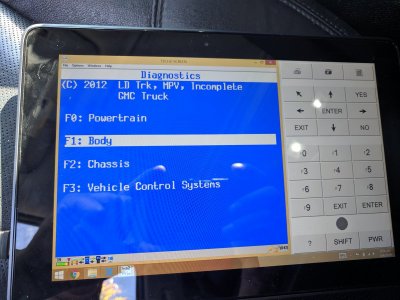
Well I played with it a little this morning, it works, not sure what it can't do versus a actual tech2 I'll have to Google that, it did everything I tried, honked the horn, rolled the windows up/down, opened/closed the lift gate, scanned for codes, it def does the basics
it did get a little laggy a couple times, at first I thought it had locked up but it was just being slow, not sure why but it works
IMG_20190804_085630.jpg
 
Last edited:

86k5heavy

TYF Newbie
Joined
Nov 23, 2012
Posts
10
Reaction score
15
And supposedly this little vxdiag device will work with a bunch of different vehicles, I only installed the software for gm, but it gave me the option for others

Being that you already owned a Tech-2 why did you buy the vxdiag and tablet? Which one would you rather have if you didn't own either one?
 

Doubeleive

Wes
Supporting Member
Joined
Nov 7, 2017
Posts
30,698
Reaction score
48,334
Location
Stockton, Ca.
Being that you already owned a Tech-2 why did you buy the vxdiag and tablet? Which one would you rather have if you didn't own either one?
I bought it basically just to try it out for one, the touchscreen function is nice and it has a dedicated power source so it doesn't reboot when you shut-off and restart the vehicle which the clone will do if you do not have a external 12v power supply attached which really doesn't matter unless you are trying to do a couple of specific test's like a evap test. I also bought it because it can do GDS2 functions for a future vehicle that I want to purchase. As for my preference probably the physical tech2 unit because it's more hardware based, but I haven't really messed with the tablet much yet, there are supposed to be somethings the tech2win software cannot do versus the tech2 but I haven't found out what those functions are yet
 

Fless

Staff member
Moderator
Joined
Apr 2, 2017
Posts
16,617
Reaction score
34,386
Location
People's Republic of Colorado
I’m interested if you can find a way to do that. I didn’t see that option for my 02 but it might have just been me not the Tech 2.

@Rocketman and @gooffeyguy


Might not be an option for the ’02, but here’s where I found the HVAC actuator recalibrate for my ’04.

Set up the Tech 2 with your specific vehicle info and get to this menu:

Powertrain
Body
Chassis
Diag Circuit … (can’t read the rest of my writing – LOL)


Select BODY on that menu

Select your RADIO (not sure why it has to go through this but it is what it is.) I stopped here first time through thinking it was a dead end, but gave it a try on the next pass. I have an aftermarket radio so I just picked whatever one was close to the factory one that was in it originally.

Select HVAC SYSTEM

Select BODY

Select Heat & Air

Select SPECIAL FUNCTIONS

Select HVAC ACTIVATION RECAL


I didn’t go any further than that since I don’t need a recal, but you may find yours in a similar spot on the Tech 2. YMMV. Buried, for sure.

I don't think the dash gauges can be 'swept' on my model year, at least I haven't found that yet on the Tech 2. No transmission fluid life % either.
 
Back
Top