Tech 2 Purchase

Disclaimer: Links on this page pointing to Amazon, eBay and other sites may include affiliate code. If you click them and make a purchase, we may earn a small commission.

kbuskill

***CAUTION*** I do my own stunts!
Joined
Mar 11, 2017
Posts
5,821
Reaction score
9,832
Location
NE. FL.
This!! ^^^ I think I may have had the power cord plugged into the cable and not the VCI module.

The instruction manual for the Tech 2 says to supply power at the DLC cable while programming so that the ground is provided to the vehicles OBD2 port as well... or something to that effect.

I wonder what would happen if you supply power to the VCI port from the AC adapter AND hooked the cigarette lighter adapter to the DLC cables power port?

I can't imagine it would hurt anything.

Maybe I will try that the next time I have mine hooked up.
 

Doubeleive

Wes
Supporting Member
Joined
Nov 7, 2017
Posts
30,526
Reaction score
47,959
Location
Stockton, Ca.
when I was trying to do the evap test I had mine plugged into ac power at the bottom of the tech2 worked just fine, the test requires you shut off and restart while the tech2 is attached and in the procedure, when it wasn't plugged into ac power it would shut off and reboot when you restarted the truck
 

kbuskill

***CAUTION*** I do my own stunts!
Joined
Mar 11, 2017
Posts
5,821
Reaction score
9,832
Location
NE. FL.
Here is a question for those of you with a Tech 2 clone.

I noticed that sometimes I can't make a selection with the "soft keys" but not all the time. 99% of the time the soft keys work fine, it is only on certain screens that it won't work.

I first noticed this when I hooked mine up for the first time to run the self tests. I went into the menus to set the time on the Tech 2 and when I had finished it had a soft key pop up at the bottom of the screen to save the info or something to that effect. When I pressed it to save it didn't do anything. I ended up hitting the exit button and then went back into that menu and the time was still set where I had set it so it didn't seem to matter that I wasn't able to save it with the soft key.

The second time I noticed it was when I turned on the "Afterblow" feature on the blower motor the other night. Again after navigating the menus and selecting Afterblow, which puts an asterisks next to it so you know you have selected it, the soft key showed a save button that I was unable to select. But when I exited the menu and returned into it the asterisks was still there next to the Afterblow feature so the soft key not working doesn't seem to be a problem, I was just curious if anyone else's does the same thing?

Seems like maybe a minor glitch.

 

Doubeleive

Wes
Supporting Member
Joined
Nov 7, 2017
Posts
30,526
Reaction score
47,959
Location
Stockton, Ca.
Here is a question for those of you with a Tech 2 clone.

I noticed that sometimes I can't make a selection with the "soft keys" but not all the time. 99% of the time the soft keys work fine, it is only on certain screens that it won't work.

I first noticed this when I hooked mine up for the first time to run the self tests. I went into the menus to set the time on the Tech 2 and when I had finished it had a soft key pop up at the bottom of the screen to save the info or something to that effect. When I pressed it to save it didn't do anything. I ended up hitting the exit button and then went back into that menu and the time was still set where I had set it so it didn't seem to matter that I wasn't able to save it with the soft key.

The second time I noticed it was when I turned on the "Afterblow" feature on the blower motor the other night. Again after navigating the menus and selecting Afterblow, which puts an asterisks next to it so you know you have selected it, the soft key showed a save button that I was unable to select. But when I exited the menu and returned into it the asterisks was still there next to the Afterblow feature so the soft key not working doesn't seem to be a problem, I was just curious if anyone else's does the same thing?

Seems like maybe a minor glitch.
I think that is just the way the tech2 are it will show options that are not really available, when you press the button it does nothing I think that is normal operation. why I don't know
 

George B

¯\_(ツ)_/¯
Joined
Feb 5, 2020
Posts
7,882
Reaction score
18,994
Location
Oconomowoc, Wisconsin 53066
Another Tech2 clone question. Or quirk??

When connecting to our 2002 Envoy I do the following operations and get the following results:

  1. Connect tech2 to OBD port.
  2. Key on engine off.
  3. Power on tech2
  4. Notice DIC says “UNKNOWN DRIVER”
  5. Continue to connect to truck with tech2: Diagnostics/year/model/body.
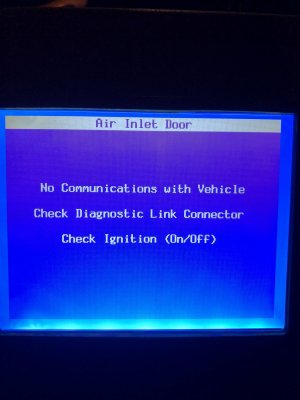
  6. Receive the following message:
F5D7FB85-E195-4078-82ED-6B46D0B7386A.jpeg

7.Continue/HVAC/Special Functions/Output Controls/Motor/Actuator Tests

8. receive the following message:74FCC37D-8A54-4345-A0A0-89821F16ACC6.jpeg

At this point I turn the tech 2 off and back on then follow the same path. I don’t get the warning about the VCIM and it connects normally.

Any ideas
 

Doubeleive

Wes
Supporting Member
Joined
Nov 7, 2017
Posts
30,526
Reaction score
47,959
Location
Stockton, Ca.
Another Tech2 clone question. Or quirk??

When connecting to our 2002 Envoy I do the following operations and get the following results:

  1. Connect tech2 to OBD port.
  2. Key on engine off.
  3. Power on tech2
  4. Notice DIC says “UNKNOWN DRIVER”
  5. Continue to connect to truck with tech2: Diagnostics/year/model/body.
  6. Receive the following message:
View attachment 263550
7.Continue/HVAC/Special Functions/Output Controls/Motor/Actuator Tests

8. receive the following message:View attachment 263551

At this point I turn the tech 2 off and back on then follow the same path. I don’t get the warning about the VCIM and it connects normally.

Any ideas
hard to say on a 02 but onstar function if it has it would be on it's last leg due to the battery going dead, even if you get a message like that just ignore it. do other hvac test's work?
 

George B

¯\_(ツ)_/¯
Joined
Feb 5, 2020
Posts
7,882
Reaction score
18,994
Location
Oconomowoc, Wisconsin 53066
hard to say on a 02 but onstar function if it has it would be on it's last leg due to the battery going dead, even if you get a message like that just ignore it. do other hvac test's work?
Yeah, everything works the second time I try to connect. All the tests work and I was able to fix the mode door issue this morning. I just thought it was strange. I may try tomorrow after waiting a bit after turning the key on. Maybe a module is slow to wake up.
 

TJ Baker

Full Access Member
Joined
Mar 5, 2018
Posts
245
Reaction score
268
Location
Colorado
I can check the same on my 02 TrailBlazer. I have the same VCIM module and it seems to communicate on the serual data line just fine. I don't remember ever seeing that particular message.
 

TJ Baker

Full Access Member
Joined
Mar 5, 2018
Posts
245
Reaction score
268
Location
Colorado
Another Tech2 clone question. Or quirk??

When connecting to our 2002 Envoy I do the following operations and get the following results:

  1. Connect tech2 to OBD port.
  2. Key on engine off.
  3. Power on tech2
  4. Notice DIC says “UNKNOWN DRIVER”

I see this Unknown Driver when there are communications issues with the BCM.

Does this happen each time you follow this procedure?
 

George B

¯\_(ツ)_/¯
Joined
Feb 5, 2020
Posts
7,882
Reaction score
18,994
Location
Oconomowoc, Wisconsin 53066
I see this Unknown Driver when there are communications issues with the BCM.

Does this happen each time you follow this procedure?
No only the first time I try to connect after the truck sits a while. I cycle the Tech2 off and back on then immediately go through the procedure. The message does not return the second time and diagnostic functions of the tech2 work as expected.
 

TJ Baker

Full Access Member
Joined
Mar 5, 2018
Posts
245
Reaction score
268
Location
Colorado
The Uxxxx codes, if current would make sense. What you posted looks like there are some communications issues in the truck. Somewhere in the Tech 2 is a selection for checking comms with various modules. Might be worth seeing if you can track down the issue before it becomes troublesome.
 

JGib

TYF Newbie
Joined
Nov 26, 2020
Posts
17
Reaction score
18
Just wanted to slide a question in here. After reading 44 pages I definitely have a lot to learn. Looking to buy a tech2 but one question. Can the tech2 program a bcm? Or ECU?
Just replaced engine in my 2007 tahoe and instructions with engine call for a reflash and they list a few numbers.
Ive read about MDIs, etc etc but still very confusing since i have never put my hands on one of these.......
I want to be able to diagnose an issue with my driver's heated seat (online search said a texh 2 would come in handy)
I would like the ability to reflash / program a bcm /ecu. Tech2 + subscription? Or additional hardware needed? Good read here for sure. Will definitely make more since once i have the device (s) in front of me...
 

kbuskill

***CAUTION*** I do my own stunts!
Joined
Mar 11, 2017
Posts
5,821
Reaction score
9,832
Location
NE. FL.
Just wanted to slide a question in here. After reading 44 pages I definitely have a lot to learn. Looking to buy a tech2 but one question. Can the tech2 program a bcm? Or ECU?
Just replaced engine in my 2007 tahoe and instructions with engine call for a reflash and they list a few numbers.
Ive read about MDIs, etc etc but still very confusing since i have never put my hands on one of these.......
I want to be able to diagnose an issue with my driver's heated seat (online search said a texh 2 would come in handy)
I would like the ability to reflash / program a bcm /ecu. Tech2 + subscription? Or additional hardware needed? Good read here for sure. Will definitely make more since once i have the device (s) in front of me...

The Tech 2 + a subscription to TDS is required to flash 2007-2013/2014 GM Vehicles.

The subscription is $40 for 2 years and is only good for one vehicle.

As for ECMs, they are reflashable. If my research is correct the BCMs are a one time flash via normal means, so a new BCM would be required.

There is a company that can reprogram your BCM to add/change functions but you can't do that with a Tech 2.

If any of the above info is inaccurate please feel free to correct.
 

kbuskill

***CAUTION*** I do my own stunts!
Joined
Mar 11, 2017
Posts
5,821
Reaction score
9,832
Location
NE. FL.
Regarding flashing modules. What is required to flash earlier modules? Like in the the NBS. Do you need a subscription?

The TIS2000 software that comes with the Tech 2 is all that is needed for the 2006 and back vehicles.
 

George B

¯\_(ツ)_/¯
Joined
Feb 5, 2020
Posts
7,882
Reaction score
18,994
Location
Oconomowoc, Wisconsin 53066
The Uxxxx codes, if current would make sense. What you posted looks like there are some communications issues in the truck. Somewhere in the Tech 2 is a selection for checking comms with various modules. Might be worth seeing if you can track down the issue before it becomes troublesome.
I will look into that. The issue I have first is that it is a temporary problem that goes away the second time I connect the tech2. I may just unplug the VCIM and see if it goes away.
 

Doubeleive

Wes
Supporting Member
Joined
Nov 7, 2017
Posts
30,526
Reaction score
47,959
Location
Stockton, Ca.
I will look into that. The issue I have first is that it is a temporary problem that goes away the second time I connect the tech2. I may just unplug the VCIM and see if it goes away.
you can run a test on all the modules to check for dtc's review them all then clear them all and restart and shut off the truck and see what comes back as current or open. whatever is open/current is what you will want to address. what I do is write down the historical codes and then clear everything and if nothing comes back right away then I just wait a few days and then check again to see if it ends up coming back. This tells me if something is intermittent or not, it can also see the mods I have done like adding led strips or connecting my puddle lights to the interior lights it shows it as "a short to ground" which does not affect anything it just see's the ground I added. If that showed up on something else that I had not done anything to then I know that particular module or section has a problem.
 

George B

¯\_(ツ)_/¯
Joined
Feb 5, 2020
Posts
7,882
Reaction score
18,994
Location
Oconomowoc, Wisconsin 53066
Well, I cleared everything out without writing it down. Whatever! I think when I start the tech2 it causes something. Maybe the power draw from the OBDII port. I may try powering the tech2 from the AC adapter and see if it does it.
At least it works after the second try and I can use it to diagnose issues.
 

Doubeleive

Wes
Supporting Member
Joined
Nov 7, 2017
Posts
30,526
Reaction score
47,959
Location
Stockton, Ca.
Well, I cleared everything out without writing it down. Whatever! I think when I start the tech2 it causes something. Maybe the power draw from the OBDII port. I may try powering the tech2 from the AC adapter and see if it does it.
At least it works after the second try and I can use it to diagnose issues.
on my 2012 I had a short somewhere which I think is under my fuse box, I had a code come up for a short in the lan and it really wouldn't work right, after I wiggled the wires under the fuse box and zip tied them up where they should be (mine had come off the xmas tree holder and were dangling) then the short went away and everything communicated properly again. I wanted to replace the harness that goes from the main wiring harness to the bottom of the fuse block but they only sell the harness connector and not the pig tail.
 

Forum statistics

Threads
137,724
Posts
1,990,493
Members
102,714
Latest member
briannorris
Back
Top