
You are using an out of date browser. It may not display this or other websites correctly.
You should upgrade or use an alternative browser.
You should upgrade or use an alternative browser.
Audio System Upgrade Thread 04 Tahoe
- Thread starter 04whitetahoe
- Start date
Disclaimer: Links on this page pointing to Amazon, eBay and other sites may include affiliate code. If you click them and make a purchase, we may earn a small commission.

OP
OP

04whitetahoe
TYF PLUS!(tm)
Haven't touched it lately, but will soon!!
Hey Chuck, Thanks for that tip. After reading your input, I looked at my instruction sheet and really didn't find anything about programming. I searched online and found the full instruction sheet. I had an old revision and didn't have the 2nd page that explains the procedure. I haven't yanked my head unit yet to do it, but I know how now!
Thanks!
Hey Mike,
I still haven't finished with my wires, but I'll get photos up when I do. I'm definitely going to shorten them and re-route power to them. I wanted to keep power away from RCA and speaker wire, but when wiring everything to the amps, it's tough to keep them separated. I've seen the amp stands that are built up so the wires are underneath, But I wanted to keep mine as low as possible so when I fold down my seats, they're not crunching the amps.
Joe

Congrats on getting it done. Try programming the steering wheel controller again. Mine didnt take the first time. Once I got the pattern of which buttons to push, I got it working.
Hey Chuck, Thanks for that tip. After reading your input, I looked at my instruction sheet and really didn't find anything about programming. I searched online and found the full instruction sheet. I had an old revision and didn't have the 2nd page that explains the procedure. I haven't yanked my head unit yet to do it, but I know how now!
Looks good!
Thanks!
Is it all buttoned up and finished project?
Would like to see what you did w/ all the wires. Thats my dilemma and looking for ideas
Hey Mike,
I still haven't finished with my wires, but I'll get photos up when I do. I'm definitely going to shorten them and re-route power to them. I wanted to keep power away from RCA and speaker wire, but when wiring everything to the amps, it's tough to keep them separated. I've seen the amp stands that are built up so the wires are underneath, But I wanted to keep mine as low as possible so when I fold down my seats, they're not crunching the amps.
Joe
Doverpoint
Member
- Joined
- Dec 20, 2011
- Posts
- 74
- Reaction score
- 0
I have the same battery going on 5 months now. Excellent battery!

the headache i may attempt to start tomorrow smh but still have no idea for where to place the amps mines wont fit like urs there bigger and i have 3-4 long body z71 but i want it as neat as urs..how did u run the door speakers to rear from oem amplifier back or new wire?
OP
OP
04whitetahoe
TYF PLUS!(tm)
New wires from amps to doors
They should be good batteries. Hasn't let me down yet!! I like the dual post too.
Hey There,
Maybe Shawn will chime in as to where you might install your amps!!
I ran all new speaker wire from my amps to the doors.
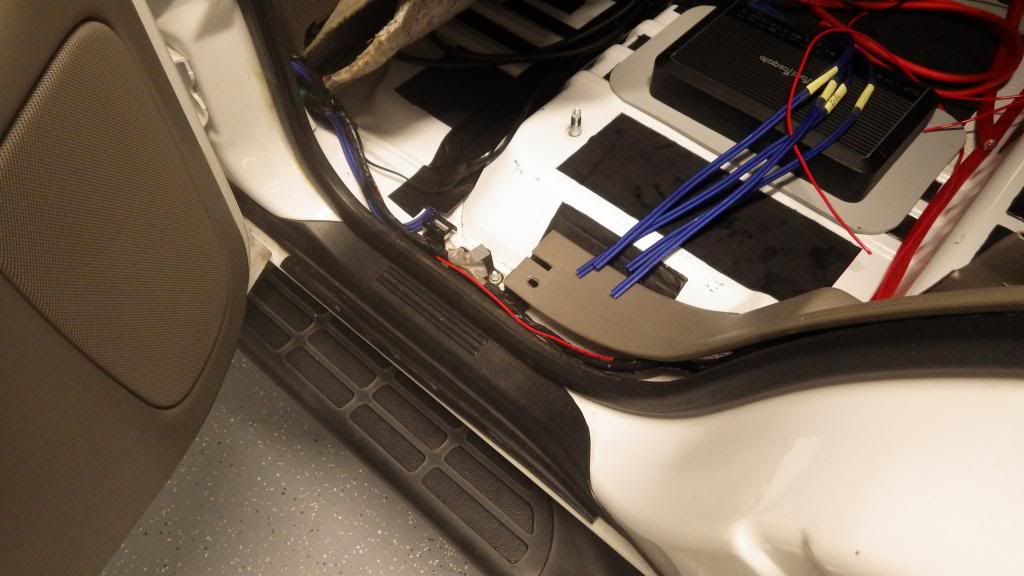
Look at the blue wire. I removed the seats and lifted the carpet and ran underneath to all of the doors. Remove all of your molding and door panels to run the wire:
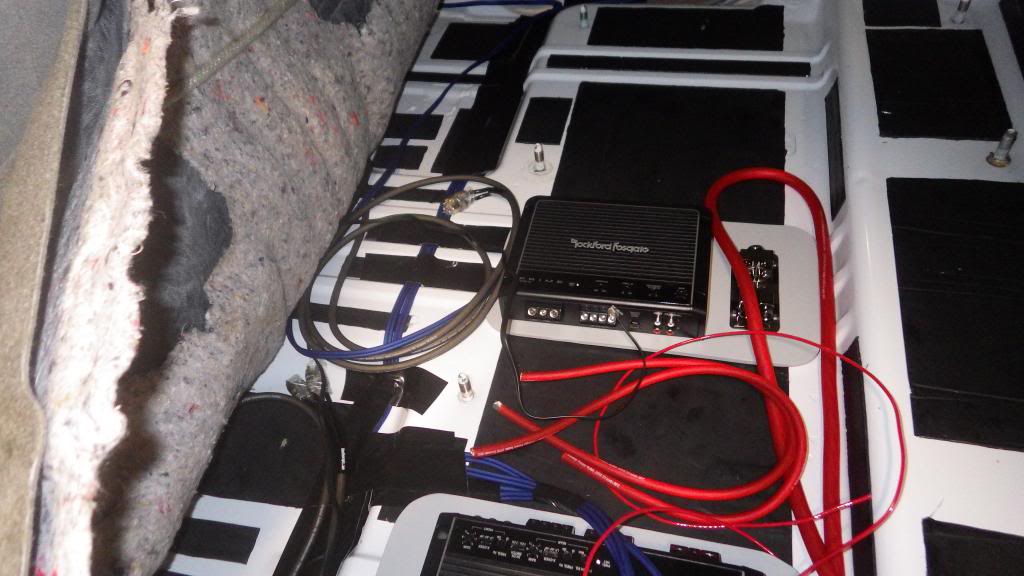
This photo is the passenger side rear door, notice I made the run along the stock wiring on the side and when routing to the amps, separated from the RCA and power runs to decrease the potential for cross interference:

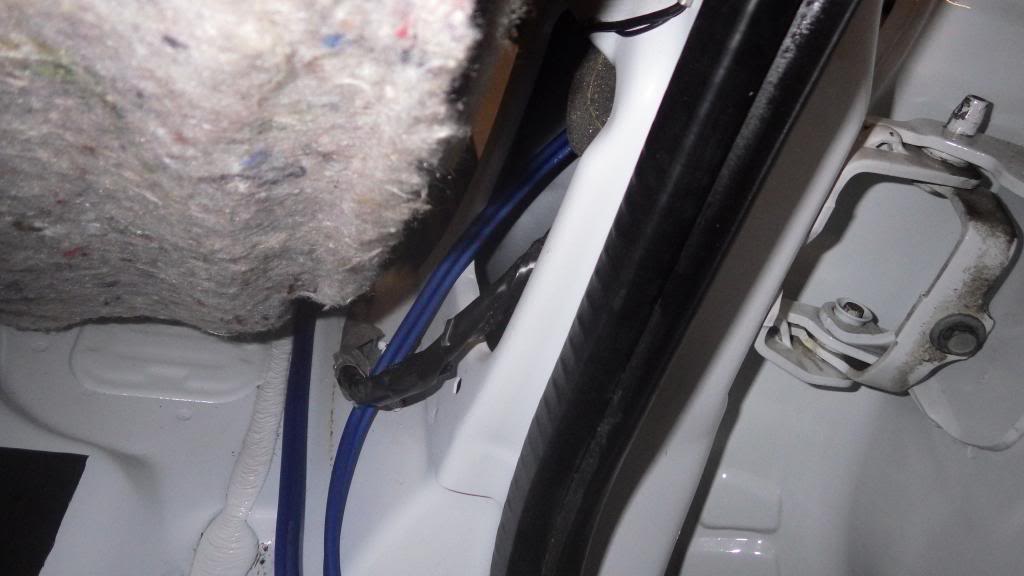
This view is the drivers side rear door going forward, notice the blue wires going forward to the rear and front doors:
Thanks,
I still have some clean up work to do, but I have tunes, so I've not been in too big of a hurry!!

I have the same battery going on 5 months now. Excellent battery!
They should be good batteries. Hasn't let me down yet!! I like the dual post too.
the headache i may attempt to start tomorrow smh but still have no idea for where to place the amps mines wont fit like urs there bigger and i have 3-4 long body z71 but i want it as neat as urs..how did u run the door speakers to rear from oem amplifier back or new wire?
Hey There,
Maybe Shawn will chime in as to where you might install your amps!!
I ran all new speaker wire from my amps to the doors.
Look at the blue wire. I removed the seats and lifted the carpet and ran underneath to all of the doors. Remove all of your molding and door panels to run the wire:
This photo is the passenger side rear door, notice I made the run along the stock wiring on the side and when routing to the amps, separated from the RCA and power runs to decrease the potential for cross interference:
This view is the drivers side rear door going forward, notice the blue wires going forward to the rear and front doors:
Looks awesome....nice work.
Sent from under your Sister's skirt
Thanks,
I still have some clean up work to do, but I have tunes, so I've not been in too big of a hurry!!
YukonXL04
The Riverboat
Hey Joe,
Looking great man. In for final pics! But once you have sound, it's hard to finally finish it all.
Hell mines going on 2 years lol. But I have sound!
1sickz71- do you have bucket seats or bench? Also what amp do you have? And you have a burban right?
Looking great man. In for final pics! But once you have sound, it's hard to finally finish it all.
Hell mines going on 2 years lol. But I have sound!
1sickz71- do you have bucket seats or bench? Also what amp do you have? And you have a burban right?
Front Street
Member
Excellent work on the layout and wiring Joe!
i am finishing up my install of Boston Acoustics components and an Alpine PDX amp for all 4 corners. I too purchased them over time. I am also running a Pioneer HU AVH-P8400BH along with Second Skin dampening. So, it was really cool following your build since we used similar stuff. Anyways, I have some random questions for ya,
1. Do you have to unscrew the "hooks" in the cargo area floor all the way to get the carpet out? Mine have rubber sealant and I can't get them unscrewed all the way, just a little bit.
2. What do you recommend for cutting the Second Skin dampening? You had all those strips in the low spots and was wondering if a utility blade did the job or what else you might have used.
3. How are the KnuKoncepts Terminals holding up? Would you have rather gone with a D-block for all the connections?
4. Did you find any source for tan carpet to recover your sub-box? I also have tan carpet so if you found a place it will help.
5. Thanks for posting the build thread! Despite all my questions I learned a lot from your post and I thought I was pretty decent at car audio. This old dog learned some new tricks, so thanks again!
Gelly
noob/troller
i am finishing up my install of Boston Acoustics components and an Alpine PDX amp for all 4 corners. I too purchased them over time. I am also running a Pioneer HU AVH-P8400BH along with Second Skin dampening. So, it was really cool following your build since we used similar stuff. Anyways, I have some random questions for ya,
1. Do you have to unscrew the "hooks" in the cargo area floor all the way to get the carpet out? Mine have rubber sealant and I can't get them unscrewed all the way, just a little bit.
2. What do you recommend for cutting the Second Skin dampening? You had all those strips in the low spots and was wondering if a utility blade did the job or what else you might have used.
3. How are the KnuKoncepts Terminals holding up? Would you have rather gone with a D-block for all the connections?
4. Did you find any source for tan carpet to recover your sub-box? I also have tan carpet so if you found a place it will help.
5. Thanks for posting the build thread! Despite all my questions I learned a lot from your post and I thought I was pretty decent at car audio. This old dog learned some new tricks, so thanks again!
Gelly
noob/troller
OP
OP
04whitetahoe
TYF PLUS!(tm)
Suggestions
Hey Gelly,
Thanks for the compliment and here's my suggestions:
_____________________________________________________________
1. Do you have to unscrew the "hooks" in the cargo area floor all the way to get the carpet out? Mine have rubber sealant and I can't get them unscrewed all the way, just a little bit.
To get your carpet out, you do have to take those D-mounts off. They just come out - keep unscrewing the bolts and then pull the D-mount until the silicone comes loose. Mine were siliconed in too, it just took some pulling to get it them to free up and come off.
This question reminds me that I didn't silicone them back, I suppose I should do so!
____________________________________________________________
2. What do you recommend for cutting the Second Skin dampening? You had all those strips in the low spots and was wondering if a utility blade did the job or what else you might have used.
I used a good straight edge (an aluminum level), sharp utility knife (changing blades occasionally) and cut on a piece of plywood. I recommend wearing gloves to protect your hands.
I found it helpful to mark out several lines on my cutting board of various widths (like 3", 5", Etc) I used so I wouldn't have to measure and mark the dampener every cut.
I used a clamp one of the sides of my level to my cutting board when I made my cuts, this made it easier to keep it in place when making the utility knife cut. Take several passes with the utility knife, rather than pushing really hard for one pass. It makes it easier and safer when cutting and you for sure cut all the way through. Once you have the shapes of one of your doors, you can copy them for the other. I recommend cutting all the material first, then applying it all. It's more efficient than cut, apply, cut apply.
Cutting the material:
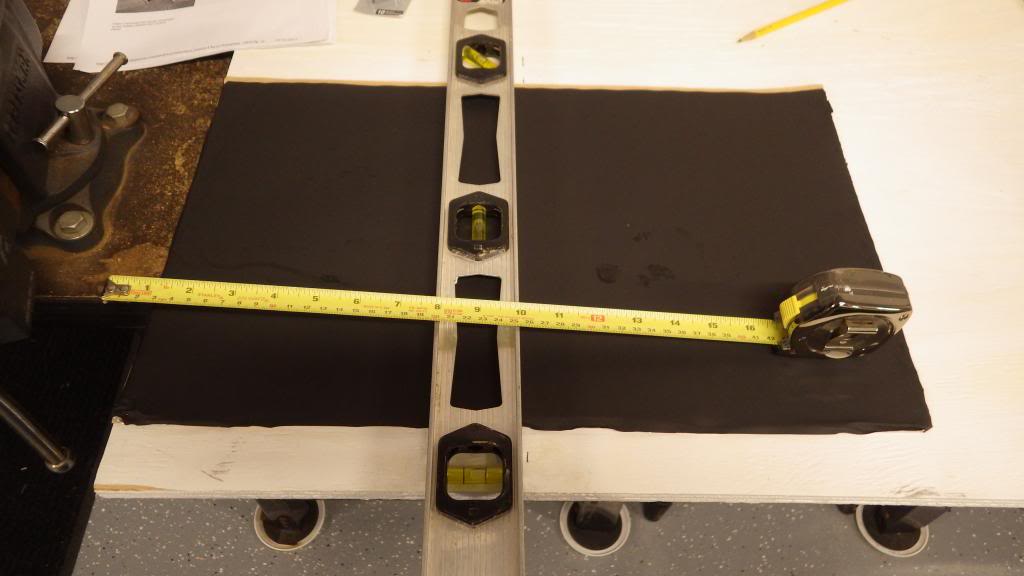
For Speaker front door:
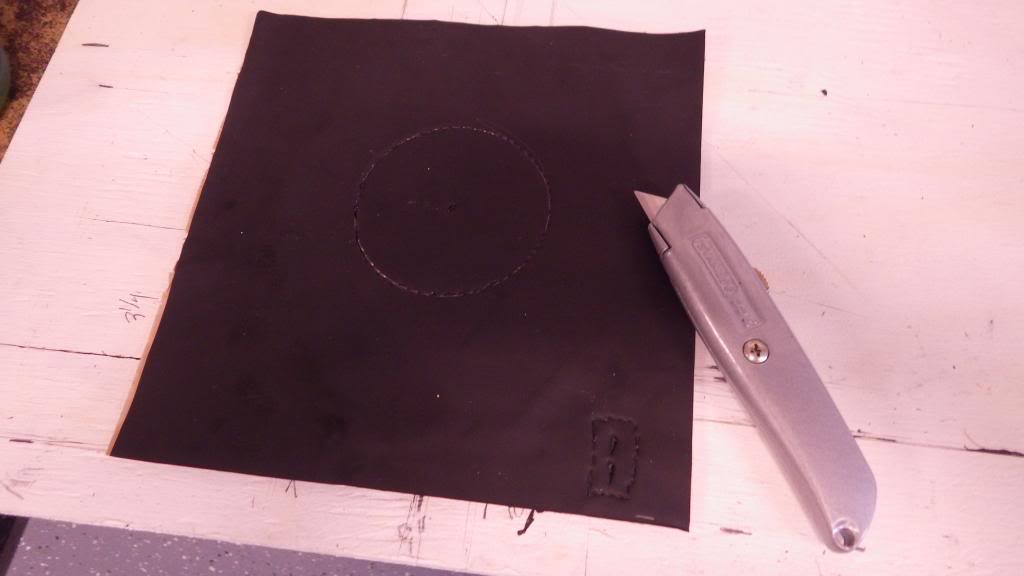
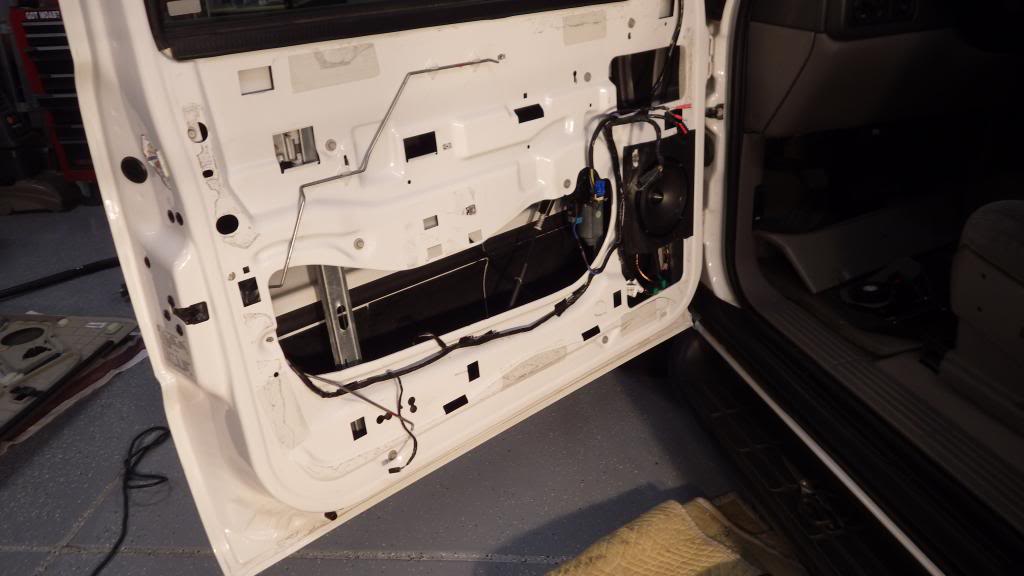
Material ready to apply:
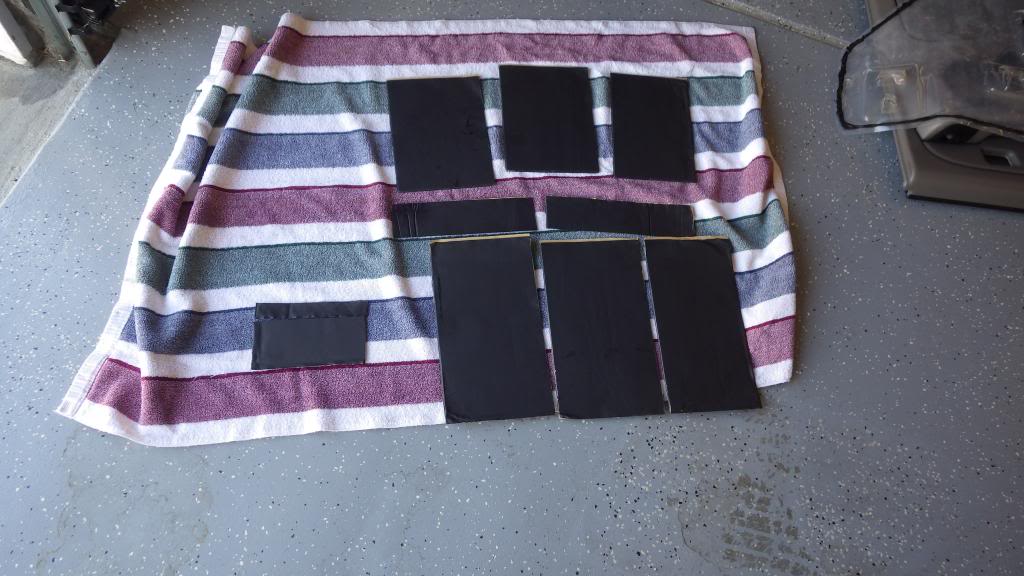
Do a test fit before you peel the backing:


Rear Door:

One more hint on the Damplifier - if you get some tiles that look like this:

Take a large kitchen rolling pin to it and that flattens it out quite a bit to make it more usable.
I used simple green cleaner on the sheet metal, then just plain water and let dry thoroughly. To apply the material, rollers are good, but I found that using a tennis ball and a "wooden spoon" from the kitchen works very well to apply. In tight places, the handle of the spoon works well too. You want to make sure you press on all areas of the dampening material so you get a good bond. Have all three tools on hand so you'll have everything you need handy.
When you place the material, start at one edge and work it down with the tennis ball so you don't get air bubbles. If you do get a bubble (common), simply make a cut in the middle of it and work the air out with the ball/roller/spoon.
___________________________________________________________
3. How are the KnuKoncepts Terminals holding up? Would you have rather gone with a D-block for all the connections?
I like the KNU connections/materials everywhere but my battery terminals. I found the way the terminals clamp to the posts is easily stripped due to the small allen screw they used for tightening. They are good looking, but the way they clamp onto the battery posts is not great. I would look for a different terminal if that's the connection you are referring to.
____________________________________________________________
4. Did you find any source for tan carpet to recover your sub-box? I also have tan carpet so if you found a place it will help.
Mine is grey! My sub box is also grey, so I'm set!
You might try this place to a carpet source. If they don't sell individual pieces, maybe they can give you a referral:
http://www.auto-interior.com/chevy26.htm#TAHOE

Hey Gelly,
Thanks for the compliment and here's my suggestions:
_____________________________________________________________
1. Do you have to unscrew the "hooks" in the cargo area floor all the way to get the carpet out? Mine have rubber sealant and I can't get them unscrewed all the way, just a little bit.
To get your carpet out, you do have to take those D-mounts off. They just come out - keep unscrewing the bolts and then pull the D-mount until the silicone comes loose. Mine were siliconed in too, it just took some pulling to get it them to free up and come off.
This question reminds me that I didn't silicone them back, I suppose I should do so!
____________________________________________________________
2. What do you recommend for cutting the Second Skin dampening? You had all those strips in the low spots and was wondering if a utility blade did the job or what else you might have used.
I used a good straight edge (an aluminum level), sharp utility knife (changing blades occasionally) and cut on a piece of plywood. I recommend wearing gloves to protect your hands.
I found it helpful to mark out several lines on my cutting board of various widths (like 3", 5", Etc) I used so I wouldn't have to measure and mark the dampener every cut.
I used a clamp one of the sides of my level to my cutting board when I made my cuts, this made it easier to keep it in place when making the utility knife cut. Take several passes with the utility knife, rather than pushing really hard for one pass. It makes it easier and safer when cutting and you for sure cut all the way through. Once you have the shapes of one of your doors, you can copy them for the other. I recommend cutting all the material first, then applying it all. It's more efficient than cut, apply, cut apply.
Cutting the material:
For Speaker front door:
Material ready to apply:
Do a test fit before you peel the backing:
Rear Door:
One more hint on the Damplifier - if you get some tiles that look like this:
Take a large kitchen rolling pin to it and that flattens it out quite a bit to make it more usable.
I used simple green cleaner on the sheet metal, then just plain water and let dry thoroughly. To apply the material, rollers are good, but I found that using a tennis ball and a "wooden spoon" from the kitchen works very well to apply. In tight places, the handle of the spoon works well too. You want to make sure you press on all areas of the dampening material so you get a good bond. Have all three tools on hand so you'll have everything you need handy.
When you place the material, start at one edge and work it down with the tennis ball so you don't get air bubbles. If you do get a bubble (common), simply make a cut in the middle of it and work the air out with the ball/roller/spoon.
___________________________________________________________
3. How are the KnuKoncepts Terminals holding up? Would you have rather gone with a D-block for all the connections?
I like the KNU connections/materials everywhere but my battery terminals. I found the way the terminals clamp to the posts is easily stripped due to the small allen screw they used for tightening. They are good looking, but the way they clamp onto the battery posts is not great. I would look for a different terminal if that's the connection you are referring to.
____________________________________________________________
4. Did you find any source for tan carpet to recover your sub-box? I also have tan carpet so if you found a place it will help.
Mine is grey! My sub box is also grey, so I'm set!
You might try this place to a carpet source. If they don't sell individual pieces, maybe they can give you a referral:
http://www.auto-interior.com/chevy26.htm#TAHOE
Last edited:
JonnyTahoe
Full Access Member
Wow what a project. I spent an hour looking at your build, like others on here I will be doing a system with a few minor changes. Those door speakers look like a lot of work so it was great being able to see what I have in store for me. These systems can take on a life of their own and so you have to be prepared for that. Thanks for taking the time to show us how much work it is to do this project.
---------- Post added at 05:01 PM ---------- Previous post was at 04:54 PM ----------
You guys are so lucky you dont have to deal with road salt.
---------- Post added at 05:01 PM ---------- Previous post was at 04:54 PM ----------
Nice engine bay! all clean and gunk free. GJ!
You guys are so lucky you dont have to deal with road salt.
OP
OP
04whitetahoe
TYF PLUS!(tm)
Thanks Jon - may be digging back in a little this weekend
Thanks Jon,
I may be doing a couple updates this weekend.

I still need to program my steering wheel controls and make my wiring runs look cleaner, which means pulling my rear interior back apart.
It has been quite a project!! Tons of work.
BUT THIS SYSTEM CCCCRRRRAAAANNNNNKKKKSSSSS!! (it's powerful)

Wow what a project. I spent an hour looking at your build, like others on here I will be doing a system with a few minor changes. Those door speakers look like a lot of work so it was great being able to see what I have in store for me. These systems can take on a life of their own and so you have to be prepared for that. Thanks for taking the time to show us how much work it is to do this project.
---------- Post added at 05:01 PM ---------- Previous post was at 04:54 PM ----------
You guys are so lucky you dont have to deal with road salt.
Thanks Jon,
I may be doing a couple updates this weekend.
I still need to program my steering wheel controls and make my wiring runs look cleaner, which means pulling my rear interior back apart.
It has been quite a project!! Tons of work.
BUT THIS SYSTEM CCCCRRRRAAAANNNNNKKKKSSSSS!! (it's powerful)
YukonXL04
The Riverboat
Awesome! I'm glad your happy with it. So are you glad you didn't go with that little powered subwoofer?
OP
OP
04whitetahoe
TYF PLUS!(tm)
Yes
Hey Shawn - YES!
It's nice to have this forum to bounce ideas off others who have direct experience on our projects.
I appreciate the advice and dialogue.
Joe
Awesome! I'm glad your happy with it. So are you glad you didn't go with that little powered subwoofer?
Hey Shawn - YES!
It's nice to have this forum to bounce ideas off others who have direct experience on our projects.
I appreciate the advice and dialogue.
Joe
YukonXL04
The Riverboat
Haha. Absolutely man. No problem. If you need any tuning advice let me know. Also I don't remember did you put dampener down over the big holes in the door to "seal" them?
Mighty Mouse
TYF Newbie
How do you like the 5500 Pioneer head unit? I'm thinking about getting the same one. How did the install go?
OP
OP
04whitetahoe
TYF PLUS!(tm)
More
Hey Shawn, I will contact you on the adjustments (it will be a while) and I have not sealed the big holes. Man - you like to make me work!! LOL
Hey Wayne,
I really like the head unit – I have not used all of the options available on the unit, but I will comment on what I have used/experienced.
It’s the 2013 model, so it only has one USB input, but I don’t see needing more than that.
It has the RCA outputs for front, rear and sub, which I used. Since I run external amps, I have no comment on the power output of the head unit. The Bluetooth feature works great without the extra expensive cables for the iPhone I can control my phone functions, access my phone book, make calls and stream Pandora all with Bluetooth using my iPhone 5.
It came with a microphone that I hooked up for voice commands and telephone conversations that I sound a good spot – a blank in my dash on the left of my steering wheel – it works great.
The controls on the unit are easy to use and figure out. It’s intuitive in that way, you don’t really need to study the manual if you can figure things out by just playing with the controls and trying them. The front panel angle is adjustable which is cool and it remembers where you set it, so the net time power is applied, it goes back to where you set it.
The equalizer is nice because there are several presets as well as the ability to set 2 custom settings. Depending on the song, a different setting is easy to choose until you hit the one that sounds best to you.
I have not used the DVD/CD at all, but it has the ability to read a large variety of formats. One of these days, I’ll throw a movie in to see if it plays. I think it should. I did wire in an emergency brake by-pass so the unit will play video, but have not yet tried it. I don’t see myself watching movies on the thing, but I could see where I might want to use a backup camera someday.
I have used the HD radio, but so far, Pandora is usually where I have been getting my music. I bought the Pandora monthly (about $4.00 or so).
I use a USB drive with the HU and it catalogues the drive and is easily searchable when you touch the magnifying glass to search. I ran the USB cable to the dash so I can plug in (or just leave the USB connected) and use when I want to.
It was purchased from Crutchfeild, so it came with their standard installation kit that worked out fine. The kits are universal, so you will have to cut off the spare attachment points that are not needed for your configuration. I read the instructions several times, tried it and then used my old radio for a template of what attachment points to leave on. It’s fairly straight forward, but take some time getting acquainted with all of the pieces and instructions. The dash comes apart easily and the old radio is a breeze to remove. I did mine in stages, so was without tunes in my car for a bit, but used my iPhone/Pandora with a portable Bluetooth speaker (JBL Charge) to get me through the week or two. This was a great solution.
The radio is in there tight especially because of the steering wheel control/On Star adapter and its associated wiring, but is definitely doable.
I ran my RCAs from the passenger side, behind the glove box and ran the rest of any wiring (microphone/amp on switch/) on the driver’s side.
I bought the equalizing microphone for the unit, but have not yet tried it to see what it adjusts. I still need to do some work to the system, like get my steering wheel controls to work and re-route/dress my wiring, but I will eventually get to this too.
That about covers it. PM me if you have other specific questions.
Joe
Haha. Absolutely man. No problem. If you need any tuning advice let me know. Also I don't remember did you put dampener down over the big holes in the door to "seal" them?
Hey Shawn, I will contact you on the adjustments (it will be a while) and I have not sealed the big holes. Man - you like to make me work!! LOL
How do you like the 5500 Pioneer head unit? I'm thinking about getting the same one. How did the install go?
Hey Wayne,
I really like the head unit – I have not used all of the options available on the unit, but I will comment on what I have used/experienced.
It’s the 2013 model, so it only has one USB input, but I don’t see needing more than that.
It has the RCA outputs for front, rear and sub, which I used. Since I run external amps, I have no comment on the power output of the head unit. The Bluetooth feature works great without the extra expensive cables for the iPhone I can control my phone functions, access my phone book, make calls and stream Pandora all with Bluetooth using my iPhone 5.
It came with a microphone that I hooked up for voice commands and telephone conversations that I sound a good spot – a blank in my dash on the left of my steering wheel – it works great.
The controls on the unit are easy to use and figure out. It’s intuitive in that way, you don’t really need to study the manual if you can figure things out by just playing with the controls and trying them. The front panel angle is adjustable which is cool and it remembers where you set it, so the net time power is applied, it goes back to where you set it.
The equalizer is nice because there are several presets as well as the ability to set 2 custom settings. Depending on the song, a different setting is easy to choose until you hit the one that sounds best to you.
I have not used the DVD/CD at all, but it has the ability to read a large variety of formats. One of these days, I’ll throw a movie in to see if it plays. I think it should. I did wire in an emergency brake by-pass so the unit will play video, but have not yet tried it. I don’t see myself watching movies on the thing, but I could see where I might want to use a backup camera someday.
I have used the HD radio, but so far, Pandora is usually where I have been getting my music. I bought the Pandora monthly (about $4.00 or so).
I use a USB drive with the HU and it catalogues the drive and is easily searchable when you touch the magnifying glass to search. I ran the USB cable to the dash so I can plug in (or just leave the USB connected) and use when I want to.
It was purchased from Crutchfeild, so it came with their standard installation kit that worked out fine. The kits are universal, so you will have to cut off the spare attachment points that are not needed for your configuration. I read the instructions several times, tried it and then used my old radio for a template of what attachment points to leave on. It’s fairly straight forward, but take some time getting acquainted with all of the pieces and instructions. The dash comes apart easily and the old radio is a breeze to remove. I did mine in stages, so was without tunes in my car for a bit, but used my iPhone/Pandora with a portable Bluetooth speaker (JBL Charge) to get me through the week or two. This was a great solution.
The radio is in there tight especially because of the steering wheel control/On Star adapter and its associated wiring, but is definitely doable.
I ran my RCAs from the passenger side, behind the glove box and ran the rest of any wiring (microphone/amp on switch/) on the driver’s side.
I bought the equalizing microphone for the unit, but have not yet tried it to see what it adjusts. I still need to do some work to the system, like get my steering wheel controls to work and re-route/dress my wiring, but I will eventually get to this too.
That about covers it. PM me if you have other specific questions.
Joe
Mighty Mouse
TYF Newbie
Joe, thanks for the details. I know the 5500 is last years model and it does more then I need. I'm pretty sure I'm sold on that unit. I have been running Pioneer's for years and installed them with no issues. The Tahoe is going to be the first one I have done with all the extra crap attached to the radio. I'm going to do the head unit now because my 6 disc changer in the radio is screwed up. After that I'll look into subs and speakers.
OP
OP
04whitetahoe
TYF PLUS!(tm)
Steering wheel controls working!
Got my steering wheel controls working, so wanted to share this if anyone else comes across this same issue, maybe this could help.
I thought it was programming or even my unit was bad, but it turned out the simplest thing was the cause - The remote control plug from the CRUX harness to HU not plugged in.
Here’s what happened – I bought the right unit for my application, an 04 Tahoe with OnStar no Bose, so I bought the CRUX SOOGM-15.
I did my HU install and was concentrating on many things including making up the wiring harness that goes from the crux to the HU wiring loom. My instruction sheet from the CRUX was a one page document that included no documentation on programming of the CRUX, other than making sure the dial was set to the proper position for the brand of HU you run.
Showing dial indicator on CRUX (in middle of blue box):

Mine HU is a Pioneer, so I made sure it was set to “0”. I installed my HU which worked fine, but my steering wheel controls did not work.
In this thread, I posted my controls didn’t work and it was mentioned that I might try to re-program the unit for a potential fix. I did some research and found additional instructions for my CRUX model that included the programming, so I thought that this must be the answer -- and last night when my son was over, I tore into my dash armed with the fix.
Steering wheel down and shift lever in low 1:

Pulling trim off:

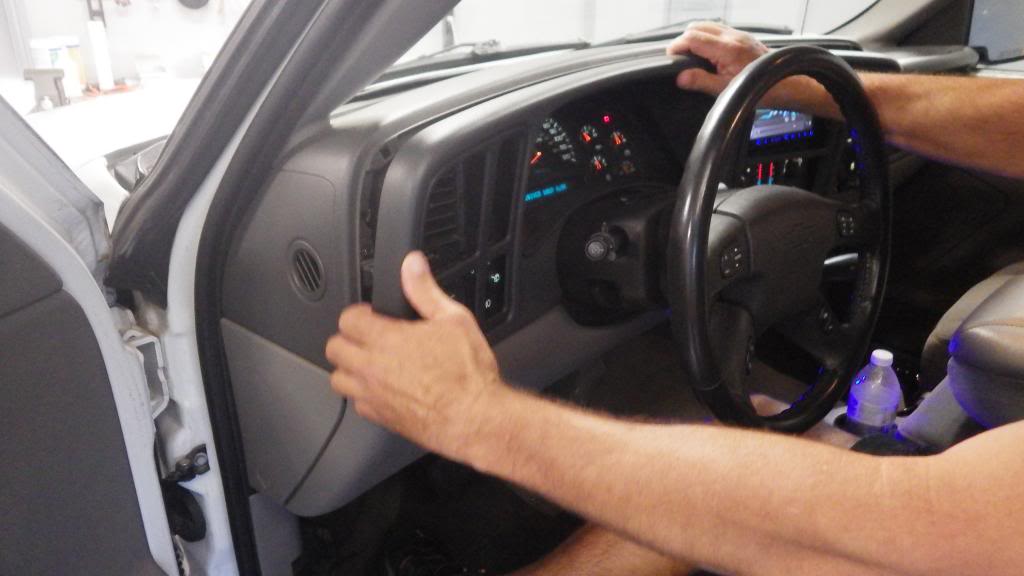
Since I didn’t do the programming the first time, I thought this had to be the fix.
Specifically the "test for high/low systems" and "setting the audio controls".
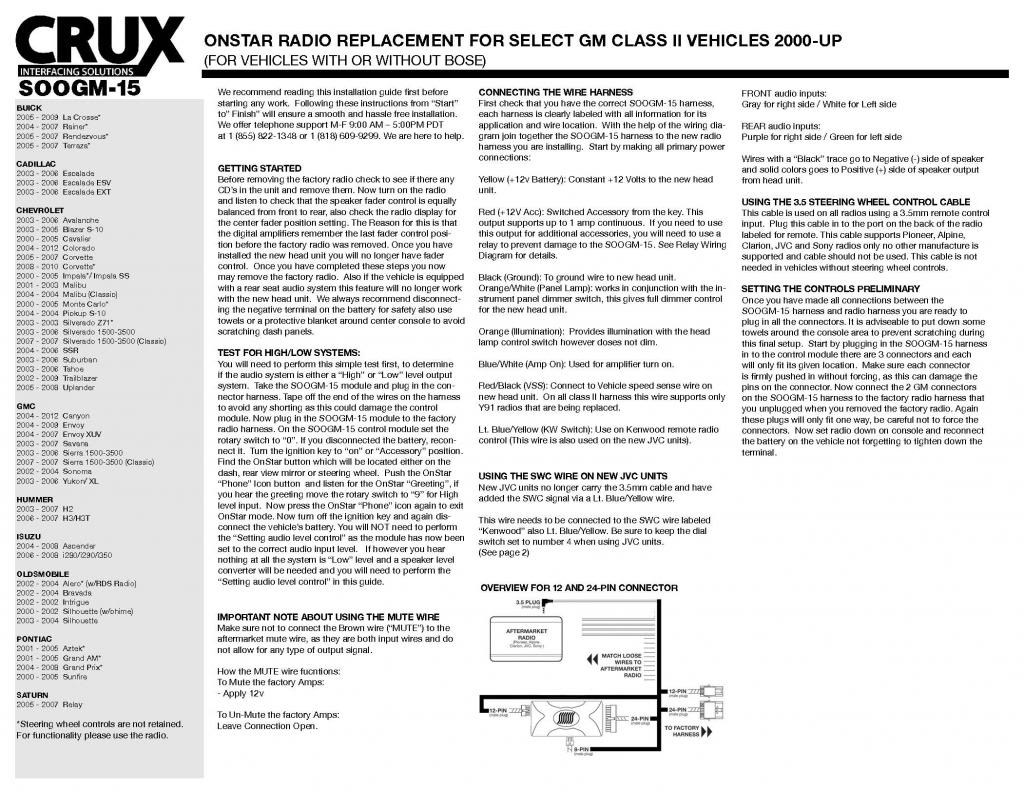
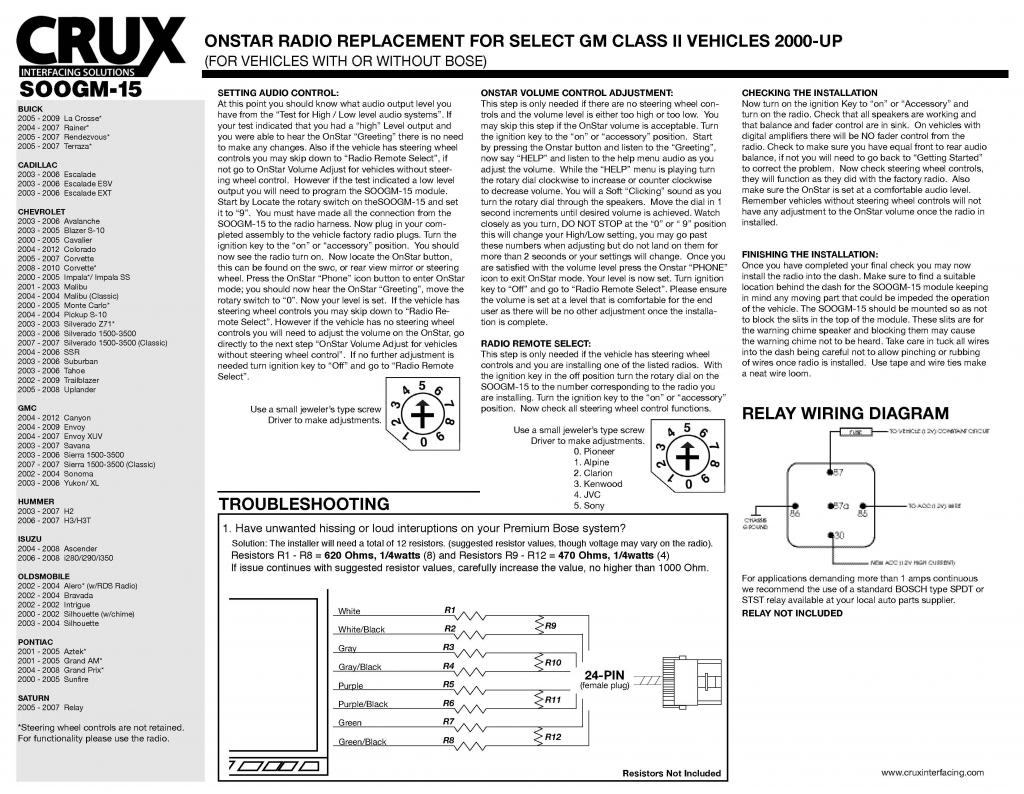
It has you check for “high level” or “low level” inputs by turning on the key and pressing the OnStar button and listen for a response. If you get the OnStar response with the CRUX dial position indicator on “0”, no further programming is needed, if you don’t further programming IS needed.
This is what messed with me – because I NEVER got an OnStar response in either of the positions that the instruction talked about.
I did it several times to no avail. My son saw the plug for “remote control” from the CRUX harness that I NEVER HOOKED UP, assuming it was for the FOB style remote control that comes with the HU that I would never use.
With his suggestion to try it, plugged it in and the steering wheel controls worked!!
Buttoned up:
This is just a shot to show where I placed the Bluetooth microphone – I thought it made a good spot:


I never could make it come up the OnStar greeting, but didn’t care at that point and buttoned it up and now have steering wheel controls.
PROBLEM SOLVED.

Next on the agenda – amplifier wire dressing!!

Got my steering wheel controls working, so wanted to share this if anyone else comes across this same issue, maybe this could help.
I thought it was programming or even my unit was bad, but it turned out the simplest thing was the cause - The remote control plug from the CRUX harness to HU not plugged in.
Here’s what happened – I bought the right unit for my application, an 04 Tahoe with OnStar no Bose, so I bought the CRUX SOOGM-15.
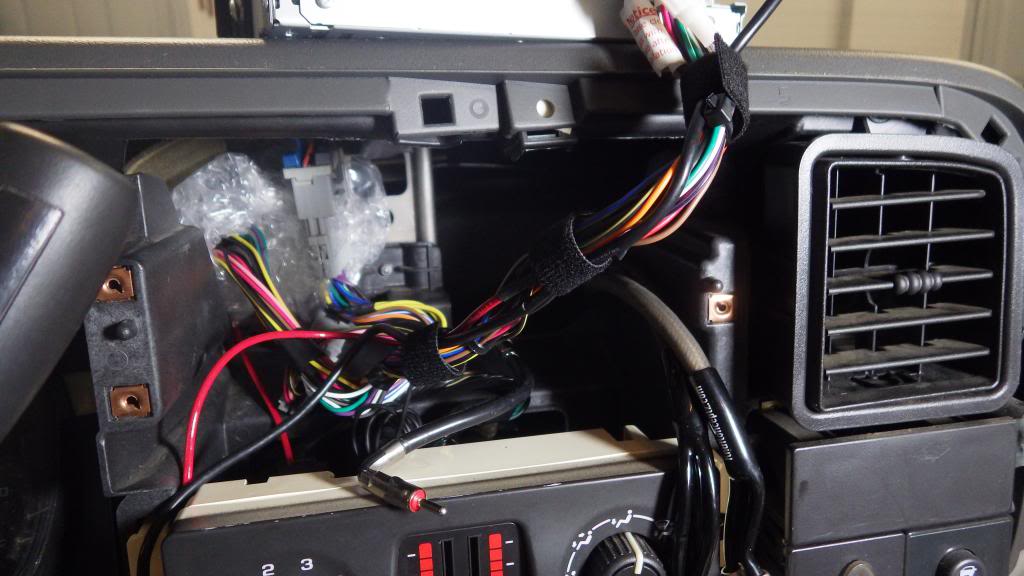
I did my HU install and was concentrating on many things including making up the wiring harness that goes from the crux to the HU wiring loom. My instruction sheet from the CRUX was a one page document that included no documentation on programming of the CRUX, other than making sure the dial was set to the proper position for the brand of HU you run.
Showing dial indicator on CRUX (in middle of blue box):
Mine HU is a Pioneer, so I made sure it was set to “0”. I installed my HU which worked fine, but my steering wheel controls did not work.
In this thread, I posted my controls didn’t work and it was mentioned that I might try to re-program the unit for a potential fix. I did some research and found additional instructions for my CRUX model that included the programming, so I thought that this must be the answer -- and last night when my son was over, I tore into my dash armed with the fix.
Steering wheel down and shift lever in low 1:
Pulling trim off:
Since I didn’t do the programming the first time, I thought this had to be the fix.
Specifically the "test for high/low systems" and "setting the audio controls".
It has you check for “high level” or “low level” inputs by turning on the key and pressing the OnStar button and listen for a response. If you get the OnStar response with the CRUX dial position indicator on “0”, no further programming is needed, if you don’t further programming IS needed.
This is what messed with me – because I NEVER got an OnStar response in either of the positions that the instruction talked about.
I did it several times to no avail. My son saw the plug for “remote control” from the CRUX harness that I NEVER HOOKED UP, assuming it was for the FOB style remote control that comes with the HU that I would never use.
With his suggestion to try it, plugged it in and the steering wheel controls worked!!
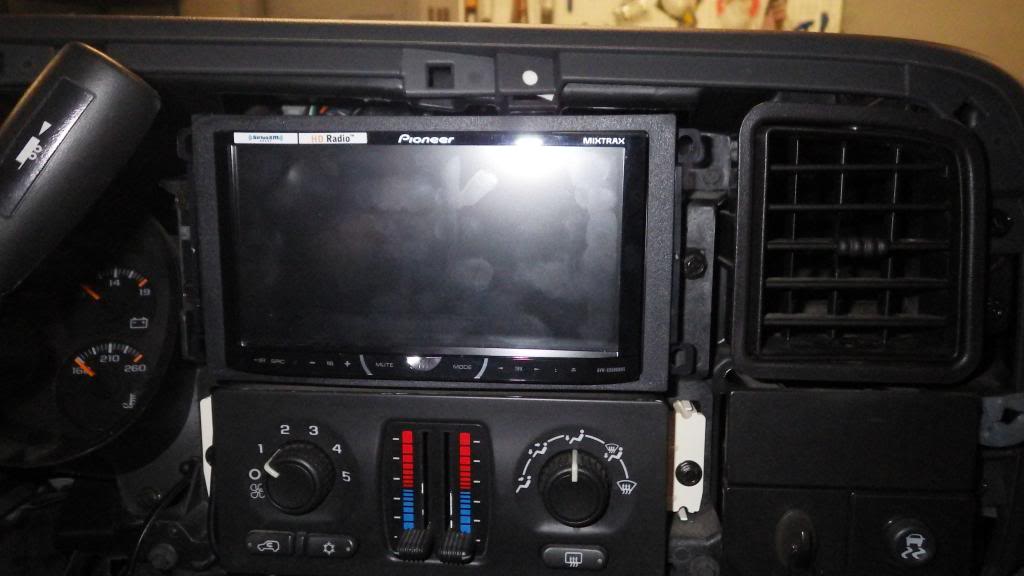
Buttoned up:
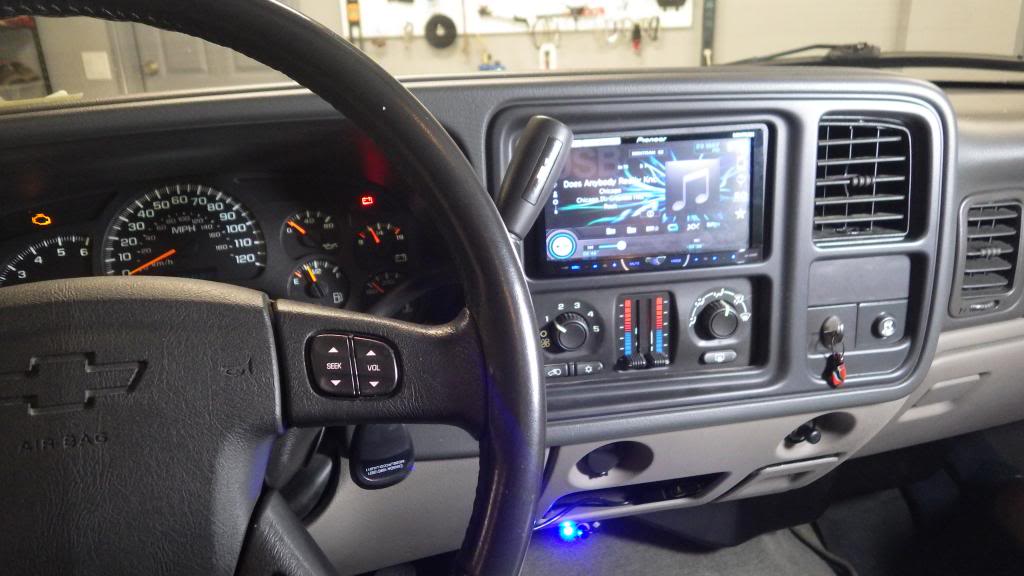
This is just a shot to show where I placed the Bluetooth microphone – I thought it made a good spot:
I never could make it come up the OnStar greeting, but didn’t care at that point and buttoned it up and now have steering wheel controls.
PROBLEM SOLVED.
Next on the agenda – amplifier wire dressing!!
Mighty Mouse
TYF Newbie
Seeing your's makes me want to get my 5600 installed asap. Everything should be here Monday.
Similar threads
- Replies
- 2
- Views
- 134


- Replies
- 14
- Views
- 1K
- Replies
- 3
- Views
- 156


