I want to replace my OEM Nav unit with Z120BT or equivalent. Looked at the Rosen units but they seem expensive for what would be a slight upgrade. The Z120BT looks pretty good but I would like to preserve the Rear Seat Entertainment, Onstar, backup cam on the HU and BOSE Centerpoint. Wondering if anyone has done that setup on same system and how much of the OEM extras was preserved.

You are using an out of date browser. It may not display this or other websites correctly.
You should upgrade or use an alternative browser.
You should upgrade or use an alternative browser.
z120bt in 09 Tahoe LTZ
- Thread starter ptwat
- Start date
Disclaimer: Links on this page pointing to Amazon, eBay and other sites may include affiliate code. If you click them and make a purchase, we may earn a small commission.
From reading one of the other threads with a response from Modded it sounds like I need the Axxess ASWC for SW controls and the PAC OS-4 to interface everything else. Sound right?
Still questions in my mind are- does the OS-4 interface to the BOSE Centerpoint system (not the more common Bose without the center channel) and do all the functions of the RSE still work?
Still questions in my mind are- does the OS-4 interface to the BOSE Centerpoint system (not the more common Bose without the center channel) and do all the functions of the RSE still work?
I just installed the same thing on my Yukon about 2 week ago, so might be able to help out as everything is still fresh in my memory somewhat  .
.
Pac OS-4, Axcess sw, GM-K317 was the kit that I used. If you are doing this by yourself, I recommend taking the stock unit early and get into the back to break out the plastic part. I cut the front piece and also the back black piece. I cut them on both side about 1" before the bend. Metal clippers work the best, unless you have a dremel to get back there. The only thing was I do not have back up cam on my head unit, had it on the rear view mirror instead. And also did not have rear seat entertainment, but if you already have this, the wiring for it should already be there to connect to the new unit. Might want to remove the stock unit to check the wiring.
. Pac OS-4, Axcess sw, GM-K317 was the kit that I used. If you are doing this by yourself, I recommend taking the stock unit early and get into the back to break out the plastic part. I cut the front piece and also the back black piece. I cut them on both side about 1" before the bend. Metal clippers work the best, unless you have a dremel to get back there. The only thing was I do not have back up cam on my head unit, had it on the rear view mirror instead. And also did not have rear seat entertainment, but if you already have this, the wiring for it should already be there to connect to the new unit. Might want to remove the stock unit to check the wiring.
DJVIM
TYF Newbie
I have 10 tahoe non bose and was also looking to do the z120bt but it does not fit in a tahoe. It is too long (deep). I had to settle with the avhp4200 even that was a tight fit. With this model being shorter I still needed to cut pieces of plastic a metal at the very rear to make it fit. I stiil retained my onstar with the gmos lan 2 adapter but needed to buy a seperate center speaker for it to work since i am using an amp for my door speakers if you dont use an amp then the you use the door speakers for the onstar and door chime. I did add the back up camera and did not buy the steering wheel controls.
vietcu, what year is your Yukon? I would think the Yukon would be the same as a Tahoe in depth. You said that you "cut the front piece"- the front of what? If what DJVIM is saying is true the z120bt will not fit anyway. I guess I had the impression that the cutting in the back was to make room for the cables to come out of the back of the unit not that things were cut for the unit to fit in depthwise.
Thanks for all the input guys!
Btw, I sent PAC a question about one of the adapters they supply with the OS-4 that has the backup cam and a "center and sub connection" on it. Just curious if that is also the center channel on the Bose Centerpoint system on some Tahoes.
Thanks for all the input guys!
Btw, I sent PAC a question about one of the adapters they supply with the OS-4 that has the backup cam and a "center and sub connection" on it. Just curious if that is also the center channel on the Bose Centerpoint system on some Tahoes.
Ptwat, in order to get the unit to sit flush with the radio bezel to make it look factory. You have to cut the plastic trimming in the back of the vehicle once you take out the factory radio. When you take out the factory radio, you will see that the plastic housing will go from side to side in the back as if it was a one piece of plastic molding. Then right behind that housing is another piece of plastic (black in my vehicle). I cut both piece off with a tin snip as I see that it wouldn't affect anything, doing that made it possible to slide the 120bt all the way back to make it flush with the front radio bezel. Do a search on this particular radio on this forum and you should see some pictures of different types of install. Hope that explains a little why you want to cut the back of the housing off, any other questions feel free to ask.
Sorry about not answering your question fully. I have a 2010 Yukon SLT. What I mean by "cut the front piece". Once you take the factory radio out, run your hand from both side to the back (or visualize with your eyes). About 1" before you get to the back part of the housing on both side, you cut right there, so that you are basically taking out a letter U. It sound hard but took me a little more than 10 minute to do once I figured that a tin snip was my best tool. Using a razor blade I score a line on both side, again 1" right before the bend. Once I scored a line, I cut with the snip and was able to snap it right off.
Sorry about not answering your question fully. I have a 2010 Yukon SLT. What I mean by "cut the front piece". Once you take the factory radio out, run your hand from both side to the back (or visualize with your eyes). About 1" before you get to the back part of the housing on both side, you cut right there, so that you are basically taking out a letter U. It sound hard but took me a little more than 10 minute to do once I figured that a tin snip was my best tool. Using a razor blade I score a line on both side, again 1" right before the bend. Once I scored a line, I cut with the snip and was able to snap it right off.
Last edited:
Thanks vietcu. So if i understand you correctly, if you look at the HU cavity in the dash as a plastic square bowl, you cut the bottom of it out about one inch up from the bottom. Another question is- if you decide to put your OEM radio back in (maybe if you decide to see your Yukon) will cutting the bottom out preclude that? Sounds like a dremel tool with a cutoff disk might also work if their is nothing on the other side of the plastic to damage.
I got a message back from the PAC guys about the adaptor that comes with the OS4 about the BOSE Centerpoint channel. They said that the adaptor should handle any center channel a GM would have.
I got a message back from the PAC guys about the adaptor that comes with the OS4 about the BOSE Centerpoint channel. They said that the adaptor should handle any center channel a GM would have.
Cutting the piece out from the housing does not mess with re-installing the factory at all. The 4 bolts in the front of the unit will hold it in place just fine, I had to re-install my stock radio for 4 days after I cut the plastic out waiting for all the parts to come in to install the 120 anyways.
DJVIM
TYF Newbie
Well now i am pissed about finding out that a z120 would fit in a tahoe. Stupid crutchfield guy told me it wouldn't. Oh well the avhp4200 is not a bad stereo. pretty much the same except with nothing built in but all can be added in later. **** crutchfield and their overpriced stereos. lol
Sorry about the crutchfield thing- they told me that Rosen GM720 would not fit a Tahoe either and it is made as a OEM replacement. That is why I read as much from these forums as possible.
I think I read recently that you have to agree to the lawyer page on the z120bt every time it starts up. Vietcu, is that your experience? The lawyer page is one of the reasons I want to replace the OEM Nav radio.
I think I read recently that you have to agree to the lawyer page on the z120bt every time it starts up. Vietcu, is that your experience? The lawyer page is one of the reasons I want to replace the OEM Nav radio.
Here is my personal experience with the 120bt so far. It's a ****** head unit for it being their top of the line model, don't get me wrong Pioneer is a great unit but not if this is their flag ship. I saved huge on it paying 850 and a 100 rebate coming so total is 750 so I had to jump on it, or else I would have saved up for the Kenwood. You do have to hit the OK button to bypass the "lawyer" page on start up, not that big of a deal for me. Navigation was the main thing I got this for, and it is nothing compared to TomTom or Garmin, will get me where I want to go but hard to get POI on this sucker. Radio quality is great, only draw back is I cannot control the output volume of movies as this is also the second reason I got this unit. Radio would play fine at volume 10, but when running DVD I have to bump it up to 15-20 range. Went through all the work of getting Hard drive loaded with movies only to find out it will not play to the rear monitors. And the last thing that I am pretty peaved about is not being able to use Bluetooth. Their MIC is a total piece of crap, everyone that has this installed is complaing about it. There are some lucky ones that can use bluetooth with this head unit, but from what I can gather, maybe 1% of the buyers are able to use it.
If I had to do it all over again, not sure I would go with this unit if I had a choice. But then again it all depends on what you are getting the unit for. Quality seems great so far, very easy to use once you get a hang of it. But the options that I am interested in just isn't cutting it. If you haven't bought this unit yet, I would suggest reading more about it in the avic411 forum.
If I had to do it all over again, not sure I would go with this unit if I had a choice. But then again it all depends on what you are getting the unit for. Quality seems great so far, very easy to use once you get a hang of it. But the options that I am interested in just isn't cutting it. If you haven't bought this unit yet, I would suggest reading more about it in the avic411 forum.
So maybe it is time to take another look at the Kenwoods. I had looked at them before and did not like something about them but can't remember. I definitely want a HU so that I can play a different source in the RSE. Did you look at them before deciding on the z120bt?
felixgun
Full Access Member
If you need to know more about the screen itself go to avic411.com for all your pioneer questions about the screen and components. I have one of these in an 08 Tahoe LTZ and it is great. The nav feature is by far the weakest component but it still works and I use it all the time.
The user interface is awesome and I own the MSN Direct Tuner (to pull in stocks,news,movie times, weather, etc.), HD radio for digital radio stations, pioneer rear cam, and the PAC-OS4 and PAC-SWIPS (for bose speakers and the steering wheel controls). It has an SD slot which I use a 16gb sd card for music, and I bought the usb/audio pioneer cable for ipod/iphone hookup which works great. It also plays video via DVD, SD, and iPod/USB. Bluetooth audio connection works AWESOME but the phone hookup to my iPhone 4 has a spotty microphone. This IS the flagship model of pioneer and all in all, I would buy it again. People have also mistaken it for being a factory screen because it looks so factory and sits flush with everything else and it is a 7" screen with no knob and has "Pioneer" written very small on the very top of it.
The user interface is awesome and I own the MSN Direct Tuner (to pull in stocks,news,movie times, weather, etc.), HD radio for digital radio stations, pioneer rear cam, and the PAC-OS4 and PAC-SWIPS (for bose speakers and the steering wheel controls). It has an SD slot which I use a 16gb sd card for music, and I bought the usb/audio pioneer cable for ipod/iphone hookup which works great. It also plays video via DVD, SD, and iPod/USB. Bluetooth audio connection works AWESOME but the phone hookup to my iPhone 4 has a spotty microphone. This IS the flagship model of pioneer and all in all, I would buy it again. People have also mistaken it for being a factory screen because it looks so factory and sits flush with everything else and it is a 7" screen with no knob and has "Pioneer" written very small on the very top of it.
felixgun
Full Access Member
I want to replace my OEM Nav unit with Z120BT or equivalent. Looked at the Rosen units but they seem expensive for what would be a slight upgrade. The Z120BT looks pretty good but I would like to preserve the Rear Seat Entertainment, Onstar, backup cam on the HU and BOSE Centerpoint. Wondering if anyone has done that setup on same system and how much of the OEM extras was preserved.
I had to buy two adapters. I have Bose/Onstar so I had to get the PAC-OS4 and I also got the PAC-SWIPS for steering wheel controls to work. I don't have rear seat entertainment so I don't know... I got the corresponding nd-bc4 from pioneer for the rear-cam because my 08 tahoe ltz did not come with the backup cam unfortunately.
Okay, so an update is in order. I now have a z120bt in possession with an assortment of cables and adaptors. Got the z120bt for a good deal from Al & Eds who pricematched the lowest price I could find on the internet ($930). I also have the rebate ($100) to turn in on the z120bt since Al & Eds is a authorized Pioneer vendor. I have a PAC OS-4 and SWI-PS and opted for the GMRVD cable to keep the RSE functions. I had to send the OS-4 back to PAC to reflash to get the latest firmware so I am waiting for that. Last night I soldered all the cables together and man is that a gob of wires just to adapt the three OEM connectors. I have not taken the OEM out yet since I am waiting for the OS-4 to come back. I do want to get in there this weekend to do any cutting to make room for all that wiring.
Question 1- how did you guys dress up the wiring and adaptors? Is there enough room back there? did you mount the PAC devices, relay and chime to anything or let them hang? Did you have to use the chime device?
Question 2- did you run the ipod cable (CD-IU50V) to your center console bin and if so how did you get the cupholder out? I read on one of the forums where there are four clips that hold it in (two on each side)- is that your experience?
Question 3- Did you cut the brown wire loop on the OS-4 and run the Mute Output (-) to the Mute in on the z120bt?
Question 4- Did you use the center channel or the sub channel connection on the brown connector adaptor to the sub channel on the z120bt?
Lastly I guess I am a little surprised about how many modifications I had to do to the adaptor cables. 1. The mute wire. 2. I added outputs to the brown connector in order to get backup camera out with the center channel and sub. 3. The bypass of course.
Question 1- how did you guys dress up the wiring and adaptors? Is there enough room back there? did you mount the PAC devices, relay and chime to anything or let them hang? Did you have to use the chime device?
Question 2- did you run the ipod cable (CD-IU50V) to your center console bin and if so how did you get the cupholder out? I read on one of the forums where there are four clips that hold it in (two on each side)- is that your experience?
Question 3- Did you cut the brown wire loop on the OS-4 and run the Mute Output (-) to the Mute in on the z120bt?
Question 4- Did you use the center channel or the sub channel connection on the brown connector adaptor to the sub channel on the z120bt?
Lastly I guess I am a little surprised about how many modifications I had to do to the adaptor cables. 1. The mute wire. 2. I added outputs to the brown connector in order to get backup camera out with the center channel and sub. 3. The bypass of course.
Last edited:

Modded
That Guy
- Joined
- May 3, 2009
- Posts
- 6,942
- Reaction score
- 109
To answer question 1, I just let all my wiring and adapter sit right behing the A/C control and break peal controls. There is a faid amount of room back there because behind those controls are about 6" of space. And yes you have to use the chime device. It sounds weird but I have had mine for a bit over 2 months and I am used to it now.
2. Don't know.
3. No, I did not cut my mute loop, so if the mute button is held down over 1 sec it causes my HU to shut off and activates Onstar. If it is cut, it will not shut off any longer.
4. The center channel sub wire is for vehciles with a center and sub (or Bose system). Escalades I know for a fact have both.
LASTLY, when you program the SWI-PS to the OS-4 steering outputs, DO NOT cut the purple or brown loops on the connector that goes into the SWI-PS interface. Program the SWI for version 2 and then program your controls.
2. Don't know.
3. No, I did not cut my mute loop, so if the mute button is held down over 1 sec it causes my HU to shut off and activates Onstar. If it is cut, it will not shut off any longer.
4. The center channel sub wire is for vehciles with a center and sub (or Bose system). Escalades I know for a fact have both.
LASTLY, when you program the SWI-PS to the OS-4 steering outputs, DO NOT cut the purple or brown loops on the connector that goes into the SWI-PS interface. Program the SWI for version 2 and then program your controls.
Thanks for the info! I don't use Onstar so no big deal there. The HU has a mute input and I thought I read somewhere on this site there is a problem if you don't use it. I will have to try to track that down again.
I have Bose with Centerpoint so I figure one of those is the Centerpoint channel. I hooked up both on the z120bt- one on the "Sub" output and one on the "Center" output so I will have to see what happens when I fire it all up.
Thanks again,
Tom
I have Bose with Centerpoint so I figure one of those is the Centerpoint channel. I hooked up both on the z120bt- one on the "Sub" output and one on the "Center" output so I will have to see what happens when I fire it all up.
Thanks again,
Tom
Did some prep work for my install today. Ran the Ipod cable to the console storage and did a test fit for the z120bt. Vietcu has mentioned above that he cut the plastic in the back of the HU well and when I looked at that today it looks like that only helps at the bottom of the HU well. I marked the photo attached. There is metal behind the plastic at the top of the well so it does not look like it helps much to cut that plastic.
Is this where most people are cutting out the plastic back?
Thanks,
Tom
Is this where most people are cutting out the plastic back?
Thanks,
Tom
Attachments
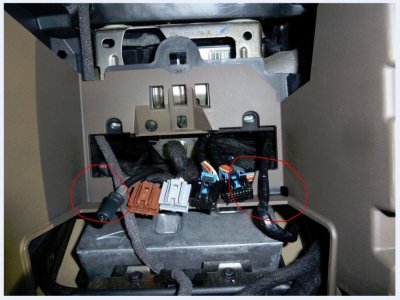
You see the red lines I drew? Sorry for it not being straight. I cut that whole piece off starting at the red line. Make sure to remove that screw in the back circled as well. The red stars that I put on the black piece, is another piece of plastic. Not sure if it was needed to be removed to make the unit flush, but I did it as well and removed that piece once I removed the front plastic piece. Hope that helps.
Similar threads

- Replies
- 2
- Views
- 10K
- Replies
- 12
- Views
- 15K


- Replies
- 32
- Views
- 11K


