Ultimate RSE (Rear Seat Entertainment) Setup!

Disclaimer: Links on this page pointing to Amazon, eBay and other sites may include affiliate code. If you click them and make a purchase, we may earn a small commission.

Guiatarzzan

TYF Newbie
Joined
Jun 11, 2021
Posts
13
Reaction score
15
Do you mind posting a link to those exact cables you purchased? I can't find any online that look that perfect!
Ya. I will get the links. The biggest issue I has was the adhesive pads. The fire sticks are not left hand and right hand. I had to twist a cable and it wanted to pull it off. But over time I think I forced it to stay. I used a few of the extra pads and made a wedge between the seats until it stayed.
 

Guiatarzzan

TYF Newbie
Joined
Jun 11, 2021
Posts
13
Reaction score
15
Do you mind posting a link to those exact cables you purchased? I can't find any online that look that perfect!

This is the angle hdmi cord


This is angle usb c cable


this is usb-c to micro usb for the fire stick power.

With this setup you do get a warning for low power on the fire sticks but they seem to work just fine and they don’t durn off if you forget to turn off the auto stop/start button.
I have not figured out a hard rice and how to transfer movies to it. I ended up getting an unlimited data plan for the year which is cheaper than by the month. We can stream pandora and other things that way. It’s worked really well.
 

Guiatarzzan

TYF Newbie
Joined
Jun 11, 2021
Posts
13
Reaction score
15
This side worked fine. The other side I wedged liked in the picture until the braided wire lost it’s memory and did not try to pull it off.
E34BE843-0C3D-4570-A28B-C38D779C4949.jpeg
ED4ACFA5-ED88-4F90-8065-8F7D3172912F.jpeg
 

Guiatarzzan

TYF Newbie
Joined
Jun 11, 2021
Posts
13
Reaction score
15
The small little storage pocket on the doors under the handle is a great spot for the remotes.
 

abhishekd

TYF Newbie
Joined
Aug 25, 2021
Posts
1
Reaction score
0
Bought a new Tahoe this week. Here is my setup. Used velcro mount to stick the FireTv 4k at the bottom. Unfortunately the USB and HDMI ports are faulty. They switch on intermittently and then go dead.
A7DB0E89-A08F-4B2D-9C08-22D790C458FD.jpeg
 

gbirk7

TYF Newbie
Joined
Sep 3, 2021
Posts
6
Reaction score
0
Location
Bradford PA
Bought a new Tahoe this week. Here is my setup. Used velcro mount to stick the FireTv 4k at the bottom. Unfortunately the USB and HDMI ports are faulty. They switch on intermittently and then go dead.View attachment 348737
I like the look of that for the fireTV, just to make sure I understand. You are using the usb to power the fireTV, HDMI for video/audio and it's enough power to run it if the usb/hdmi were not faulty. these are greats posts.
 

Michael Lewis

TYF Newbie
Joined
Jul 12, 2017
Posts
12
Reaction score
5
I like the look of that for the fireTV, just to make sure I understand. You are using the usb to power the fireTV, HDMI for video/audio and it's enough power to run it if the usb/hdmi were not faulty. these are greats post
 

Michael Lewis

TYF Newbie
Joined
Jul 12, 2017
Posts
12
Reaction score
5
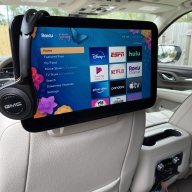
First attempt for my 2 Roku Streaming Sticks. I’m going to remove them when not in use (only use on longish trips) so I’m not entirely concerned with perfect cable mgmt.
A0230FBA-3D72-4FEA-8A9F-DE547A524414.jpeg
 

SLVTahoe

TYF Newbie
Joined
Dec 8, 2011
Posts
15
Reaction score
4
Maybe someone can assist. I tried my RSE for the first time. 2021 suburban LT and I hooked up a Chromecast to it. I for some reason can get audio to play in the speakers. Only when I put my iPhone in airplane mode it works ? Thanks
 

Fourtyfive

Member
Joined
Sep 8, 2021
Posts
59
Reaction score
25
About to order a 2022, I can’t believe there is no DVD player anymore. Two questions….

If you have a usb flash drive plugged in, can you select the movie and start it for a 5 and 2 year old in the back from the driver seat?

Can you not get a read and write player from Amazon and just plug it in as a stand alone DVD player?

 
Last edited:

Pro299

Full Access Member
Joined
Jun 17, 2021
Posts
127
Reaction score
95
About to order a 2022, I can’t believe there is no DVD player anymore. Two questions….

If you have a usb flash drive plugged in, can you select the movie and start it for a 5 and 2 year old in the back from the driver seat?

Can you not get a read and write player from Amazon and just plug it in as a stand alone DVD player?

1. Yes, you can select and start flash drive content from the front.

2. I suppose you could, since stand alone dvd players and game consoles can be used that way.

BTW, another option is to cast your phone to the RSE screens. I like that option, because I have an unlimited data plan for our phones and my grandkids have lots of shows on Netflix and Prime they like to watch. This also means I can find no good reason to get GM's data plan, which saves a few bucks each month. And there are no wires hanging around the console like there would be using a FireStick. The cell phone does everything I want.

All in all, though I was disappointed in there being no DVD player, now that we've had this setup for a while, it doesn't bother me. In fact, being able to have lots of movies on a flash drive is way more convenient than carrying lots of DVD's. Not to mention, handling DVD's that much tends to get them scratched up. That's happened to at least three discs we've used in my wife's Pacifica.

 

Fourtyfive

Member
Joined
Sep 8, 2021
Posts
59
Reaction score
25
1. Yes, you can select and start flash drive content from the front.

2. I suppose you could, since stand alone dvd players and game consoles can be used that way.

BTW, another option is to cast your phone to the RSE screens. I like that option, because I have an unlimited data plan for our phones and my grandkids have lots of shows on Netflix and Prime they like to watch. This also means I can find no good reason to get GM's data plan, which saves a few bucks each month. And there are no wires hanging around the console like there would be using a FireStick. The cell phone does everything I want.

All in all, though I was disappointed in there being no DVD player, now that we've had this setup for a while, it doesn't bother me. In fact, being able to have lots of movies on a flash drive is way more convenient than carrying lots of DVD's. Not to mention, handling DVD's that much tends to get them scratched up. That's happened to at least three discs we've used in my wife's Pacifica.
I use an Iphone, will it connect with it?
How much space does a typical movie take up on a drive?
What software do you use to rip?
 

Pro299

Full Access Member
Joined
Jun 17, 2021
Posts
127
Reaction score
95
I use an Iphone, will it connect with it?
How much space does a typical movie take up on a drive?
What software do you use to rip?
I've not used an Apple product in a decade, so someone else will have to answer that one. Most movies at 720p will be about a gig, give or take. I'm no IT tech, but Handbrake is probably the most common software. (Try a search for Handbrake+anydvd.) I usually get hung up with these things, but fortunately I have a family member to call to get me through when i get stuck. DVD's weren't too bad, but some of our newer blu-rays I need help with. I also had trouble with the flash drive format. I had to reformat to FAT16 to get the system to recognize it.
 
OP
OP
AirRocker

AirRocker

TYF Newbie
Joined
Mar 20, 2021
Posts
3
Reaction score
11
Any issues with the headphones?? I just posted, got my Yukon last week and the headphones aren’t working right. Also I’m so jealous of your data plans in the US. They offered me the $25 unlimited plan, then said “oh, you’re from Canada…… we can offer you 11GB for $70/month. Well we tore through 3GB in just a few days, so no way we’re getting a data plan that isn’t unlimited lol.
Yes we definitely have issues with the headphones. As someone else noted, they have to be directly in front of the screen to function properly (they are now IR instead of RF). Being IR, even bright sunlight can interfere with them. The batteries seem to die pretty quickly as well (I'm not sure if they're not auto-powering off or what). And we also have a strange issue where if I forget to disable the auto start/stop and the Roku gets powered off, there occasionally will be a horrid ~5 second full-volume static blast on the headphones after it powers back up. I have considered getting some cheap bluetooth headphones to replace them but haven't bothered yet.
 

ljn21

Full Access Member
Joined
Aug 1, 2021
Posts
209
Reaction score
88
Te: headphones. We bought Roku models that have the headphone Jack in the remotes for just this reason. Can use any headphones. We even have a splitter that we use that allows two headphones to plug in so when the kids have friends with them, everyone can listen In/watch. Don’t have to rely on the wireless ones or worry if the batteries die.
 

kcb14214

Full Access Member
Joined
Mar 5, 2011
Posts
222
Reaction score
73
I use an Iphone, will it connect with it?
How much space does a typical movie take up on a drive?
What software do you use to rip?
On the 2022 we just got I cannot cast from iphone, and we cant use scandisk for movies. Roku stick works great.
 

jorgetoro

Member
Joined
Aug 29, 2021
Posts
31
Reaction score
14
I prefer a fully hidden set up. No wires showing for a 90k vehicle should be the standard from the factory. In the future I am going to go for a no cable showing set up. I plan on using just a Amazon tablet with streaming apps installed, hot spot from my phone and that is it. Only shown wires will be when charging. But I will try to hide that too.
 

therealbofa

Member
Joined
Nov 14, 2021
Posts
67
Reaction score
27
I prefer a fully hidden set up. No wires showing for a 90k vehicle should be the standard from the factory. In the future I am going to go for a no cable showing set up. I plan on using just a Amazon tablet with streaming apps installed, hot spot from my phone and that is it. Only shown wires will be when charging. But I will try to hide that too.
If you are planning to use miracast, I dont think the fire tablets offer it.
 

itsmike2k

TYF Newbie
Joined
Dec 12, 2021
Posts
12
Reaction score
3
Only option on 22's is HDMI input, no wireless streaming, no SSD on the usb, no APPS.. we have touchscreen and the only use it to select HDMI1 or HDMI2.. Really disappointing you have to use a media streamer that relies on internet. They should have left the Blu-ray at least..
 

chackakori

TYF Newbie
Joined
Nov 16, 2021
Posts
3
Reaction score
1
The screens on our 2022 Yukon had an interesting message when we first turned them on.
"Rear Media is Unable to Connect to Streaming Video Services Right Now
HDMI 1 and HDMI 2 can still be used.
If this problem persists, ask the driver to contact a vehicle dealer."

I'm wondering if GM is planning on adding streaming apps to the system and this error came up because the vehicles data wasn't connected yet. That would definitely be a nice option but I'm still not happy that they removed the options to connect a USB drive or share phone screens. I'm sure they are wanting to push customers to pay for data plans but as a Canadian it would be nice if they offered decent plans then.
 

Forum statistics

Threads
137,675
Posts
1,989,137
Members
102,675
Latest member
j_jerry79
Back
Top