Factory Options - 2004 Tahoe Z71

Disclaimer: Links on this page pointing to Amazon, eBay and other sites may include affiliate code. If you click them and make a purchase, we may earn a small commission.

MassHoe04

Full Access Member
Joined
Nov 4, 2021
Posts
1,588
Reaction score
2,841
Location
Western MA
I went through and decoded all the RPO codes (attached) for my 2004 Tahoe Z71.

It has almost every luxury option you could think of, but I thought this was weird...

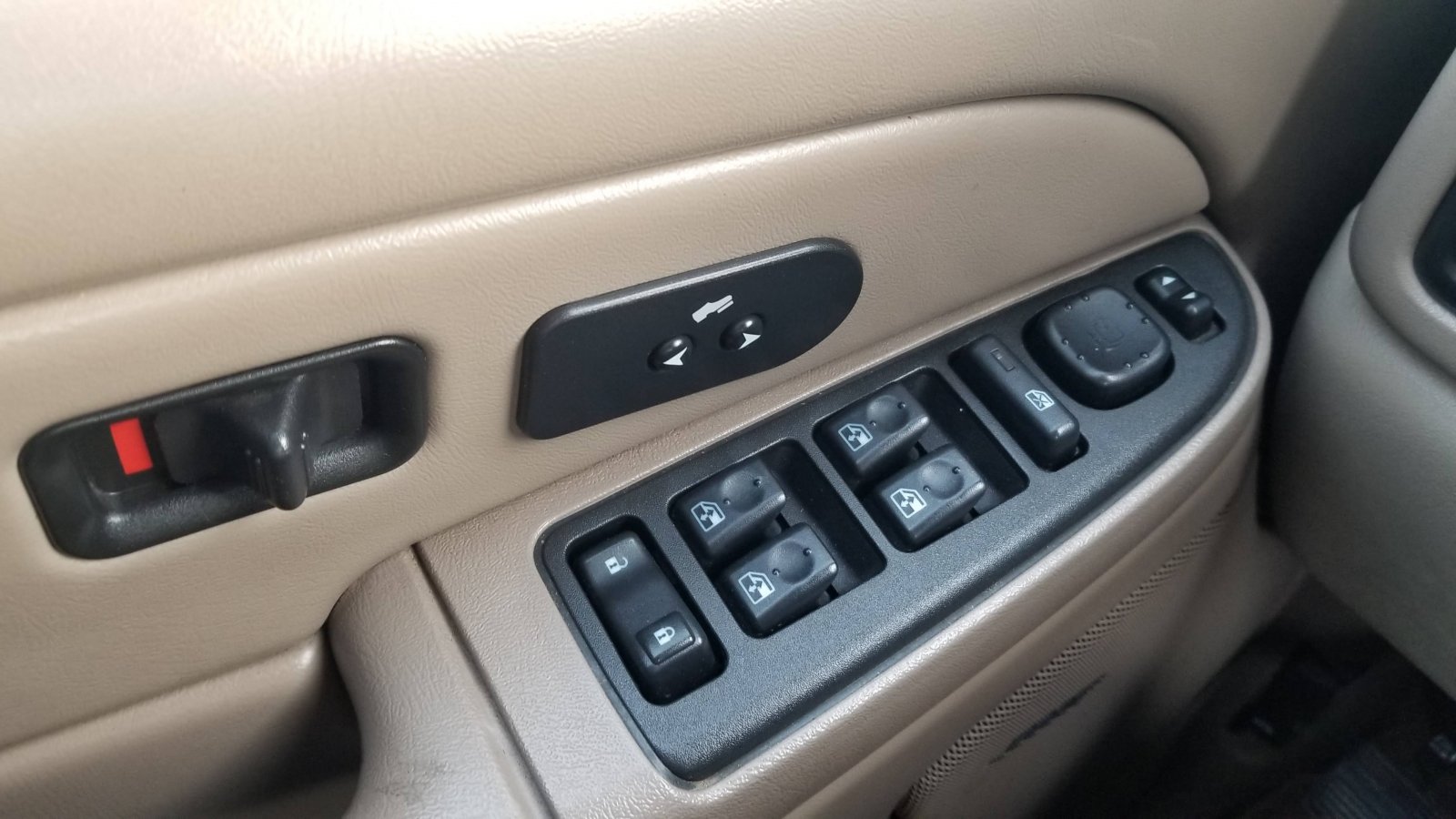
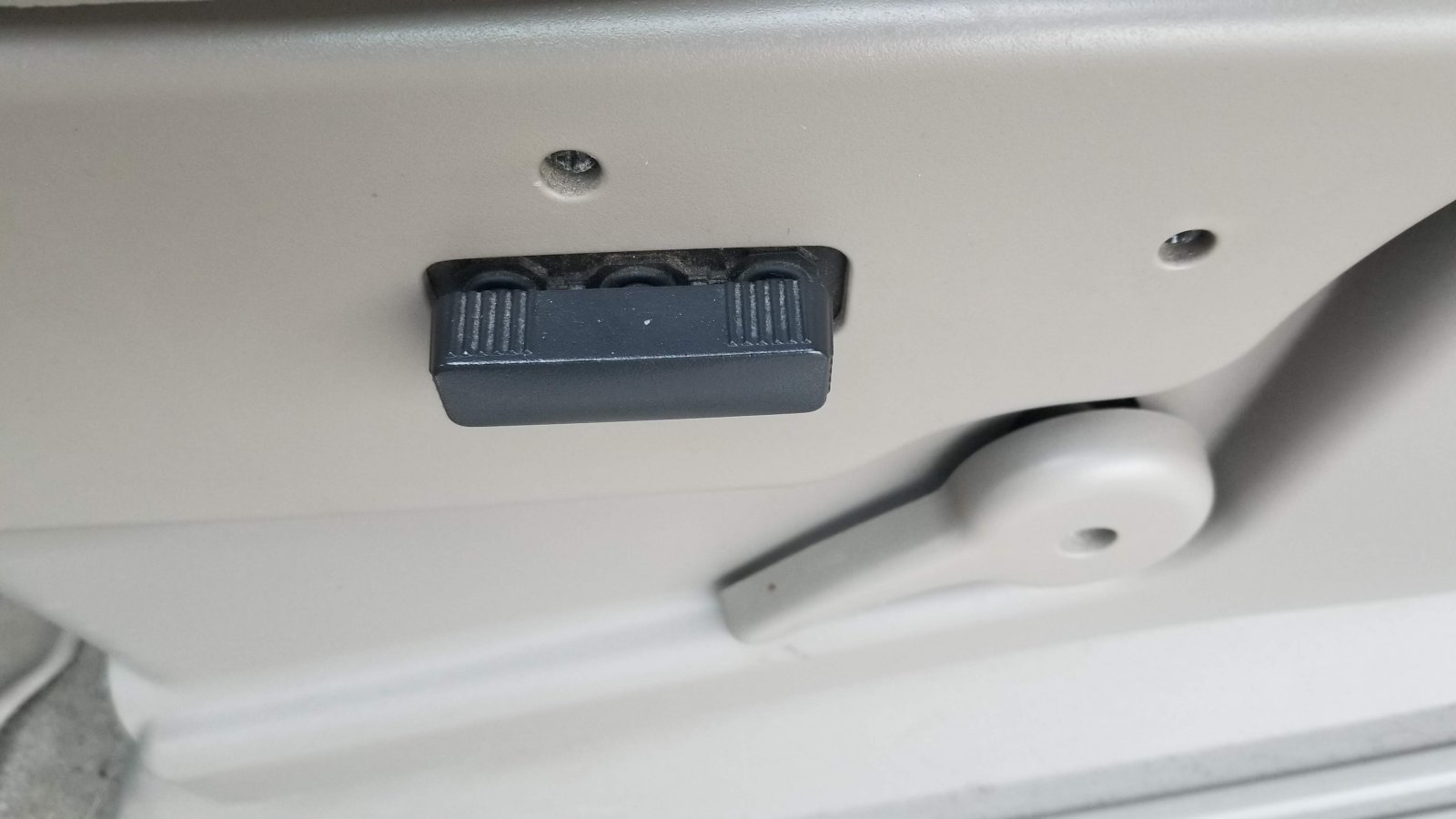
Seats are 6-way power driver, no heat and 100% manual passenger seat with no heat.
I see Driver 1 displaying on the information center, but no buttons to change Driver 1 or Driver 2.
20211205_075137.jpg

20211205_075155.jpg


Seemed odd that there are no seat memory buttons anywhere and that with the level of options added, it did not have heated seats... I thought heated seats were standard on the Z71 Tahoe comfort/convenience packages. Maybe not?

Anyone else with 00-06 Tahoe/Yuke Z71 have this configuration?

Are driver settings/seat memory controlled from the info center controls or did I get a unicorn?

 

Attachments

  • Todd's 2004 Chevy Tahoe Order Codes.pdf
    75.7 KB · Views: 31

Fless

Staff member
Moderator
Joined
Apr 2, 2017
Posts
16,330
Reaction score
33,767
Location
People's Republic of Colorado
You have adjustable pedals. The seat memory buttons and the seat heater switches would be on that door panel if you have them.

1638725050700.png


The Driver 1 or Driver 2 setting is controlled by whichever remote entry fob you use. The first one to get programmed into the system is Driver 1; the next is Driver 2, and so on.
 
OP
OP
MassHoe04

MassHoe04

Full Access Member
Joined
Nov 4, 2021
Posts
1,588
Reaction score
2,841
Location
Western MA
You have adjustable pedals. The seat memory buttons and the seat heater switches would be on that door panel if you have them.

View attachment 357209

The Driver 1 or Driver 2 setting is controlled by whichever remote entry fob you use. The first one to get programmed into the system is Driver 1; the next is Driver 2, and so on.
Thank you! I have only have one fob so far. I was given another one from another vehicle, but I have not programmed that one yet. I guess I see if it changes over to Driver 2 when the second one is added.
 

Fless

Staff member
Moderator
Joined
Apr 2, 2017
Posts
16,330
Reaction score
33,767
Location
People's Republic of Colorado
Thank you! I have only have one fob so far. I was given another one from another vehicle, but I have not programmed that one yet. I guess I see if it changes over to Driver 2 when the second one is added.

If the FOB you have is OE, it probably has these numbers. Pay attention to them when evaluating aftermarket FOBs for compatibility:

2004 FOB_resized.jpg


And here's what the driver's door panel switches look like for heated and memory seats:

Door switches_resized.jpg
 
Last edited:

shelton

Member
Joined
Jan 29, 2016
Posts
30
Reaction score
20
I’ve seen several z71 packages like this. A z71 was actually below an LT3 inside. They were standard as an LT1 I believe which was no heated seats, no full power passenger and driver, and no memory buttons on door panel. Any one item could be added or taken alway as well such as disk changer, rear entertainment, heated, memory, and full power seats etc etc.
 
OP
OP
MassHoe04

MassHoe04

Full Access Member
Joined
Nov 4, 2021
Posts
1,588
Reaction score
2,841
Location
Western MA
If the FOB you have is OE, it probably has these numbers. Pay attention to them when evaluating aftermarket FOBs for compatibility:

View attachment 357225

And here's what the driver's door panel switches look like for heated and memory seats:

View attachment 357226
Please be patient here. I just came from owning a Jeep Rubicon, that I drove every day and never bothered to lock the doors, ever.
I am coming from that, where I had power nothing and automatic was not in the vocabulary.
I am still learning all these automated luxury features on this new (to me) 04 Tahoe.

Thanks! My OE fob does have a big old "1" on the back like the photo. Never knew about the fob and driver settings.

I was familiar with what the door switches looked like for memory/heat/pedals. I couldn't figure out why it showed Driver 1 on the dash, if there was no switches to change anything. I never suspected it was the fobs!

Since I don't have the switches on the door... What exactly will the fob 1 do for driver 1? The seat doesn't automatically slide back when I turn the truck off (exit mode). Is it only customizing the personal trip information (MPG, trip miles, etc.) or will the second remote move the seat to where driver 2 had it set after using fob 2?

Thanks for helping me figure out all gizmos and gadgets!

Cheers!
 

S33k3r

Elite Member
Supporting Member
Joined
Aug 14, 2017
Posts
2,859
Reaction score
4,098
Location
Dallas, Texas
There are two places where you can get good information on your vehicle:

1) Monroney Labels <-- This will replicate your original window sticker. It's like $7, and worth every penny -- to me!

2) Email [email protected] <-- They will provide a build sheet via email, for free -- they did that June of last year, at the least. Here is a sample email I sent:

To Whom it may concern:

I just purchased a <year, make, model>, VIN #<VIN number>.

Could you please provide me with build information on this truck? < I also added something sappy because I'm sappy; ymmv: I finally replaced my Lincoln Town Car, and I'd like to know all the things this truck is capable of.)

Thank you,

<your name>
 

Forum statistics

Threads
137,757
Posts
1,991,290
Members
102,742
Latest member
CKendrick

Latest posts

Back
Top