Dimmable rearview mirror with built in backup LCD screen

Disclaimer: Links on this page pointing to Amazon, eBay and other sites may include affiliate code. If you click them and make a purchase, we may earn a small commission.

OP
OP
Ron C

Ron C

Full Access Member
Joined
Nov 4, 2017
Posts
727
Reaction score
174
Location
Los Alamos, NM
If you are absolutely sure the Freon is fully charged and the compressor is short cycling then it's probably a bad low pressure switch.

I don't know if the Tahoe has a clutch on the compressor, but I had a Jeep where the AC clutch was bad, and engaged and disengaged all the time.

Ron
 

kbuskill

***CAUTION*** I do my own stunts!
Joined
Mar 11, 2017
Posts
5,821
Reaction score
9,832
Location
NE. FL.
I don't know if the Tahoe has a clutch on the compressor, but I had a Jeep where the AC clutch was bad, and engaged and disengaged all the time.

Ron

It does have a clutch... I assumed he meant the clutch was engaging and disengaging from power being applied intermittently.
 
OP
OP
Ron C

Ron C

Full Access Member
Joined
Nov 4, 2017
Posts
727
Reaction score
174
Location
Los Alamos, NM
It does have a clutch... I assumed he meant the clutch was engaging and disengaging from power being applied intermittently.


It could be a bad relay, the contacts in some of them (especially the cheap ones) tend to fail.

Ron
 
OP
OP
Ron C

Ron C

Full Access Member
Joined
Nov 4, 2017
Posts
727
Reaction score
174
Location
Los Alamos, NM
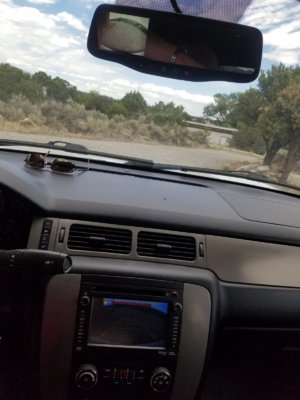
Well, I have the rear view mirror with LCD installed. It's pretty easy really. The coax cable, with leads that go in the plug came with instructions on what wires to replace in the plug. The plug has a 'latch' that locks the metal lead in place in the plug. The instructions explain what leads need to be replaced (the harness that's 'dangling' near the overhead console is wired for a camera already) with the leads that come attached to the cable already. The coax was 9 feet long and that was (in my case) just enough to route it through the 'ceiling', down the driver side A-pillar, along the fuse box and kick panel to the center console, where the radio is. I used an RCA Y connector/splitter one female to two male connectors. (camera goes to the female, NAV radio and mirror connect to the two male connectors. As you can see it works too. The video on the radio comes on even when the key is in accessory position, the mirror comes on when the key is in the run position.

The mirror you can find around $100, the cable with instructions is $15 and the splitter was $4.

Ron

20180704_124548.jpg
 
Last edited:

Ebay Mike

Full Access Member
Joined
May 9, 2018
Posts
190
Reaction score
117
Location
Detroit MI
That is fantastic. I sure wish I had the same luck in getting things to work that you have. You have managed to get it working on the radio and the rear view mirror! I am so jealous! I spent several hours this morning in 90 degree heat with about 200% humidity hooking up my camera today. And of course it does not work just like everything else I have tried with this radio swap! I have power into the camera. I have power out of the camera when in reverse. I have signal at the radio but yet I have no image on the screen! I took the radio out and swapped the wiring plug for the camera with the old harness and still no image! What did you hook the dark blue wire too if anything? You wanna take a road trip to hook all this stuff up for me??? LOL.

Happy 4th!

Mike--Hamilton Chevy
 
OP
OP
Ron C

Ron C

Full Access Member
Joined
Nov 4, 2017
Posts
727
Reaction score
174
Location
Los Alamos, NM
Try and see if you can get an image on the screen using a dvd player or so that has an RCA plug, that way, if you see an image, you know that the 'screen' is working, and it possibly is the wiring.

Hook an RCA cable up to the video input, that way you don't have to take the radio out all the time.

What dark blue wire are you talking about?

I put the mirror in while it was a 100 degr here... and in in the car.. with black interior... no AC becuse I took the battery + off.. because these airbag curtains, in the A-pillar....

Ron
 

Ebay Mike

Full Access Member
Joined
May 9, 2018
Posts
190
Reaction score
117
Location
Detroit MI
Try and see if you can get an image on the screen using a dvd player or so that has an RCA plug, that way, if you see an image, you know that the 'screen' is working, and it possibly is the wiring.

Hook an RCA cable up to the video input, that way you don't have to take the radio out all the time.

What dark blue wire are you talking about?

I put the mirror in while it was a 100 degr here... and in in the car.. with black interior... no AC becuse I took the battery + off.. because these airbag curtains, in the A-pillar....

Ron


OK I will see if I can find someone to loan me a DVD player since I do not own one and I will give that a try. I reread your write up and I see the camera you used does not have the dark blue wire which the factory camera does have. The factory wiring diagram says the dark blue goes to the BCM but I was told from the guy at work I did not need it because it was for using a mirror display?

I will trade your 100 degrees and low humidity for our 90 degrees and high humidity any time. I have been in 108 in Arizona that felt cooler then 90 here!

Thanks for the suggestion.

Mike--Hamilton Chevy
 

Ebay Mike

Full Access Member
Joined
May 9, 2018
Posts
190
Reaction score
117
Location
Detroit MI
Try and see if you can get an image on the screen using a dvd player or so that has an RCA plug, that way, if you see an image, you know that the 'screen' is working, and it possibly is the wiring.

Hook an RCA cable up to the video input, that way you don't have to take the radio out all the time.

What dark blue wire are you talking about?

I put the mirror in while it was a 100 degr here... and in in the car.. with black interior... no AC becuse I took the battery + off.. because these airbag curtains, in the A-pillar....

Ron


Sorry. Duplicate Post????

Mike--Hamilton Chevy
 

Ebay Mike

Full Access Member
Joined
May 9, 2018
Posts
190
Reaction score
117
Location
Detroit MI
Try and see if you can get an image on the screen using a dvd player or so that has an RCA plug, that way, if you see an image, you know that the 'screen' is working, and it possibly is the wiring.

Hook an RCA cable up to the video input, that way you don't have to take the radio out all the time.

What dark blue wire are you talking about?

I put the mirror in while it was a 100 degr here... and in in the car.. with black interior... no AC becuse I took the battery + off.. because these airbag curtains, in the A-pillar....

Ron


Sorry! Duplicate Post?

Mike--Hamilton Chevy
 
OP
OP
Ron C

Ron C

Full Access Member
Joined
Nov 4, 2017
Posts
727
Reaction score
174
Location
Los Alamos, NM
OK I will see if I can find someone to loan me a DVD player since I do not own one and I will give that a try. I reread your write up and I see the camera you used does not have the dark blue wire which the factory camera does have. The factory wiring diagram says the dark blue goes to the BCM but I was told from the guy at work I did not need it because it was for using a mirror display?

I will trade your 100 degrees and low humidity for our 90 degrees and high humidity any time. I have been in 108 in Arizona that felt cooler then 90 here!

Thanks for the suggestion.

Mike--Hamilton Chevy


a few things.
- your camera has 4 wires right? (VCC/GND, SIG+/SIG-, power, ground, signal, signal ground). ?

- I think hooking up your camera that way won't work, I don't think you have all the wiring for that and I don't think your conversion harness supports it. The radios signal wires come in through the yellow RCA in that conversion harness. Even IF you had the camera wiring factory, with that harness it is not connected.. So I don't think that route will work.

- You probably want to attach a coax(for video) and power/gnd(for running it) and power it directly and run the signal directly to the radio's input.

- The radio, and camera, factory, are turned on by ignition key power, I am pretty sure the camera doesn't have anything to do with the BCM, only the radio itself (and for that only the anti theft stuff).

- What I noticed is with this "audio stuff" is that darker color wires tend to be some sort of ground and lighter ones power/signal (but I wouldn't bet anything much on that), and I'm not an expert by any means.

- also, some laptops have an RCA output, or have a cable/converter that has an RCA pigtail.

Ron

 

Ebay Mike

Full Access Member
Joined
May 9, 2018
Posts
190
Reaction score
117
Location
Detroit MI
a few things.
- your camera has 4 wires right? (VCC/GND, SIG+/SIG-, power, ground, signal, signal ground). ?

- I think hooking up your camera that way won't work, I don't think you have all the wiring for that and I don't think your conversion harness supports it. The radios signal wires come in through the yellow RCA in that conversion harness. Even IF you had the camera wiring factory, with that harness it is not connected.. So I don't think that route will work.

- You probably want to attach a coax(for video) and power/gnd(for running it) and power it directly and run the signal directly to the radio's input.

- The radio, and camera, factory, are turned on by ignition key power, I am pretty sure the camera doesn't have anything to do with the BCM, only the radio itself (and for that only the anti theft stuff).

- What I noticed is with this "audio stuff" is that darker color wires tend to be some sort of ground and lighter ones power/signal (but I wouldn't bet anything much on that), and I'm not an expert by any means.

- also, some laptops have an RCA output, or have a cable/converter that has an RCA pigtail.

Ron
My factory camera has more than 4 wires. I think it is 6 total but I left my paper at home with that information. I hooked up the key on power and ground to one of the connectors. The other connector has one wire which the wiring diagram shows as being blunted so I was told that meant not used. I hooked up the positive wire to the center on the RCA and the ground wire to the outer part of the RCA plug. The last wire in that connector is the Dark Blue which I was told went to the BCM but I did not need it.

I hooked the RCA plug to the harness coming out of the radio so it sounds like I have it hooked up like you said?

I must admit that not only do I not have a DVD player but I also do not have a laptop nor do I even have a smart phone! I have a flip phone.

I switched out the harness with the RCA plug to the original used one that came with the radio when I got it and that did not make the camera work either so it should not be a wiring issue. I have confirmed power into the camera and when in reverse I have power out of the camera and I had power going into the RCA plug at the radio.

Mike--Hamilton Chevy
 

Ebay Mike

Full Access Member
Joined
May 9, 2018
Posts
190
Reaction score
117
Location
Detroit MI
triplicate? *lol*

Ron

When I replied this morning I hit Post Reply and nothing happened so of course I hit it again and still nothing happened so I figured third time was the charm and it then worked but posted all three times I hit it. Sorry about that.

Mike--Hamilton Chevy
 
OP
OP
Ron C

Ron C

Full Access Member
Joined
Nov 4, 2017
Posts
727
Reaction score
174
Location
Los Alamos, NM
My factory camera has more than 4 wires. I think it is 6 total but I left my paper at home with that information. I hooked up the key on power and ground to one of the connectors. The other connector has one wire which the wiring diagram shows as being blunted so I was told that meant not used. I hooked up the positive wire to the center on the RCA and the ground wire to the outer part of the RCA plug. The last wire in that connector is the Dark Blue which I was told went to the BCM but I did not need it.

I hooked the RCA plug to the harness coming out of the radio so it sounds like I have it hooked up like you said?

I must admit that not only do I not have a DVD player but I also do not have a laptop nor do I even have a smart phone! I have a flip phone.

I switched out the harness with the RCA plug to the original used one that came with the radio when I got it and that did not make the camera work either so it should not be a wiring issue. I have confirmed power into the camera and when in reverse I have power out of the camera and I had power going into the RCA plug at the radio.

Mike--Hamilton Chevy


I am not sure if it's a wiring issue. WHat I do know is that the NAV radio needs the conversion harness, with the RCA plug, to connect a camera too (or at least those wires. I bought my camera with the coax and RCA and a power and ground lead. So I didn't have to figure out what wires needed to be used.

Ron
 

Ebay Mike

Full Access Member
Joined
May 9, 2018
Posts
190
Reaction score
117
Location
Detroit MI
I am not sure if it's a wiring issue. WHat I do know is that the NAV radio needs the conversion harness, with the RCA plug, to connect a camera too (or at least those wires. I bought my camera with the coax and RCA and a power and ground lead. So I didn't have to figure out what wires needed to be used.

Ron

I am using the conversion harness with the RCA plug and I have the wires hooked up the same as yours except mine goes through the factory connectors on the lift gate and your does not. Other than that they should be exactly the same.

Mike--Hamilton Chevy
 
OP
OP
Ron C

Ron C

Full Access Member
Joined
Nov 4, 2017
Posts
727
Reaction score
174
Location
Los Alamos, NM
I am using the conversion harness with the RCA plug and I have the wires hooked up the same as yours except mine goes through the factory connectors on the lift gate and your does not. Other than that they should be exactly the same.

Mike--Hamilton Chevy

well maybe that is your problem then, the SSV/PPV is not configure to do the video stuff (factory) some plugs/wiring might be there, but doesn't mean it is connected. For example the harness for the mirror, the plug has some (short) wires in there for video, OnStar and BlueTooth stuff, which I know is not there and not connected because the car doesn't factory have that. (and the "main radio harness" doesn't even have that wiring. My car has the backup assist sensors, and the basic/factory radio was beeping in an increasing rate when getting closer to an object. Maybe that's why some wiring is there in my case, but not all of it.

Might very well be that for larger harnesses it was cost effective to leave the wiring out, and make a different harness and for shorter harnesses it wasn't cost effective. I'd just run coax all the way from the tailgate to the radio, that's what I did.

Also, I'd test the RCA connection by using a dvd player or so... and after that take the camera and plug it in to a small monitor or so, to confirm it is working and wired correctly.

I think the main harness does not provide wiring for integrating a camera into the factory harness, but I am not sure about it. What I do know is that people that sell OEM "upgrade kits" don't mess with the existing harness much, probably for that very same reason.

Ron
 

Ebay Mike

Full Access Member
Joined
May 9, 2018
Posts
190
Reaction score
117
Location
Detroit MI
well maybe that is your problem then, the SSV/PPV is not configure to do the video stuff (factory) some plugs/wiring might be there, but doesn't mean it is connected. For example the harness for the mirror, the plug has some (short) wires in there for video, OnStar and BlueTooth stuff, which I know is not there and not connected because the car doesn't factory have that. (and the "main radio harness" doesn't even have that wiring. My car has the backup assist sensors, and the basic/factory radio was beeping in an increasing rate when getting closer to an object. Maybe that's why some wiring is there in my case, but not all of it.

Might very well be that for larger harnesses it was cost effective to leave the wiring out, and make a different harness and for shorter harnesses it wasn't cost effective. I'd just run coax all the way from the tailgate to the radio, that's what I did.

Also, I'd test the RCA connection by using a dvd player or so... and after that take the camera and plug it in to a small monitor or so, to confirm it is working and wired correctly.

I think the main harness does not provide wiring for integrating a camera into the factory harness, but I am not sure about it. What I do know is that people that sell OEM "upgrade kits" don't mess with the existing harness much, probably for that very same reason.

Ron

I really do NOT know how to make this more clear! I am NOT using any of the factory harness except the part that comes already connected to the factory camera! I could have cut off the plugs from the camera and wired it from there but I chose to get the matching connectors and wire after the connectors so if I ever needed to replace the factory camera all I would have to do is unplug it and plug in a new one. The factory wiring or lack of wiring has absolutely NOTHING to do with me or what I am trying to do. PLEASE remove that thought from your head completely and forget the word factory wiring was ever mentioned. That seems to be the sticking point with our conversations and it needs to be left out. Factory wiring is NOT involved in this issue or solution.
 

Ebay Mike

Full Access Member
Joined
May 9, 2018
Posts
190
Reaction score
117
Location
Detroit MI
Also, I'd test the RCA connection by using a dvd player or so... and after that take the camera and plug it in to a small monitor or so, to confirm it is working and wired correctly.

Ron

I will try to do this as soon as I find a DVD player I can borrow and will report back once I verify the camera works or does not work. Thank You Very Much for the suggestions.

Mike--Hamilton Chevy
 

kbuskill

***CAUTION*** I do my own stunts!
Joined
Mar 11, 2017
Posts
5,821
Reaction score
9,832
Location
NE. FL.
I will try to do this as soon as I find a DVD player I can borrow and will report back once I verify the camera works or does not work. Thank You Very Much for the suggestions.

Mike--Hamilton Chevy

I believe you need to hook 12v to the blue wire on your camera as that is the camera turn on lead that normally goes to the BCM.

You could hook it up to the reverse lights or to a switch to control it manually or to an ignition source.

Try it and see if your camera works.
 

Ebay Mike

Full Access Member
Joined
May 9, 2018
Posts
190
Reaction score
117
Location
Detroit MI
I believe you need to hook 12v to the blue wire on your camera as that is the camera turn on lead that normally goes to the BCM.

You could hook it up to the reverse lights or to a switch to control it manually or to an ignition source.

Try it and see if your camera works.

Tried to hook power to the dark blue wire and nothing happened. It did not turn the camera on. I did stick a DVD in the radio and the screen works perfectly to play the movie. I still have not found a DVD player to plug into the RCA plug to test it.

Mike--Hamilton Chevy
 

Forum statistics

Threads
137,716
Posts
1,990,301
Members
102,708
Latest member
glazar

Latest posts

Back
Top