Aftermarket Radio Installation - 2015 Tahoe LS with IO3

Disclaimer: Links on this page pointing to Amazon, eBay and other sites may include affiliate code. If you click them and make a purchase, we may earn a small commission.

JohnC12

Full Access Member
Joined
Mar 5, 2015
Posts
125
Reaction score
46
Location
Orlando, FL
For those interested, here's the How-To Guide.

After much thought, debate and research, I decided to upgrade my 4.2" IO3 radio with an aftermarket Pioneer AVH-4100NEX DVD receiver.

I initially wanted to upgrade my 4.2" with the factory 8" MyLink, but after the dreaded inspection of that little sticker in my glove box, I have an IO3 radio. For those of us with the IO3, we know there are very few options (at this moment) to upgrade - even upgrading to an aftermarket radio was not easy.

Considering the lack of information found on the internet, I have decided to document the entire process with pictures. I'll post the entire process, but here's a little bit of information and pictures.

Equipment Purchased:
Pioneer AVH-4100NEX receiver
Axxess AX-LCD Interface
Axxess GMOS-LAN-09 Interface
Axxess ASWC-1 Steering Wheel Adapter
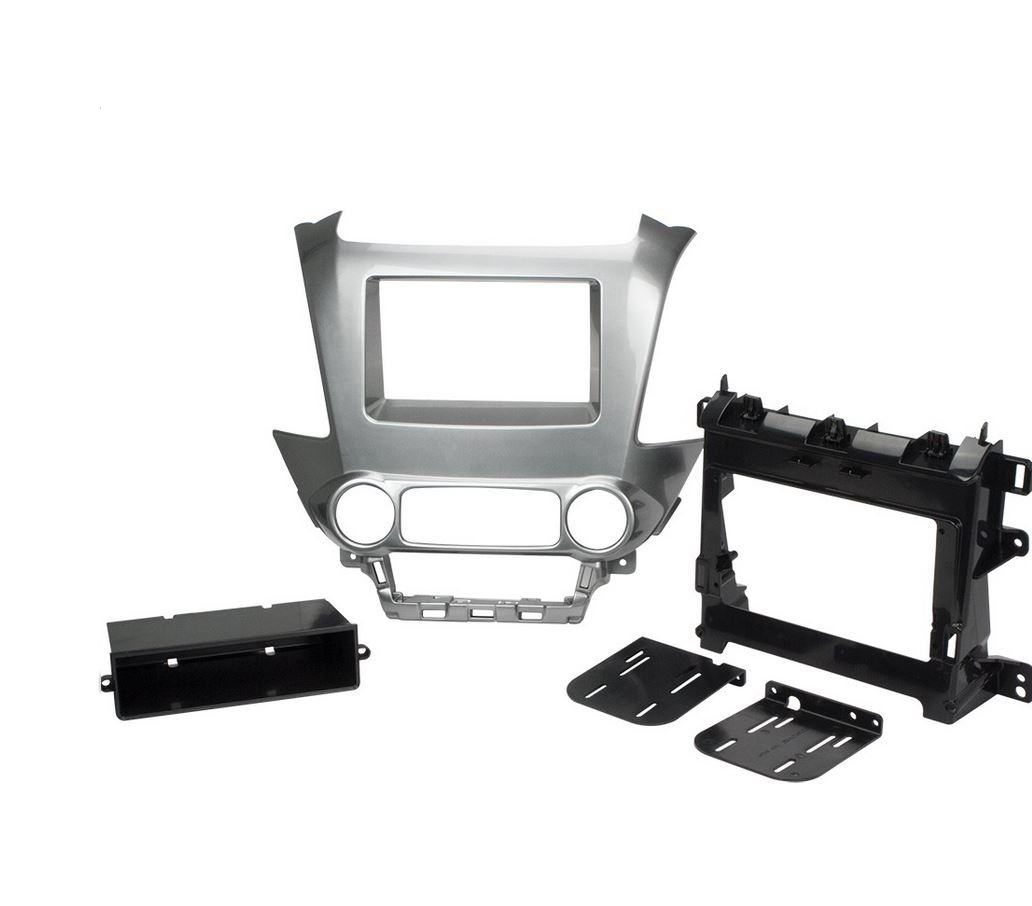
Metra 99-3015G Dash Kit
Metra 40-EU10 Antenna Adapter
Metra AX-USB-MiniB USB Adapter
RCA male adapter
Misc wiring accessories (connectors, heat shrink tubing, etc)

The entire process took approximately 8 hours - this includes the pre-wiring of the interface modules, the dashboard dis-assembly, install and reassembly.

I still have two unaccounted for items - 1) the steering wheel controls do not work, and 2) the back-up cam is not functioning.

1) I cannot find the GREEN/BLACK SWC wire under the dash. The instructions provided my Axxess are for the 2014 Sierra and doesn't come close to resembling the 2015 Tahoe. Since I purchased my equipment from Crutchfield, they're researching the location of the appropriate wire.

2) I've located the GRAY/YELLOW and WHITE/BLUE signal wires coming from the back-up camera, but have been unsuccessful in obtaining a signal. I'm going back to the drawing board on this one.

Here are some pictures:

Before
DSC_0003.JPG


After
IMG_2486.JPG


IMG_2449.JPG


IMG_2469.JPG


IMG_2485.JPG


Complete installation pictures coming soon.
 
Last edited by a moderator:

NathanJax

Vacation Nathan
Staff member
Administrator Moderator Supporting Member
Joined
May 9, 2009
Posts
49,141
Reaction score
943,577,203
Location
Jax, Fl
Nice. Hope you can figure everything out and get a clean install. I'm sure there will be a ton of other people doing this as well!
 
OP
OP
JohnC12

JohnC12

Full Access Member
Joined
Mar 5, 2015
Posts
125
Reaction score
46
Location
Orlando, FL
Thanks NathanJax!

Here's an update.

After working with Crutchfield and doing a bit of research on my own, I was able to locate the appropriate GREEN/BLACK wire to connect the Axxess ASWC-1 Steering Wheel Adapter. My steering wheel controls are now working great!

The wire is located in the steering column, not under the dash as specified by the Axxess directions. (The directions are for a 2014 Sierra.) There just so happens to be a GREEN/BLACK wire running from the steering column down to a plug further down the column - this IS NOT the correct wire.

First, I removed the trim panel on the outer driver's edge of dash. Use a pry tool to pop the clips. (Note that the furthest back are hinge clips, so the panel needs to be popped free and then pulled straight towards you.

IMG_2440.JPG


Next, I removed the trim panel below the steering column. I removed the hood release latch from the panel in an effort to provide plenty of space to solder my connection.

IMG_2441.JPG


I then removed the top and bottom portion of the steering column cover. I used a plastic trim tool to pry apart the two halves. There are no screws to remove. To remove the steering wheel tilt lever, grab onto it and give it a good tug - it will pop out - no tools required. (Did I mention to give it a GOOD tug?)

IMG_2490.JPG


On the bottom portion of the upper steering column, there's an 8 wire black plug that connects to the steering column ring. This is where you'll find the appropriate GREEN/BLACK wire.

2015TahoeLS_SWC.jpg


2015TahoeLS_SWC4.jpg


2015TahoeLS_SWC3.jpg


I removed some insulation and soldered the GREEN/BLACK wire coming from the ASWC-1 module.

2015TahoeLS_SWC2.jpg


I turned the radio on, pressed the UP VOLUME button on the back of the steering wheel and the radio immediately picked-up the ASWC-1 module.

I buttoned everything up and reassembled the truck and everything is working great now.

On a side note - there is a specific channel to run the wires through, as shown, below. I used wire ties to secure the wires to the block. If you don't rerun your wires back into this channel, the bottom portion of your steering wheel column cover WILL NOT go back on. I learned this after several attempts.

IMG_2495a.jpg
 
Last edited:
OP
OP
JohnC12

JohnC12

Full Access Member
Joined
Mar 5, 2015
Posts
125
Reaction score
46
Location
Orlando, FL
One other update:

I absolutely can't stand the empty pocket in the Metra 99-3015G dash kit. (I installed the Axxess AX-LCD Interface in the center console.) It's barely big enough to hold a pen and will likely be a great dust collector.

IMG_2486.JPG


I just purchased the SCOSHCE GM5214SB dash kit which gives a much cleaner look.

SCOSCHE.jpg


51OE4k73LXL._SL1032_.jpg
 

Khurshid

TYF Newbie
Joined
Dec 8, 2015
Posts
7
Reaction score
0
John,

I, too, am interested in upgrading from the hideous 4.2 inch screen to a larger screen. The Pioneer receiver is a good aftermarket option. Did you get the back-up cam to work? What was the total cost of the upgrade including the SCOSHCE GM5214SB dash kit?

Thx,
Khurshid
 
OP
OP
JohnC12

JohnC12

Full Access Member
Joined
Mar 5, 2015
Posts
125
Reaction score
46
Location
Orlando, FL
Hi Khurshid! All in, including the SCOSHCE dash kit, I'm at $1,200. With the exception of the SCOSHCE kit, I ordered my components through Crutchfield so I could get their technical support, so I paid a bit more than if I had purchased the same components from another source, like Amazon.

As for the back-up camera, it's still not working. I located the positive and negative signal wires, tapped into them with an RCA plug, but get nothing when I place the Tahoe in reverse. I plugged up my SLR camera and it worked fine, so I know it's not the radio head or the reverse signal wire. At this point, I'm planning on installing a flush mount aftermarket cam into the trunk lid on the opposite side of the OEM cam.
 

Khurshid

TYF Newbie
Joined
Dec 8, 2015
Posts
7
Reaction score
0
Thanks John. It makes sense to pay a bit more for technical support.

Does this mean that the OEM back-up camera is not compatible with the aftermarket Pioneer receiver? Is an aftermarket back-up cam our only option? I would really like to use the OEM cam if possible. What does Crutchfield have to say about the OEM cam not working?
 
OP
OP
JohnC12

JohnC12

Full Access Member
Joined
Mar 5, 2015
Posts
125
Reaction score
46
Location
Orlando, FL
With the research I've done online, the OEM back-up camera should work by simply tapping into the positive and negative terminals coming from the camera. In full disclosure, I'm just a weekend warrior and know very little about how (electrical in general) these cameras work. Maybe someone else here knows more about this subject.

I don't believe the back-up camera not working has anything to do with the Pioneer receiver - I think I'm doing something wrong - I'm missing something.

If you take a look at these instructions from Alpine, under Mounting The Stereo Continued #3, you'll see that they say to simply tap into the positive and negative signal wires. This sounds to me like I'd simply connect the positive lead on the positive side of the RCA and the negative lead onto the negative side of the RCA connector. When doing so, I get nothing but a blank screen when I place the car in reverse. It's certainly switching over to the back-up camera mode for the radio, but I'm not getting a signal from the camera to the receiver.

As for Crutchfield, they won't provide support for the camera since it has nothing to do with any of their equipment they sold. To be honest, I never expected them to have any knowledge about the camera integration - I talked to them about this early off in my conversations and they told me there are no options (available on the market) to make the OEM camera work with any installation.

For those with the IO4 or above, METRA sells a connector so you can tap into OEM camera. It just doesn't work with the IO3 radio.

A few weeks ago, I contacted Cam (GM Technician) over at Just Answer and asked about the back-up camera integration. He states that the following:


Expert: GM Tech (Cam) replied 17 days ago.
The operating power for the rear camera is supplied by the trailer back up lamp relay which also supplies the inside rear view camera through the green wire with a white stripe. This is when the transmission is in reverse. The ignition power comes on a violet green wire through fuse 63 in the left dash fuse block. Ground is on G325. I think it you use the following 2, it may work. Signal to the radio is on X1 Pin 5 and is Grey Yellow (+) , and the (-) is Pin 4 and is white with a blue tracer.

Read more: http://www.justanswer.com/chevy/9f02w-chevrolet-tahoe-4x2-ls-2015-tahoe-ls.html#ixzz3tv3y4Ci8
 
Last edited:

Khurshid

TYF Newbie
Joined
Dec 8, 2015
Posts
7
Reaction score
0
Great. So the OEM back-up integration is possible? It's a trial and error I suppose. In any case, let me know if you are able to figure it out.

What about bluetooth? Any issues pairing your phone or making hands-free calls?
 
OP
OP
JohnC12

JohnC12

Full Access Member
Joined
Mar 5, 2015
Posts
125
Reaction score
46
Location
Orlando, FL
Yeah, I believe the integration is possible, it's just a matter of figuring it out. I'll certainly update this thread as I learn more.

The bluetooth is EXCELLENT and there are no issues pairing my iPhone 6 - it's an instant connection upon start-up. I've been told by everyone I've talked to that the sound quality is significantly better than the OEM system. (Most people I talked to on the OEM system said I sounded like I was in a tunnel or wet paper bag. Back in June, I had the mic replaced by Chevrolet, but saw no improvements.)

I'm also really enjoying Apple CarPlay - it's great!
 

undertaker

Full Access Member
Joined
Sep 21, 2009
Posts
176
Reaction score
4
Location
Long Island NY
most likely the integration is possible, whatever unit came with my alpine x009 for the suburban reused the factory backup camera with no isseus (well I thought there were issues but they were on the truck end at 8 years old not the interface)

the interface was an idatalink maestro, was included in the box......hell everything was in the box, that was the first aftermarket head unit where it was one box shopping, and I loved it. I really hope they expand to the new trucks in the future, definetely much easier than the old days. And your headaches have clearly shown a need.
 

Khurshid

TYF Newbie
Joined
Dec 8, 2015
Posts
7
Reaction score
0
Sounds good. I am not sure about the Bluetooth option because I do not have an OEM hands free system in my truck. Did your truck come equipped with Bluetooth?
 
OP
OP
JohnC12

JohnC12

Full Access Member
Joined
Mar 5, 2015
Posts
125
Reaction score
46
Location
Orlando, FL
Undertaker - Those Alpine kits are AWESOME! I really like how they put everything into one kit for you - nothing else to buy. I also like how they maximize the screen size - I think you can go up to 9" on the older Tahoes - very nice! It's just unfortunate that they haven't made one for the 2015/2016... yet.

Khurshid - Yes, my Tahoe did come factory with Bluetooth (phone calls only). You have to start the phone call from your phone using - it would then Bluetooth sound through the speakers, but it wouldn't transfer your phone book data. (You do have the option of storing phone numbers directly to the vehicle, but who wants to manually transfer their phone book data? It also won't play music over Bluetooth - you have to connect the device to the vehicle via. USB. Complete failure on GM's part when buying a $40k+ vehicle.

What model do you have, Khurshid?
 

Khurshid

TYF Newbie
Joined
Dec 8, 2015
Posts
7
Reaction score
0
I have a 2015 Tahoe LS that did not come equipped with Bluetooth. Chances are I will not have Bluetooth or hands-free capability even after I install an aftermarket receiver like Pioneer. I will probably need an additional component to enable the bluetooth function. You're right about it being a failure on GM's part. Even the cheapest cars in the market have Bluetooth and hands-free calling as a standard option. I really do not understand GM's logic behind deleting the Bluetooth option from the base Tahoes. What's even more frustrating is our inability to upgrade to something that's more functional and aesthetically appealing. It's almost like Apple with all it's restrictions and compatibility issues. At lease, Apple products look good and are technologically advanced unlike the 4.2 inch I03 radio.
 

undertaker

Full Access Member
Joined
Sep 21, 2009
Posts
176
Reaction score
4
Location
Long Island NY
Undertaker - Those Alpine kits are AWESOME! I really like how they put everything into one kit for you - nothing else to buy. I also like how they maximize the screen size - I think you can go up to 9" on the older Tahoes - very nice! It's just unfortunate that they haven't made one for the 2015/2016... yet.

its in the works for the 14+ pickups as of Nov (I'd be thinking of a Jan 16 release at CES and street release mid late spring personally), my my guess is the SUV dash will follow shortly after.

 
OP
OP
JohnC12

JohnC12

Full Access Member
Joined
Mar 5, 2015
Posts
125
Reaction score
46
Location
Orlando, FL
Khurshid - I had no idea that the LS base model came without the Bluetooth option - this is crazy! I assumed what I had was bottom of the barrel, as bad as it was. You aren't missing much!

This all being said, after installing my new Head unit, I'm no longer using any of the OEM Bluetooth. (With the exception of Bluetooth OnStar, the GMOSLAN09 does not do anything for Bluetooth.) Both phone calls and music streaming are now going through the Pioneer. I ran a mic up the driver side A column and hid it near the overhead console - it works great. If you upgrade, you'll have full Blutooth capabilities.
 
Last edited:
OP
OP
JohnC12

JohnC12

Full Access Member
Joined
Mar 5, 2015
Posts
125
Reaction score
46
Location
Orlando, FL
I completed the Scosche GM5214SB dash kit install yesterday evening. I am much happier with this look over the Metra dash kit with the blank pocket.

The Scosche kit is very nice! It's made of heavier duty plastic than the Metra - and the clips that hold the top dash trim are metal rather than plastic like on the Metra. When removing the top dash trim last night to upgrade to the Scosche, I broke all three of the plastic clips from the Metra kit - very low quality!

After

IMG_2510.JPG


Before
IMG_2486.JPG
 

Khurshid

TYF Newbie
Joined
Dec 8, 2015
Posts
7
Reaction score
0
John,
Thanks for sharing the pictures. That's a clean install and it looks awesome. I guess all the hard work paid off. Now only if you can get the back-up cam to work. Nevertheless, the dash looks really nice. As a matter of fact, I think it looks nicer than the factory 8 inch radio.

I contacted the GM dealership and they quoted $3700 to upgrade to the OEM 8 inch I06 radio with the pop-up screen. Ridiculous!

By the way, I checked the Crutchfield website but they don't have the Pioneer 4100NEX so I will probably have to go with the 7100NEX.
 
OP
OP
JohnC12

JohnC12

Full Access Member
Joined
Mar 5, 2015
Posts
125
Reaction score
46
Location
Orlando, FL
Hi Khurshid - Thank you... and you're very welcome - glad I could help. If you decide to upgrade your system, I'll be happy to help where I can. I'm working on putting together a complete install guide, with pictures, for those looking to upgrade to an aftermarket - I should be done soon.

As for back-up camera, I did a little messing around yesterday when I had everything apart. I plugged the original head unit back in and the camera was working fine. I once again tried running and RCA plug from the positive/negative leads from the camera wiring harness, and nothing. At this point, I'm just going to install an aftermarket flush mount into the drunk lid and call it a day. From what I can, it should be fairly straight forward install and it looks like it's going to be a piece of cake to run the wire up to the dash.

WOW... $3700?!?! That is ridiculous! One might be better off trading in and buying a new '16 model for that kind of price! Ouch!

As for the Pioneer 4100NEX, I was just on Crutchfields website so I could print out the $75 mail-in rebate form. According to their site, they have them in-stock. Check out this link - http://www.crutchfield.com/p_1304100NEX/Pioneer-AVH-4100NEX.html?tp=20217 Although, the built-in navigation with the 7100NEX is really nice!
 

Forum statistics

Threads
137,786
Posts
1,992,230
Members
102,779
Latest member
Merch619

Latest posts

Back
Top