After market audio amplifier install

Disclaimer: Links on this page pointing to Amazon, eBay and other sites may include affiliate code. If you click them and make a purchase, we may earn a small commission.

OP
OP
Ron C

Ron C

Full Access Member
Joined
Nov 4, 2017
Posts
727
Reaction score
174
Location
Los Alamos, NM
He just paid a shit ton of Money for the Nav radio. and it appears to be useless without changing out the entire dash harness and wiring up a Bose amp. I'm glad I didn't get interested in the Nav radio.


That is not completely true. It's more like I paid a 'shart' load of money for the radio, it was $600 and it does work (with a $75 conversion harness). However the volume isn't all that and... no shimes etc. The reason for that is, that these Nav Radios need an amp. That is where the trouble starts. The factory way (replacing the dash instrument cluster Harness) is not practical AND very expensive. (you need to replace the AC controls and the thingy below too) But you can hook up the Nav Radio that way and make the rear audio work. That solution is approx $700, and $600 for the radio. The after market solution. You need an amp, the interface kit and a few free weekends to re-wire the dang car. That is $600 for the radio, $30 fr the interface, $250 (and up) for the amp... and of course the speaker wiring, splicing, fighting with the wife and kids etc.... A little cheaper, but probably not worth the splicing and the cussing. This plug and play harness/amp is $225 for the harness and amp, do that together pans out to be just over $800 for the project.

If you'd buy a Tahoe (new) with that radio installed, it would be $2,500 more (a new Nav Radio goes for close to $2,000.

Is it worth the money? Probably not, a Garmin GPS costs $180, with free maps updates, and it's right on the dash. I like the GM OEM navigation, it is a little more helpful than the Garmin. I also like it that the Nav Radio has a 30Gb hard drive (SSD) that not only stores maps, but yu can record anything you play on it, to that drive (except radio). Also, the thing has a USB connector, that let's you use a bunch of storage devices (phone, drives, USB sticks etc.)

Draw back compared to Garmin, the GM OEM Nav Radio map updates are $180, ouch, that is the same as a Garmin with 'free' map updates.

Is it worth it? No probably not, $$$ wise for sure, is it a fun project, I think it is, you get to dig around and see what all in your SSV is not 'standard'. I like the radio, it fits in nicely, same trim, buttons, lights etc. (Oh and I am not even saying it adds value... because I probably not sell the Hoe any time soon anyway)

Ron
 

Rocket Man

Mark
Supporting Member
Joined
Dec 25, 2014
Posts
26,679
Reaction score
52,954
Location
Oregon
I'm just glad to have installed a new DD with Apple carplay so I can use Google maps on the big screen. But I don't have a PPV.
 
OP
OP
Ron C

Ron C

Full Access Member
Joined
Nov 4, 2017
Posts
727
Reaction score
174
Location
Los Alamos, NM
Not useless just needs an amp, not necessarily the Bose amp. He is just trying to keep from having to run his own wires from the amp to the speakers.

Exactly true. I liked the type of radio, because it has Navigation in it, it looks nice. Also, it let's you hook up other things and use it. I wasn't planning on turning the Hoe into a disco, nor an opera building. I wanted decent music, navigation with it would be neat, the option of connecting stuff is neat. I like tinkering with stuff like this, so I consider it a hobby. What I figured out is that these GM Nav Radios are really picky about what amp can be used. That is why there are these 'interface kits' ... BUT as Ken mentioned, I didn't want to re-wire the whole damn car

Ron
 
OP
OP
Ron C

Ron C

Full Access Member
Joined
Nov 4, 2017
Posts
727
Reaction score
174
Location
Los Alamos, NM
Oh yeah one thing I really like about the GM OEM Nav Radio, the navigation "guidance" overlays the sound of the music you can clearly hear the directions (plus the GM radio has that double audible chime telling you "this is the intersection I was talking about").

An 'issue' I had with my separate Garmin GPS is (it happened a lot me driving in TX), the Garmin GPS says something.. but at that point the music was at the same level or higher as the GPS, so you quite didn't hear what it said, you miss the exit and have to drive another 10-15 miles, and turn around.. and drive back that 10-15 miles. The GM OEM Navigation 'overlays' the audio, and the instructions are not washed out by the music. The GM Navigation 'lady' is a little chatty, but you can adjust that in the configs.

Ron
 
OP
OP
Ron C

Ron C

Full Access Member
Joined
Nov 4, 2017
Posts
727
Reaction score
174
Location
Los Alamos, NM
I am interested. I just googled the model number of the unit and if it is the same one, your rear audio system will still work and be put through the rear channel of the outputs. I am not sure if it is the same unit, do you have a link to the one you purchased?


Actually, the link on their site wasn't working. But I talked to the owner. Their amp-harness solution just restores the audio levels and chimes in an SSV/PPV where the factory/basic radio is replaced by a GM HDD Radio.

I would still be interested in a solution that makes the rear audio work though.

Once I get their amp/harness, I'll post pics, post/pre install and some remarks about how I like it. The rear passenger audio system working )with that donor center console) would be neat, but not a real priority.

Ron
 
OP
OP
Ron C

Ron C

Full Access Member
Joined
Nov 4, 2017
Posts
727
Reaction score
174
Location
Los Alamos, NM
I looked at their stuff and don't see anything that would do that. I could be wrong, but I've never heard of a harness or amp that does what you want. If you want to just bypass the factory amp and run off the amp in the head unit there's some of those types of adapters out there. idatalink makes a Maestro that's pretty sweet for that. Let us know what you find.


well, remember, I have an SSV with a factory basic radio, there never was a factory amp in the car.. there was just this amp, with a rear audio center in the center console I put in (it was from a 2011 Chevy Silverado)\

Would be cool to get it to work, I looked into it.. but seems to encompass a lot of unanticipated work.

Ron
 
OP
OP
Ron C

Ron C

Full Access Member
Joined
Nov 4, 2017
Posts
727
Reaction score
174
Location
Los Alamos, NM
I am interested. I just googled the model number of the unit and if it is the same one, your rear audio system will still work and be put through the rear channel of the outputs. I am not sure if it is the same unit, do you have a link to the one you purchased?


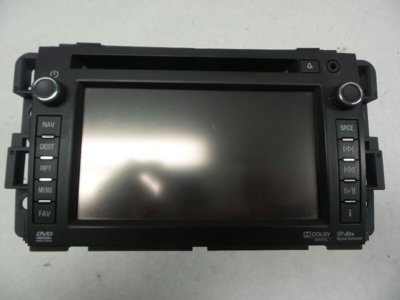
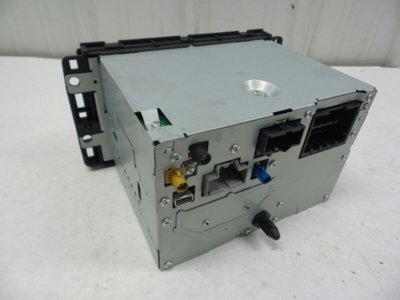
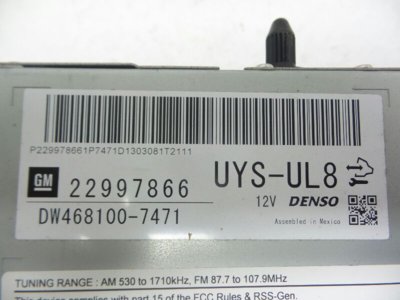
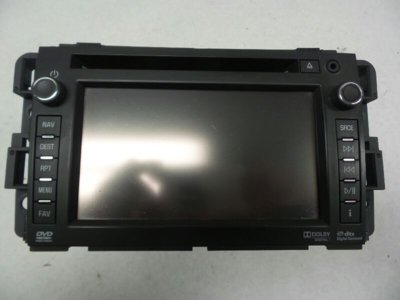
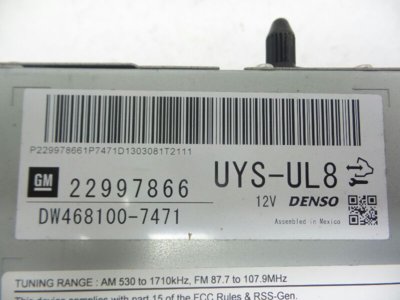
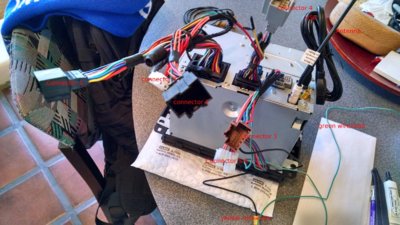
Here are a few pics of what I bought, the GM Nav Radio head unit (the last one has the GM part # on it.) It is know as the "GM Nav HDD Radio": HDD meaning it has a (ssd) hard drive, for storing maps and recording music, GPS way-points etc etc.

Ron

1.jpg 3.jpg 4.jpg
 
OP
OP
Ron C

Ron C

Full Access Member
Joined
Nov 4, 2017
Posts
727
Reaction score
174
Location
Los Alamos, NM
I am interested. I just googled the model number of the unit and if it is the same one, your rear audio system will still work and be put through the rear channel of the outputs. I am not sure if it is the same unit, do you have a link to the one you purchased?


Oh btw: IF (big if) you have a car that is already setup with rear seat passenger audio, then yes it will work (the rear audio). BUT in general our SSVs/PPVs are not set up like that and ours have the different, simpler, instrument cluster harness. I found that, unless I was not that thorough, there is no 'kit' that will connect the rear audio in a SSV and PPV.

However, I did chat with a guy in CO, who said "I am sure we are able to figure it out and make it work, but I am sure it is not worth the $$$ to you.

So... it might be possible, if there is an existing solution, I'd consider it.. BUT .....

Ron
 

iamdub

Full Access Member
Joined
Apr 23, 2016
Posts
20,821
Reaction score
45,014
Location
Li'l Weezyana
IMO, forget about making the rear seat audio work. You'd be investing a bunch of money, time and effort for something that will rarely, if ever, be used. I went with an OEM nav because I wanted to retain all features including the rear seat controls to satisfy my OCD of having all present features operating. It hasn't been used to this day. I got a deal on the nav unit and I'm still under the cost of an aftermarket head unit and all necessary adapters. But, trying to retain those rear seat controls is a waste and I'd happily sacrifice them to have a nicer head unit.

I say you just focus your efforts on the bigger, more attainable priority which is getting your current setup working properly.
 
OP
OP
Ron C

Ron C

Full Access Member
Joined
Nov 4, 2017
Posts
727
Reaction score
174
Location
Los Alamos, NM
Signals go to the radio? What? No, signals cone FROM the radio.into the harness. Then that signal normally goes to the factory amp and then from the amp to the speakers. If you add an amp in between the radio and stock amp, you don't have access to the speaker wires because they're attached to the stock amp. So your signal can go back into the harness but that harness goes to the factory amp, not directly to the speakers.


Correct IF you are just considering audio signals, but that radio has more inputs than just an antenna or two

Ron
 
OP
OP
Ron C

Ron C

Full Access Member
Joined
Nov 4, 2017
Posts
727
Reaction score
174
Location
Los Alamos, NM
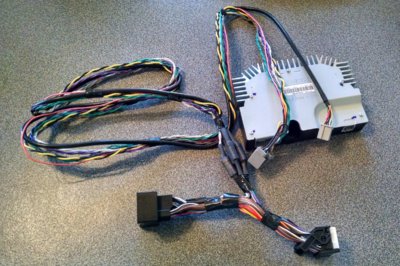
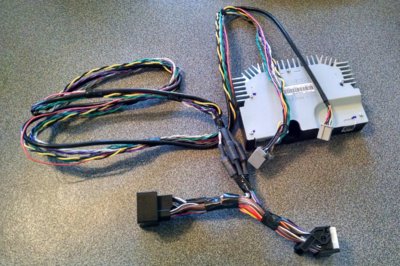
Well, here's the "plug and play" amplifier with harness I bought. It's nothing fancy, nothing adjustable, but that wasn't what I was looking for anyway.
Looks pretty simple and straight forward. The big plug with the white edge goes into the radio. The Black receptacle take (the same) plug that came out of the radio, and the other two go in the amplifier. No loose wires etc. to splice into things. I'll put it in the car Fri/Sat and let you know how it went/sounds.

Ron

amp-harness.jpg
 

kbuskill

***CAUTION*** I do my own stunts!
Joined
Mar 11, 2017
Posts
5,861
Reaction score
9,931
Location
NE. FL.
So what kind of amp is it and what are the specs?
 
OP
OP
Ron C

Ron C

Full Access Member
Joined
Nov 4, 2017
Posts
727
Reaction score
174
Location
Los Alamos, NM
So what kind of amp is it and what are the specs?

the brand name is "Visteon".. and to be honest, I don't have the specs. Bose made two kinds of amplifiers, that factory came in GM trucks. This is supposed to be the replacementfor the better one. (we'll see, as I mentioned, not looking for performance, just get the volume levels, for audio and chimes etc, working with the new radio.

Ron
 
Last edited:
OP
OP
Ron C

Ron C

Full Access Member
Joined
Nov 4, 2017
Posts
727
Reaction score
174
Location
Los Alamos, NM
Hello all,

Well, I finally finished that radio conversion, and it's working well. (Before I had the amplifier installed, I turned the chimes (in the DIC) to loud, and could barely hear them, I had to turn them to 'normal'. So the Sound level/Volume works like it should, and the chimes do too. Also, the built in 'equalizer' works properly (somehow it didn't have much of an effect without an amp).
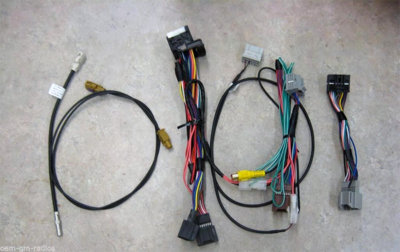
I installed the amplifier under the center console tray, on the roll over sensor, for easy access. The harness that comes with the amplifier is pretty long, like 3' - 4', so it pretty much goes anywhere you want, within reason. To do this, you need two harnesses, one is a "conversion" harness, the other one hooks up the amplifier).

So here is what I used, I'll attached pics.

- The GM OEM HDD Navigation Radio (from eBay) GM 22997866 (Denso)
- re-program the radio for your vin (I had OEM-RADIOS do that, they guarantee their work.
- Conversion Harness, (part 6308 from http://www.oemradios.com/parts.php)
- a GPS antenna (part 6311 from the same site)
- the amplifier with harness. from MVI (gm-navigation.com. They have the 'plug and play' harness (they mention it on https://www.gm-navigation.com/shop/2007-14-gmc-hard-disk-drive-hdd-factory-navigation-system/ but doesn't show it on their site.

The whole installation is pretty much, "Plug and Play" except for one wire, from the conversion harness, that needs to be spliced in to the speedsensor (VSS)

Once you have all the parts/harnesses and antenna, it is a pretty easy install.

(The only thing left to do, is put a SDD hard drive under the center console tray, with all my music, and plug it into the radio's USB port. (that port can not handle more than one USB device at a time btw)

Ron

1.jpg 4.jpg conv-harness.jpg amp-harness.jpg
 
Last edited:

01FormulaTA

Full Access Member
Joined
Mar 23, 2017
Posts
536
Reaction score
567
Thanks for the write up man, this should be a sticky....how are you liking the new setup? I take it everything works just as if it were installed from the factory?
 
OP
OP
Ron C

Ron C

Full Access Member
Joined
Nov 4, 2017
Posts
727
Reaction score
174
Location
Los Alamos, NM
Well thank you, I don't think it is up to me to make it a 'sticky' though.

I like the set up (I am still playing with it) It opens opportunity to add a backup camera. The buttons on the upgraded steering wheel work nicely with it. (I found out the "phone button" doesn't actually mute the "entertainment" audio, as hinted before, but it switches to a different input. It also has the XM option (but I don't have a module) and also AV input (that factory comes from the rear seat audio), but the inputs are there,

Yes, everything that works, does work as if it was installed factory. Of course my Tahoe doesn't have XM radio, but the radio does have that input. The radio also switches to the back up screen, when put in reverse, So a camera could be installed (which I am planning on), I heard it is a hassle, but not impossible. The chimes etc also all work, so that's nice (there is a bit of a delay, 1/2 a second or so before you hear the chimes, when you turn off the car). GPS also works as if it is factory, I bought an OEM GPS antenna and stuck it in the factory location in the dash.

Everything is "plug and Play", with the two harnesses, except for one wire, the VSS wire that goes to the Nav Radio, so it is a pretty easy install/conversion.

Ron
 

jmm121783

Searching for the next sunset...
Joined
Oct 30, 2017
Posts
208
Reaction score
84
Location
Detroit
Sorry to thread hijack possibly but in reading the original post, Am I understanding correctly that getting the rear door speakers and the rear pillar tweeters working with even just the stock system is impossible without a new harness from the firewall back??? Ugh that would really suck, I would def do what people mentioned which mean getting all new door speakers (say Polk audio 6.5" components) in all four doors, running my own wiring to each and then obviously have an amp and some sort of convertor to stock head unit or get a new Double Din Pioneer/Kenwood Headunit?

I was hoping there was a way I could get my rear door speakers working and just add the tweeters in the two rear pillars (my rear door speakers are installed and hooked up but must not get power thru the factory harness. The rear tweeters did not come installed but I saw the wiring harness for both) and I'd have at least 4 door speakers and 4 tweeters....any help is appreciated!
 
OP
OP
Ron C

Ron C

Full Access Member
Joined
Nov 4, 2017
Posts
727
Reaction score
174
Location
Los Alamos, NM
Sorry to thread hijack possibly but in reading the original post, Am I understanding correctly that getting the rear door speakers and the rear pillar tweeters working with even just the stock system is impossible without a new harness from the firewall back??? Ugh that would really suck, I would def do what people mentioned which mean getting all new door speakers (say Polk audio 6.5" components) in all four doors, running my own wiring to each and then obviously have an amp and some sort of convertor to stock head unit or get a new Double Din Pioneer/Kenwood Headunit?

I was hoping there was a way I could get my rear door speakers working and just add the tweeters in the two rear pillars (my rear door speakers are installed and hooked up but must not get power thru the factory harness. The rear tweeters did not come installed but I saw the wiring harness for both) and I'd have at least 4 door speakers and 4 tweeters....any help is appreciated!


I don't think that is the case, in my SSV that all works. What the dash harness would be needed for is to hookup the center console "satelite audio center" or what ever the name is. It is the radio like thing in the back of the center console. It has a harness itself, and rear seat passenger would be able to use it to choose what they want (play music etc.) most of them also have an AV input. The harness in an SSB/PPV (I am kinda assuming) is for the basic radio setup, a vehicle with the Nav Radio, has that harness. You can make a Nav Radio work in an SSV/PPV by using a conversion harness (also you'll more than likely want an amp, but it will work, in a basic way without one), that connects the radio to the existing harness, but there is no way to hook up a center console other than replacing the dash harness, for a basic radio, with the harness for a vehicle with the Nav radio setup.

Ron
 

Ebay Mike

Full Access Member
Joined
May 9, 2018
Posts
190
Reaction score
117
Location
Detroit MI
Hello all,

Well, I finally finished that radio conversion, and it's working well. (Before I had the amplifier installed, I turned the chimes (in the DIC) to loud, and could barely hear them, I had to turn them to 'normal'. So the Sound level/Volume works like it should, and the chimes do too. Also, the built in 'equalizer' works properly (somehow it didn't have much of an effect without an amp).
I installed the amplifier under the center console tray, on the roll over sensor, for easy access. The harness that comes with the amplifier is pretty long, like 3' - 4', so it pretty much goes anywhere you want, within reason. To do this, you need two harnesses, one is a "conversion" harness, the other one hooks up the amplifier).

So here is what I used, I'll attached pics.

- The GM OEM HDD Navigation Radio (from eBay) GM 22997866 (Denso)
- re-program the radio for your vin (I had OEM-RADIOS do that, they guarantee their work.
- Conversion Harness, (part 6308 from http://www.oemradios.com/parts.php)
- a GPS antenna (part 6311 from the same site)
- the amplifier with harness. from MVI (gm-navigation.com. They have the 'plug and play' harness (they mention it on https://www.gm-navigation.com/shop/2007-14-gmc-hard-disk-drive-hdd-factory-navigation-system/ but doesn't show it on their site.

The whole installation is pretty much, "Plug and Play" except for one wire, from the conversion harness, that needs to be spliced in to the speedsensor (VSS)

Once you have all the parts/harnesses and antenna, it is a pretty easy install.

(The only thing left to do, is put a SDD hard drive under the center console tray, with all my music, and plug it into the radio's USB port. (that port can not handle more than one USB device at a time btw)

Ron

View attachment 194397

I have that same conversion harness and I am getting ready to install the radio tomorrow but one plug has me confused as to where it goes. It is the light gray one in the middle of your attached picture with 2 wires attached to it. What does this hook to and where is it located?

Mike--Hamilton Chevy
 
OP
OP
Ron C

Ron C

Full Access Member
Joined
Nov 4, 2017
Posts
727
Reaction score
174
Location
Los Alamos, NM
I have that same conversion harness and I am getting ready to install the radio tomorrow but one plug has me confused as to where it goes. It is the light gray one in the middle of your attached picture with 2 wires attached to it. What does this hook to and where is it located?

Mike--Hamilton Chevy


Hello Mike,

I don't think you need it, your radio (if it is the same as mine) doesn't even have a connector for it.

This conversion kit was made for several different radio conversions, and has stuff in it you don't need.

You only need the two black ones, from the harness, the connect to the harness of the car, to the connectors that went into your old radio. The other one you need is the antenna conversion cable. There is also a connector with a yellow RCA plug and a green/white wire (that is the VSS) I didn't put in the XM connector either, since I don't have XM.

Here is a pic with everything you can connect. (I have a USB cable in there too )

Ron

nav-radio-harness.jpg
 

Forum statistics

Threads
138,103
Posts
1,999,210
Members
103,031
Latest member
Rooster2000
Back
Top