Yes I connected the GM5+ to all open connectors (except the rear AV harness, never used before, don't plan on using now) and then in the Alpine radio settings I had to select factory XM tuner, and it's been working fine for a year. No extra harness connections or anything.
wait, so the maestro GM5+ or the crutchfield iDatalink HRN-HRR-GM2 plugs into the radio and then the satellite XM receiver will get a satalite signal through that?
it's an external XM tuner that plugs into the radio so hence the confusion.

You are using an out of date browser. It may not display this or other websites correctly.
You should upgrade or use an alternative browser.
You should upgrade or use an alternative browser.
Adding an aftermarket radio to 07-14 FAQ
- Thread starter yates ™
- Start date
Disclaimer: Links on this page pointing to Amazon, eBay and other sites may include affiliate code. If you click them and make a purchase, we may earn a small commission.
For wireless apple car play, i had to buy a separate adapter (GM GPS antenna to Pioneer) this was not included in the crutchfield package and quite annoying i had to wait for it. Some aftermarket head units now come with wireless apple car play and android auto, if your gmt900 came with factory gps then you already have the gps antenna in the sharkfin and you do not need to add the aftermarket head unit gps antenna and snake wires through the dash. this is not listed anywhere in my research hence the post.


Sup yall, wanted some advice on a harness for my SSV. The only options I see here are for models with bose/navi/TV/wheel controls/BU camera... I don't have ANY of that and would prefer a cheaper solution.
As I understand it, my biggest hurdle would be retaining the chimes and turn signals, but I may have a work around if I can find more information on how the operate and on what wire.
Thanks in advance.
As I understand it, my biggest hurdle would be retaining the chimes and turn signals, but I may have a work around if I can find more information on how the operate and on what wire.
Thanks in advance.

Charlie207
Full Access Member
I've been watching this thread for years, and still am waiting on a simple & affordable plug'n'play solution to upgrading the Bose w/Nav headunit. Everything sounds cobbled together so far.
PatDTN
Full Access Member
- Joined
- Jul 5, 2016
- Posts
- 632
- Reaction score
- 465
Much of the cobbling involves supporting the rear entertainment and steering wheel controls. If those aren't important to you I suspect someone on this list can make some Much cheaper and less cobbled suggestions.
It's silly but i paid extra to support my rear entertainment and I've never even looked at it before or after.
It's silly but i paid extra to support my rear entertainment and I've never even looked at it before or after.
kbuskill
***CAUTION*** I do my own stunts!
With a Maestro RR you can install anything you want and still maintain all factory functionality. It is an added expense above the cost of the head unit but as the old saying goes, "Buy once, Cry once". In the grand scheme of things it really isn't that much extra expense to keep everything working.I've been watching this thread for years, and still am waiting on a simple & affordable plug'n'play solution to upgrading the Bose w/Nav headunit. Everything sounds cobbled together so far.
*** EDIT ***
It is funny, I just posted this and then when looking in the for sale section seen this...
idatalink.com maestro ADS-MRR w/ harnesses for 2007 suburban
This has been sitting on the shelf since I sold my suburban. 100 bucks plus shipping? It is the ONLY kit that works perfectly with the Bose systems...and if you're here, you already know.
 www.tahoeyukonforum.com
I have no affiliation with the seller, just thought it was funny. Also a decent price in my opinion.
Last edited:
Charlie207
Full Access Member
With a Maestro RR you can install anything you want and still maintain all factory functionality. It is an added expense above the cost of the head unit but as the old saying goes, "Buy once, Cry once". In the grand scheme of things it really isn't that much extra expense to keep everything working.
*** EDIT ***
It is funny, I just posted this and then when looking in the for sale section seen this...
idatalink.com maestro ADS-MRR w/ harnesses for 2007 suburban
This has been sitting on the shelf since I sold my suburban. 100 bucks plus shipping? It is the ONLY kit that works perfectly with the Bose systems...and if you're here, you already know.
I have no affiliation with the seller, just thought it was funny. Also a decent price in my opinion.
So, the Maestro RR is the only thing I'd need? Crutchfield's discription states that it'll lose multiple functions:
Installation notes:
- In order to retain your vehicle's warning chimes, you must use a factory integration adapter recommended by Crutchfield. Failure to do so may result in serious injury and/or death. Crutchfield cannot offer technical support for an installation undertaken without this adapter.
- This harness will not work with any receiver/amplifier with an output higher than 25 watts RMS.
- This interface will not retain front-rear fader control in vehicles with RPO code Y91 (Premium Bose). You can find the RPO code on the service parts identification label in the glove compartment.
- This wiring interface works with non-amplified systems or any system in which you're not using the factory amp. The interface retains warning chimes and Retained Accessory Power, and provides a 12v accessory output. The interface does not retain OnStar or factory amplifiers.
- The wiring interface retains warning chimes, OnStar, rear seat entertainment, Bluetooth, and the factory amplifier.
- The iDatalink harness connects the ADS-MRR module to your vehicle. In most applications, you'll have to connect its OBDII connector plug to the OBDII diagnostic port under the driver's side dash. For more details, refer to the install guide you'll download from the ADS website when you flash the module.
- The wiring interface retains the steering wheel audio controls, rear seat control, the Bose amplifier, and warning chimes in your GM vehicle. The interface also provides connections for retained accessory power, vehicle speed sensor, illumination, reverse trigger, and parking brake. It does not retain OnStar.
- The wiring interface retains warning chimes, OnStar, Bluetooth, and the factory amplifier. You'll have to program it online.
kbuskill
***CAUTION*** I do my own stunts!
Crutchfield's notes also contain multiple contradictions. So I'm not sure what to say.So, the Maestro RR is the only thing I'd need? Crutchfield's discription states that it'll lose multiple functions:
Installation notes:
- In order to retain your vehicle's warning chimes, you must use a factory integration adapter recommended by Crutchfield. Failure to do so may result in serious injury and/or death. Crutchfield cannot offer technical support for an installation undertaken without this adapter.
- This harness will not work with any receiver/amplifier with an output higher than 25 watts RMS.
- This interface will not retain front-rear fader control in vehicles with RPO code Y91 (Premium Bose). You can find the RPO code on the service parts identification label in the glove compartment.
- This wiring interface works with non-amplified systems or any system in which you're not using the factory amp. The interface retains warning chimes and Retained Accessory Power, and provides a 12v accessory output. The interface does not retain OnStar or factory amplifiers.
- The wiring interface retains warning chimes, OnStar, rear seat entertainment, Bluetooth, and the factory amplifier.
- The iDatalink harness connects the ADS-MRR module to your vehicle. In most applications, you'll have to connect its OBDII connector plug to the OBDII diagnostic port under the driver's side dash. For more details, refer to the install guide you'll download from the ADS website when you flash the module.
- The wiring interface retains the steering wheel audio controls, rear seat control, the Bose amplifier, and warning chimes in your GM vehicle. The interface also provides connections for retained accessory power, vehicle speed sensor, illumination, reverse trigger, and parking brake. It does not retain OnStar.
- The wiring interface retains warning chimes, OnStar, Bluetooth, and the factory amplifier. You'll have to program it online.
I don't use Onstar so if I did lose it I wouldn't know.
It is funny because in one sentence it says you lose it and then in the next it says you retain it, same goes for the factory amp, one sentence say yes, the other says no. I know it works beautifully with my factory Bose "dumb" amplifier. I don't have the Y91 "Smart amp" so I can't speak to that.
The one listed on here for sale says it has the unit AND harnesses needed for the GMT900 trucks, so other than programming certain features, like which steering wheel buttons you want to control different functions, you shouldn't need anything else other than a different headunit.
CMoore711
Full Access Member
- Joined
- Jul 18, 2017
- Posts
- 1,575
- Reaction score
- 1,500
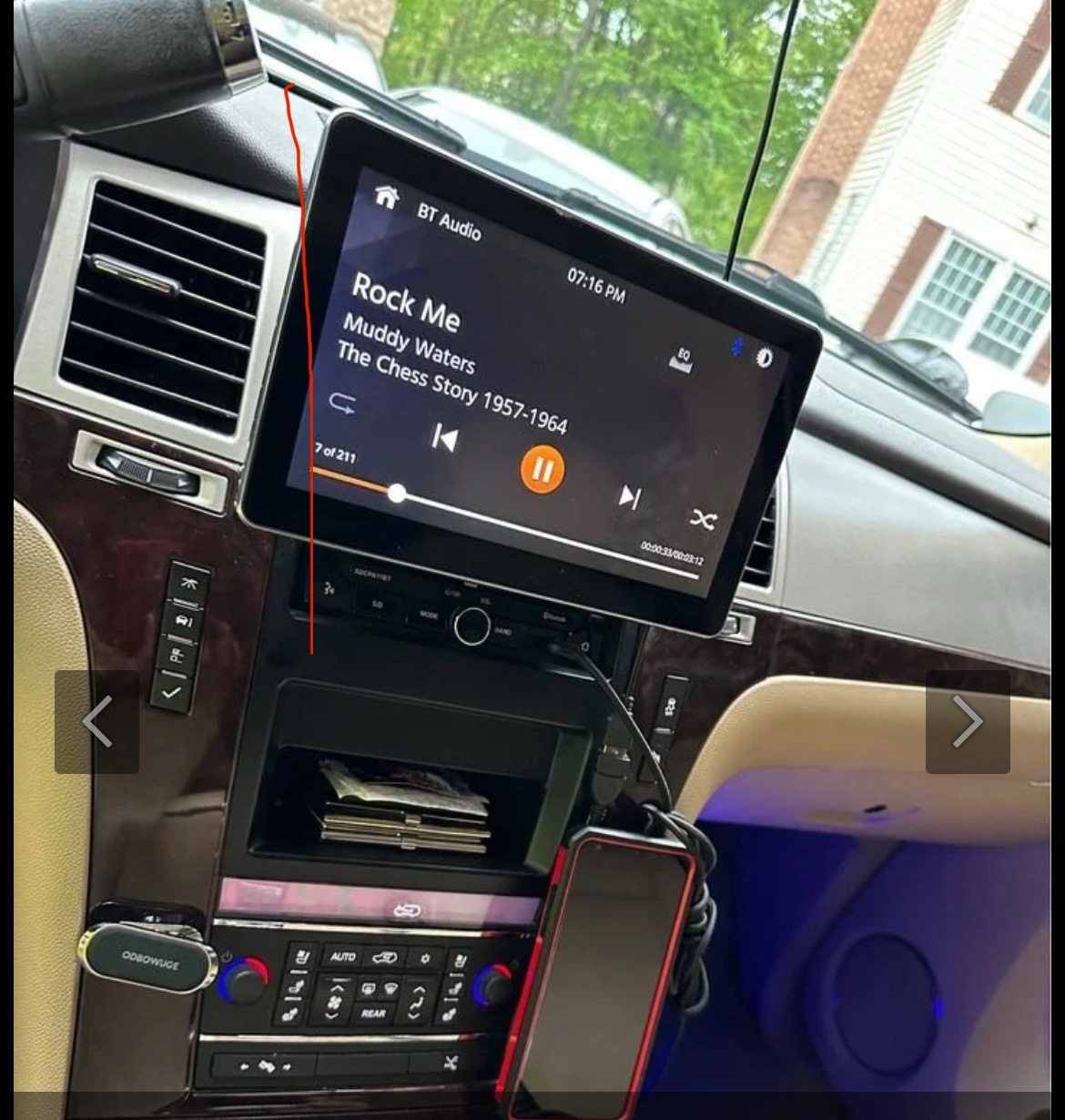
Been looking into upgrading the stereo on my ‘13 Escalade ESV and am on the fence on getting a head unit that’s located in the dash like the stock unit or going with the floating screen style unit.
Looking for feedback from other owners who have upgraded their radio to either style.
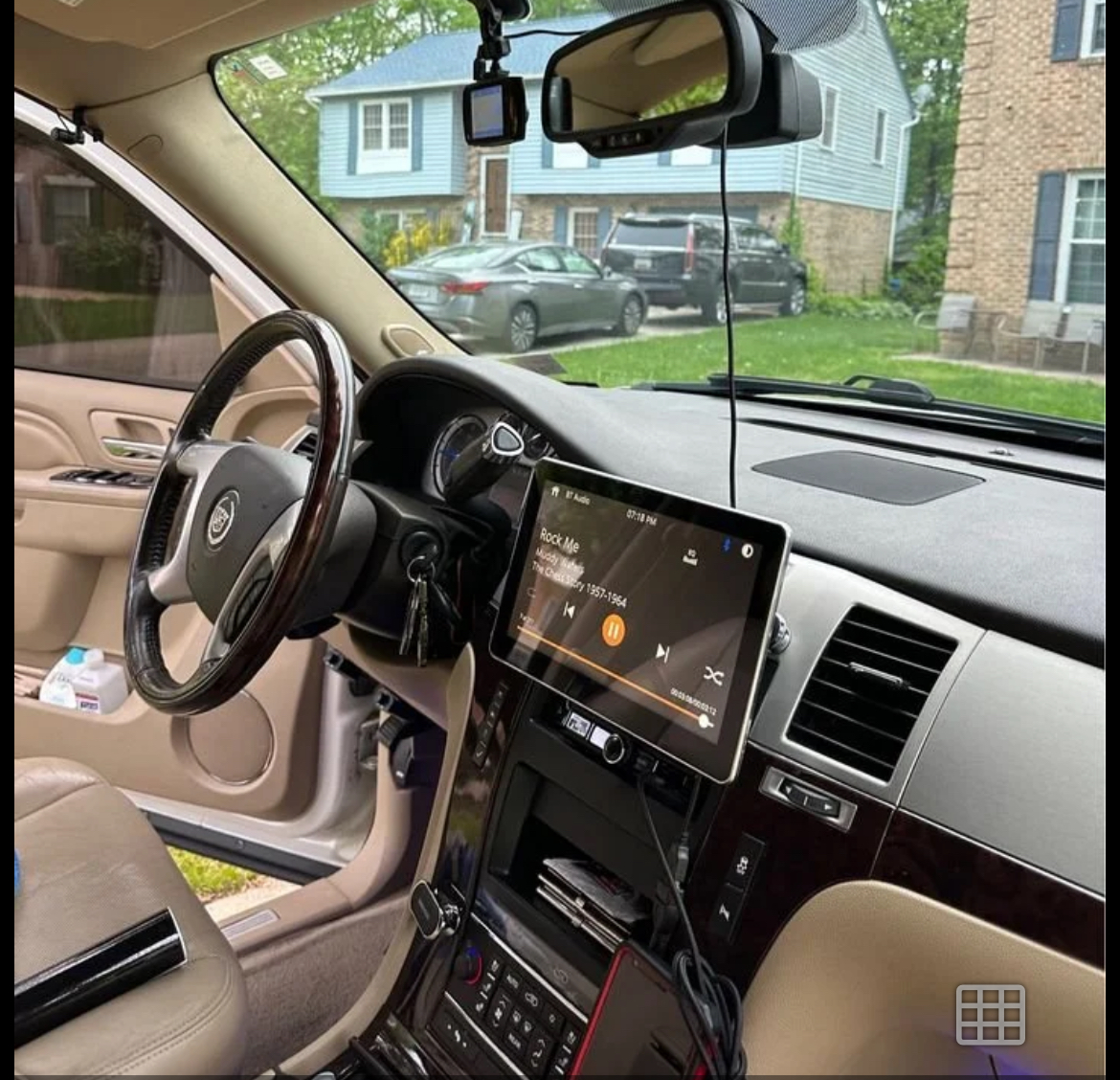
Reason considering the floating screen style is with the available dash kit designed to keep the radio in the stock location the screen would sit up higher than factory and potentially be a bit easier to view while driving etc for navigation purposes. That and the screen is larger obviously.
Feedback from those with the floating screen style on interference with the gear shifter while in drive and any blockage of the HVAC vents? What specific dash kit and model head unit did you use?
Floating style:
Traditional in dash style install:
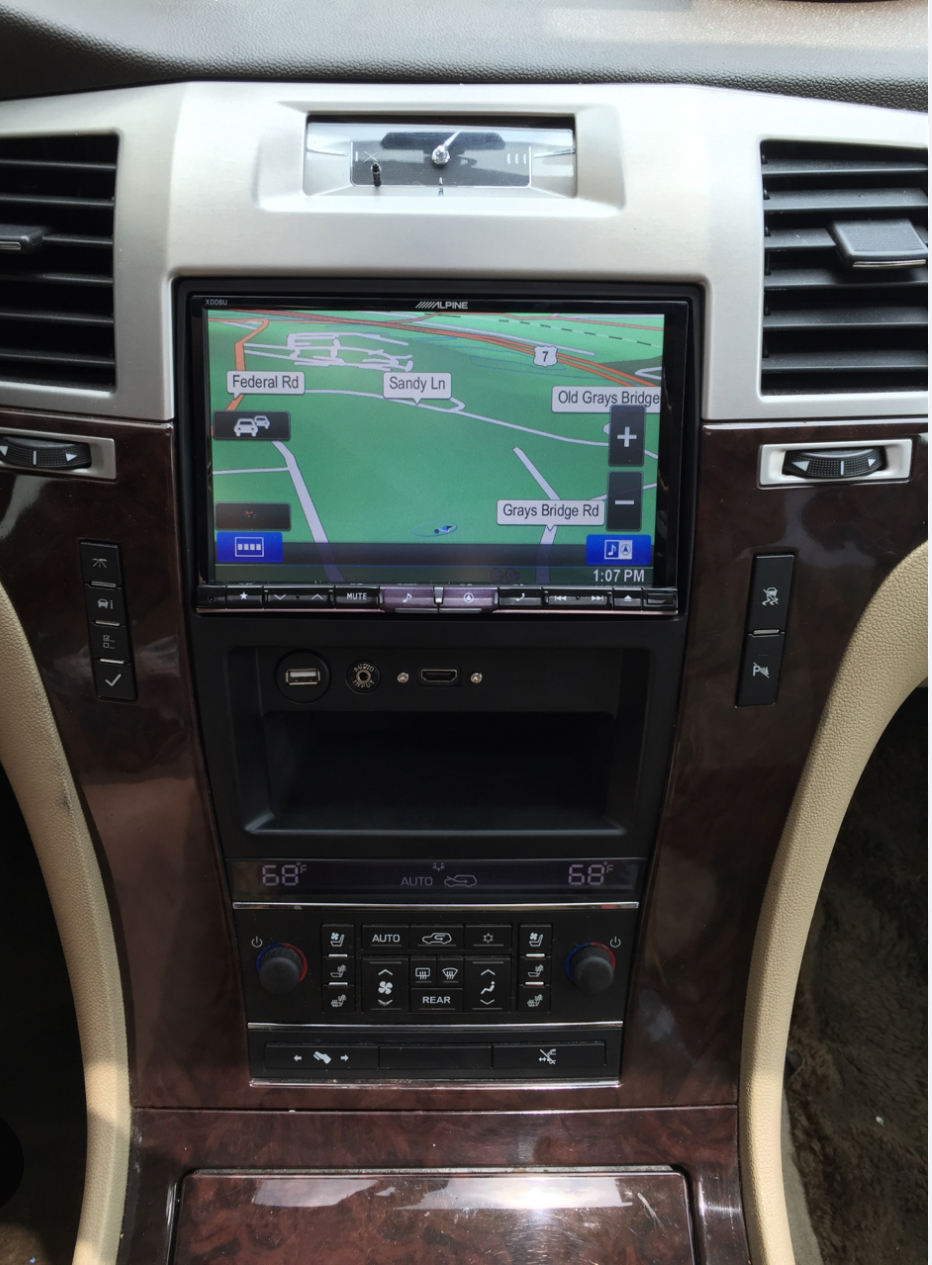
This is the dash kit I’m referring to:
This is the only dash kit I would consider due to it keeping the screen closest to the factory location.
Floating Screen style:
Larger Screen
Easier to view location
Not a huge fan of the “bolted on I-pad” to the dash look. But it’s not terrible and allows for a larger screen. Also seems to be the direction newer vehicles are going to “appears” more modern.
Potential interference with gear shifter while in drive
Potential interference with HVAC vents.
In dash traditional style:
Looks more factory OEM
No concerns with interference with shifter or HVAC vents.
Appreciate any input and experience you guys can provide.
Looking for feedback from other owners who have upgraded their radio to either style.
Reason considering the floating screen style is with the available dash kit designed to keep the radio in the stock location the screen would sit up higher than factory and potentially be a bit easier to view while driving etc for navigation purposes. That and the screen is larger obviously.
Feedback from those with the floating screen style on interference with the gear shifter while in drive and any blockage of the HVAC vents? What specific dash kit and model head unit did you use?
Floating style:
Traditional in dash style install:
This is the dash kit I’m referring to:
This is the only dash kit I would consider due to it keeping the screen closest to the factory location.
Floating Screen style:
Larger Screen
Easier to view location
Not a huge fan of the “bolted on I-pad” to the dash look. But it’s not terrible and allows for a larger screen. Also seems to be the direction newer vehicles are going to “appears” more modern.
Potential interference with gear shifter while in drive
Potential interference with HVAC vents.
In dash traditional style:
Looks more factory OEM
No concerns with interference with shifter or HVAC vents.
Appreciate any input and experience you guys can provide.
Last edited:

I couldn't comment on if it blocks the shifter or not, when I had a pop-up dvd screen mine did, but if you dropped it into gear before the screen deployed all the way it was no issue, otherwise you just had to be careful to not pinch your fingers.
for the people concerned about module/adapter prices, if you just research exactly what you need, make a list write it down and then shop on ebay you can save a lot of money buying open box stuff, if you are poor like me I managed to buy what I needed a piece at a time until I had everything.
you just check on ebay every other day or so until something at the "right price" shows up.
you can also "save" your search on ebay and they will email you everyday if one or more gets listed.
for the people concerned about module/adapter prices, if you just research exactly what you need, make a list write it down and then shop on ebay you can save a lot of money buying open box stuff, if you are poor like me I managed to buy what I needed a piece at a time until I had everything.
you just check on ebay every other day or so until something at the "right price" shows up.
you can also "save" your search on ebay and they will email you everyday if one or more gets listed.
PatDTN
Full Access Member
- Joined
- Jul 5, 2016
- Posts
- 632
- Reaction score
- 465
I'll leave researching to you or someone else. I've seen heads up display modules that sit on your dash and project onto the windshield. That would keep your eyes up where you can see the road.
CMoore711
Full Access Member
- Joined
- Jul 18, 2017
- Posts
- 1,575
- Reaction score
- 1,500
I'll leave researching to you or someone else. I've seen heads up display modules that sit on your dash and project onto the windshield. That would keep your eyes up where you can see the road.
Sure those add on HUD modules exist; But most of them seem pretty gimmicky and only display your speed.
PatDTN
Full Access Member
- Joined
- Jul 5, 2016
- Posts
- 632
- Reaction score
- 465
Funny, I did a brief search and found several that connect to the obd2 port and your phone to display a wide range of things. I still advocate searching and reading .Sure those add on HUD modules exist; But most of them seem pretty gimmicky and only display your speed.
denalianyone
NYBlackLade08
I have this screen for about 4-5 years with no problems. I have the older processor version. There is a FB group that will help bring out the full capabilities of the unit as well. It’s a plug n play and sits flush.
The 13” version is nice too but more pricey.
CMoore711
Full Access Member
- Joined
- Jul 18, 2017
- Posts
- 1,575
- Reaction score
- 1,500
Thanks @denalianyone.
I’ve seen a lot of mixed reviews on those style units. It seems either people love them or hate them; There are a lot of different vendor/sellers that appear to be selling the same unit.
I’ve seen a lot of mixed reviews on those style units. It seems either people love them or hate them; There are a lot of different vendor/sellers that appear to be selling the same unit.
denalianyone
NYBlackLade08
Thanks @denalianyone.
I’ve seen a lot of mixed reviews on those style units. It seems either people love them or hate them; There are a lot of different vendor/sellers that appear to be selling the same unit.
I wasn’t overly happy when I first bought mines. After the firmware update thru a vendor on FB, the unit is much more intuitive.
builds4christ
Member
- Joined
- May 14, 2024
- Posts
- 71
- Reaction score
- 50
Man this is killing me.
I've never owned a vehicle with such a difficult system to upgrade lol.
I purchased the best available option from Phoenix recently. They assured me that it would reatin all OEM functionality.
When I installed it, it did not retain it. I have the Y91 rpo code, full bose, and rear screen.
Their unit displayed on the rear screen, but the aspect ratio was off and the video was 1.5" tall. Also, I wasn't able to let the kids watch something while I listened to music up front. Deal breaker there. On top of that, it wasn't able to use the OEM mic for calls .
Anyway, been searching for a good setup to retain all this stuff and I have been SOL.
Any ideas?
P.s. I'm having problems with my radio at the moment too. Got a few speakers not turning on.
I've never owned a vehicle with such a difficult system to upgrade lol.
I purchased the best available option from Phoenix recently. They assured me that it would reatin all OEM functionality.
When I installed it, it did not retain it. I have the Y91 rpo code, full bose, and rear screen.
Their unit displayed on the rear screen, but the aspect ratio was off and the video was 1.5" tall. Also, I wasn't able to let the kids watch something while I listened to music up front. Deal breaker there. On top of that, it wasn't able to use the OEM mic for calls .
Anyway, been searching for a good setup to retain all this stuff and I have been SOL.
Any ideas?
P.s. I'm having problems with my radio at the moment too. Got a few speakers not turning on.
kbuskill
***CAUTION*** I do my own stunts!
Man this is killing me.
I've never owned a vehicle with such a difficult system to upgrade lol.
I purchased the best available option from Phoenix recently. They assured me that it would reatin all OEM functionality.
When I installed it, it did not retain it. I have the Y91 rpo code, full bose, and rear screen.
Their unit displayed on the rear screen, but the aspect ratio was off and the video was 1.5" tall. Also, I wasn't able to let the kids watch something while I listened to music up front. Deal breaker there. On top of that, it wasn't able to use the OEM mic for calls .
Anyway, been searching for a good setup to retain all this stuff and I have been SOL.
Any ideas?
P.s. I'm having problems with my radio at the moment too. Got a few speakers not turning on.
Maestro RR and any aftermarket headunit you prefer. I was running a Kenwood with the Maestro before changing it out for the Phoenix Automotive Headunit and the Kenwood setup was flawless. RSE, Bose, steering wheel controls, etc.
The Phoenix looks good and I like the big screen but the functionality isn't as good as the previous setup when it comes to all the little bells and whistles. Plus they lie about the actual screen size, advertised as a 13" actually 11.8" per their sticker and they knowingly do this because they admitted it when asked about it.
Similar threads

- Replies
- 2
- Views
- 249


- Replies
- 0
- Views
- 163


