04 Tahoe stereo pinout?

Disclaimer: Links on this page pointing to Amazon, eBay and other sites may include affiliate code. If you click them and make a purchase, we may earn a small commission.

josephernst2

TYF Newbie
Joined
May 22, 2015
Posts
15
Reaction score
4
Hey there I have a stock stereo pinout question. I have a 04 Tahoe z71 factory Bose, indash 6 disc changer. No XM, no DVD unit. I am wanting to install just a aux 1/8 headphone jack. I spent all night last night looking online for the correct pinout of the stereo harnesses but couldn't find the correct one. On the back of the stereo there are 2 plugs, one is the 12 pin and the other is the 24 pin. I know the 12 pin is for the Bose amp ECT. But the 24 pin only has the orange and pink wires that run to the on star box for the handsfree mic. I need a pinout of that 24 pin harness so I know what the other 22 connections are for, does anyone have that diagram?

I don't want to order any interfaces if I don't need to, i am also comfortable with soldering and working with electronics. Thanks in advance

Sent from my Pixel XL using Tapatalk
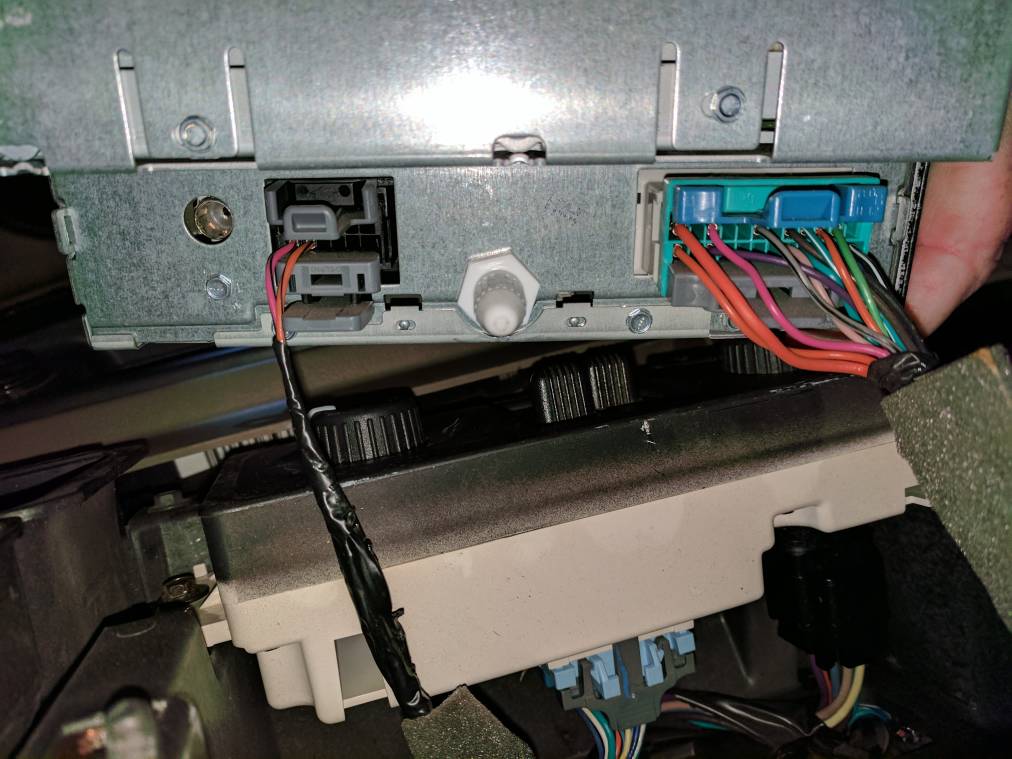
fc73efb2b81058ba340a482bd5f372d5.jpg
 
OP
OP
J

josephernst2

TYF Newbie
Joined
May 22, 2015
Posts
15
Reaction score
4
Sweet thank you. I see the same pink and orange wire, kinda makes that harness look like a 2 pin instead of a 24pin.

Sent from my Pixel XL using Tapatalk
 

M1Gunner

Full Access Member
Joined
Feb 7, 2015
Posts
1,078
Reaction score
1,238
Location
Gainesville, Fl
Sweet thank you. I see the same pink and orange wire, kinda makes that harness look like a 2 pin instead of a 24pin.

Sent from my Pixel XL using Tapatalk

You're actually gonna wanna tap into right aud sig pin 'H' (dark grn/wht) and left aud sig pin 'J' (Brn/wht) and then pin 'A12' for the ground.
 
OP
OP
J

josephernst2

TYF Newbie
Joined
May 22, 2015
Posts
15
Reaction score
4
You're actually gonna wanna tap into right aud sig pin 'H' (dark grn/wht) and left aud sig pin 'J' (Brn/wht) and then pin 'A12' for the ground.
Well. You rock. FYI.

So where does that tap into for aux to work?
Like what do I set the radio to listen ?
Thank you.

Sent from my Pixel XL using Tapatalk
 

M1Gunner

Full Access Member
Joined
Feb 7, 2015
Posts
1,078
Reaction score
1,238
Location
Gainesville, Fl
Well. You rock. FYI.

So where does that tap into for aux to work?
Like what do I set the radio to listen ?
Thank you.

Sent from my Pixel XL using Tapatalk

You're gonna have to plug it all up and play something on your phone or what device you're going to use and flip through the band button to see if it'll pick it up.
 

M1Gunner

Full Access Member
Joined
Feb 7, 2015
Posts
1,078
Reaction score
1,238
Location
Gainesville, Fl
This is what I used for mine but I have the XM "digital radio receiver" so I have to select the XM band and then hit Left side of the seek/scan button.

IMG_2391.JPG


IMG_2392.JPG


IMG_2393.JPG


IMG_2395.JPG
 
OP
OP
J

josephernst2

TYF Newbie
Joined
May 22, 2015
Posts
15
Reaction score
4
You guys rock.
I saw the aux mod with the XM , bought and wired up the cable and jack. Beboped out to my wife Tahoe, flipped open the glove box like a boss. And all I saw was an empty cave where the XM should be. I then spent an untold amount of hours flipping through countless wiring diagrams online.
Why do you get results for everything BUT the vehicle you typed into the search bar? Anyways I killed my laptop battery and cellphone looking last night with nothing. Now thanks to you I have exactly what I needed. Thank you thank you.

Sent from my Pixel XL using Tapatalk
 

M1Gunner

Full Access Member
Joined
Feb 7, 2015
Posts
1,078
Reaction score
1,238
Location
Gainesville, Fl
The only issue I see is that the wires you need to tap into 'H' and 'J' are just empty terminals in Connector 2. That's your smaller connector with just the orange/black pink/black wires. But the pins in the radio which coincide with terminals 'H' and 'J' should still be there to connect to. Maybe you can still make it work.
 
OP
OP
J

josephernst2

TYF Newbie
Joined
May 22, 2015
Posts
15
Reaction score
4
The only issue I see is that the wires you need to tap into 'H' and 'J' are just empty terminals in Connector 2. That's your smaller connector with just the orange/black pink/black wires. But the pins in the radio which coincide with terminals 'H' and 'J' should still be there to connect to. Maybe you can still make it work.
Oh, I'll make it work......[emoji57]

Sent from my Pixel XL using Tapatalk
 

M1Gunner

Full Access Member
Joined
Feb 7, 2015
Posts
1,078
Reaction score
1,238
Location
Gainesville, Fl
Oh, I'll make it work......[emoji57]

Sent from my Pixel XL using Tapatalk

So that schematic is not yours. That's for 'Bose w/ CD' but after looking at your picture and studying all the schematics and different options... your picture matches up to the 'mid line radio w/o rear seat audio'
Here is your correct schematic... the purple wire in your picture was what made me look harder at everything.

Here's the complete set schematics for your system

IMG_2667.PNG


IMG_2668.PNG


IMG_2669.PNG
 
Last edited:
OP
OP
J

josephernst2

TYF Newbie
Joined
May 22, 2015
Posts
15
Reaction score
4
I actually have a shop that we rent out half of. There's a bunch of of car parts and a few engine bay wiring harnesses, I'm thinking I'll go see if I can pop out some small pins and see if they fit. If they do I'll solder them up.

Sent from my Pixel XL using Tapatalk
 
OP
OP
J

josephernst2

TYF Newbie
Joined
May 22, 2015
Posts
15
Reaction score
4
I found some wire pins from an old Dell computer that fit into the factory harness. However I connected the 3 wires (H,J and A12) and it didn't work, boo.
M1Gunner, thank you for the updated diagrams. I'll have to study them more. They look pretty similar at a glance, as far as the harnesses that I'm working with go anyways. I feel as though I need to create some sort of return signal to the harness to trick the HU into thinking the XM is there? Unless, if I tap the correct wires the audio signal carries enough to trigger it? Gonna sleep on it. Thanks again everyone.

Sent from my Pixel XL using Tapatalk
 

M1Gunner

Full Access Member
Joined
Feb 7, 2015
Posts
1,078
Reaction score
1,238
Location
Gainesville, Fl
I found some wire pins from an old Dell computer that fit into the factory harness. However I connected the 3 wires (H,J and A12) and it didn't work, boo.
M1Gunner, thank you for the updated diagrams. I'll have to study them more. They look pretty similar at a glance, as far as the harnesses that I'm working with go anyways. I feel as though I need to create some sort of return signal to the harness to trick the HU into thinking the XM is there? Unless, if I tap the correct wires the audio signal carries enough to trigger it? Gonna sleep on it. Thanks again everyone.

Sent from my Pixel XL using Tapatalk

Looking over these that fit your set-up, a few routes did change so you may want to disregard the A12 ground and use terminal 'K' the "common aud sig" from Connector 2 along with 'H' and 'J'
 
OP
OP
J

josephernst2

TYF Newbie
Joined
May 22, 2015
Posts
15
Reaction score
4
Looking over these that fit your set-up, a few routes did change so you may want to disregard the A12 ground and use terminal 'K' the "common aud sig" from Connector 2 along with 'H' and 'J'
I tried that last night, but I didn't have pin soldered on so I doubt it had a good connection. Plus balancing the HU, holding the ground and messing with my phone wasn't exactly easy lol. I'll pull the HU out again after work and try again with the ground wire pin.

As a thought, does that 12 pin connector with the 2 voice wires (pink and orange) have to be connected for any reason? We don't use on star so I'm not concerned about that.

Sent from my Pixel XL using Tapatalk
 
OP
OP
J

josephernst2

TYF Newbie
Joined
May 22, 2015
Posts
15
Reaction score
4
Well I tried using the K pin. The best I got was with the entire 12 pin harness unplugged, and my 3 wires attached to H, J and K I was able to just barely hear music if I had my phone and HU cranked. But it only did that if I push the on star button with just the Dot. But it automatically switches back to the last source used after 30sec.

I'm going to step away until this weekend, I don't want to damage anything trying to jump wires around. So I'll research the diagrams, and think this through. I started thinking, maybe I'm trying to tap the wrong harness? The HU has the DISC AUX button, what option is that AUX button for?

Sent from my Pixel XL using Tapatalk
 

Forum statistics

Threads
137,813
Posts
1,992,767
Members
102,794
Latest member
Drewphil
Back
Top