Removing the HMI Module

Disclaimer: Links on this page pointing to Amazon, eBay and other sites may include affiliate code. If you click them and make a purchase, we may earn a small commission.

steverkemp

TYF Newbie
Joined
Apr 16, 2014
Posts
21
Reaction score
1
Hello, I am trying to locate the HMI module. Does anyone have any tips as to where it is located- I've heard behind the glovebox. I'd like to document it for others to benefit but don't know where to start.
 

jmitchell

Full Access Member
Joined
Apr 3, 2014
Posts
182
Reaction score
4
I am going to take mine out first part of next week and send to Chris for programming. I will take pictures when I do. For now, let me look tonight and see if I can get a picture of it installed in place.
 
OP
OP
S

steverkemp

TYF Newbie
Joined
Apr 16, 2014
Posts
21
Reaction score
1
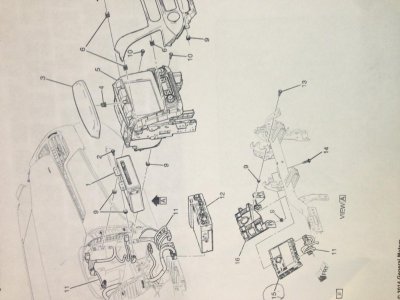
Schematic and Pictures so far

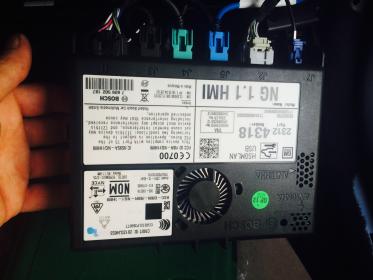
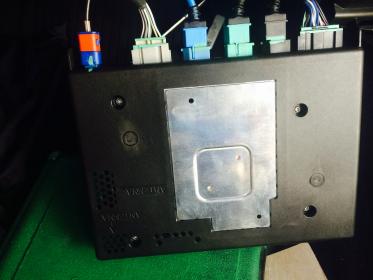
Looking at the attached schematic it appears that what Chris has indicated that the HMI is located under the glove box appears to be true. It will be nice if I don't have to get into the dash at all. I'll get into this later today and also try to take some pictures. The attached pictures of the front and back of the HMI are from Chris.
 

Attachments

  • 15_yukon_dash_schematic.jpg
    15_yukon_dash_schematic.jpg
    88.7 KB · Views: 446
  • hmifront.jpg
    hmifront.jpg
    16 KB · Views: 547
  • hmiback.jpg
    hmiback.jpg
    14 KB · Views: 529
Last edited:
OP
OP
S

steverkemp

TYF Newbie
Joined
Apr 16, 2014
Posts
21
Reaction score
1
Success

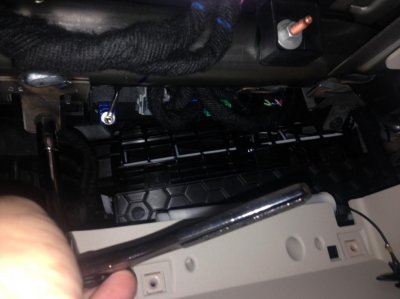
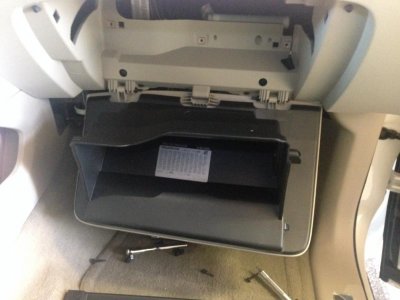
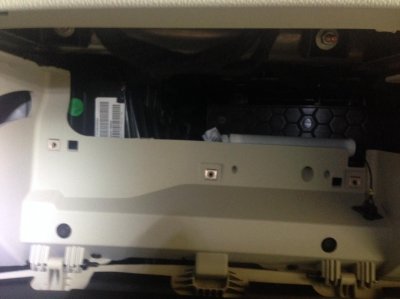
I was successful at removing the HMI today. I'll add pictures as soon as I can but here are the steps.

1. Open Glovebox and disconnect nylon spring line on right side.
2. Squeeze box to allow box to drop beyond stops and rest on floor board.
3. Remove 6 T-10 screws from black cover behind glovebox and remove black cover. There are 2 flanges on the top so gently pull down black cover once screws are removed.
4. Locate HMI and remove 6 harness connectors. You will be viewing it from the side that all of the connectors plug into.
5. Slide box out and towards you. (there are no screws to remove despite the fact that my pictures shows my wrench, it is an unnecessary step)
---Optional if you want to operate the vehicle without the HMI---
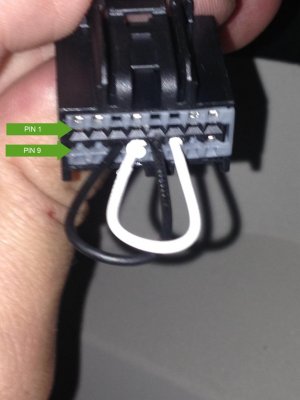
6. Jump pin 11 to 13 and 12 to 14 on the 16 pin female connector that was connected to location marked J1 on the HMI. IMPORTANT: SEE MY SUBSEQUENT POSTS ABOUT JUMPING THESE PINS!
 

Attachments

  • photo 1.jpg
    photo 1.jpg
    77.9 KB · Views: 393
  • photo 2.jpg
    photo 2.jpg
    91.1 KB · Views: 372
  • photo 3.jpg
    photo 3.jpg
    85.7 KB · Views: 361
Last edited:

jmitchell

Full Access Member
Joined
Apr 3, 2014
Posts
182
Reaction score
4
Thanks for the good info. Let's see those pics.

Do you have to jump the pins on the connector to get the vehicle to run without the HMI? I don't know if I want to mess with those. What do those pins represent?
 
OP
OP
S

steverkemp

TYF Newbie
Joined
Apr 16, 2014
Posts
21
Reaction score
1
Thanks for the good info. Let's see those pics.

Do you have to jump the pins on the connector to get the vehicle to run without the HMI? I don't know if I want to mess with those. What do those pins represent?

Attached picture of pin out. Jumping these pins is required to close the buslink communication loop to key vehicle systems. It will not fully operate with an open loop. The attached picture is of a spare connector for reference purpose only.
 

Attachments

  • 16-pin hmi.jpg
    16-pin hmi.jpg
    83.1 KB · Views: 193
Last edited:

jmitchell

Full Access Member
Joined
Apr 3, 2014
Posts
182
Reaction score
4
Ahhhh, I get it now, thanks for the picture. So you just use a separate piece of wire for each "Jump". Is there a specific wire that needs to be used or what did you use?
 
OP
OP
S

steverkemp

TYF Newbie
Joined
Apr 16, 2014
Posts
21
Reaction score
1
Something like a 20-22 gauge solid would be fine. Start smaller and move up until you get a snug fit. You want to avoid too large of gauge that could potentially over-stress the connector.
 

HAASTYL

TYF Newbie
Joined
Apr 20, 2014
Posts
8
Reaction score
0
Location
Iowa
Thanks Steve this is great! Now to get some free time to tear into things.

Much appreciated.
 
OP
OP
S

steverkemp

TYF Newbie
Joined
Apr 16, 2014
Posts
21
Reaction score
1
Hi all, I reinstalled the HMI yesterday and discovered that I damaged the jumped connectors with too thick of gauge wire. I had to repair the connector and will end up replacing it. It is CRITICAL that you do not overstress the connectors on female harness that you jump. I soldered a stranded 18 gauge and it was too big and I knew it after I inserted it. That is why I said before, please start with a very small 22 gauge sold wire and be very gentle. I'd love to hear others experience. If you aren't comfortable doing such then you should be prepared to leave the vehicle inoperable until you reinstall the HMI module.

I highly recommend testing the connection once you reinstall the HMI module before reassembling the glove box. With the vehicle running you should wiggle the J1 connector and make sure it has solid contact. Connection failure during operation could result in loss of key vehicle systems including power steering.
 

jmitchell

Full Access Member
Joined
Apr 3, 2014
Posts
182
Reaction score
4
This is great information. The only thing I can add to this is when the harnesses are all disconnected there is only 1 retainer clip holding the HMI in place. It is located on the top of the HMI and you simply push up on it to allow the HMI to slide out. Here is a picture...
20140507_2207092.jpg


---------- Post added at 03:45 PM ---------- Previous post was at 03:43 PM ----------

Oh and instead of jumping the connectors I just let my vehicle sit idle for a week to avoid the extra electrical work.
 
OP
OP
S

steverkemp

TYF Newbie
Joined
Apr 16, 2014
Posts
21
Reaction score
1
Smart idea on avoiding the extra electrical work. Thanks for the additional info.


Sent from my iPhone using Tapatalk
 

OneStepAhead

TYF Newbie
Joined
Jun 6, 2014
Posts
10
Reaction score
0
I'm trying to do this on my 2015 Escalade. So far the main difference appears to be that there are only 4 torx screws, and they are t15's. Well, t15 fit in there, it may actually be a slightly different size. I've now got the glove box fully removed and the black lining.

What is the trick to getting the blue antenna harness to disconnect? That''s the only one I'm struggling with at the moment.

I don't think I'm going to attempt to bridge some connections. What if for some reason the Escalade wiring is slightly different and I bridge the wrong thing? Doesn't seem safe.

 

GTPprix

Senior Member
Joined
Feb 8, 2014
Posts
637
Reaction score
43
Location
Metro Detroit, MI
I'm trying to do this on my 2015 Escalade. So far the main difference appears to be that there are only 4 torx screws, and they are t15's. Well, t15 fit in there, it may actually be a slightly different size. I've now got the glove box fully removed and the black lining.

What is the trick to getting the blue antenna harness to disconnect? That''s the only one I'm struggling with at the moment.

I don't think I'm going to attempt to bridge some connections. What if for some reason the Escalade wiring is slightly different and I bridge the wrong thing? Doesn't seem safe.


Antenna has a small detent that needs to be pressed and pulled off. You should be able to feel the grooved area on the release area. The wiring is exactly the same at least to the HMI its the same module with the same inputs.
 

OneStepAhead

TYF Newbie
Joined
Jun 6, 2014
Posts
10
Reaction score
0
So I seem to of made a *slight* oversight when reinstalling my glove box after the HMI mod. I forgot to plug the power cable into the glovebox and closed it. Now obviously the powered glovebox button will not open it. I cant see the cable from underneath. There has to be someway to open this thing without the power hooked up, right? :)
 

OneStepAhead

TYF Newbie
Joined
Jun 6, 2014
Posts
10
Reaction score
0
I figured out the solution. If you need to open the glove box on a 2015 Cadillac Escalade or Yukon and you don't have power, you first need to remove the piece of trim that is on the right side of the instrument panel. Just open the passenger door and gently pull off the trim that is on the side of the dash, there are 6 clips if I recall and it comes off surprisingly easy. This exposes a fuse panel and also allows you to insert a long object (I used a twig) to manually release the lock.

Opening the Instrument Panel Compartment Door without Electrical Power (Cadillac)

Ivz9b3P.jpg


Opening the Instrument Panel Compartment Door without Electrical Power
Callout

Component Name

Preliminary Procedure

Remove the right instrument panel fuse block access hole cover. Refer to Instrument Panel Fuse Block Access Hole Cover Replacement.

1

Instrument Panel Compartment Door Latch

Note: It is important that the tool used is blunt, such as a ¼ inch drive socket extension or eraser end of a pencil. Sharper tools, such as a screwdriver, may damage the latch mechanism.

Procedure

In the event that either the actuator or the glove box button should become inoperative, the compartment door can be opened by inserting a small, blunt ended tool into the access hole to manually release the latch and open the door.
 
Last edited:

OneStepAhead

TYF Newbie
Joined
Jun 6, 2014
Posts
10
Reaction score
0
It's the brains for the Infotainment stuff. We are taking them out to have them hacked by White Auto and Media Services. Allows us to have video in motion, sms, enter addresses to the NAV while in drive, and startup sounds.
 

hosseface

Full Access Member
Joined
Mar 20, 2014
Posts
794
Reaction score
107
I just removed my HMI this morning to ship to Chris. Can't wait to get the mod done.

Just another option for how to drive your vehicle with the HMI removed-

The pins in question 11/13 12/14 are 2 white wires and 2 blue wires. Instead of risking damaging your connector - there is plenty of slack in the harness. Remove the factory cloth electrical tape, simply cut the 2 blue wires and splice them together (on the truck side = leave the 2 wires going to the connector cut) and do the same to the 2 white wires. Takes about 5 minutes. When your HMI comes back, simply connect the wires back together. Zero risk of damage.

Just another option. I know some people won't feel comfortable doing that but I am a professional auto tech by trade so no biggie here ;) One item of concern to me is if you jump those wires and your jumper falls out driving do the road - you are totally screwed.

---------- Post added at 08:37 AM ---------- Previous post was at 08:35 AM ----------

Antenna has a small detent that needs to be pressed and pulled off. You should be able to feel the grooved area on the release area. The wiring is exactly the same at least to the HMI its the same module with the same inputs.

To add to this:

The detent/button you push is on the top. I used a 90 degree pick, pressed the button in and the antenna came right off.

VERY easy to remove HMI. 20 minute job MAX including tricking the CAN BUS.
 

GTPprix

Senior Member
Joined
Feb 8, 2014
Posts
637
Reaction score
43
Location
Metro Detroit, MI
Just an FYI and heads up to you guys, I have entered into contract that as of July 1st this product will be sold exclusively through a very reputable third party. The thing is it will also be more expensive so if you have ANY interest in getting this done you'd need to order before July 1st; just a heads up!
 

Forum statistics

Threads
137,811
Posts
1,992,730
Members
102,794
Latest member
Drewphil
Back
Top