XLDenali06's Build Thread

Disclaimer: Links on this page pointing to Amazon, eBay and other sites may include affiliate code. If you click them and make a purchase, we may earn a small commission.

OP
OP
XLDenali06

XLDenali06

Full Access Member
Joined
Apr 4, 2017
Posts
194
Reaction score
285
Location
Southeast Tennessee
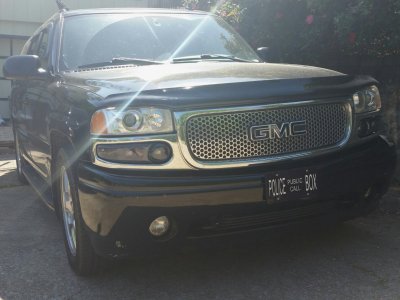
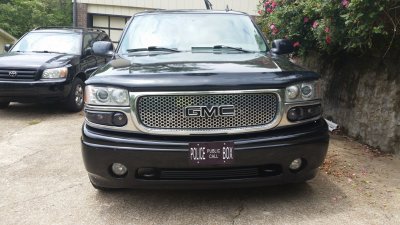
New front emblem went on. Looks a lot better than the solid black one. Pardon the crappy pic.
2017-04-26 16.14.35.jpg

My video interface for the stock nav screen came in today. Cameras came in yesterday. I'd love to tear into everything today, but it'll likely be this weekend when the hubby is around to help with the kids. Not looking forward to opening up the navigation unit and swapping the ribbon, but it looks like it should be straightforward enough. The rest is basically just taking off trim to route wires and hook everything up. Or at least that's what I'm hoping.
 
OP
OP
XLDenali06

XLDenali06

Full Access Member
Joined
Apr 4, 2017
Posts
194
Reaction score
285
Location
Southeast Tennessee
Reading through yesterday's comments about the cluster gauges and faces and chrome rings, etc... has left me less sure than I was before. Lol. Will the 05/06 Esky chrome rings lay over my 06 Nali gauges/face and line up correctly or no? I think I saw it posted by @OHSIXX originally. Maybe he can chime in.

@Red Rocket do you know for sure if what I'm wanting to do will work?
 
OP
OP
XLDenali06

XLDenali06

Full Access Member
Joined
Apr 4, 2017
Posts
194
Reaction score
285
Location
Southeast Tennessee
Unfortunately OHSIXX sold his beautiful Denali and has been inactive since May 2016.

Here is his build thread with some info that may be worth perusing.
http://www.tahoeyukonforum.com/threads/ohsixxs-2006-denali-build.76350/page-13#post-992030


Thanks for that info. I've glanced at his build thread, but I'll look at it more in depth.

Despite swearing I wouldn't start on my backup camera project until this weekend, I spent nearly 4 hours installing the Nav-Tool interface into my stock navigation screen, and running wires from the backup camera up the passenger side of the car. It probably took twice as long as it should have, but I had my 2 year-old trying to run over my feet with his scooter and my 4 year-old "helping" me. Plus I was probably being way more **** about everything than I really needed to, especially the bit of wiring going from the camera to the inside of the car. Still quite a bit to do, but at least the majority of the wire running is done and my interior is mostly put back together :)
 
Last edited:

adventurenali92

Full Access Member
Joined
Feb 16, 2015
Posts
7,722
Reaction score
9,173
Location
Big Bear Lake, ca
Loving the progress! Always good to be over **** about wires! Better to be over cautious and have it done right the first time, rather than not do it right and wires short out! Haha. Wanna see pics when it's done to see a back up cam on the stock Navi unit. Never seen that before. I have a backup cam on my 2006 nali, but it's part of my aftermarket clarion headunit.
 

adventurenali92

Full Access Member
Joined
Feb 16, 2015
Posts
7,722
Reaction score
9,173
Location
Big Bear Lake, ca

05Single

afraid of the dark
Joined
Feb 26, 2015
Posts
8,243
Reaction score
11,639
Thanks for that info. I've glanced at his build thread, but I'll look at it more in depth.

Despite swearing I wouldn't start on my backup camera project until this weekend, I spent nearly 4 hours installing the Nav-Tool interface into my stock navigation screen, and running wires from the backup camera up the passenger side of the car. It probably took twice as long as it should have, but I had my 2 year-old trying to run over my feet with his scooter and my 4 year-old "helping" me. Puts I was probably being way more **** about everything than I really needed to, especially the bit of wiring going from the car to the inside of the car. Still quite a bit to do, but at least the majority of the wire running is done and my interior is mostly put back together :)
Just routed my reverse can wires the other day, was quite the job as I'm also super ocd **** lol. But it's all ran. Just need to mount the cam on the bumper after I get the bumper painted first
 
OP
OP
XLDenali06

XLDenali06

Full Access Member
Joined
Apr 4, 2017
Posts
194
Reaction score
285
Location
Southeast Tennessee
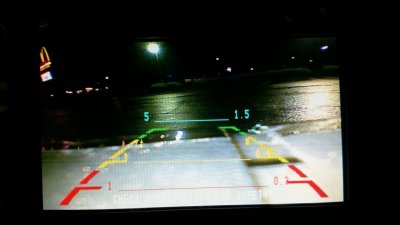
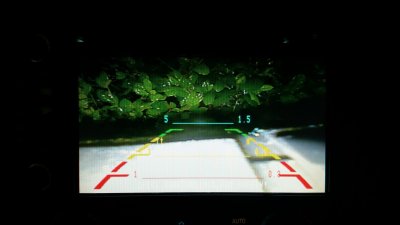
Wiring for the backup camera to oem navigation unit still isn't 100% (need to solder and shrink tube everything...right now it's just quick and dirty to make sure it works), but the interface works and the backup camera works (I still need to actually mount it, it's currently just sort of sitting between the hatch and the bumper). The interface seemed to need a few goes to get straightened out, not sure what the deal was there, but it's been wiring flawlessly all night. Overall, I'm very happy, and can't wait to add a forward-facing bumper camera, which will be on a switch. (Pardon the photo - camera hasn't been mounted in its final spot, so a lot of bumper is showing). 20170429_230240.jpg 20170429_231802.jpg
 
OP
OP
XLDenali06

XLDenali06

Full Access Member
Joined
Apr 4, 2017
Posts
194
Reaction score
285
Location
Southeast Tennessee
Wiring for the backup camera to oem navigation unit still isn't 100% (need to solder and shrink tube everything...right now it's just quick and dirty to make sure it works), but the interface works and the backup camera works (I still need to actually mount it, it's currently just sort of sitting between the hatch and the bumper). The interface seemed to need a few goes to get straightened out, not sure what the deal was there, but it's been wiring flawlessly all night. Overall, I'm very happy, and can't wait to add a forward-facing bumper camera, which will be on a switch. (Pardon the photo - camera hasn't been mounted in its final spot, so a lot of bumper is showing). View attachment 80630 View attachment 80631

Hubby agreed - video quality is at least as good as his mother's oem 2014 Toyota backup camera. For under $250 (including both the backup camera and a front facing camera), and utilizing the oem display, I couldn't be happier. Can't wait to finalize the install. Now, if only these kids weren't so needy. Lol!
 

HiHoeSilver

Away!
Joined
Feb 28, 2017
Posts
10,918
Reaction score
14,578
Location
Chicago
Hubby agreed - video quality is at least as good as his mother's oem 2014 Toyota backup camera. For under $250 (including both the backup camera and a front facing camera), and utilizing the oem display, I couldn't be happier. Can't wait to finalize the install. Now, if only these kids weren't so needy. Lol!

Link to the kit you used?
 
OP
OP
XLDenali06

XLDenali06

Full Access Member
Joined
Apr 4, 2017
Posts
194
Reaction score
285
Location
Southeast Tennessee
Link to the kit you used?

The interface that allows two triggered video sources to display on the stock touchscreen navigation screen: http://www.navtool.com/chevrolet-suburban-2005-2006-video-interface-category.aspx

The rearview camera I bought (but any camera will do): https://amazon.com/gp/aw/d/B01COZLP2U/

The front-facing camera I bought (but again, any camera will do, and I haven't hooked this one up yet): https://amazon.com/gp/aw/d/B017GC4GTA/

The wiring for the rearview mirror ended up being a little short (made it to behind the glove box), so I bought a 3' RCA male to female cable: https://amazon.com/gp/aw/d/B00RXNVF2E/
 
OP
OP
XLDenali06

XLDenali06

Full Access Member
Joined
Apr 4, 2017
Posts
194
Reaction score
285
Location
Southeast Tennessee
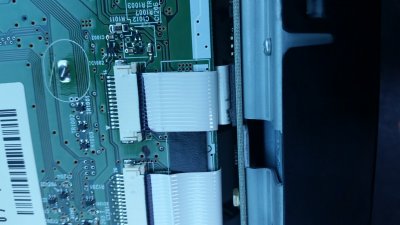
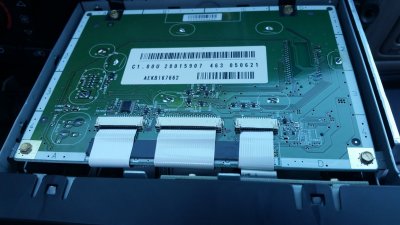
Here's a picture of the navigation unit opened up:

20170426_185106.jpg

The interface replaces the ribbon cable on the right side (top one in this pic):

20170426_185127.jpg

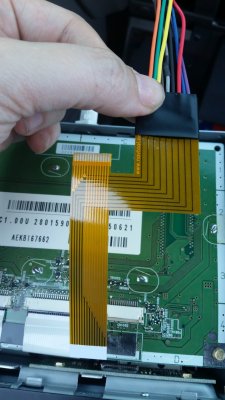
And here's the cable supplied by NavTool:

20170426_190519.jpg

Idk why I didn't get a pic of it after I got it installed. I'm horrible at remembering to take pics during installs.
 

adventurenali92

Full Access Member
Joined
Feb 16, 2015
Posts
7,722
Reaction score
9,173
Location
Big Bear Lake, ca
Interesting process to add a backup cam. Nice work! My cam is mounted on the two step pads, right in middle. Works great there cuz it sits directly over my tow package receiver hitch.
 
OP
OP
XLDenali06

XLDenali06

Full Access Member
Joined
Apr 4, 2017
Posts
194
Reaction score
285
Location
Southeast Tennessee
Interesting process to add a backup cam. Nice work! My cam is mounted on the two step pads, right in middle. Works great there cuz it sits directly over my tow package receiver hitch.

I'm still undecided on if I want it directly under the back hatch, where it sits now, or in the open space at the top of the hitch. I'm going to play around a little with the placement to see where gets me the best view for backing up in tight spaces. I don't foresee towing very often at all, and when we do there's likely to be 2 people present, so I don't need the best view of the hitch. Just the best view for not backing into someone or something.
 

05Single

afraid of the dark
Joined
Feb 26, 2015
Posts
8,243
Reaction score
11,639
I thought about the open space above the hitch but with a straight bar tow hitch the ball would be directly in the way. Just see a huge ball on the screen lol.
Mine drops down but once I go lower it will be level
 

Forum statistics

Threads
137,758
Posts
1,991,300
Members
102,742
Latest member
CKendrick
Back
Top