
You are using an out of date browser. It may not display this or other websites correctly.
You should upgrade or use an alternative browser.
You should upgrade or use an alternative browser.
Upgrade '16 Denali to HDMI input from '17 models?
- Thread starter scott6760
- Start date
Disclaimer: Links on this page pointing to Amazon, eBay and other sites may include affiliate code. If you click them and make a purchase, we may earn a small commission.
Cmatt have you had any luck with figuring it out. I have a 15 Denali and have upgraded my HMI and DVD to the newer models. I am wanting to start the cabling for the module and don’t want to tear anything apart if it’s not going to work. Please let me know
So you picked up a 2017+ DVD player, had it programmed and installed it?
Sent from my iPad using Tapatalk
I'm also interested to hear if you ever had any luck getting the HDMI port to work properly. Thanks for doing the R&D for us all!
I’m close. Just waiting on the programmed DVD player to make it back to me.
Sent from my iPad using Tapatalk
cmatt..
Have you had any revelations? I'm thinking it's a combination of a newer DVD player (84409491) and a newer HMI module (84331776 or 84546904) to make it work.
I have a slightly different problem. I have a 2018 with RSE (hdmi input). The input is not displaying any res higher than 480p. Signal from a Roku appears zoomed in to just the bottom left portion of what the Roku would normally put out. Yet, other 2018 Tahoes on the dealer lot display 720p just fine. I'm thinking the problem is either my version of the DVD player installed during the build (not support more than 480p from the hdmi input coming to it) or the HMI module. I have 84364936 which is an earlier build than the ones listed above. GM infotainment support is aware of the issue. GM tech support is telling the dealer techs that replacing the HMI won't fix the issue. Of course my response to them is "then what will make it output 720p... if you're so confident it's not in the HMI then where is the problem?". I haven't received that answer yet but will pass along if I find out.
I am of the same opinion on the modules. They do have to be programmed to your vehicle.
Sent from my iPad using Tapatalk
Seanjordan20
TYF Newbie
- Joined
- Jun 10, 2017
- Posts
- 8
- Reaction score
- 0
I am going to ask a company I deal with if it’s possible to program the module to the trucks
Sent from my iPhone using Tapatalk
Sent from my iPhone using Tapatalk

Hani orfali
Member
- Joined
- Oct 22, 2018
- Posts
- 30
- Reaction score
- 33
Hello @cmatt I have 2017 DVD player where I can program it ? ThanksI’m close. Just waiting on the programmed DVD player to make it back to me.
Sent from my iPad using Tapatalk
Hey guys,
Any updates on getting this HDMI unit to work on a '15 or '16 Tahoe/Suburban/Yukon?
I'm looking at a couple '16 Suburbans and can't stand the fact that they have this archaic composite connection for the rear entertainment.
Also, in addition to the HDMI input, the '17 & up models also allow casting from your phone directly to the rear screens via WiFi. Pretty cool if we could figure out how to get that working as well!
Thanks!
Any updates on getting this HDMI unit to work on a '15 or '16 Tahoe/Suburban/Yukon?
I'm looking at a couple '16 Suburbans and can't stand the fact that they have this archaic composite connection for the rear entertainment.
Also, in addition to the HDMI input, the '17 & up models also allow casting from your phone directly to the rear screens via WiFi. Pretty cool if we could figure out how to get that working as well!
Thanks!
Christian80
Member
- Joined
- Nov 11, 2016
- Posts
- 38
- Reaction score
- 4
No news lately, it doesn't seem like this conondrum was solved.
No news lately, it doesn't seem like this conondrum was solved.
Hey cmatt,
Any updates on this HDMI conversion in the 2015-2016 Yukon/Tahoe/suburban? Is it a lost cause? Last you posted you said that you sent an HDMI unit off to be reprogrammed. I'm really curious how that went!
Thanks!
Kevin
Hani orfali
Member
- Joined
- Oct 22, 2018
- Posts
- 30
- Reaction score
- 33
You don't need to program the DVD player just buy new version of dvd player 2017 and up...Hey cmatt,
Any updates on this HDMI conversion in the 2015-2016 Yukon/Tahoe/suburban? Is it a lost cause? Last you posted you said that you sent an HDMI unit off to be reprogrammed. I'm really curious how that went!
Thanks!
Kevin
Seanjordan20
TYF Newbie
- Joined
- Jun 10, 2017
- Posts
- 8
- Reaction score
- 0
The HMI will have to be replaced at a minimum
Sent from my iPhone using Tapatalk
Sent from my iPhone using Tapatalk
John Flores
TYF Newbie
- Joined
- Jan 29, 2020
- Posts
- 1
- Reaction score
- 0
I have a 2018 silverado that didn't have any video entertainment so i added everything to do so. I got the front screen, a 2019 bluray player, the rear screen, and the wiring from harness dr and Amazon. I had white auto media do all my programming to my hmi and dvd player. Now everything works fine. I got a fire stick connected to the hdmi input and can watch pretty much anything. Also the fire stick lets you mirror your phone.
I have a 2018 silverado that didn't have any video entertainment so i added everything to do so. I got the front screen, a 2019 bluray player, the rear screen, and the wiring from harness dr and Amazon. I had white auto media do all my programming to my hmi and dvd player. Now everything works fine. I got a fire stick connected to the hdmi input and can watch pretty much anything. Also the fire stick lets you mirror your phone.
What are the part numbers for the wire harnesses that you used? I can't seem to find them anywhere . .
Ok folks . .
The infamously difficult to find a part number for the 2017+ blue USB cable from the HMI to the DVD player / screen / center console is PN# 84275164.
The 2017+ center console wire harness that goes back to the rear seat entertainment receptacle is PN# 84202933. Just a quick note that this required taking the entire center console out and taking it completely apart, which was easily the most intensive work so far. The plus side of this though is that everything is plug and play!
The 2017+ rear seat entertainment receptacle with HDMI is PN# 84144678.
My 2016 Yukon Denali already had the the IO6 version 2.5 HMI and video enabled screen, so I bought a new 2017+ DVD/Blu-Ray player (PN# 84409491) and sent my HMI and the new disc player to White Automotive and Media Services to be programmed.
More to come!
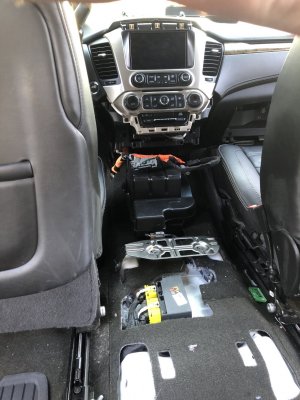
The infamously difficult to find a part number for the 2017+ blue USB cable from the HMI to the DVD player / screen / center console is PN# 84275164.
The 2017+ center console wire harness that goes back to the rear seat entertainment receptacle is PN# 84202933. Just a quick note that this required taking the entire center console out and taking it completely apart, which was easily the most intensive work so far. The plus side of this though is that everything is plug and play!
The 2017+ rear seat entertainment receptacle with HDMI is PN# 84144678.
My 2016 Yukon Denali already had the the IO6 version 2.5 HMI and video enabled screen, so I bought a new 2017+ DVD/Blu-Ray player (PN# 84409491) and sent my HMI and the new disc player to White Automotive and Media Services to be programmed.
More to come!
Nice work.
On the USB cable for the dash you listed (84275164), looking at the pictures online it appears to be a little different than what would be in an SUV that came with the HDMI from the factory. It may still work if the lengths are long enough.
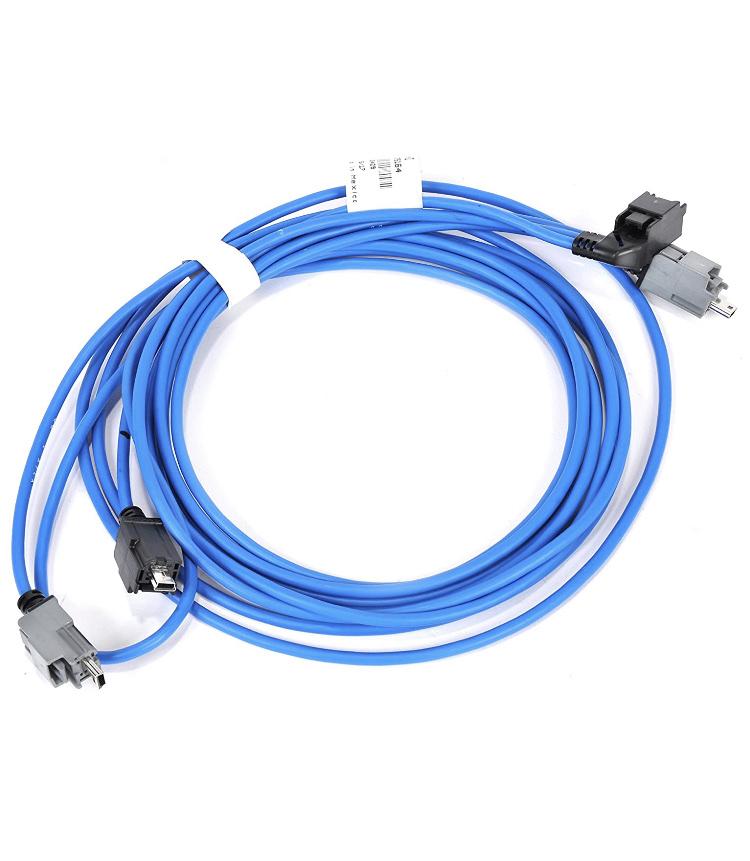
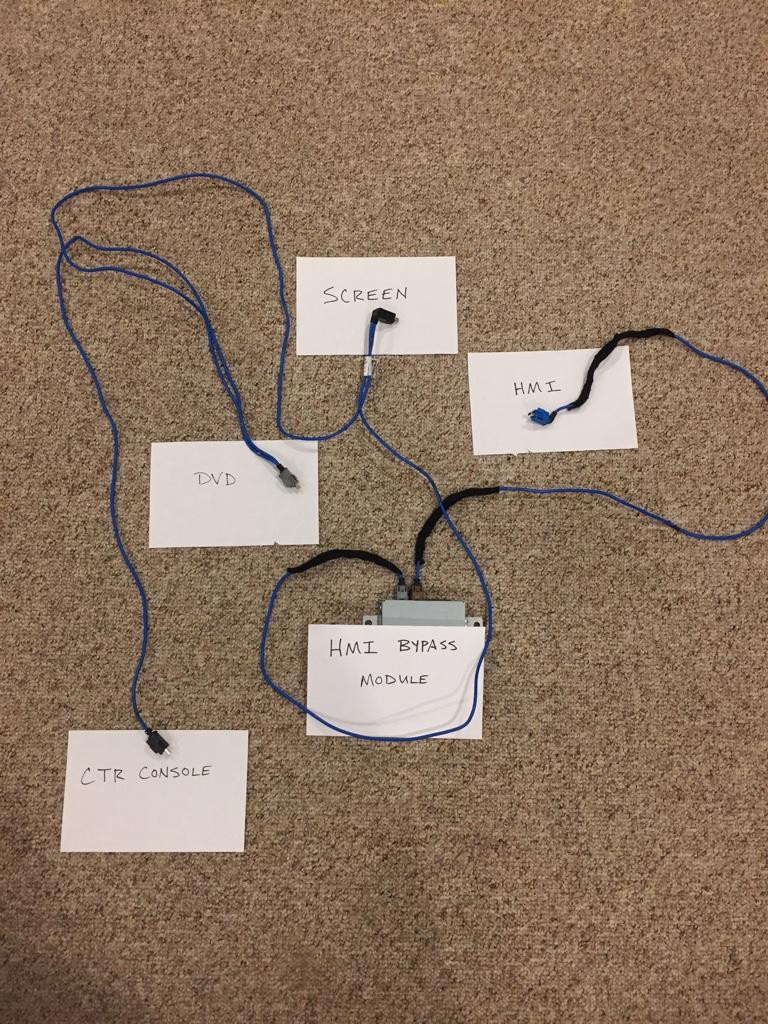
This is the dash usb cable from a 2018 Denali that had the rear entertainment center. 2016 and earlier SUVs won’t have the bypass module.
Sent from my iPhone using Tapatalk
On the USB cable for the dash you listed (84275164), looking at the pictures online it appears to be a little different than what would be in an SUV that came with the HDMI from the factory. It may still work if the lengths are long enough.
This is the dash usb cable from a 2018 Denali that had the rear entertainment center. 2016 and earlier SUVs won’t have the bypass module.
Sent from my iPhone using Tapatalk
That one has the correct usb plugs. I’d love to see it unwound to verify.Could be this one too . . PN# 84005111
Sent from my iPad using Tapatalk
It works!
The key to all of this is the DVD drive . . it is NOT the HMI (although the HMI and the DVD drive need to be programmed, and you've got to be using a 2.5 HMI). I did not connect the grey connector on the back of the DVD drive (because you can't . . they're different sized connectors between 2017+ and below), and am unsure what it's even used for at this point because all audio / video functions work perfectly.
Huge thanks to White Automotive and Media Services for programming / unlocking the 2.5 HMI and the 2017+ DVD drive.
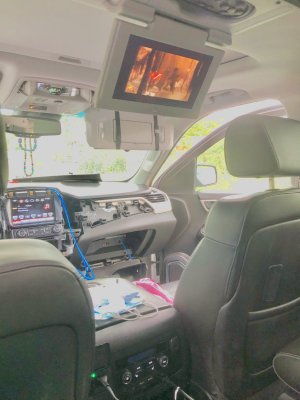
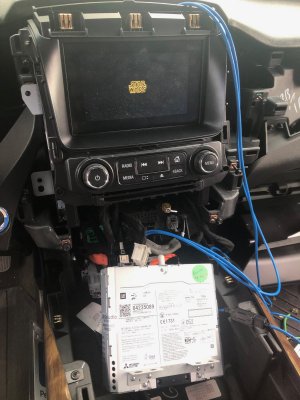
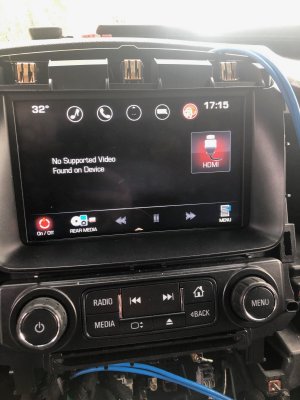
The key to all of this is the DVD drive . . it is NOT the HMI (although the HMI and the DVD drive need to be programmed, and you've got to be using a 2.5 HMI). I did not connect the grey connector on the back of the DVD drive (because you can't . . they're different sized connectors between 2017+ and below), and am unsure what it's even used for at this point because all audio / video functions work perfectly.
Huge thanks to White Automotive and Media Services for programming / unlocking the 2.5 HMI and the 2017+ DVD drive.
Last edited:
It works!
The key to all of this is the DVD drive . . it is NOT the HMI (although the HMI and the DVD drive need to be programmed, and you've got to be using a 2.5 HMI). I did not connect the grey connector on the back of the DVD drive (because you can't . . they're different sized connectors between 2017+ and below), and am unsure what it's even used for at this point because all audio / video functions work perfectly.
Huge thanks to White Automotive and Media Services for programming / unlocking the 2.5 HMI and the 2017+ DVD drive.
View attachment 246962 View attachment 246963 View attachment 246964
This is amazing. Are you able to cast as well?
Similar threads


- Replies
- 16
- Views
- 3K

- Replies
- 11
- Views
- 9K

- Replies
- 20
- Views
- 7K

