Recommend a head unit?

Disclaimer: Links on this page pointing to Amazon, eBay and other sites may include affiliate code. If you click them and make a purchase, we may earn a small commission.

Rocket Man

Mark
Supporting Member
Joined
Dec 25, 2014
Posts
26,679
Reaction score
52,949
Location
Oregon
Nice! I bet you’re excited to get going with AirPlay.

Since you’re wiring it up yourself... mind as well connect the parking brake wire to a screw on the chassis of the Pioneer so you can access settings and mirror your phone to it, etc while on the go. This method worked on my Kenwood, but not exactly sure it will work on Pioneer. You’ll definitely want to test it before finalizing the install. ;)

Anyone know if this works on Pioneer?
Not sure what you mean by accessing settings on the go or mirror your phone (since that’s android). CarPlay is mirroring your phone only it’s for an iPhone not android. Settings are always available. The parking brake wire is normally just for watching DVD’s but the DMH-4660NEX doesn’t have a DVD or CD mechanism. I do know on my Pioneer the parking brake wire goes to the power side of the parking brake wire instead of the ground side so I had to buy an adapter to simulate it, so I can watch DVD’s in motion although I’ve never even used that.
 

Jason in DLH

Cheeseburger and Fries
Joined
Sep 4, 2020
Posts
1,400
Reaction score
1,564
Location
MN
Not sure what you mean by accessing settings on the go or mirror your phone (since that’s android). CarPlay is mirroring your phone only it’s for an iPhone not android. Settings are always available. The parking brake wire is normally just for watching DVD’s but the DMH-4660NEX doesn’t have a DVD or CD mechanism. I do know on my Pioneer the parking brake wire goes to the power side of the parking brake wire instead of the ground side so I had to buy an adapter to simulate it, so I can watch DVD’s in motion although I’ve never even used that.

I wasn’t exactly sure what “accessing settings” and “mirroring” means either. I just took note of the....note...about that on Crutchfield’s website regarding the HU:

https://www.crutchfield.com/S-mn9uhdUkYw6/p_130DMW4660/Pioneer-DMH-W4660NEX.html

If you scroll down to “other information” you’ll see the note about the parking brake wire there.
 

Jason in DLH

Cheeseburger and Fries
Joined
Sep 4, 2020
Posts
1,400
Reaction score
1,564
Location
MN
Not sure what you mean by accessing settings on the go or mirror your phone (since that’s android). CarPlay is mirroring your phone only it’s for an iPhone not android. Settings are always available. The parking brake wire is normally just for watching DVD’s but the DMH-4660NEX doesn’t have a DVD or CD mechanism. I do know on my Pioneer the parking brake wire goes to the power side of the parking brake wire instead of the ground side so I had to buy an adapter to simulate it, so I can watch DVD’s in motion although I’ve never even used that.

That’s good to know about the adapter and where the parking brake wire gets connected on these Pioneers. Thanks for the info!
 

Rocket Man

Mark
Supporting Member
Joined
Dec 25, 2014
Posts
26,679
Reaction score
52,949
Location
Oregon
I wasn’t exactly sure what “accessing settings” and “mirroring” means either. I just took note of the....note...about that on Crutchfield’s website regarding the HU:

https://www.crutchfield.com/S-mn9uhdUkYw6/p_130DMW4660/Pioneer-DMH-W4660NEX.html

If you scroll down to “other information” you’ll see the note about the parking brake wire there.
It just says “the brake must be set for video display” which is weird because that unit has no DVD player. It’s a short chassis unit, only about 2” deep.
 
OP
OP
B

Bill 1960

Testing the Limits
Joined
Dec 17, 2020
Posts
1,480
Reaction score
2,866
DVD??? That’s yesterday’s news. :cool:

These days it’s all streaming and downloadable content. Although I have experienced that tech on other platforms and it’s not always such a great thing. I invested in an Apple TV box so I could download movies to my iPad and watch them mirrored on the TV later... only to find out that some popular streaming services specifically blocked that capability. With Apple’s consent of course. :favorites68:
 

Doubeleive

Wes
Supporting Member
Joined
Nov 7, 2017
Posts
30,545
Reaction score
47,990
Location
Stockton, Ca.
DVD??? That’s yesterday’s news. :cool:

These days it’s all streaming and downloadable content. Although I have experienced that tech on other platforms and it’s not always such a great thing. I invested in an Apple TV box so I could download movies to my iPad and watch them mirrored on the TV later... only to find out that some popular streaming services specifically blocked that capability. With Apple’s consent of course. :favorites68:
All you need to do is load them on a sd card or thumb drive and it will play most formats, you don't need some 3rd party gizmo to watch movies or shows, if you do then you just use the hdmi input and connect your device to a hotspot and it will never know the difference.
 
OP
OP
B

Bill 1960

Testing the Limits
Joined
Dec 17, 2020
Posts
1,480
Reaction score
2,866
All you need to do is load them on a sd card or thumb drive and it will play most formats, you don't need some 3rd party gizmo to watch movies or shows, if you do then you just use the hdmi input and connect your device to a hotspot and it will never know the difference.

The issue for us is wanting to download content online, and watch it later offline, when there’s no cell or internet available. Some of the media services are clever enough to play back in the download device and disable offline screen sharing. Of course Apple iOS is complicit in this because they provide the API to allow the app like Netflix to know where the content is displayed.
 
OP
OP
B

Bill 1960

Testing the Limits
Joined
Dec 17, 2020
Posts
1,480
Reaction score
2,866
:beer:
Interesting find on the lack of rear sound today. I already have the LR door interior off to work on restoring the locks and door handles. There’s rear audio signal all the way to the speaker. I hooked up a headphone I had laying around to the leads and I’ve got sound. Test meter on the speaker shows it’s open circuit.
Well THAT seems clear, but what’s itching my brain now is I studied the wiring schematic and there are FOUR speakers in the rear. I hadn’t known about the ones in the D pillars which are connected in parallel with the rear doors. So what’s the chances of all four rear speakers being electrically blown open circuit? Seems a bit much to believe.

I’ll post up the end of the story when I get it sorted.

Two new speakers in the back doors and rear sound is restored. :beer:
Still can’t believe all 4 rear speakers failed without some human intervention. I’ll deal with the D pillar speakers at a later date because I don’t want to remove my cabinets to get at them.
 

Rocket Man

Mark
Supporting Member
Joined
Dec 25, 2014
Posts
26,679
Reaction score
52,949
Location
Oregon
:beer:

Two new speakers in the back doors and rear sound is restored. :beer:
Still can’t believe all 4 rear speakers failed without some human intervention. I’ll deal with the D pillar speakers at a later date because I don’t want to remove my cabinets to get at them.
Awesome news.
 

swathdiver

Full Access Member
Joined
May 18, 2017
Posts
21,296
Reaction score
30,248
Location
Treasure Coast, Florida
Will an original nav radio work with a non-Bose system? Will Bluetooth streaming adapters work with a non-Bose system? Nav radios are cheap on Ebay. Saw one for sale on here last night too.
 
OP
OP
B

Bill 1960

Testing the Limits
Joined
Dec 17, 2020
Posts
1,480
Reaction score
2,866
4ECFDFDF-ABEF-4F77-85E9-4BE88645CB29.jpeg
Install is complete, other than awaiting parts to add the USB port. That’s why I haven’t reinstalled the trim yet in the photo.

Sound is good for stock speakers, wireless CarPlay is fantastic. Still figuring out all the possibilities.

Regarding the topic of grounding the parking brake input, my reading indicates Pioneer got wise to that and the HU requires a change of state to enable those functions. Defeat devices are sold, which are basically a relay. I just took the easy way out and hooked it up to the parking brake.

Thanks again to all the contributors to this thread. I really appreciate the help.

 

Doubeleive

Wes
Supporting Member
Joined
Nov 7, 2017
Posts
30,545
Reaction score
47,990
Location
Stockton, Ca.
The issue for us is wanting to download content online, and watch it later offline, when there’s no cell or internet available. Some of the media services are clever enough to play back in the download device and disable offline screen sharing. Of course Apple iOS is complicit in this because they provide the API to allow the app like Netflix to know where the content is displayed.
if you are internet savvy then you can download any show or series or movie to a sd card or thumb drive and the pioneer will play many formats there are some it does not. If you are attempting to "display or mirror" it from a phone then yes you will run into issue's where it will not play on a external device. the work around otherwise is to use a media device with hdmi output and a hotspot such a firestick or roku, etc those type of devices are designed to display the media on a tv and in this case the pioneer screen would be the "tv"
 

Rocket Man

Mark
Supporting Member
Joined
Dec 25, 2014
Posts
26,679
Reaction score
52,949
Location
Oregon
View attachment 275018 Install is complete, other than awaiting parts to add the USB port. That’s why I haven’t reinstalled the trim yet in the photo.

Sound is good for stock speakers, wireless CarPlay is fantastic. Still figuring out all the possibilities.

Regarding the topic of grounding the parking brake input, my reading indicates Pioneer got wise to that and the HU requires a change of state to enable those functions. Defeat devices are sold, which are basically a relay. I just took the easy way out and hooked it up to the parking brake.

Thanks again to all the contributors to this thread. I really appreciate the help.

Awesome, glad you got it up and running. I replaced my factory speakers with some JBL 6 1/2” that didn’t break the bank but sound great, about $80 per pair iirc. You know, just in case you decide to upgrade speakers. :rolleyes:
 
OP
OP
B

Bill 1960

Testing the Limits
Joined
Dec 17, 2020
Posts
1,480
Reaction score
2,866
A final comment on the Pioneer DMH-4660NEX, having lived with it for a while. I will NOT recommend this head unit to others.

The wireless CarPlay works properly most of the time, but not always. Occasionally it glitches and the screen goes blank.

Or it will take a phone call, but not transmit audio on one side of the conversation. Sometimes I can’t hear callers, sometimes they can’t hear me.

It’s also subject to discernible lag that’s not present when using USB connected CarPlay.

The SiriusXM app is glitchy using the CarPlay interface.

In general it’s typical buggy tech that is a disappointment from a major brand like Pioneer. This thing needs a firmware update in the worst way. Or something.

I also have another data point from another family member with this unit who reports the same type of experience. They also have an older Pioneer from the line preceding the NEX which has all the same capabilities and it does not present these issues.

Caveat emptor.
 

Rocket Man

Mark
Supporting Member
Joined
Dec 25, 2014
Posts
26,679
Reaction score
52,949
Location
Oregon
A final comment on the Pioneer DMH-4660NEX, having lived with it for a while. I will NOT recommend this head unit to others.

The wireless CarPlay works properly most of the time, but not always. Occasionally it glitches and the screen goes blank.

Or it will take a phone call, but not transmit audio on one side of the conversation. Sometimes I can’t hear callers, sometimes they can’t hear me.

It’s also subject to discernible lag that’s not present when using USB connected CarPlay.

The SiriusXM app is glitchy using the CarPlay interface.

In general it’s typical buggy tech that is a disappointment from a major brand like Pioneer. This thing needs a firmware update in the worst way. Or something.

I also have another data point from another family member with this unit who reports the same type of experience. They also have an older Pioneer from the line preceding the NEX which has all the same capabilities and it does not present these issues.

Caveat emptor.
Have you checked for a firmware update? That’s unfortunate. I have their AVH-1330NEX in one truck and AVH-W4400NEX in another and they both work flawlessly. Wireless CarPlay always works on the 4400 (the 1330 is wired) but every once in awhile I have to bring up my Amazon music stations on my phone before they can be played. It’s not an issue really, 98% of the time I can keep my phone in my pocket. So I know their technology is good, maybe you just got a bad HU out of the box. I’m sure they’ll exchange it for you, and you could just swap the HU’s themselves and leave all the wiring in the box the new one came in and send it back so all you’d have to do is swap the unit in the dash kit and plug your harnesses into it.
 

NASTY GM

Full Access Member
Joined
Jun 15, 2009
Posts
780
Reaction score
313
Location
Nor Cal
I just had the Stinger 10.1 installed. The Kenwood seemed to be nicer, but couldn't find one anywhere.

Screen.jpg
 
Last edited:

Denaliz

Full Access Member
Joined
Feb 24, 2014
Posts
334
Reaction score
371
Location
Frisco,TX
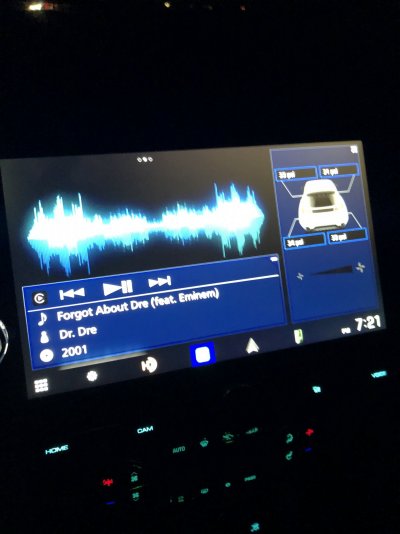
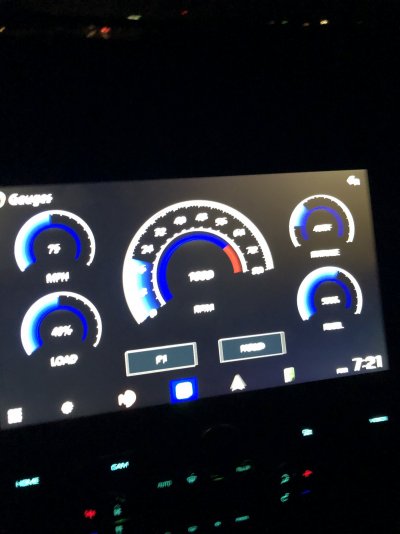
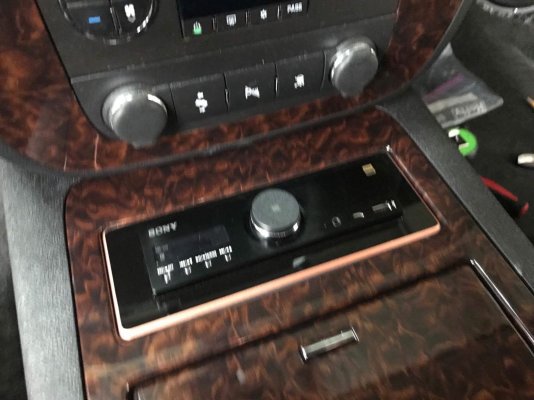
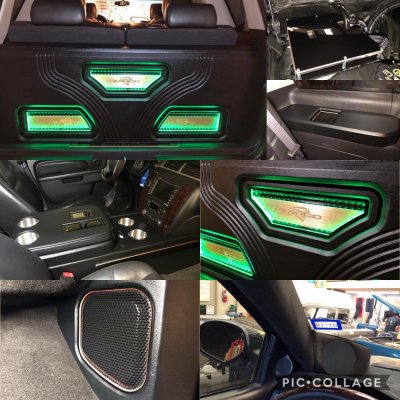
I’ve run multiple head-units in my Denali and my Kenwood DMX1057XR is by far the best I’ve had in here. It’s a hi res media center capable of LDAC streaming as well. The screen is amazing and it’s one of the few that has a true 5v pre out which is a must for me with the rest of my sq system (I compete in sq shows)

I also ran the factory head unit and a 2nd Sony RSX-GS9 at the same time with 2 inputs prior to. Kenwood dmx1057xr also will run all factory alerts and monitoring
627FCF27-28A2-4060-A9A2-5CA8A22AD60D.jpeg
 

Attachments

  • FAD32D37-0142-4B1C-B8EB-3BE7E331AE5C.jpeg
    FAD32D37-0142-4B1C-B8EB-3BE7E331AE5C.jpeg
    173.7 KB · Views: 23
  • 74A13AA7-2BC8-46B8-9A4A-C054B771436C.jpeg
    74A13AA7-2BC8-46B8-9A4A-C054B771436C.jpeg
    172.4 KB · Views: 24
  • 86753B49-7CE6-4923-ACEE-AD4B796C08AA.jpeg
    86753B49-7CE6-4923-ACEE-AD4B796C08AA.jpeg
    248.8 KB · Views: 27
  • 4AA6C1A0-D2A0-43A1-BF47-5C2D650D4637.jpeg
    4AA6C1A0-D2A0-43A1-BF47-5C2D650D4637.jpeg
    428.8 KB · Views: 33

NASTY GM

Full Access Member
Joined
Jun 15, 2009
Posts
780
Reaction score
313
Location
Nor Cal
I’ve run multiple head-units in my Denali and my Kenwood DMX1057XR is by far the best I’ve had in here. It’s a hi res media center capable of LDAC streaming as well. The screen is amazing and it’s one of the few that has a true 5v pre out which is a must for me with the rest of my sq system (I compete in sq shows)

I also ran the factory head unit and a 2nd Sony RSX-GS9 at the same time with 2 inputs prior to. Kenwood dmx1057xr also will run all factory alerts and monitoring
View attachment 357905

I’ve run multiple head-units in my Denali and my Kenwood DMX1057XR is by far the best I’ve had in here. It’s a hi res media center capable of LDAC streaming as well. The screen is amazing and it’s one of the few that has a true 5v pre out which is a must for me with the rest of my sq system (I compete in sq shows)

I also ran the factory head unit and a 2nd Sony RSX-GS9 at the same time with 2 inputs prior to. Kenwood dmx1057xr also will run all factory alerts and monitoring
View attachment 357905
That's the one I wanted!
 

Forum statistics

Threads
137,750
Posts
1,991,171
Members
102,739
Latest member
D Rollins
Back
Top