Question about diagnostics (realtime) screen?

Disclaimer: Links on this page pointing to Amazon, eBay and other sites may include affiliate code. If you click them and make a purchase, we may earn a small commission.

Tah

TYF Newbie
Joined
Apr 1, 2011
Posts
14
Reaction score
0
2012 Chevy Tahoe LTZ 4wd 5.3.

Is there a diagnostic tool that I can tell what my car (engine, drivetrain anything) is doing in realtime as it’s running? Can I plug a screen into something (OBD port) and send that information to a screen (iPhone, IPad, TV, anything) to see realtime things happening?
 

Joseph Garcia

Elite Member
Supporting Member
Joined
Aug 2, 2018
Posts
10,308
Reaction score
14,931
Tech 2 bi-directional scanner will perform that function. You can view these items in real time while you are driving by simply watching the Tech 2's screen. If you want to do time-based analysis, you can hook up the Tech 2 to a PC and download the data and view on the PC.
 
OP
OP
T

Tah

TYF Newbie
Joined
Apr 1, 2011
Posts
14
Reaction score
0
Tech 2 bi-directional scanner will perform that function. You can view these items in real time while you are driving by simply watching the Tech 2's screen. If you want to do time-based analysis, you can hook up the Tech 2 to a PC and download the data and view on the PC.
Can I mount a small screen? I guess think android tablet to monitor diagnostics while driving. I know I said tv but that or a laptop might be a bit cumbersome.
 

Doubeleive

Wes
Supporting Member
Joined
Nov 7, 2017
Posts
30,548
Reaction score
47,998
Location
Stockton, Ca.
IDATALINK MAESTRO RR & compatible headunit radio will give you real time data on the radio screen
 
OP
OP
T

Tah

TYF Newbie
Joined
Apr 1, 2011
Posts
14
Reaction score
0
IDATALINK MAESTRO RR & compatible headunit radio will give you real time data on the radio screen
If my head unit which I spent a decent amount of money on isn’t compatible I’m not going to buy a new one but thanks for the idea. I’ll look up and see if what I have is compatible with IDATALINK MAESTRO RR.
 
OP
OP
T

Tah

TYF Newbie
Joined
Apr 1, 2011
Posts
14
Reaction score
0
or download EFI live and connect a obd tool and a laptop, tablet etc.
Do you know what tablet might be compatible? A lot of those are PC based only and that might get a bit cumbersome driving.
 

Doubeleive

Wes
Supporting Member
Joined
Nov 7, 2017
Posts
30,548
Reaction score
47,998
Location
Stockton, Ca.
Do you know what apps I might be able to use on my iPhone?
efi live is windows compatible, so any windows tablet or laptop
as for android app's torque or torque pro is one, just buy a bt obd adapter those can be had for as little as $20-30 online like a ELM.
 

j91z28d1

Full Access Member
Joined
Feb 28, 2022
Posts
4,604
Reaction score
5,863
what info exactly are you trying to view?

basis obd2 info, a 20$ Bluetooth dongle and some phone apps will do it.

if you want to deeper dive into other modules it's a little more expensive.
 

Joseph Garcia

Elite Member
Supporting Member
Joined
Aug 2, 2018
Posts
10,308
Reaction score
14,931
^^^^^x2^^^^^ It would be more helpful to know what type of real-time data you are thinking about monitoring.
 
OP
OP
T

Tah

TYF Newbie
Joined
Apr 1, 2011
Posts
14
Reaction score
0
what info exactly are you trying to view?

basis obd2 info, a 20$ Bluetooth dongle and some phone apps will do it.

if you want to deeper dive into other modules it's a little more expensive.
 
OP
OP
T

Tah

TYF Newbie
Joined
Apr 1, 2011
Posts
14
Reaction score
0
Right. I do understand but it’s one of those I don’t know what I don’t know things. I’m not sure what information is available for me to monitor outside of what I can see on my display information scroll thru lcd screen. Mpg. Engine hours. Miles to go. Tire pressure. Etc. beyond that I’d like to see anything that’s available to see. I’m just not sure what my truck will show me.
 

j91z28d1

Full Access Member
Joined
Feb 28, 2022
Posts
4,604
Reaction score
5,863
well for example my truck has almost 30 different modules on the can bus network all talking to each other and all have live data that can be viewed by different scanners. you just can physically display all the live data just for the heck of it.

you're basically going to need to research what data will help you with whatever driving you're doing and go from there. what you need to access that data and if that scanner can be used to output to your preferred viewing device will decide what answers you get. Just one really won't cover everything.

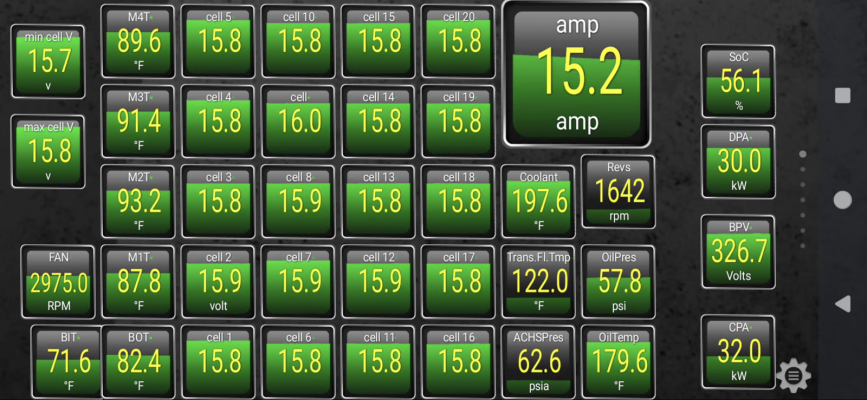
for an example, I have a hybrid yukon.. and I like to see what the hybrid pack is doing from time to time while driving, so I have a found a bunch of pids to put into torque app on my phone to view it.

Screenshot_20240113-183754.png

now while I'm loading the trailer, I like to view the psi in the rear shocks, i have the auto level option. so I don't get to much tongue weight on it and go over the rated max, but torque app I can't find the pids to add that display, so I have a different dongle and phone app to display that data quickly.

so the answer is, it all depends.
 
  • Like
Reactions: Tah

Forum statistics

Threads
137,759
Posts
1,991,353
Members
102,745
Latest member
Buford bubba
Back
Top