
You are using an out of date browser. It may not display this or other websites correctly.
You should upgrade or use an alternative browser.
You should upgrade or use an alternative browser.
Disclaimer: Links on this page pointing to Amazon, eBay and other sites may include affiliate code. If you click them and make a purchase, we may earn a small commission.
kbuskill
***CAUTION*** I do my own stunts!
I just installed a kenwood deck
DMX706S in my truck 08 yukon denali xl I got the rse
harness grounded it and hooked up
the rca's but the rear flip down TV wont power up please help
Wiring harness I used is a crux soogm-16
I'm not sure about the harness you used.
I have an '08 Burb LTZ and I installed a Kenwood DNX575S using a Maestro and have RSE working.
On my HU there are a couple settings that need to be selected depending on how you want the RSE to play (headphones or through the rear speakers).
Here is a video that shows the proper way to hook up the wiring harnesses for RSE and also shows you the settings I am talking about in the radio.
Skip ahead to about 2:30 for the menu settings...
https://binged.it/2ObhUjk
Hope this helps.
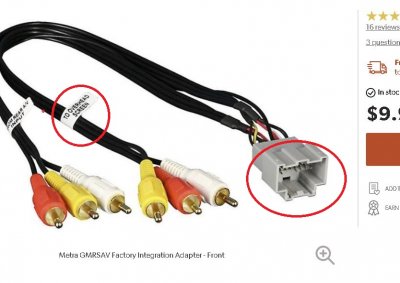
Thx for the info I'm using Axxess GMRSAV harness for the rse its straight forward how to install that but on the factory drop down screen is no picture the kenwood deck I have has no DVD player it's a multi media deck but in the av out settings I have it set to USB and still nothing
kbuskill
***CAUTION*** I do my own stunts!
Thx for the info I'm using Axxess GMRSAV harness for the rse its straight forward how to install that but on the factory drop down screen is no picture the kenwood deck I have has no DVD player it's a multi media deck but in the av out settings I have it set to USB and still nothing
GMRSAV doesn't use USB, it uses RCA ports, so having the AV OUT set to USB won't allow the RSE to work... at least that's my guess.
Try changing the AV out settings and see what happens.
kbuskill
***CAUTION*** I do my own stunts!
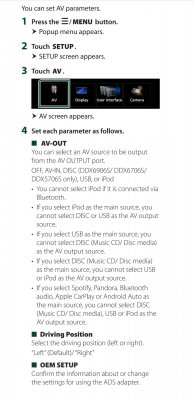
This is what I'm talking about
View attachment 239741
So I have it so what is playing off the USB stick ie movies will play on the av out but screen is black like no power
If all of your connections on the back of the HU are correct then I am at a loss.
As I stated earlier, I used an Idatalink Maestro to retain all the factory functions and they use a different RSE harness. It was an Idatalink HRN-AV-GM5.
Perhaps someone who has used the same RSE harness as you can be of more help.
Buckeye Banker
TYF Newbie
I just put a Kenwood DMX906s in my 13 Yukon Denali XL and had the same issue. I used the idatalink maestro rr, so I called their tech support and was informed that the 2nd row and 3rd row monitors are run on different pins on the factory harness. I had to find pins 8 and 18 on the back side of the factory connector and solder an rca jack. Then split the video signal from the audio out from my new kenwood with RCA Y adapter to the jack that I just installed AND the video connector on the aftermarket AV harness.
Hope this makes sense. I found a tech bulletin from Alpine that had pictures, but don't have it with me right now.
Worked like a charm after I split the signal and sent to both feeds, but definitely more work that I had planned for.
I did search all the aftermarket AV harness makers, and none seemed to send the video feed to pins 8 and 18. They all seem to be made for Tahoe/Yukon with single rear screen instead of the Suburban/Yukon XL with dual screens.
Here is the email that I received from tech support at idatalink:
GM2 harness vehicles with 3rd row overhead, the 3rd row video wires can be found in the 20 pin black plug that plugs into the AVGM2, pin 8 Green (goes to center conductor of RCA) and pin 18 White (goes to shield of RCA)
Shout out to Idatalink on their excellent support and also for their Maestro RR. It worked great!!! Does not retain factory XM, but does OnStar, chimes, OBD2 for guages, rear park assist, tpms, Rear AV IN, 2nd row factory screen, factory wireless headphones.
Hope this makes sense. I found a tech bulletin from Alpine that had pictures, but don't have it with me right now.
Worked like a charm after I split the signal and sent to both feeds, but definitely more work that I had planned for.
I did search all the aftermarket AV harness makers, and none seemed to send the video feed to pins 8 and 18. They all seem to be made for Tahoe/Yukon with single rear screen instead of the Suburban/Yukon XL with dual screens.
Here is the email that I received from tech support at idatalink:
GM2 harness vehicles with 3rd row overhead, the 3rd row video wires can be found in the 20 pin black plug that plugs into the AVGM2, pin 8 Green (goes to center conductor of RCA) and pin 18 White (goes to shield of RCA)
Shout out to Idatalink on their excellent support and also for their Maestro RR. It worked great!!! Does not retain factory XM, but does OnStar, chimes, OBD2 for guages, rear park assist, tpms, Rear AV IN, 2nd row factory screen, factory wireless headphones.
Last edited:
Buckeye Banker
TYF Newbie
Read through your post again, and just wanting to clarify that you got the 2nd row screen working, but not the 3rd. If 2nd row not working, you have other install issues or issues with settings on the Kenwood head unit.
Here is a link to the tech bulletin from alpine showing pictures of the Rear AV connector and the mod that needs to be made to allow the 3rd row screen to display the same content as the 2nd row.
https://kb.alpine-usa.com/file.php?id=2
To test, I used a isimple medialinx composite to HDMI converter on the rear video inputs. Then used apple lightning to HDMI adapter. This allows my kids to use their iphones or ipads in back to run into the system. Kenwood must be set to patch AV IN -> AV OUT.
I was also able to play a video file from a USB device on the back screens, but you cant do this while using Apple CarPlay, so worthless for me. I did not purchase a Kenwood unit with the DVD because we intend to use the AV IN to connect devices and provide content. I cannot recommend trying to play media files from USB. If not getting content from AV IN, I recommend getting unit with DVD.
The factory wireless headphones still work just fine with the audio from AV IN.
Hope this helps!
Here is a link to the tech bulletin from alpine showing pictures of the Rear AV connector and the mod that needs to be made to allow the 3rd row screen to display the same content as the 2nd row.
https://kb.alpine-usa.com/file.php?id=2
To test, I used a isimple medialinx composite to HDMI converter on the rear video inputs. Then used apple lightning to HDMI adapter. This allows my kids to use their iphones or ipads in back to run into the system. Kenwood must be set to patch AV IN -> AV OUT.
I was also able to play a video file from a USB device on the back screens, but you cant do this while using Apple CarPlay, so worthless for me. I did not purchase a Kenwood unit with the DVD because we intend to use the AV IN to connect devices and provide content. I cannot recommend trying to play media files from USB. If not getting content from AV IN, I recommend getting unit with DVD.
The factory wireless headphones still work just fine with the audio from AV IN.
Hope this helps!
Attachments
Last edited:
Buckeye Banker
TYF Newbie
Sorry, I misread your original post. I have basically the same kenwood unit (906 instead of 706). Only problem I had with 2nd row was trying to use a cheap 1/8" to RCA component cable between receiver and the aftermarket harness. Came to find out the kenwood pinout on the 1/8" jack is not the same as the cable I purchased or any of the 3 laying around my house. Had to purchase kenwood CA-C3AV cable for about $19 from amazon to make it work. Multimeter confirmed that kenwood does not use the same pinout as "identical" cables I have for JVC camcorder and LG OLED TV.
Hope this helps! I love my new Kenwood unit!
Hope this helps! I love my new Kenwood unit!
I'm only having problem of the video out to the 2nd row flip down monitor I try and play a movie on the kenwood deck and want it to display on the 2nd row flip down. I talked to an audio guy and he said it's like it's not being triggered on so maybe there is a wire on the factory harness that's a trigger wire but not sure have to look into it more
itsbo1313
Full Access Member
I also installed a Kenwood with Maestro. Do you have two rear monitors working. I can only get the second row screen to work. Third row stays dark.I'm not sure about the harness you used.
I have an '08 Burb LTZ and I installed a Kenwood DNX575S using a Maestro and have RSE working.
On my HU there are a couple settings that need to be selected depending on how you want the RSE to play (headphones or through the rear speakers).
Here is a video that shows the proper way to hook up the wiring harnesses for RSE and also shows you the settings I am talking about in the radio.
Skip ahead to about 2:30 for the menu settings...
https://binged.it/2ObhUjk
Hope this helps.


You have to patch the 2nd row and 3rd row monitor cables together behind the factory harness to make the 3rd row workI also installed a Kenwood with Maestro. Do you have two rear monitors working. I can only get the second row screen to work. Third row stays dark.
itsbo1313
Full Access Member
How do you that. Crutchfield had me tap the solid green and solid white wires on the idatalink gm harness. But it didn’t work.
kbuskill
***CAUTION*** I do my own stunts!
I also installed a Kenwood with Maestro. Do you have two rear monitors working. I can only get the second row screen to work. Third row stays dark.
I don't have a 3rd row monitor, only 2nd row.
I remember reading about others doing what Wes suggested though.
you have to trace the 2 wires that are used to connect the 2nd row with the a/v adapter to the back of the factory harness and connect those to the 2 wires for the 3rd row, I don't have a diagram to show you and I would have to pull my deck out, has nothing to do with the idatalink the 3rd is just not physically connected once the factory unit is pulled out.How do you that. Crutchfield had me tap the solid green and solid white wires on the idatalink gm harness. But it didn’t work.
you have to patch the wires for the 2nd row screen to the 3rd, they should be next to 2nd row ones
itsbo1313
Full Access Member
Thank you, I’ll try that tomorrow.
itsbo1313
Full Access Member
Got it working. Thanks guys.
Similar threads

- Replies
- 1
- Views
- 154


