Tech2 and SPS2 programing

Disclaimer: Links on this page pointing to Amazon, eBay and other sites may include affiliate code. If you click them and make a purchase, we may earn a small commission.

Mickey_7106

Full Access Member
Joined
Oct 22, 2018
Posts
485
Reaction score
316
Location
Bay Area
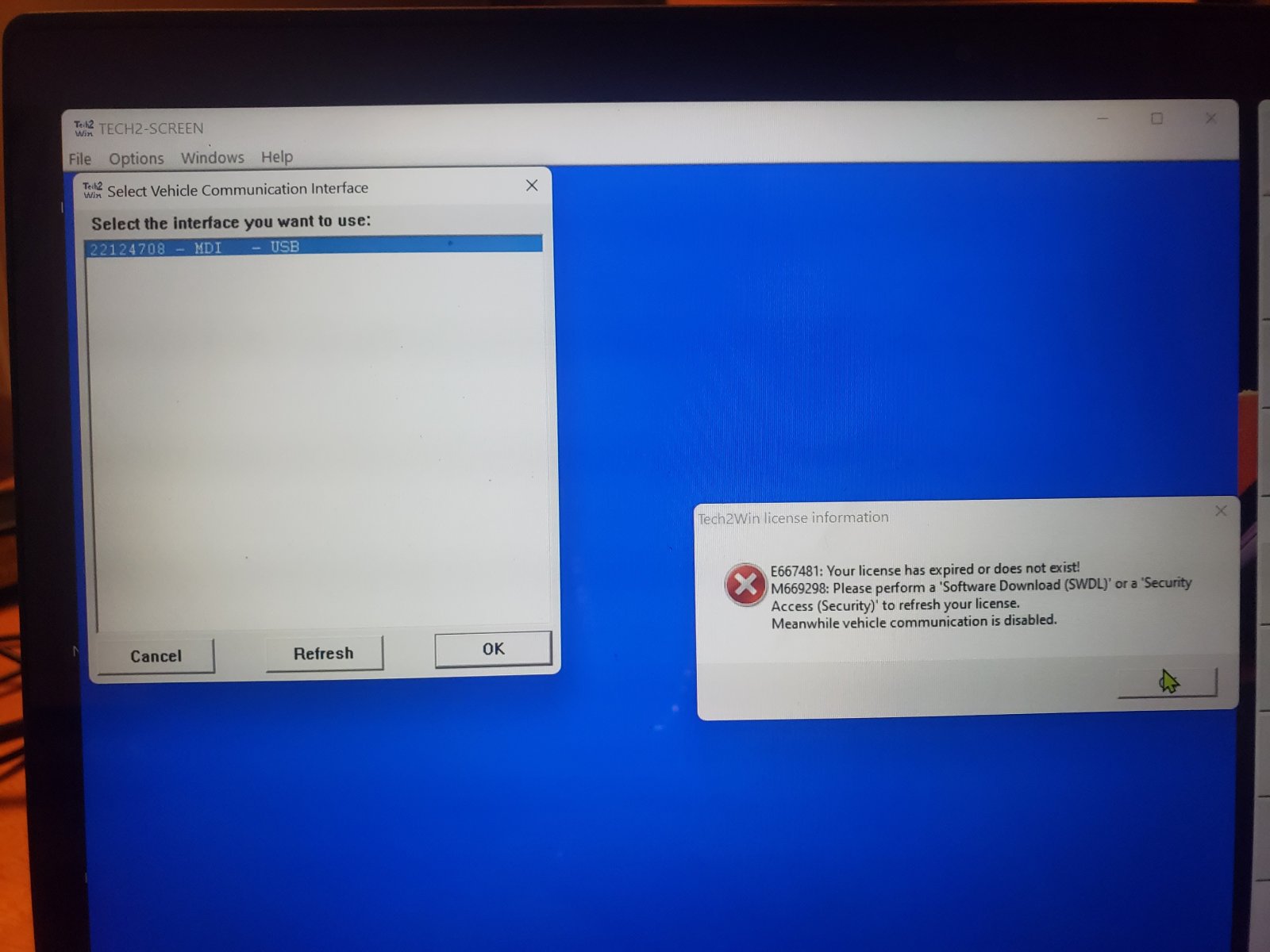
I have vxdiag download. Firmware and license are up to date. Tech2win was downloaded. Don't remember if was from vxdiag software or the tech line connect. When i click on tech2win app it shows it needs to be updated and expired license
20221127_202009.jpg


20221127_202045.jpg


20221127_202100.jpg


20221127_202118.jpg
 

mattbta

Full Access Member
Joined
Jun 19, 2012
Posts
1,185
Reaction score
2,217
Location
Frisco, TX
You have to periodically update the Nano license. IIRC, it is accessed on that first page "Device" for VX Manager.
 

Mickey_7106

Full Access Member
Joined
Oct 22, 2018
Posts
485
Reaction score
316
Location
Bay Area
The tech2win app i have is outdated. not sure how to get the most current version.
 

mattbta

Full Access Member
Joined
Jun 19, 2012
Posts
1,185
Reaction score
2,217
Location
Frisco, TX
ive been using different blogs from that site and its confusing. Its easier to download TLC from ACdelcotds.com. It downloads tech2win and MDI manager. Doing it both ways leaves me stuck with an old version of tech2win
Did your Nano come with a CD/DVD? That's where I install from..the tech2win is cracked, tho, to work with their device.
 

Mickey_7106

Full Access Member
Joined
Oct 22, 2018
Posts
485
Reaction score
316
Location
Bay Area
ok. the software was in the usb stick. It was in .RAR format so my laptop wouldnt recognize it until i downloaded a program to read it then extract it. looks like i have access to tech2win but now it wont recognize the nano as being plugged in or installed
 

mattbta

Full Access Member
Joined
Jun 19, 2012
Posts
1,185
Reaction score
2,217
Location
Frisco, TX
If you installed the GM software, it replaces the VXDiag drivers with its own. Might have to start over..uninstall everything and try again.
 

Mickey_7106

Full Access Member
Joined
Oct 22, 2018
Posts
485
Reaction score
316
Location
Bay Area
I Uninstalled everything and started over. Still getting this message when i open tech2win. I can see the vcx nano connected on vx manager. What am i missing?
20221128_141511.jpg


And now this doing more digging within my pc system settings

20221129_085203.jpg
 

exp500

Full Access Member
Joined
May 14, 2017
Posts
2,016
Reaction score
1,965
Com port 5 message. Need to check which are active and which is in use. Then compare drivers. Windows has never been good at selecting drivers automatically. You have to give it the right one.
 

Pickensmd

TYF Newbie
Joined
Nov 13, 2021
Posts
11
Reaction score
4
I had major success while using SPS2 and Techline Connect to program my driver door module. Here is what I learned.

Guide I followed: http://blog.vxdiagshop.com/2022/03/...ano-gm-with-techline-connect-vmware-solution/

My particular scenario: Use a VM on my work laptop because my home desktop is everything that is not approved: Fedora 36, Ryzen 7 5000 series, and not portable. The work laptop has a strict security policy, but VMs are approved and there is no security policy for them.

What didn't work: 1) VirtualBox. All sorts of weird errors such as unable to authenticate TDS. I spent 3 hours on this before giving up and moving to VMWare Player. 2) Windows Host: could not download a Windows ISO while already using Windows and can't execute the media creation tool due to the work laptop security policy mentioned above.

What did work: 1) USB passthrough to guest OSes on either VM. Easier to set up in VMWare though. May be useful in the future because I have weird graphics issues with VMWare. (white distorted blocks) 2) VX Manager 1.8.9. I think it is the newest version. 3) Launching from Edge browser. 4) Not installing software in any particular order. 5) Only needing VX Manager and Techline Connect.

Actual process took maybe an hour from start-to-finish, including the Windows 10 Pro install.
The driver door module was programmed in under 5 minutes and resolved all of my weird issues I mentioned in my introduction thread.

I tried this process and followed it down to the T. I did everything correctly but once I plug in the usb to the VCXNano and "Connect to virtual machine" from list it does nothing. The VCXNano is not recognized and upon proceeding to the next step of setting up the VX Manager and updating the firmware, is just give me an error and says "No Device".

Any help here would be greatly appreciated. Also once you get to the final programming screen, could you post some screenshots of what it looks like or even a video of the laptop screen to know if I am seeing the same thing that worked for you?
 

mattbta

Full Access Member
Joined
Jun 19, 2012
Posts
1,185
Reaction score
2,217
Location
Frisco, TX
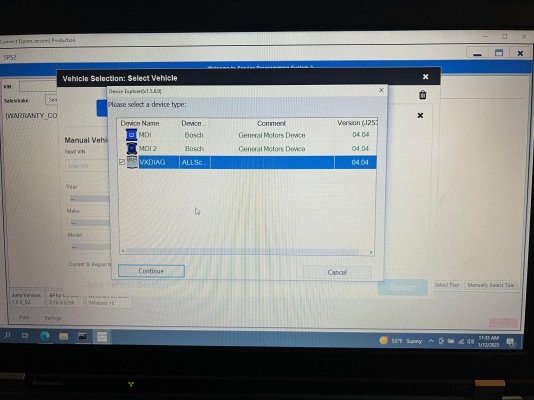
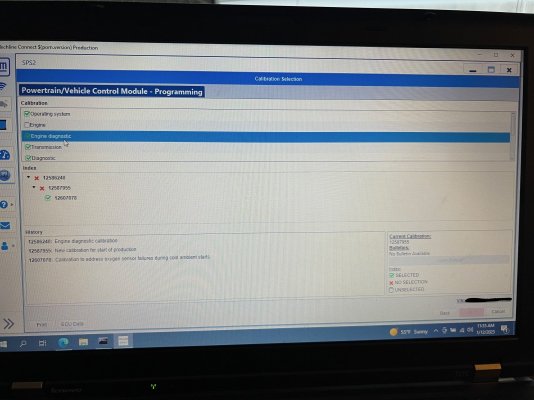
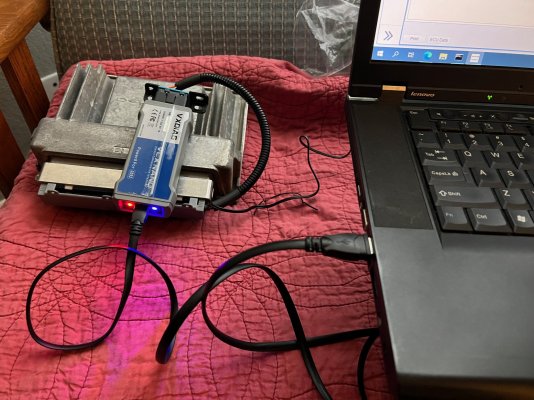
I used an old Lenovo T-510.
Installed windows 10 64 bit.
Installed java 8 32 bit.
Installed VCX Manager.
Installed Techline Connect directly from AC Delco TDS website launcher.
Can program in vehicle or via bench harness.
No VMWare.
IMG_1807.jpegIMG_1808.jpegIMG_1809.jpeg
 
OP
OP
Fubar0715

Fubar0715

Scott
Supporting Member
Joined
Jun 13, 2020
Posts
695
Reaction score
1,422
Location
Southern New Hampshire

Forum statistics

Threads
137,691
Posts
1,989,691
Members
102,691
Latest member
RobK
Back
Top