Installing a backup Camera (here we go, finally)

Disclaimer: Links on this page pointing to Amazon, eBay and other sites may include affiliate code. If you click them and make a purchase, we may earn a small commission.

OP
OP
Ron C

Ron C

Full Access Member
Joined
Nov 4, 2017
Posts
727
Reaction score
174
Location
Los Alamos, NM
Ok I had one of our techs print me out the wiring for the 2013 Tahoe and it shows the camera with 6 wires total. There is one connector that has a Pink which would be key on power and a black which would be ground. The second connector has a white wire which I was told was the Positive camera lead and light blue which is the negative camera lead. Then the gray he said gets blunted out which I take to mean it is not used and the dark blue goes to the BCM somehow. This info helps but I still am not sure what to do since I am not a wiring guy and I am lost at this point!

Mike--Hamilton Chevy


btw: the blue wire could also be a trigger, that the BCM uses to switch the camera on. (but your BCM doesn't know about a camera, so it might be that you's have to have it high all the time, so that the camera is just on, and the radio "decides" to display the signal, or not.) Amps use a wire like that too, but that is set high by the radio.

Ron
 
OP
OP
Ron C

Ron C

Full Access Member
Joined
Nov 4, 2017
Posts
727
Reaction score
174
Location
Los Alamos, NM
btw; I'd be careful hooking the camera up to a 12V source, if I were you. The camera itself is 5V AND it does not have a red lead (which is typically used for +12V connections.)

I am not sure, but I think that the camera is more than likely driven by the Nav Radio (power, signal, trigger etc), it would make more sense, since the radio can determine how long the screen is on/off (or other situations, like displaying a map, a dvd etc), and when the signal needs to be off, or the whole camera needs to be on/off

My camera has the 5V markings, but as you can see in the first picture, the first part is gray (the label says it is 5V for the camera itself). I have been told the gray part of the harness has a voltage controller in it, to reduce the voltage. Also, that camera has a red and black lead, re +12V, black being ground.

Ron
 

89Suburban

Bull in the china shop
Space X Supporting Member
Joined
Jan 10, 2013
Posts
17,830
Reaction score
50,797
Location
SE PA
and the leads are different, red/black/RCA.

This is the type I have. Do you do any towing? I have a camera temp mounted so I can see when lining up the trailer ball. My major problem is I have a 6" drop hitch. So it sticks out of the bumper about 6" then drops another 6". Right now the only way I can get a shot of trailer ball is having my camera mounted on the rear wiper arm because it seems to be the furthest point back (excluding the rear bumper) that can get a view of the ball and the camera is out of harms way and not very noticeable.
 
OP
OP
Ron C

Ron C

Full Access Member
Joined
Nov 4, 2017
Posts
727
Reaction score
174
Location
Los Alamos, NM
This is the type I have. Do you do any towing? I have a camera temp mounted so I can see when lining up the trailer ball. My major problem is I have a 6" drop hitch. So it sticks out of the bumper about 6" then drops another 6". Right now the only way I can get a shot of trailer ball is having my camera mounted on the rear wiper arm because it seems to be the furthest point back (excluding the rear bumper) that can get a view of the ball and the camera is out of harms way and not very noticeable.

Yes I do some towing, and planning on more. (I have a regular utility trailer, but planning on trading it for a dual axle car hauler, to haul my 79 CJ.)

I didn't get the camera to work yet, it was a DOA, the new one will be here in a week or two.

So you have the red/black/RCA style too? What keyed contact did you connect the red one up to?

and... isn't it fun to get the RCA plug through the tailgate boot, in the top?

Ron
 

Ebay Mike

Full Access Member
Joined
May 9, 2018
Posts
190
Reaction score
117
Location
Detroit MI
Isn't it fun to get the RCA plug through the tailgate boot, in the top?

Ron

That is why I am going to run my wires through the boot before I connect the RCA plug to them so it will be much easier to squeeze it through there. I already have extra wires for the light bar I have in the back window running through the boot so it is getting very tight in there.

Mike--Hamilton Chevy
 

89Suburban

Bull in the china shop
Space X Supporting Member
Joined
Jan 10, 2013
Posts
17,830
Reaction score
50,797
Location
SE PA
Yes I do some towing, and planning on more. (I have a regular utility trailer, but planning on trading it for a dual axle car hauler, to haul my 79 CJ.)

I didn't get the camera to work yet, it was a DOA, the new one will be here in a week or two.

So you have the red/black/RCA style too? What keyed contact did you connect the red one up to?

and... isn't it fun to get the RCA plug through the tailgate boot, in the top?

Ron

I actually have it connected to a power cord running up to the dash with a cigarette lighter socket end and just plug it in when I want it on. I ran the wires from the center console under the pass seat and under the floor mat trim all the way to the back headliner trim and just have some wire hanging out ghetto style going into the tailgate trim LOL.

Then it runs down the tailgate trim and under the tail glass to the outside wiper LOLOLOL.
 
OP
OP
Ron C

Ron C

Full Access Member
Joined
Nov 4, 2017
Posts
727
Reaction score
174
Location
Los Alamos, NM
I actually have it connected to a power cord running up to the dash with a cigarette lighter socket end and just plug it in when I want it on. I ran the wires from the center console under the pass seat and under the floor mat trim all the way to the back headliner trim and just have some wire hanging out ghetto style going into the tailgate trim LOL.

Then it runs down the tailgate trim and under the tail glass to the outside wiper LOLOLOL.


is this Dave? from Oregon? Hahahahaha
 
OP
OP
Ron C

Ron C

Full Access Member
Joined
Nov 4, 2017
Posts
727
Reaction score
174
Location
Los Alamos, NM
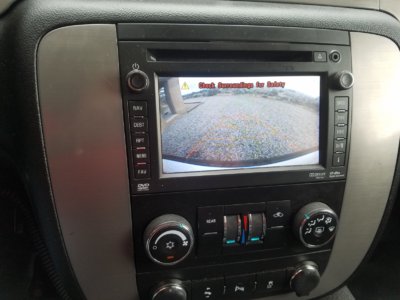
... replacement camera came in yesterday, and installed it today....

and yay... it's working like a charm... I noticed it being uncomfortable watching it while backing up, I guess it is a good means to check what's right behind you. Same as with the "backup assist".. not something to depend on, just an adde feature to help.

The "backup assist" and backup camera definitely help... because I figured that 'Tahoe' must be 'TX slang' for 'can't see a damn thing with all these dead angles because of the pillars and head rests"

Ron

20180616_145025.jpg
 

Ebay Mike

Full Access Member
Joined
May 9, 2018
Posts
190
Reaction score
117
Location
Detroit MI
Congrats on getting the camera working. Once I get my radio stuff figured out I will finish my wiring for the camera and the XM radio but not until I get the radio to quit acting up. Glad to see you making progress on yours.

Mike--Hamilton Chevy
 
OP
OP
Ron C

Ron C

Full Access Member
Joined
Nov 4, 2017
Posts
727
Reaction score
174
Location
Los Alamos, NM
Congrats on getting the camera working. Once I get my radio stuff figured out I will finish my wiring for the camera and the XM radio but not until I get the radio to quit acting up. Glad to see you making progress on yours.

Mike--Hamilton Chevy

Installing the camera is pretty straight forward, one just has to 'route' the wires through trim, so you need to take the tailgate covers off and from there route it through the 'ceiling' Easiest I found was to route it through the boot, from there to the rear dome light, fish it out and from there to the driver side C pillar, going down, and from there to the front. My camera is connected to a 'spare' ignition keyed power tab in that junction box near the brake pedal. The ground needs to actually go to a ground/sheet-metal. The RCA connector runs to the radio.

I am thinking about the XM part, if I can get free weather and traffic info with that. I posted before, when I was driving in a busy area in Dallas a few weeks back, I heard traffic announcements a few times, which was somewhat weird, since I don't have XM, I was listening to "usb audio" and I don't think GPS sends traffic info? Maybe it picked up an XM signal even without the antenna?

Ron
 
OP
OP
Ron C

Ron C

Full Access Member
Joined
Nov 4, 2017
Posts
727
Reaction score
174
Location
Los Alamos, NM
Congrats on getting the camera working. Once I get my radio stuff figured out I will finish my wiring for the camera and the XM radio but not until I get the radio to quit acting up. Glad to see you making progress on yours.

Mike--Hamilton Chevy


I wonder if Matt from OEM radios could test/fix your radio. Also, I would have gone after the ebay seller, he might have the two week return policy BUT that's for regular merchandise, not broken stuff. (but I am just like that).

Ron
 

Ebay Mike

Full Access Member
Joined
May 9, 2018
Posts
190
Reaction score
117
Location
Detroit MI
I wonder if Matt from OEM radios could test/fix your radio. Also, I would have gone after the ebay seller, he might have the two week return policy BUT that's for regular merchandise, not broken stuff. (but I am just like that).

Ron

I have asked Matt and he basically said they only fix radios that they sell. They do not repair other people's radios. As for the Ebay seller, he sold me a radio that worked perfectly fine when I installed it so what exactly is his fault that I am have issues later? I tried to get him to work with me and I can not argue the fact that it is an electronic item that I have modified by having programming done to it and it worked fine when installed even after being programmed. Not much more he can be held liable for.

I am growing tired of all the drama and am about ready to go back to the stock radio and just forget about all the additional stuff. This is not worth all the drama. I just went through a divorce after 12 years of marriage and I have enough drama already. This was supposed to be my present to myself to take my mind off how bad I got rung through the ringer by the lawyer and judge and it has been all bad! Thanks for your suggestions but I give up.

Mike--Hamilton Chevy
 
Last edited:

89Suburban

Bull in the china shop
Space X Supporting Member
Joined
Jan 10, 2013
Posts
17,830
Reaction score
50,797
Location
SE PA
... replacement camera came in yesterday, and installed it today....

and yay... it's working like a charm... I noticed it being uncomfortable watching it while backing up, I guess it is a good means to check what's right behind you. Same as with the "backup assist".. not something to depend on, just an adde feature to help.

The "backup assist" and backup camera definitely help... because I figured that 'Tahoe' must be 'TX slang' for 'can't see a damn thing with all these dead angles because of the pillars and head rests"

Ron

View attachment 201618


Looks good. i took all my headrests out. I can't stand them blocking my view and not being able to reach around/over them.
 
OP
OP
Ron C

Ron C

Full Access Member
Joined
Nov 4, 2017
Posts
727
Reaction score
174
Location
Los Alamos, NM
Looks good. i took all my headrests out. I can't stand them blocking my view and not being able to reach around/over them.


and in a Suburban you have larger widows in the back, but you of course have 3 rows of seats. I kinda reasoned, *lol*, that Tahoe is TX slang for "you can't see a darn thing with these dead angles"

Oh and thank you!!.. I tried to do it in a OEM look and feel, I just like it that way.

Ron
 
Last edited:

Ebay Mike

Full Access Member
Joined
May 9, 2018
Posts
190
Reaction score
117
Location
Detroit MI
Ok I think I need to learn more patience! I finally pulled the Nav radio back out and plugged in the GPS antenna and then drove the truck to work this morning. When I stopped for gas and turned the truck off the radio kept playing like it should and when I opened the door it turned off. Shockingly when I got back in the truck and restarted it the clock had held the correct time instead of resetting to 12:00! Maybe Ron was right and I just needed the GPS antenna to fix the clock issue. That is why I came here was to get help from people who are much smarter than I am. Thanks.

Mike--Hamilton Chevy
 
OP
OP
Ron C

Ron C

Full Access Member
Joined
Nov 4, 2017
Posts
727
Reaction score
174
Location
Los Alamos, NM
Ok I think I need to learn more patience! I finally pulled the Nav radio back out and plugged in the GPS antenna and then drove the truck to work this morning. When I stopped for gas and turned the truck off the radio kept playing like it should and when I opened the door it turned off. Shockingly when I got back in the truck and restarted it the clock had held the correct time instead of resetting to 12:00! Maybe Ron was right and I just needed the GPS antenna to fix the clock issue. That is why I came here was to get help from people who are much smarter than I am. Thanks.

Mike--Hamilton Chevy


*lol* yeah these things act a little weird. For example, if you would disconnect the VSS wire, navigation etc would work BUT, it will not update the display, unless you stop and take the car out of gear. (nav screen, clock, music titles.. nothing changes/updates, unless you take the car out of gear OR have the VSS lead actually connected.

glad you got it going though

Ron
 

Forum statistics

Threads
137,715
Posts
1,990,293
Members
102,708
Latest member
glazar

Latest posts

Back
Top