Help Needed - B1000 Symptom 35 Trouble Code - SOLVED

Disclaimer: Links on this page pointing to Amazon, eBay and other sites may include affiliate code. If you click them and make a purchase, we may earn a small commission.

Joseph Garcia

Elite Member
Supporting Member
Joined
Aug 2, 2018
Posts
10,303
Reaction score
14,923
Hi Folks,

I need some assistance from the Team. I started using my Tech 2, and I currently have two trouble codes.

History:

When I first used the Tech 2, I found out that it was working correctly, and I cleared all previous trouble codes, in order to start with a clean and blank slate. After removing all previous trouble codes, I ran the truck for 20 or so miles, and plugged in the Tech 2 again. I now have 2 trouble codes, but I do not believe that they are related to each other (unless, you tell me otherwise).

B1000 Symptom 35 ECU Performance ROM Failure
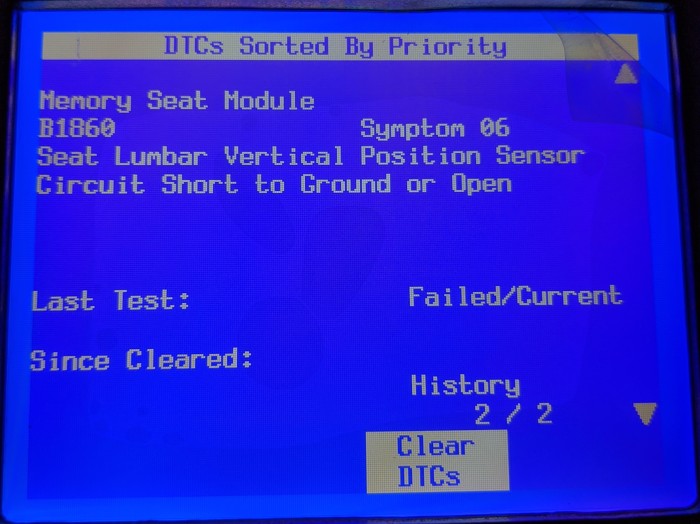
B1860 Symptom 06 Seat Lumber Vertical Position Sensor Circuit Short to Ground or Open

I have no dashboard lights or notifications popping up, nor I do not notice anything unusual in the way that the truck performs. The only unusual occurrence is that after I had the recent heater hose blowout and repair, I am getting over 2 mpg less than the average mpg across the past 2 years (not that I care, but it is a noticeable change).

I have a Black Bear Performance tune on the ECU and TCU that was last updated in May of 2019.

Screen shots of the current trouble codes are listed below:
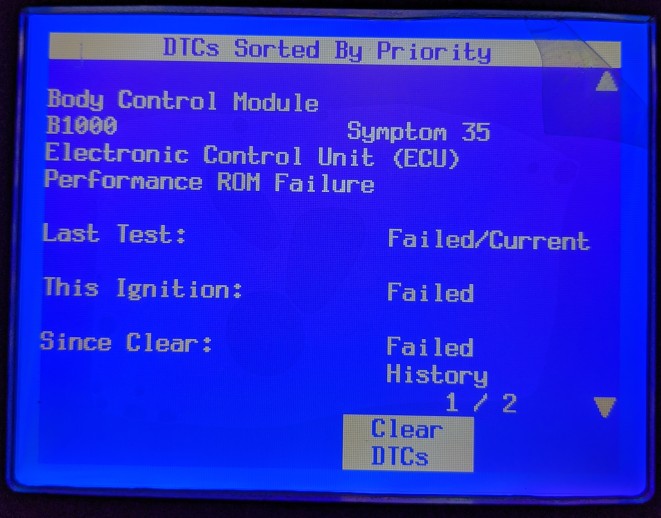
B1000 Symptom 35.jpg

B1860 Symptom 06.jpg


Next Steps:

Please give me your thoughts and recommendations for proceeding with troubleshooting these 2 trouble codes. As always, you input and assistance are very much appreciated.
 

OR VietVet

GMT800 2005 Tahoe Z71
Navy Supporting Member
Joined
Oct 8, 2014
Posts
23,720
Reaction score
44,163
Location
Willamette Valley
B1000 code: B1000 is an internal fault code for the BCM, either for an internal "write malfunction" or "checksum malfunction". According to the service manual, it might be a wiring issue, however, it is most likely a bad BCM.

B1860 code: The Body Control Module (BCM) monitors the Climate Control A/C Pressure Switch. The BCM sets the OBDII code when the Climate Control A/C Pressure Switch is not to factory specifications.

Sounds to me like it is not related to what you experienced and I see no reason for the 2 mpg loss related to them. I would get to that BCM and pull it and inspect and inspect wiring as far as you can.
 

swathdiver

Full Access Member
Joined
May 18, 2017
Posts
21,296
Reaction score
30,248
Location
Treasure Coast, Florida
Hi Folks,

I need some assistance from the Team. I started using my Tech 2, and I currently have two trouble codes.

History:

When I first used the Tech 2, I found out that it was working correctly, and I cleared all previous trouble codes, in order to start with a clean and blank slate. After removing all previous trouble codes, I ran the truck for 20 or so miles, and plugged in the Tech 2 again. I now have 2 trouble codes, but I do not believe that they are related to each other (unless, you tell me otherwise).

B1000 Symptom 35 ECU Performance ROM Failure
B1860 Symptom 06 Seat Lumber Vertical Position Sensor Circuit Short to Ground or Open

I have no dashboard lights or notifications popping up, nor I do not notice anything unusual in the way that the truck performs. The only unusual occurrence is that after I had the recent heater hose blowout and repair, I am getting over 2 mpg less than the average mpg across the past 2 years (not that I care, but it is a noticeable change).

I have a Black Bear Performance tune on the ECU and TCU that was last updated in May of 2019.

Screen shots of the current trouble codes are listed below:
View attachment 254558
View attachment 254559

Next Steps:

Please give me your thoughts and recommendations for proceeding with troubleshooting these 2 trouble codes. As always, you input and assistance are very much appreciated.

Joe, your BCM is beginning to malfunction and the lumbar portion of your driver's seat isn't working all the time as it should. Could be a loose wire issue but probably a motor is wore out. If you're the only one driving it, I'd get ready for a new BCM first. It has not completely failed, it just registered a partial failure. It wouldn't start if it failed.

Haven't driven mine much this year but the mileage is off on it too. My wife has been driving it and her mileage with it is way off too! I get better mileage burning E85 than she does on gas! LOL
 
OP
OP
Joseph Garcia

Joseph Garcia

Elite Member
Supporting Member
Joined
Aug 2, 2018
Posts
10,303
Reaction score
14,923
Thank you, Folks. I much appreciate your responses.

I'll check all of the wiring and connectors. A few follow-up questions, if I may....


BCM

In the event that I determine that I need to replace the BCM, where would I look for a replacement? It looks like Rock Auto has some, but I will have to get the actual part number for mine, as it looks like that is more than one BCM part number for my year/model of truck.

If/when I replace the BCM, is it simply a plug and replace, or will there be some programming/security clearing procedures required?


Lumbar Support Position Sensor

To find this sensor, is it likely that it is located within the seat itself? If yes, would I need to remove the seat covering on the backrest portion of the seat to access it?
 

Doubeleive

Wes
Supporting Member
Joined
Nov 7, 2017
Posts
30,545
Reaction score
47,989
Location
Stockton, Ca.
Thank you, Folks. I much appreciate your responses.

I'll check all of the wiring and connectors. A few follow-up questions, if I may....


BCM

In the event that I determine that I need to replace the BCM, where would I look for a replacement? It looks like Rock Auto has some, but I will have to get the actual part number for mine, as it looks like that is more than one BCM part number for my year/model of truck.

If/when I replace the BCM, is it simply a plug and replace, or will there be some programming/security clearing procedures required?


Lumbar Support Position Sensor

To find this sensor, is it likely that it is located within the seat itself? If yes, would I need to remove the seat covering on the backrest portion of the seat to access it?
the new bcm would need to be programmed with a tech2 or by the dealer, there may be other company's that pre-program them for the vin but not sure you would need to look online like ebay or google
 
OP
OP
Joseph Garcia

Joseph Garcia

Elite Member
Supporting Member
Joined
Aug 2, 2018
Posts
10,303
Reaction score
14,923
the new bcm would need to be programmed with a tech2 or by the dealer, there may be other company's that pre-program them for the vin but not sure you would need to look online like ebay or google

Excellent! Since I have a Tech 2, I should be able to program it. If this is the outcome, I may need some programming tips from you or @swathdiver .

I'll check out the wiring first. Probably not today, at it is supposed to be in the low 90's.

Thanks again.
 

Doubeleive

Wes
Supporting Member
Joined
Nov 7, 2017
Posts
30,545
Reaction score
47,989
Location
Stockton, Ca.
Excellent! Since I have a Tech 2, I should be able to program it. If this is the outcome, I may need some programming tips from you or @swathdiver .

I'll check out the wiring first. Probably not today, at it is supposed to be in the low 90's.

Thanks again.
to do the programming you will need a tablet/laptop/pc with at least windows 7 and a serial port or usb to serial adapter and a cable that will reach from the computer to the tech2 to the truck.
then you have to pay the $40 subscription fee that gives you 2yrs of programming (per vin number). you will also want to have a 12v wall power cord to plug into the tech2 so it wont be depending on the truck battery for power. If the truck battery is not in good shape you may also want to have it hooked up to a battery charger.
 
OP
OP
Joseph Garcia

Joseph Garcia

Elite Member
Supporting Member
Joined
Aug 2, 2018
Posts
10,303
Reaction score
14,923
Thank you, Wes. Much appreciated. I'll have to think about that. May be easier to pay my mechanic the $40, and have him program it. Though, if I'm ever going to become proficient on using the Tech 2, no time like the present.

Who would I need to contact, in order to pay the $40 subscription fee?

I did previously try to install the Tech 2 software on my Windows 10 machine, and it would not start the installation, giving me a wrong OS error. I do have an old laptop with Windows 200 installed on it, and it runs, so that may be an option. And, it does have a serial port.
 

swathdiver

Full Access Member
Joined
May 18, 2017
Posts
21,296
Reaction score
30,248
Location
Treasure Coast, Florida
Thank you, Wes. Much appreciated. I'll have to think about that. May be easier to pay my mechanic the $40, and have him program it. Though, if I'm ever going to become proficient on using the Tech 2, no time like the present.

Who would I need to contact, in order to pay the $40 subscription fee?

I did previously try to install the Tech 2 software on my Windows 10 machine, and it would not start the installation, giving me a wrong OS error. I do have an old laptop with Windows 200 installed on it, and it runs, so that may be an option. And, it does have a serial port.

Joe, you don't NEED that software that came with the Tech-2. You go here (https://www.acdelcotds.com/subscriptions#) and purchase a subscription and the app works once the Tech-2 is connected to your PC. Did you get this adapter? https://www.amazon.com/Tripp-Lite-Keyspan-High-Speed-USA-19HS/dp/B0000VYJRY/ref=sr_1_3?crid=31EW8IETX4SZE&dchild=1&keywords=keyspan+usb+to+serial+adapter&qid=1597291759&sprefix=keyspan,aps,184&sr=8-3

I was quite apprehensive at first about doing programming but really it takes longer to explain the process than to do it.
 
OP
OP
Joseph Garcia

Joseph Garcia

Elite Member
Supporting Member
Joined
Aug 2, 2018
Posts
10,303
Reaction score
14,923
Joe, you don't NEED that software that came with the Tech-2. You go here (https://www.acdelcotds.com/subscriptions#) and purchase a subscription and the app works once the Tech-2 is connected to your PC. Did you get this adapter? https://www.amazon.com/Tripp-Lite-Keyspan-High-Speed-USA-19HS/dp/B0000VYJRY/ref=sr_1_3?crid=31EW8IETX4SZE&dchild=1&keywords=keyspan+usb+to+serial+adapter&qid=1597291759&sprefix=keyspan,aps,184&sr=8-3

I was quite apprehensive at first about doing programming but really it takes longer to explain the process than to do it.


Super!! I just ordered the USB/Serial adapter.

So, it looks like the Tech 2 becomes connected to the PC through one of the phone/Ethernet-type RJ45 jack on the side of the Tech 2, using existing adapters in the Tech 2 kit plus the adapter that I just purchased?
 

swathdiver

Full Access Member
Joined
May 18, 2017
Posts
21,296
Reaction score
30,248
Location
Treasure Coast, Florida
Super!! I just ordered the USB/Serial adapter.

So, it looks like the Tech 2 becomes connected to the PC through one of the phone/Ethernet-type RJ45 jack on the side of the Tech 2, using existing adapters in the Tech 2 kit plus the adapter that I just purchased?

Exactly. And you'll power it at your computer using the shore power adapter connected at the cable, not the VCI.

Basically it goes like this:

1. At the truck, go into SPS and it will download the truck's specifications into the Tech-2.
2. Go to the house computer and logon on to TDS and then connect the Tech-2 when it tells you to which then gives you access to all the modules.
3. Select the modules to be programmed and then they will download to the Tech-2.
4. Disconnect from the PC, go back to the truck and into SPS and it will update the modules.

Overly simplified but this is how I do it. You can also bring a laptop into the truck and use the Tech-2 as a pass-thru device, Mark and Wes do it this way.
 

Rocket Man

Mark
Supporting Member
Joined
Dec 25, 2014
Posts
26,679
Reaction score
52,949
Location
Oregon
Sorry I came late to the party @Joseph Garcia but it looks like you’re getting the help you need. All I would add is if you have any aftermarket electronics ie stereo or alarm, pull the fuses to them because as the Tech2 starts to program it wakes up all the electronics in the vehicle and does a handshake in order to gather the software versions in each one and if it can’t complete that due to an aftermarket component it can hang. As far as lessons, I know I’m still a student myself lol.
 

Rocket Man

Mark
Supporting Member
Joined
Dec 25, 2014
Posts
26,679
Reaction score
52,949
Location
Oregon
Oh, and that driver seat lumbar code is probably an exposed or open wire in the harness between the BCM and the driver seat. I had a code just like that for the airbag module under the driver seat and it was an open wire and I just spliced a section of wire in. I never found the actual break, it was in the harness somewhere hidden. If you don’t already, I would buy a subscription to www.alldatadiy.com and that way you can look up the wiring diagram so you’ll know which wire(s) to look for and test. You can pull the plug from the bcm and test between there and the seat for an open or short to ground.
 

swathdiver

Full Access Member
Joined
May 18, 2017
Posts
21,296
Reaction score
30,248
Location
Treasure Coast, Florida
OP
OP
Joseph Garcia

Joseph Garcia

Elite Member
Supporting Member
Joined
Aug 2, 2018
Posts
10,303
Reaction score
14,923
Great responses and recommendations, folks. Very much appreciated, and I'm learning a lot from all of you.

Since I am going to do the programming using TDS online option, versus installing software from the CD directly onto my computer, does it matter what the computer's operating system is, or if it is 64 bit versus 32 bit? My thought is that it no longer matters. Can you confirm my thought?
 

Forum statistics

Threads
137,750
Posts
1,991,162
Members
102,739
Latest member
D Rollins
Back
Top