2025 Tahoe/Suburban/Yukon Connected Camera Feature

Disclaimer: Links on this page pointing to Amazon, eBay and other sites may include affiliate code. If you click them and make a purchase, we may earn a small commission.

ReaperHWK

Full Access Member
Joined
Oct 14, 2020
Posts
990
Reaction score
1,229
Ok I got a HD and got it to record. However I don’t know what it’s recording when. I am using a 1 terabyte drive for now.

Dos it record every time you start and drive the car 100% of the time or does it only record “events”?

I plugged it in and went to my screen I see a video it recorded of me just moving the car in my driveway….


Also I thought this was supposed to enable my phone app to see the cameras live? Is this not the case or a future upgrade? Lots of unknowns without any good official documentation from GM. I looked in the owners manual nothing in this as well.
 

Protect1989

Full Access Member
Joined
May 27, 2017
Posts
348
Reaction score
313
Ok I got a HD and got it to record. However I don’t know what it’s recording when. I am using a 1 terabyte drive for now.

Dos it record every time you start and drive the car 100% of the time or does it only record “events”?

I plugged it in and went to my screen I see a video it recorded of me just moving the car in my driveway….


Also I thought this was supposed to enable my phone app to see the cameras live? Is this not the case or a future upgrade? Lots of unknowns without any good official documentation from GM. I looked in the owners manual nothing in this as well.

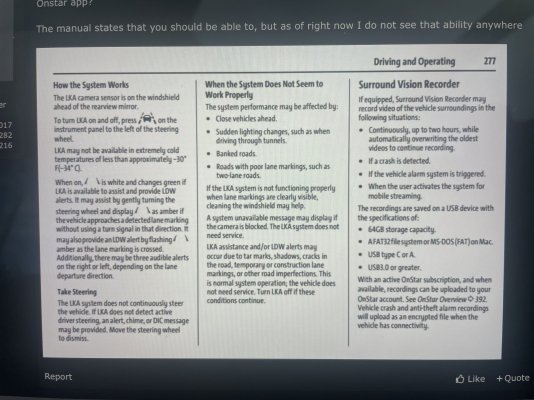
It records all the time until it fills up, then it deletes the oldest footage. It will also save any clips with the accelerometer exceeds a certain G force.

Supposedly there is a way to save recordings manually but I dont know how
 

ReaperHWK

Full Access Member
Joined
Oct 14, 2020
Posts
990
Reaction score
1,229
It records all the time until it fills up, then it deletes the oldest footage. It will also save any clips with the accelerometer exceeds a certain G force.

Supposedly there is a way to save recordings manually but I dont know how
Thanks. I was able to drive the car a few times and I see it recorded each drive from when I started the truck until I turned it off. My longest drive/recording was 20 min.

What if I take a 3 hour drive? Will it be a huge 3 hour recording or does it max out at a certain time? Does it make several 30 min files??? A huge 3 hr long recording would be a large file to manage.

Also, I’m trying to see how to use these video in case I need them in an accident. Are the files date a time stamped?

I guess I’ll play with it more later and figure these things out.

It’s a cool feature though looks like I won’t need to buy a dash cam which is awesome.
 

rlhmarines

Senior Member
Marine Corps Supporting Member
Joined
Mar 28, 2025
Posts
179
Reaction score
131
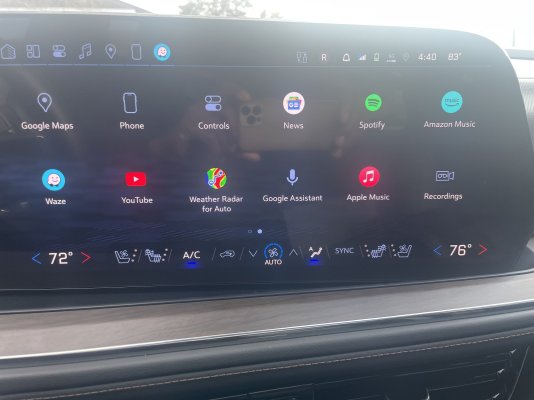
I just got my ‘25 High Country’s surround vision recorder to work after getting my android automotive version 14 installed by my dealer because my old version 12 from the factory didn’t allow it to be opened or operated but the app was in the system.

Thanks to everyone that helped myself and countless other fellow ‘25 & ‘26 Tahoe/Yukon owners get what was promised by GM to fruition.

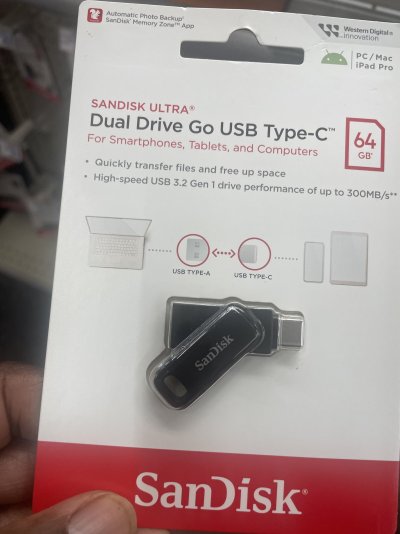
I formatted my USB 3.2 256 gb dual drive (C & A) on my iPad last night and played around with the new recordings to make sure I had it right. The owners manual says it will record up to 2 hours before starting over but I think that will depend on how much storage space you have on your USB and it will make separate files each time the car is stopped and shutdown, I hope this helps.

A red dot at the top right corner of the screen indicates that the camera is recording but it will not record if you open the recording camera icon up while driving.
 

Attachments

  • IMG_6098.jpeg
    IMG_6098.jpeg
    186 KB · Views: 27
  • IMG_6096.jpeg
    IMG_6096.jpeg
    196.6 KB · Views: 22
  • IMG_6091.jpeg
    IMG_6091.jpeg
    315 KB · Views: 28
  • IMG_6088.jpeg
    IMG_6088.jpeg
    174.3 KB · Views: 23
  • IMG_6094.jpeg
    IMG_6094.jpeg
    173 KB · Views: 27
Last edited:

DuraYuk

Full Access Member
Joined
Sep 17, 2022
Posts
1,111
Reaction score
884
Need to do this with our 25..do you get inteiror camera access on the 25s? Or only dash cam?
 

rlhmarines

Senior Member
Marine Corps Supporting Member
Joined
Mar 28, 2025
Posts
179
Reaction score
131
Need to do this with our 25..do you get inteiror camera access on the 25s? Or only dash cam?
Yes..if you have the camera installed. It records views from every available camera from front, left & right sides, rear and interior plus you can view the different angles on playback.
 

Protect1989

Full Access Member
Joined
May 27, 2017
Posts
348
Reaction score
313
Need to do this with our 25..do you get inteiror camera access on the 25s? Or only dash cam?
I dont believe the interior camera function has been issued for any model year. Supposedly that is coming, but have not seen an update that activates it yet
 
OP
OP
Sgt1411

Sgt1411

Full Access Member
Joined
Sep 17, 2024
Posts
195
Reaction score
146
I dont believe the interior camera function has been issued for any model year. Supposedly that is coming, but have not seen an update that activates it yet
I noticed some of the 26 model year Tahoe's and Yukon's have the interior camera right next to the overhead console moonroof controls. Are you saying even if the vehicle is equipped with that hardware the current SVR software isn't recording that camera?

I'm asking because it looks really easy to buy camera ($150) and DIY install if the camera feed cable is tucked up in there but no one will tell me and I'm timid to start pulling down my overhead console.
 
Last edited:

Protect1989

Full Access Member
Joined
May 27, 2017
Posts
348
Reaction score
313
I noticed some of the 26 model year Tahoe's and Yukon's have the interior camera right next to the overhead console moonroof controls. Are you saying even if the vehicle is equipped with that hardware the current SVR software isn't recording that camera?

I'm asking because it looks really easy to buy camera ($150) and DIY install if the camera feed cable is tucked up in there but no one will tell me and I'm timid to start pulling down my overhead console.
That is exactly what I am saying.

I have a 2026 tahoe with the interior camera and I have no way of accessing it. Supposedly GM is releasing a sort of "Rear Passenger Viewer" where you can activate that camera to see the passengers on the main screen PLUS adding interior recording with the surround recording feature.
 

rlhmarines

Senior Member
Marine Corps Supporting Member
Joined
Mar 28, 2025
Posts
179
Reaction score
131
That is exactly what I am saying.

I have a 2026 tahoe with the interior camera and I have no way of accessing it. Supposedly GM is releasing a sort of "Rear Passenger Viewer" where you can activate that camera to see the passengers on the main screen PLUS adding interior recording with the surround recording feature.
I saw a note on the window sticker of a newly delivered ‘26 HC at my dealer that stated it was to be updated from GM in the future with a pushed update, I just thought if it had the camera factory installed that it must be viewable from day one.
 

rlhmarines

Senior Member
Marine Corps Supporting Member
Joined
Mar 28, 2025
Posts
179
Reaction score
131
That is exactly what I am saying.

I have a 2026 tahoe with the interior camera and I have no way of accessing it. Supposedly GM is releasing a sort of "Rear Passenger Viewer" where you can activate that camera to see the passengers on the main screen PLUS adding interior recording with the surround recording feature.
Have you used a USB for the Surround Vision Camera recorder yet? Does your 360 Camera button not let you toggle between all of the different camera views?
 

Protect1989

Full Access Member
Joined
May 27, 2017
Posts
348
Reaction score
313
Have you used a USB for the Surround Vision Camera recorder yet? Does your 360 Camera button not let you toggle between all of the different camera views?
I have a USB Thumb drive and I can toggle through all the different camera views on the screen
 

rlhmarines

Senior Member
Marine Corps Supporting Member
Joined
Mar 28, 2025
Posts
179
Reaction score
131
I have a USB Thumb drive and I can toggle through all the different camera views on the screen
So I take it you’re still not able to view the interior camera while using the thumb drive?
 

Protect1989

Full Access Member
Joined
May 27, 2017
Posts
348
Reaction score
313
So I take it you’re still not able to view the interior camera while using the thumb drive?
That is correct. Currently the interior camera does not show up on any recordings NOR can i access it from the infotainment center.
 
OP
OP
Sgt1411

Sgt1411

Full Access Member
Joined
Sep 17, 2024
Posts
195
Reaction score
146
After talking to some of the Engineers I know the reason for the delay on remote camera access through the MyChevrolet App is due to power concerns and draining the vehicle battery. Same issue with Ford allowing it through FordPass.
 

ReaperHWK

Full Access Member
Joined
Oct 14, 2020
Posts
990
Reaction score
1,229
After talking to some of the Engineers I know the reason for the delay on remote camera access through the MyChevrolet App is due to power concerns and draining the vehicle battery. Same issue with Ford allowing it through FordPass.

that makes sense. I was going to say Tesla has no problem doing it but it’s obvious why they can do it on their apps.
 
OP
OP
Sgt1411

Sgt1411

Full Access Member
Joined
Sep 17, 2024
Posts
195
Reaction score
146
that makes sense. I was going to say Tesla has no problem doing it but it’s obvious why they can do it on their apps.
Yes but I applied that logic to Ford and asked why then couldn't they do it on the Lightning or Mach-E....or GM do it on Blazer or Silverado or Hummer?
 

bgro

TYF Newbie
Joined
Dec 28, 2025
Posts
2
Reaction score
0
Received the radio update to Android 14 on my 25 suburban RST. Purchase the 1TB usb stick in this thread and now have access to the recorder app. Recording starts automatically when driving and records using the front rear and side cameras. Cool feature!
 

Deuce16GMCs

Full Access Member
Joined
Aug 11, 2016
Posts
227
Reaction score
136
Has anyone had the radio updated to Android 14 in their 25 Yukon?

Or is everyone on that has had success just Taboes and Suburbans?
 

Deuce16GMCs

Full Access Member
Joined
Aug 11, 2016
Posts
227
Reaction score
136
Has anyone had the radio updated to Android 14 in their 25 Yukon?

Or is everyone on that has had success just Taboes and Suburbans?

2nd dealer got it.

Best thing that happened to me is that I installed 654.60 update over the air in the car.

654.60 broke text messaging, forced boot looped phone disconnects, delayed boot up times for infotainment and several other issues.

Dealership said there was new update that updated to Android 14 that address all the things I said and more. Asked to please installed the surround vision update while in there. He look it up and found the update that referenced surround vision/turn signal activated cameras. Installed that as well.

I now have Android 14 and SVR. And everything works perfectly.
 

Forum statistics

Threads
138,037
Posts
1,997,601
Members
102,974
Latest member
kikeap
Back
Top