2011 Tahoe/Best dash cam for Chevy Tahoe

Disclaimer: Links on this page pointing to Amazon, eBay and other sites may include affiliate code. If you click them and make a purchase, we may earn a small commission.

The Grey Beast

Full Access Member
Joined
May 11, 2023
Posts
233
Reaction score
168
Looking to install a few after market items. One of which is a dash cam for from and rear of the vehicle. I drive a 2011 Chevy Tahoe LTZ. My question is how is the install with wires properly. I watched the video's and have the tools. Is it difficult or just time consuming? What camera system do you recommend? I'm trying to check if there are wireless cameras but that would incur constant taking the unit off and charging.

Thank you for reading my rant.

ken

 

swathdiver

Full Access Member
Joined
May 18, 2017
Posts
21,315
Reaction score
30,312
Location
Treasure Coast, Florida
Looking to install a few after market items. One of which is a dash cam for from and rear of the vehicle. I drive a 2011 Chevy Tahoe LTZ. My question is how is the install with wires properly. I watched the video's and have the tools. Is it difficult or just time consuming? What camera system do you recommend? I'm trying to check if there are wireless cameras but that would incur constant taking the unit off and charging.

Thank you for reading my rant.

ken
After going through 3 previous dash cams, been using a Cobra SC201 for over 3 years now and it is connected 24/7 to the rearview mirror wiring harness with a Dongar Technologies universal adapter.

My rearview comes from the interior camera, there's not a separate camera in the back of the cab.
 

mountie

Elite Member
Supporting Member
Joined
May 9, 2018
Posts
7,195
Reaction score
14,007
Location
Wellington, Fl., (formally Kalifornia)
Looking to install a few after market items. One of which is a dash cam for from and rear of the vehicle. I drive a 2011 Chevy Tahoe LTZ. My question is how is the install with wires properly. I watched the video's and have the tools. Is it difficult or just time consuming? What camera system do you recommend? I'm trying to check if there are wireless cameras but that would incur constant taking the unit off and charging.

Thank you for reading my rant.

ken
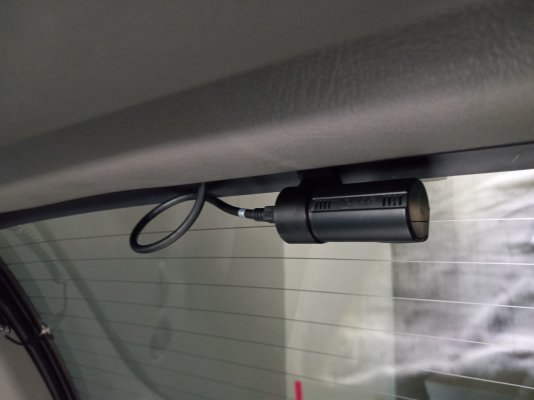
I have the "Street Guardian" front / rear dash cam. It performs great... simple to operate.
These are sample photos of my install.....( '05 Yukon configuration ) ( The trick was locating the rear cam, on the hatch glass..... and to open / close the glass.

I power it from my cig lighter.
 

Attachments

  • Front cam mounted.jpg
    Front cam mounted.jpg
    404.7 KB · Views: 39
  • interior view camera:hatch closed (unseen from rear view mirror).jpg
    interior view camera:hatch closed (unseen from rear view mirror).jpg
    232.6 KB · Views: 50
  • From interior rubber flapper through to outside vent.jpg
    From interior rubber flapper through to outside vent.jpg
    275.3 KB · Views: 54

mountie

Elite Member
Supporting Member
Joined
May 9, 2018
Posts
7,195
Reaction score
14,007
Location
Wellington, Fl., (formally Kalifornia)
I have the "Street Guardian" front / rear dash cam. It performs great... simple to operate.
These are sample photos of my install.....( '05 Yukon configuration ) ( The trick was locating the rear cam, on the hatch glass..... and to open / close the glass.

I power it from my cig lighter.
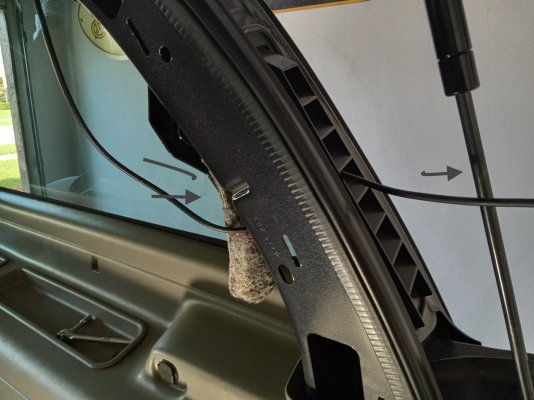
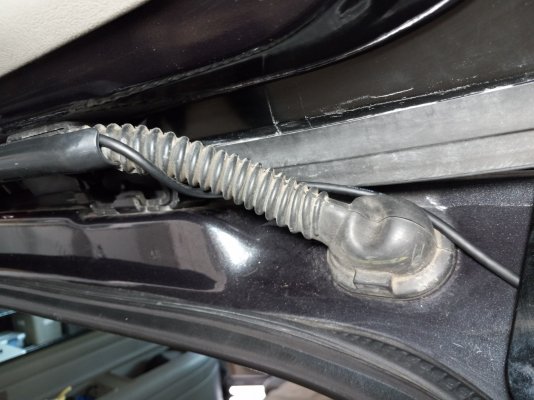
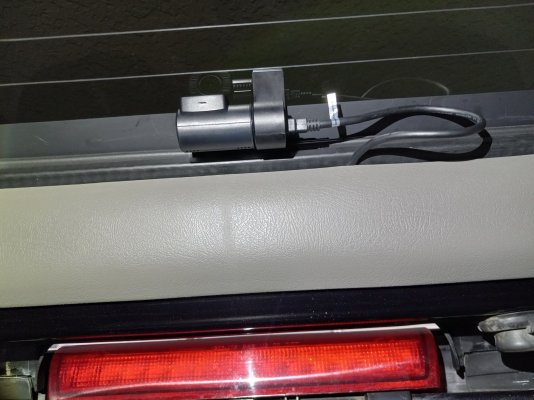
Rear cam mounted on glass / hatch open....( right side of photo....run wire through harness cover, does not interfere with weather seal.
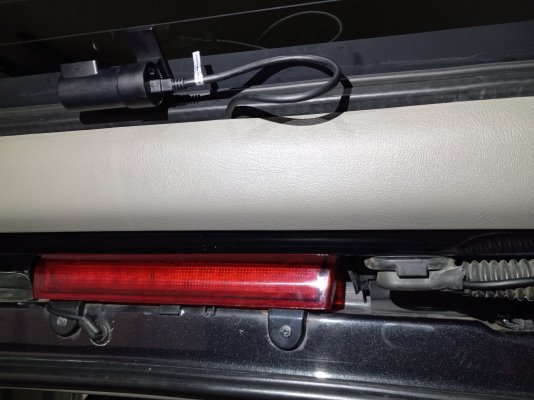
Rear cam mounted on glass, hatch closed with glass opened....
 

Attachments

  • camera on glass, hatch open - glass closed.jpg
    camera on glass, hatch open - glass closed.jpg
    309.5 KB · Views: 33
  • enough slack for glass to open and not touching weather trim when closed.jpg
    enough slack for glass to open and not touching weather trim when closed.jpg
    345.3 KB · Views: 47
OP
OP
The Grey Beast

The Grey Beast

Full Access Member
Joined
May 11, 2023
Posts
233
Reaction score
168
Wow! Thank you looks really like good unit that looks great. Hope it’s working well for you.
 
OP
OP
The Grey Beast

The Grey Beast

Full Access Member
Joined
May 11, 2023
Posts
233
Reaction score
168
After going through 3 previous dash cams, been using a Cobra SC201 for over 3 years now and it is connected 24/7 to the rearview mirror wiring harness with a Dongar Technologies universal adapter.

My rearview comes from the interior camera, there's not a separate camera in the back of the cab.
Alway good info. I’ll take it under consideration. Thank you all for the info.
 

mountie

Elite Member
Supporting Member
Joined
May 9, 2018
Posts
7,195
Reaction score
14,007
Location
Wellington, Fl., (formally Kalifornia)
Alway good info. I’ll take it under consideration. Thank you all for the info.
The rear camera shows everything, as low as 3' behind.... ( especially if you use the optional 'parking mode' )..
I have more pics showing the install, if you wish....

( The photo showing the rear cam..... that cable is un-seen, from your rear view mirror.....
 

mikez71

Full Access Member
Joined
Mar 9, 2023
Posts
3,337
Reaction score
4,139
Using a Viofo a229 plus. Seems to work OK. Very similar packaging to mountie's Street Guardian. 50% screenshot below.
Screenshotviofoa229.50%.png

I mounted mine behind the passenger side of rearview mirror. So I can't operate it when I'm driving, but a passenger can.
I put it there so that it would not block my vision. Mainly use it as a parking security camera, so I don't really operate the unit.

I had my rear camera up high, but with my camera I was getting bad glare. So I mounted it at the bottom of the glass, which helped significantly.
There is a little loop so I can still open the liftglass, which is visible, but not much worse than the factory defroster wires.
 
Last edited:

Scrappycrow

Full Access Member
Air Force
Joined
Dec 22, 2023
Posts
449
Reaction score
714
Location
Alpharetta, Georgia
Using a Viofo a229 plus. Seems to work OK. Very similar packaging to mountie's Street Guardian. 50% screenshot below.

I mounted mine behind the passenger side of rearview mirror. So I can't operate it when I'm driving, but a passenger can.
I put it there so that it would not block my vision. Mainly use it as a parking security camera, so I don't really operate the unit.

I had my rear camera up high, but with my camera I was getting bad glare. So I mounted it at the bottom of the glass, which helped significantly.
There is a little loop so I can still open the liftglass, which is visible, but not much worse than the factory defroster wires.
I have a Viofo A229 plus as well and mounted it behind the driver side of the rearview mirror. I can't get to it easily, either but the A229 does have rudimentary voice commands, e.g. "Lock the video" (but it apparently doesn't like my voice and I sound like an idiot when I have to calmly, then firmly, then aggressively yell the commands).

My rear camera is mounted on the hatch frame trim at top and I haven't had any glare issues, but it does have significant tint over the factory tint (so I had to up the exposure).

I ran the wire through the hatch wiring conduit and drilled a hole in the trim for the cable end to pass through, and the entire run of the rear cable is tucked up above the headliner and fixed out of the way of the airbags. It comes out to the left of the mirror. I ran two wires down the left A-pillar to the under-dash wiring block, one for constant 12V and one for switched.
 

mountie

Elite Member
Supporting Member
Joined
May 9, 2018
Posts
7,195
Reaction score
14,007
Location
Wellington, Fl., (formally Kalifornia)
I have a Viofo A229 plus as well and mounted it behind the driver side of the rearview mirror. I can't get to it easily, either but the A229 does have rudimentary voice commands, e.g. "Lock the video" (but it apparently doesn't like my voice and I sound like an idiot when I have to calmly, then firmly, then aggressively yell the commands).

My rear camera is mounted on the hatch frame trim at top and I haven't had any glare issues, but it does have significant tint over the factory tint (so I had to up the exposure).

I ran the wire through the hatch wiring conduit and drilled a hole in the trim for the cable end to pass through, and the entire run of the rear cable is tucked up above the headliner and fixed out of the way of the airbags. It comes out to the left of the mirror. I ran two wires down the left A-pillar to the under-dash wiring block, one for constant 12V and one for switched.
For the rear, I ran the cable through the existing wire harness to the glass, coming from under the vent cover.
 

Attachments

  • from under vent cover, to flex rubber harness holder.jpg
    from under vent cover, to flex rubber harness holder.jpg
    344.9 KB · Views: 39
  • a hole into flex rubber harness cover on hatch, ( hatch is raised)  .jpg
    a hole into flex rubber harness cover on hatch, ( hatch is raised) .jpg
    412.8 KB · Views: 34
  • from flex-rubber cover and under plastic hatch trim, to camera  (glass is raised).jpg
    from flex-rubber cover and under plastic hatch trim, to camera (glass is raised).jpg
    381.5 KB · Views: 42

mikez71

Full Access Member
Joined
Mar 9, 2023
Posts
3,337
Reaction score
4,139
Don't know why I had bad glare with it up top.. Below is the only shot I have left from upper location. It was really distracting watching videos with glare.
glare.png


I was able to get the miniusb connector through the factory flex rubber, then the cable loops so I can open the liftglass. I notice in the mornings, the area around the rear camera is defrosted!
IMG_0229.jpeg


Cable loop and camera through the rearview. Mirror cable cover wouldn't fit without modification. (I left it out) Camera about 25% visible from passenger side unless you lean forward and look upwards.
IMG_0228.jpeg
 
Last edited:

mikez71

Full Access Member
Joined
Mar 9, 2023
Posts
3,337
Reaction score
4,139
Front glare WITHOUT dashmat. SUPER annoying! No I don't armour all my dash... Bought the polarization lense, doesn't help enough.
A dashmat was the only way to go. I still see my defroster vents. Planning to get a black defroster panel or paint mine someday..
Screenshot 2024-12-05 085828.png
 
Last edited:
OP
OP
The Grey Beast

The Grey Beast

Full Access Member
Joined
May 11, 2023
Posts
233
Reaction score
168
Thank you for all your posts. So I decided to buy Think wear Q200. so I had it installed. I can install a phone charger but I wasn’t up for a dash cam. I had Best Buy do it for me. So far I find it anti climatic. I’m not sure how to use it but I downloaded the app which sort of sucks. But once you get the app going and ta user friendly. I’ may post some pics later and see how it goes.

Thanks to all.

Ken
 

hillstrubl

Member
Joined
May 11, 2024
Posts
89
Reaction score
85
Dash cams are weird in that there are cheap ones that "work" (but the app/UI is unusably bad) or expensive ones ($500+) that work much better. I was looking for the sweet spot (4K front, app not absolutely terrible, but cheap enough that I can replace it if needed). I went through a few different ones and landed eventually on 3 of these. I paid ~$150 for them originally, but now they're $99 with a $20 digital coupon - https://amzn.to/4fEef7H

OMBAR Dash Cam Front and Rear 4K/2K/1080P+1080P 5G WiFi GPS, Dash Camera for Cars with 64G SD Card, Dual Dash Cam with WDR Night Vision, 24h Parking Mode,170°Wide, G-Sensor, Loop Recording, APP "​

I have them in 3 cars and 2 other family members cars, good insurance, but you'll need the extension cable to reach the rear windshield.
 
Last edited:

mikez71

Full Access Member
Joined
Mar 9, 2023
Posts
3,337
Reaction score
4,139
That's a nice compact looking unit! Cheap too!
Good operating temp range (reason I went with the Viofo A229 plus and not the pro)
Nice to know it works well!
 

Forum statistics

Threads
138,038
Posts
1,997,637
Members
102,975
Latest member
jkhuntzinger
Back
Top