Added OEM back up cam to aftermarket radio

Disclaimer: Links on this page pointing to Amazon, eBay and other sites may include affiliate code. If you click them and make a purchase, we may earn a small commission.

NathanJax

Vacation Nathan
Staff member
Administrator Moderator Supporting Member
Joined
May 9, 2009
Posts
49,141
Reaction score
943,577,202
Location
Jax, Fl
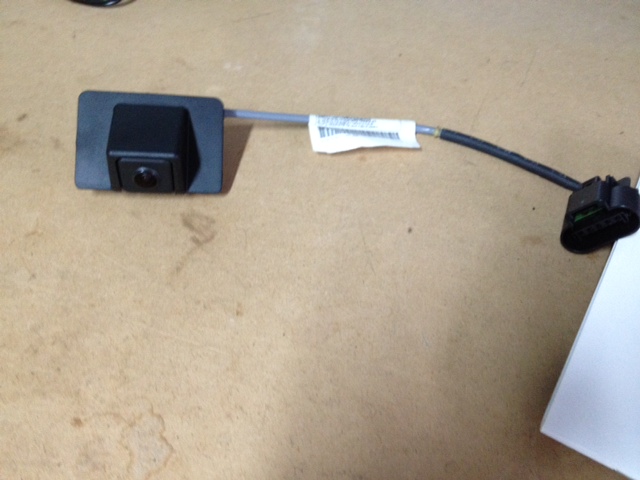
So my truck didn't come with the Nav so it didn't have back up camera. I purchased a factory back up camera off eBay for $40. Purchased a 12v to 5v converter from a member here (was an extra that he got it off eBay)


Factory camera
BUCBefore.jpg


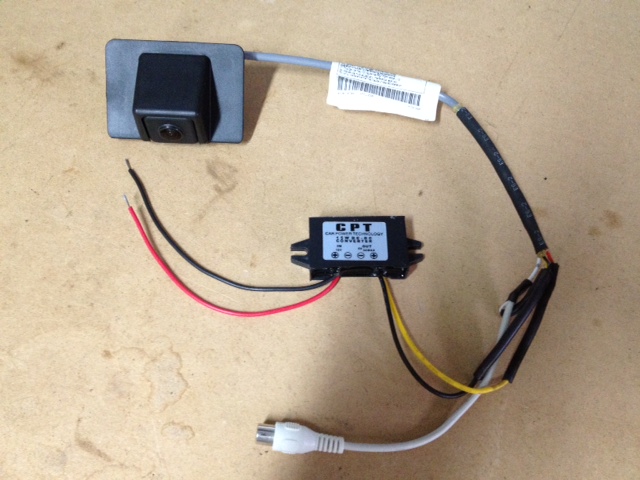
I cut off the factory plug. There were 4 wires. Red, Black, Yellow, and White.

Red = 5 volt
Black = Ground
Yellow = Positive (inside RCA) video output
White = Negative (outside RCA) video output

Wired up the 12v to 5v converter as the sticker shows, and soldered a male RCA end to the yellow and white.
BUCAfter.jpg


I kinda went with these instructions as to dremel the rear applique

Adding a back-up camera


Outside like OEM...
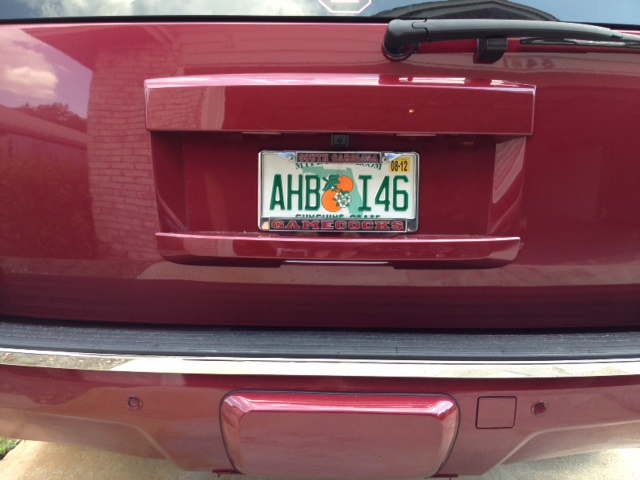
1.jpg


2.jpg


and inside when I go in to reverse, or I can hit the camera button on the screen and the camera will stay on indefinitely.

3.jpg
 
Last edited:

Obsession203

Full Access Member
Joined
Apr 1, 2012
Posts
156
Reaction score
0
Location
Connecticut
Thank you for doing this cause i actually bought a camera and wanted to add this but have no idea to do so
 

yates ™

Resident Apple hater
Joined
Jul 9, 2010
Posts
24,413
Reaction score
6,448
Location
Iowa
Nathan is the part on the applique pop out for camera or does it have to be cut?
 
OP
OP
NathanJax

NathanJax

Vacation Nathan
Staff member
Administrator Moderator Supporting Member
Joined
May 9, 2009
Posts
49,141
Reaction score
943,577,202
Location
Jax, Fl

felixgun

Full Access Member
Joined
Oct 7, 2010
Posts
9,746
Reaction score
136
Location
Lafayette, LA
They make two different appliqués. One with the camera cutout and one without.
 
Last edited:
OP
OP
NathanJax

NathanJax

Vacation Nathan
Staff member
Administrator Moderator Supporting Member
Joined
May 9, 2009
Posts
49,141
Reaction score
943,577,202
Location
Jax, Fl
They make two different appliqués. One with the camera cutout and one with.

quoted for funny...

You can cut the non-camera one and it will attach just like the camera one. The indention is already there. Just not the holes. I took a piece of construction paper and made a template to cut my OEM one.
 

felixgun

Full Access Member
Joined
Oct 7, 2010
Posts
9,746
Reaction score
136
Location
Lafayette, LA
quoted for funny...

You can cut the non-camera one and it will attach just like the camera one. The indention is already there. Just not the holes. I took a piece of construction paper and made a template to cut my OEM one.

LOL. Fixed!
 

yates ™

Resident Apple hater
Joined
Jul 9, 2010
Posts
24,413
Reaction score
6,448
Location
Iowa
I have 3 appliques at the house now that I've been messing around with...

Serious internet business question, How close are you to having the parts laying around to build another Yukon?
 
OP
OP
NathanJax

NathanJax

Vacation Nathan
Staff member
Administrator Moderator Supporting Member
Joined
May 9, 2009
Posts
49,141
Reaction score
943,577,202
Location
Jax, Fl
Serious internet business question, How close are you to having the parts laying around to build another Yukon?

Just a bunch of parts. I've sold off a lot though. Need to sell off a bunch more. Just lazy and haven't gotten around to posting stuff on Craigslist or eBay.
 
OP
OP
NathanJax

NathanJax

Vacation Nathan
Staff member
Administrator Moderator Supporting Member
Joined
May 9, 2009
Posts
49,141
Reaction score
943,577,202
Location
Jax, Fl
Any updates looking to work on this project myself

Yeah, I installed the camera by using a dremel in the factory location. Forgot to post the rest...

Updated original post...
 

Obsession203

Full Access Member
Joined
Apr 1, 2012
Posts
156
Reaction score
0
Location
Connecticut
Thanks for this update now I feel a bit more confident in doing this myself did you wire it similar to the link you posted? other than adding the power converter?
 
OP
OP
NathanJax

NathanJax

Vacation Nathan
Staff member
Administrator Moderator Supporting Member
Joined
May 9, 2009
Posts
49,141
Reaction score
943,577,202
Location
Jax, Fl
Thanks for this update now I feel a bit more confident in doing this myself did you wire it similar to the link you posted? other than adding the power converter?

I just hooked up the RCA I made from the factory camera to the pioneer radio. Grounded it to the metal and then ran the remote wire from the radio to the camera so it turs on and stays on while the truck is running
 

WhiteStripe

TYF Newbie
Joined
Apr 26, 2012
Posts
28
Reaction score
0
Location
Austin, TX
I just hooked up the RCA I made from the factory camera to the pioneer radio. Grounded it to the metal and then ran the remote wire from the radio to the camera so it turs on and stays on while the truck is running

I don't have NAV or a rear camera but was wanting to do the same thing you did. I want to put in a Pioneer head unit and add the back up camera.

I just want to get one thing straight:
Did you run new remote and rca wires from your head unit to the camera or were you able to use wires that were already there?
 
OP
OP
NathanJax

NathanJax

Vacation Nathan
Staff member
Administrator Moderator Supporting Member
Joined
May 9, 2009
Posts
49,141
Reaction score
943,577,202
Location
Jax, Fl
I just want to get one thing straight:
Did you run new remote and rca wires from your head unit to the camera or were you able to use wires that were already there?

Had to run my own.
 

fife2001

TYF Newbie
Joined
Apr 23, 2012
Posts
14
Reaction score
0
Location
Lincoln, NE
Later tonight (hopefully)


If your applique doesn't have a camera now, it has to be cut. I have 3 appliques at the house now that I've been messing around with...

How did you tighten the appliques back on? I noticed others have complained about the bolts spinning?

Also on the factory camera there are 4 cylinders poping out the back. Did you drill 4 holes and then melt the pillars?

Right now my applique is loose.
 
OP
OP
NathanJax

NathanJax

Vacation Nathan
Staff member
Administrator Moderator Supporting Member
Joined
May 9, 2009
Posts
49,141
Reaction score
943,577,202
Location
Jax, Fl
How did you tighten the appliques back on? I noticed others have complained about the bolts spinning?

I used epoxy to keep the bolts in and not turn.


Also on the factory camera there are 4 cylinders poping out the back. Did you drill 4 holes and then melt the pillars?


I did drill the 4 holes and I used epoxy as well as heating the plastic to melt it.
 

bdatguy

TYF Newbie
Joined
Apr 29, 2013
Posts
7
Reaction score
0
Hey,

I'm looking to do this install soon. I actually have an aftermarket camera setup now, but I cannot see the bumper (which is what I really need!). I noticed in your pic of the HU that your bumper is visible. Is there something you did to get that certain angle? Or was that just where it landed? Because I have seen other pics of the oem camera without the bumper being visible. I don't want to buy it and be in the same position I'm in now...
 
OP
OP
NathanJax

NathanJax

Vacation Nathan
Staff member
Administrator Moderator Supporting Member
Joined
May 9, 2009
Posts
49,141
Reaction score
943,577,202
Location
Jax, Fl
Hey,

I'm looking to do this install soon. I actually have an aftermarket camera setup now, but I cannot see the bumper (which is what I really need!). I noticed in your pic of the HU that your bumper is visible. Is there something you did to get that certain angle? Or was that just where it landed? Because I have seen other pics of the oem camera without the bumper being visible. I don't want to buy it and be in the same position I'm in now...

From my understanding that's just where the camera angle is with the OEM camera
 

Forum statistics

Threads
137,674
Posts
1,989,124
Members
102,675
Latest member
j_jerry79
Back
Top