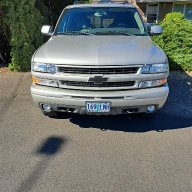
I might have found a gem that is about 1/2 mile from my American Legion post

Disclaimer: Links on this page pointing to Amazon, eBay and other sites may include affiliate code. If you click them and make a purchase, we may earn a small commission.

OP
OP
OR VietVet

OR VietVet

GMT800 2005 Tahoe Z71
Navy Supporting Member
Joined
Oct 8, 2014
Posts
23,762
Reaction score
44,263
Location
Willamette Valley
Ok, I was able to copy the link address and add the link to my signature and now if you click on the link, the RPO code list comes up. I can live with that but hope a mod will remove the two big Red X Marks.

 
OP
OP
OR VietVet

OR VietVet

GMT800 2005 Tahoe Z71
Navy Supporting Member
Joined
Oct 8, 2014
Posts
23,762
Reaction score
44,263
Location
Willamette Valley
Ok, I was able to copy the link address and add the link to my signature and now if you click on the link, the RPO code list comes up. I can live with that but hope a mod will remove the two big Red X Marks.

 

Tonyrodz

Resident Resident
Joined
Feb 16, 2012
Posts
33,201
Reaction score
51,447
Location
Central Jersey
@Tonyrodz, go to my signature and click on the link and the RPO codes are there. I sent a request to the mods to remove the two red X marks in my signature.
Can't get it.
20201002_203300.jpg
 
OP
OP
OR VietVet

OR VietVet

GMT800 2005 Tahoe Z71
Navy Supporting Member
Joined
Oct 8, 2014
Posts
23,762
Reaction score
44,263
Location
Willamette Valley
When I click on it it is ok but I guess I have to allow permission. I will work on that and let you know.
 

Rocket Man

Mark
Supporting Member
Joined
Dec 25, 2014
Posts
26,679
Reaction score
52,949
Location
Oregon
I have a link now at my signature and hopefully you can click on it to see the pic of the RPO codes.
I was joking, that’s your thing you ask newbs to do, take a picture of theirs and put it in their sig but your RPO code picture has never been in your sig lol. I’m not about to go deciphering other members RPO codes. BTW your links dont work. That’s why they’re big red x’s. :signs8:
 
Last edited:

iamdub

Full Access Member
Joined
Apr 23, 2016
Posts
20,821
Reaction score
45,012
Location
Li'l Weezyana
I post pics all the time but in the signature it wants a URL address. I would have to upload pic to a site to do that. At least I think I do.

Upload it to a thread in the traditional way you'd upload a pic. Then, copy that uploaded image's link (right click over image, select "Copy Image Location") and paste it into that box where it wants a URL for your sig pic. Basically using the site as it's own image uploader.
 
OP
OP
OR VietVet

OR VietVet

GMT800 2005 Tahoe Z71
Navy Supporting Member
Joined
Oct 8, 2014
Posts
23,762
Reaction score
44,263
Location
Willamette Valley
I was joking, that’s your thing you ask newbs to do, take a picture of theirs and put it in their sig but your RPO code picture has never been in your sig lol. I’m not about to go deciphering other members RPO codes. BTW your links dont work. That’s why they’re big red x’s. :signs8:

I know the links don't work and that is why the red X is there but when I try to delete myself, I cannot.

Upload it to a thread in the traditional way you'd upload a pic. Then, copy that uploaded image's link (right click over image, select "Copy Image Location") and paste it into that box where it wants a URL for your sig pic. Basically using the site as it's own image uploader.

@Rocket Man, I saw after using the Media section that it only allows me to open it but other members cannot. I reached out to the mods for help to allow for any member to open but I am going to try and do as @iamdub suggested.

Trying that right now.

20201002_150314.jpg


So, the RPO codes are there now in my signature but way too big. I prefer the link if other members can open. I am going to try and delete the pic address now and get rid of that big ass pic.
 
Last edited:
OP
OP
OR VietVet

OR VietVet

GMT800 2005 Tahoe Z71
Navy Supporting Member
Joined
Oct 8, 2014
Posts
23,762
Reaction score
44,263
Location
Willamette Valley
I see it shows along with the pic I uploaded to the post. Lets see if it stays with this post.
 
OP
OP
OR VietVet

OR VietVet

GMT800 2005 Tahoe Z71
Navy Supporting Member
Joined
Oct 8, 2014
Posts
23,762
Reaction score
44,263
Location
Willamette Valley
It worked but I wish it was smaller. I prefer the link opening for any member though.

I tried to delete the pic in my signature but it will not allow me to do that. Again, I am going to reach out to the mods for help.
 
Last edited:

iamdub

Full Access Member
Joined
Apr 23, 2016
Posts
20,821
Reaction score
45,012
Location
Li'l Weezyana
I use the Windows image editor to scale down my sig and avatar images. You can scale by percentage or pixel count. I'm sure there are easier ways to do this, but I just roll with whatever workarounds my dumbass can figure out.
 
OP
OP
OR VietVet

OR VietVet

GMT800 2005 Tahoe Z71
Navy Supporting Member
Joined
Oct 8, 2014
Posts
23,762
Reaction score
44,263
Location
Willamette Valley
I agree with you. I want to have the pic smaller but do prefer the link as long as other members can open it. I will keep trying.
 
OP
OP
OR VietVet

OR VietVet

GMT800 2005 Tahoe Z71
Navy Supporting Member
Joined
Oct 8, 2014
Posts
23,762
Reaction score
44,263
Location
Willamette Valley
I tried to get more straight on but was best I could do and see. Plus I am worried that if I shot another pic and attempted tp put in sig, the sig would have two pics because I have tried and cannot even delete the one that is there, unless you know a way to delete it.

How do I use either Free Sizer in Windows or the Windows Image Editor that @iamdub recommended?
 

iamdub

Full Access Member
Joined
Apr 23, 2016
Posts
20,821
Reaction score
45,012
Location
Li'l Weezyana
How do I use either Free Sizer in Windows or the Windows Image Editor that @iamdub recommended?

First, I must preface this with that I am doing this on a laptop running Windows 7.

For this, I open the pic I have saved in Windows. At the top, there is "File", "Print", "E-mail", "Burn" and "Open.

I click "Open" and the first option in the drop-down is "Paint". I click that and it opens the image up in the Windows native editing program. In the toolbar at the top is "Resize". Click on that and a window pops up with the resizing options.
 
OP
OP
OR VietVet

OR VietVet

GMT800 2005 Tahoe Z71
Navy Supporting Member
Joined
Oct 8, 2014
Posts
23,762
Reaction score
44,263
Location
Willamette Valley
I did crop it on my computer. Gonna post and then see if can paste to the sig but I am worried about it not deleting the old and then saving the new.
 

Forum statistics

Threads
137,786
Posts
1,992,234
Members
102,780
Latest member
ASG-MikeS

Latest posts

Back
Top