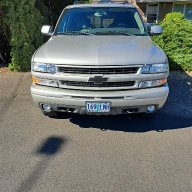

I might have found a gem that is about 1/2 mile from my American Legion post

Disclaimer: Links on this page pointing to Amazon, eBay and other sites may include affiliate code. If you click them and make a purchase, we may earn a small commission.

OP
OP
OR VietVet

OR VietVet

GMT800 2005 Tahoe Z71
Navy Supporting Member
Joined
Oct 8, 2014
Posts
23,755
Reaction score
44,245
Location
Willamette Valley
20201002_150314 (2).jpg 20201002_150314 (2).jpg
 
OP
OP
OR VietVet

OR VietVet

GMT800 2005 Tahoe Z71
Navy Supporting Member
Joined
Oct 8, 2014
Posts
23,755
Reaction score
44,245
Location
Willamette Valley
I finally figured out how to delete the pic and one of the red X's. I also deleted the link since no one could open anyway. Gonna see if can do a link that members can open if need be.
 
OP
OP
OR VietVet

OR VietVet

GMT800 2005 Tahoe Z71
Navy Supporting Member
Joined
Oct 8, 2014
Posts
23,755
Reaction score
44,245
Location
Willamette Valley
First, I must preface this with that I am doing this on a laptop running Windows 7.

For this, I open the pic I have saved in Windows. At the top, there is "File", "Print", "E-mail", "Burn" and "Open.

I click "Open" and the first option in the drop-down is "Paint". I click that and it opens the image up in the Windows native editing program. In the toolbar at the top is "Resize". Click on that and a window pops up with the resizing options.

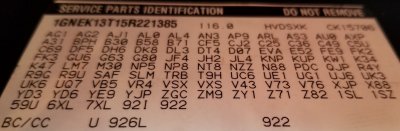
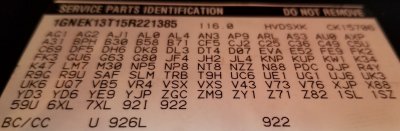
I have now finally gotten rid of the Red X's and the RPO code pic and the old Media link that members could not open. I posted a link to the pic instead. Hope it continues to work. Let me know if you cannot open the RPO code link. Thanks.
 

Fless

Staff member
Moderator
Joined
Apr 2, 2017
Posts
16,366
Reaction score
33,846
Location
People's Republic of Colorado
First, I must preface this with that I am doing this on a laptop running Windows 7.

For this, I open the pic I have saved in Windows. At the top, there is "File", "Print", "E-mail", "Burn" and "Open.

I click "Open" and the first option in the drop-down is "Paint". I click that and it opens the image up in the Windows native editing program. In the toolbar at the top is "Resize". Click on that and a window pops up with the resizing options.

There have been various versions of picture editors in Windows, and Paint has been there for a long time. You can simply right-click on the file (on your desktop, say), select Open With, then click on Paint.

I found Free Sizer to do a reasonable job of shrinking pics without excessive loss of detail. Either program works okay. YMMV
 

iamdub

Full Access Member
Joined
Apr 23, 2016
Posts
20,821
Reaction score
45,012
Location
Li'l Weezyana
There have been various versions of picture editors in Windows, and Paint has been there for a long time. You can simply right-click on the file (on your desktop, say), select Open With, then click on Paint.

I found Free Sizer to do a reasonable job of shrinking pics without excessive loss of detail. Either program works okay. YMMV

I'll have to give it a shot! I'm NOT sharp with computers- that's why I'm still rockin' Win7. Win10 is a whole other ballgame for me. Once I find something I can operate, I cling to it for as long as I can.
 

Fless

Staff member
Moderator
Joined
Apr 2, 2017
Posts
16,366
Reaction score
33,846
Location
People's Republic of Colorado
I'll have to give it a shot! I'm NOT sharp with computers- that's why I'm still rockin' Win7. Win10 is a whole other ballgame for me. Once I find something I can operate, I cling to it for as long as I can.

If you're running an older version of Office, the Windows Picture Manager -- which I thought worked good -- could be added free. And it's not really clear in this link if you would need to be running any Office product to add it to your setup. https://www.howtogeek.com/281913/ho...ffice-picture-manager-in-office-2013-or-2016/

My brother recommends GIMP; I've not tried it but I'd rather not drag myself up a leaning curve. Something that works for what I do, and is intuitive and easy, is my cup 'o tea. Or my Stella Artois.
 

iamdub

Full Access Member
Joined
Apr 23, 2016
Posts
20,821
Reaction score
45,012
Location
Li'l Weezyana
If you're running an older version of Office, the Windows Picture Manager -- which I thought worked good -- could be added free. And it's not really clear in this link if you would need to be running any Office product to add it to your setup. https://www.howtogeek.com/281913/ho...ffice-picture-manager-in-office-2013-or-2016/

My brother recommends GIMP; I've not tried it but I'd rather not drag myself up a leaning curve. Something that works for what I do, and is intuitive and easy, is my cup 'o tea. Or my Stella Artois.

Just checked- I don't have any Office on this thing. It was a $150 craigslist score about 5-6 years ago from the trunk of a lawyer's turbo'ed M6. lol

I, too, need intuitive programs and devices. That's why I have an iPhone. I'll check into that Picture Manager for pics and I was actually looking at GIMP for video editing since I now have a few YouTube vids. Thanks for the leads.
 
OP
OP
OR VietVet

OR VietVet

GMT800 2005 Tahoe Z71
Navy Supporting Member
Joined
Oct 8, 2014
Posts
23,755
Reaction score
44,245
Location
Willamette Valley
Ok, updates with no pics. Since I did not get the new Z71, I decided to continue and set up my 2005 Z71 to a base line to know where I am at on all things I can control. Sorry, no pics at this time.

I have changed ALL fluids on this rig and did the trans filter, replaced all brake pads, hardware, rotors-pads at front were thin, replaced all park brake shoes and hardware and adjusted the cable set up, replaced all four rear control arms because the right lower was bent by someone that floor jacked it, new plugs, plug wires, air filter, MAF, MAP, crank sensor and cam sensor-saved the old sensors for spares, replaced every cooling system hose and reservoir and reservoir cap and thermostat, serpentine belts and idlers and tensioners, both outside mirrors because driver's mirror vibrated at highway speed and both adjusted slowly and were jumpy, all transmission cooling lines, replaced the passenger side front seat control panel side cover-old one was cracked, rear wiper arm and all blades and did the windshield glass treatment as @Rocket Man had suggested, new Husky floor mats, all 4 shocks, all four oxygen sensors and third brake light assembly.

Next up is the oil pan gasket, rear main seal, oil pickup tube and the o-ring seal as well. Then I am going to have the front bumper corner scrapes fixed and repainted and paint the new outside mirror caps to match. Then to top it all off, a new set of tires. The current tires are at about 30% left.

I have a reman unlocked OE style radio/cd unit for the dash that is to be installed. So far the only things replaced because of leaks were the trans lines and the upcoming oil pan/rear main seal parts. Bent rear arm because was bent. Oxygen sensors because Bank 1 Sensor 1 went bad and caused a rough idle.

To tell you the truth, I never should have looked at the new Z71 but man, that damn thing looks good.
 
OP
OP
OR VietVet

OR VietVet

GMT800 2005 Tahoe Z71
Navy Supporting Member
Joined
Oct 8, 2014
Posts
23,755
Reaction score
44,245
Location
Willamette Valley
I don't know how to move this but hopefully someone else can do it. Yes, I want to get it all at a baseline and then non stock things start to happen. First will be exhaust. I forgot to mention that the Corvette servo has already been done. Likely a leveling kit. Likely performance stabilizer bar kits, front and rear. Plus, since I am one state over, I am likely going to get a BBT done in Idaho. I thought about wheels but I like the stock Z71 wheels and will likely have a matte black coating put on them. Any other recommendations will be considered. I know I am not going to do anything like a super charger. The tune will be the engine mod that this almost 68 year old man will spring for.
 
OP
OP
OR VietVet

OR VietVet

GMT800 2005 Tahoe Z71
Navy Supporting Member
Joined
Oct 8, 2014
Posts
23,755
Reaction score
44,245
Location
Willamette Valley
Ok, I have been slowly but surely getting all mechanical items taken care of and getting any maintenance related items up to ***** so I have a baseline for everything.

I dropped off the rig on Monday at a friend's recommended body shop to get the front bumper corner scrapes taken care of and to have both front outside mirror caps painted since I replace both mirrors and the old caps attaching clips broke when tried to swap over. I am having the entire body touched up where needed and buffed out when all done. Here are pics of both front bumper corners and the mirror caps.

imagejpeg_0.jpg
631666691.jpg
631666709.jpg
 
Last edited:

Forum statistics

Threads
137,782
Posts
1,992,154
Members
102,777
Latest member
wwiizz
Back
Top