What did you do to your NBS GMT800 Tahoe/Yukon Today?

Disclaimer: Links on this page pointing to Amazon, eBay and other sites may include affiliate code. If you click them and make a purchase, we may earn a small commission.

Bombsquad85

Full Access Member
Joined
Aug 18, 2016
Posts
1,515
Reaction score
1,556
Location
Northern VA

eohat

In Torque We Trust
Joined
Nov 14, 2016
Posts
157
Reaction score
277
Location
Mike @ Altitude 5,280 ft.
Very nice! How long did it take you?


Way too long. I ordered the valley cover gasket set through Amazon Prime and it arrived a week late due to bad weather. The knock sensors arrived late too. I also disassembled the intake manifold and took it down to the car wash for a good cleaning. I could probably do the job faster now that I know how to disconnect all of the different electrical connectors on the wiring harness without breaking them. :)
 

Bombsquad85

Full Access Member
Joined
Aug 18, 2016
Posts
1,515
Reaction score
1,556
Location
Northern VA
Way too long. I ordered the valley cover gasket set through Amazon Prime and it arrived a week late due to bad weather. The knock sensors arrived late too. I also disassembled the intake manifold and took it down to the car wash for a good cleaning. I could probably do the job faster now that I know how to disconnect all of the different electrical connectors on the wiring harness without breaking them. :)

What way too long lol? 10 hours? A full weekend? Did you notice a difference in drivability after or performance or fuel economy? I want to do this simply just to clean all the grime and caked on gunk. Plus I noticed a lot of the plastic covering for the wiring is flaking off so it would be a good time to replace all that.

On my tahoe I pulled the fuel rails and injectors and cleaned them and the ports and noticed a difference in fuel efficiency by a couple mpgs

Do you have a link to the stuff you ordered? I assume it's the same for the 6.0 and it is for the 5.3?
 

eohat

In Torque We Trust
Joined
Nov 14, 2016
Posts
157
Reaction score
277
Location
Mike @ Altitude 5,280 ft.
What way too long lol? 10 hours? A full weekend? Did you notice a difference in drivability after or performance or fuel economy? I want to do this simply just to clean all the grime and caked on gunk. Plus I noticed a lot of the plastic covering for the wiring is flaking off so it would be a good time to replace all that.

On my tahoe I pulled the fuel rails and injectors and cleaned them and the ports and noticed a difference in fuel efficiency by a couple mpgs

Do you have a link to the stuff you ordered? I assume it's the same for the 6.0 and it is for the 5.3?


I worked on and off over a weeks’ time, so I would say 7 hours is about right. That’s way longer than a GM Tech would take, but when the OCD kicks in every nut and bolt gets cleaned, lol. I’ve lost some of the dexterity in my hands, so that doesn’t help either.

I had a stumble at idle issue with my 5.3L before replacing the gaskets. I sprayed B12 throttle body cleaner around the intake ports and it caused a momentary rough idle when spraying cylinder #3, so I knew the intake gasket was leaking. The stumble at idle is completely gone now and it made a noticeable improvement in drivability.

Two inch wide 3M painter’s masking tape works well to cover the intake ports, and it doesn’t seem to be affected by the B12 cleaner so you can spray away.

Here’s the parts list for my 2001 5.3L. I recommend checking the price and part compatibly with your engine on Amazon or Rock Auto.

Intake gasket set
https://www.amazon.com/gp/product/B000C2AKCY

Lifter valley cover gasket set
https://www.amazon.com/gp/product/B0060ZAUHM

Knock sensors
https://www.amazon.com/gp/product/B000K02EDG

Knock sensor harness
https://www.amazon.com/gp/product/B007H8DKJG

Oil pressure sensor
https://www.amazon.com/gp/product/B000C9Q2LA

Cam position sensor
https://www.amazon.com/gp/product/B000C9HZ3Y

PCV valve
https://www.amazon.com/gp/product/B00S0GLNO8

Throttle body gasket
https://www.amazon.com/gp/product/B000C2G7VM

Fuel injector O-Ring kit
https://www.amazon.com/gp/product/B000C9LBKM

Fuel rail O-ring kit
https://www.amazon.com/gp/product/B000C9IXZI

EGR O-ring, ugh…
https://www.amazon.com/gp/product/B000C2AEV6

Threadlocker medium strength for intake bolts
https://www.amazon.com/gp/product/B0002UEMZ2

I hope that helps you out, good luck with it.
 

Bombsquad85

Full Access Member
Joined
Aug 18, 2016
Posts
1,515
Reaction score
1,556
Location
Northern VA
I worked on and off over a weeks’ time, so I would say 7 hours is about right. That’s way longer than a GM Tech would take, but when the OCD kicks in every nut and bolt gets cleaned, lol. I’ve lost some of the dexterity in my hands, so that doesn’t help either.

I had a stumble at idle issue with my 5.3L before replacing the gaskets. I sprayed B12 throttle body cleaner around the intake ports and it caused a momentary rough idle when spraying cylinder #3, so I knew the intake gasket was leaking. The stumble at idle is completely gone now and it made a noticeable improvement in drivability.

Two inch wide 3M painter’s masking tape works well to cover the intake ports, and it doesn’t seem to be affected by the B12 cleaner so you can spray away.

Here’s the parts list for my 2001 5.3L. I recommend checking the price and part compatibly with your engine on Amazon or Rock Auto.

Intake gasket set
https://www.amazon.com/gp/product/B000C2AKCY

Lifter valley cover gasket set
https://www.amazon.com/gp/product/B0060ZAUHM

Knock sensors
https://www.amazon.com/gp/product/B000K02EDG

Knock sensor harness
https://www.amazon.com/gp/product/B007H8DKJG

Oil pressure sensor
https://www.amazon.com/gp/product/B000C9Q2LA

Cam position sensor
https://www.amazon.com/gp/product/B000C9HZ3Y

PCV valve
https://www.amazon.com/gp/product/B00S0GLNO8

Throttle body gasket
https://www.amazon.com/gp/product/B000C2G7VM

Fuel injector O-Ring kit
https://www.amazon.com/gp/product/B000C9LBKM

Fuel rail O-ring kit
https://www.amazon.com/gp/product/B000C9IXZI

EGR O-ring, ugh…
https://www.amazon.com/gp/product/B000C2AEV6

Threadlocker medium strength for intake bolts
https://www.amazon.com/gp/product/B0002UEMZ2

I hope that helps you out, good luck with it.


Thanks man I dont think I need to do that right now but I want to squeeze as much life, power and economy out of this bad boy. I feel like she is getting tired and needs some refreshing I'm gonna a clean the fuel rail and injectors along with the throttle body and put new plugs and wires in soon. Hopefully I notice a difference with that
 

Bombsquad85

Full Access Member
Joined
Aug 18, 2016
Posts
1,515
Reaction score
1,556
Location
Northern VA
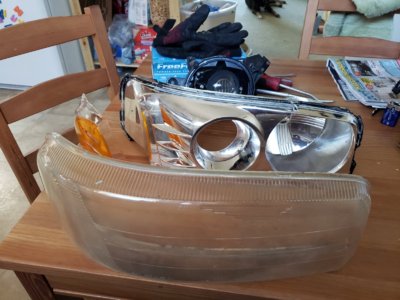
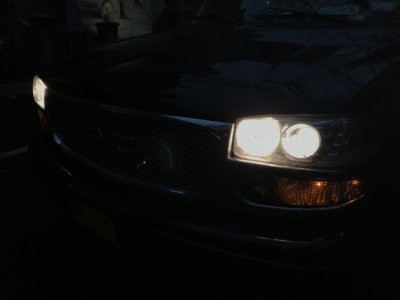
Had a spare headlight so I took the adjuster off it and put it on the lights my retrofit is in. Then I decided to try to bake these apart and get this permaseal apart. Holy shit what a ***** ended up breaking a lot of the housing but I feel that they could be sealed back up with some silicone or plastic job weld.

I'm gonna practice painting the housing and cleaning the lens before I attempt this on my housings I'm also gonna try a demon eye both passive and led

20190108_145657.jpg
 

Isaiah W

Member
Joined
Nov 20, 2016
Posts
78
Reaction score
154
Just got my Tahoe back from the mechanic's today. Had the water pump and temperature sensor replaced, replaced a front wheel bearing (triggered ABS light) and had brake pads and rotors done on all 4 corners. Mechanic also checked all belts and hoses, bearings, bushings, ball joints, steering components, control arms. Ended up being about $1400.
 

Sam Harris

Elite Member
Supporting Member
Joined
Sep 26, 2018
Posts
7,445
Reaction score
14,977
Location
Texas
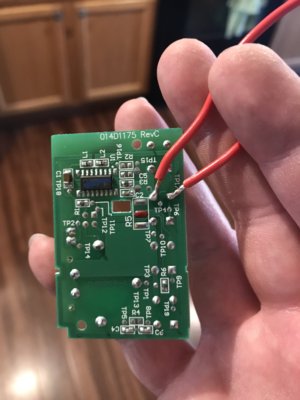
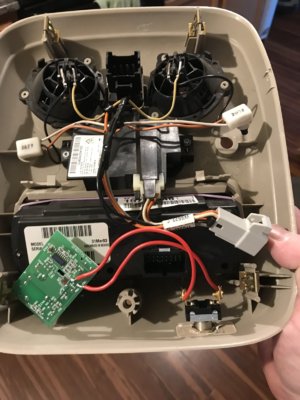
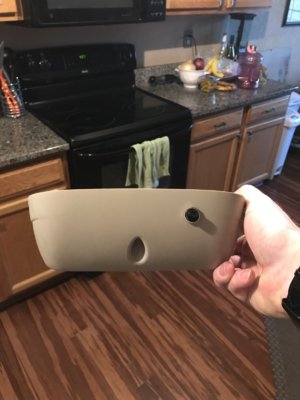
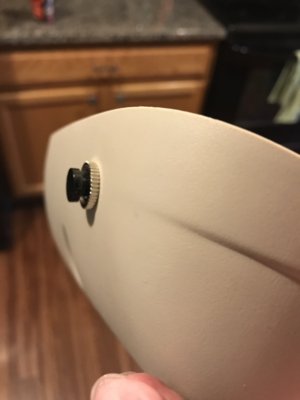
I wanted to program the Homelink transmitter to open my garage door, and found out the Yukon's version is too old to work with my door opener, circa 2015. After ordering the $40 "compatibility bridge" I decided that was a waste, and I wasn't going to pay for that, and cancelled the order. I copied another user's method found here, and added a momentary switch to the overhead console, somewhat hidden, to get the job done. This works great! The opener already had a pretty damn good range (over 1 block), but now it's probably a couple thousand feet! I haven't tested how far yet, but to give you an idea: View media item 27535 Not that I really want to open the door until I'm much closer, but wth.. that's a hellova range! IMG_3793.jpg IMG_3794.jpg IMG_3795.jpg IMG_3796.jpg

Not sure why my first image didn’t come through..
d837ffa0c189ceab85303ac41a15ba91.jpg
 
Last edited:

treehan77

TYF Fiend
Joined
Feb 1, 2015
Posts
1,446
Reaction score
1,216
Location
Crestview, FL
I wanted to program the Homelink transmitter to open my garage door, and found out the Yukon's version is too old to work with my door opener, circa 2015. After ordering the $40 "compatibility bridge" I decided that was a waste, and I wasn't going to pay for that, and cancelled the order. I copied another user's method found here, and added a momentary switch to the overhead console, somewhat hidden, to get the job done. This works great! The opener already had a pretty damn good range (over 1 block), but now it's probably a couple thousand feet! I haven't tested how far yet, but to give you an idea: View media item 27535 Not that I really want to open the door until I'm much closer, but wth.. that's a hellova range! View attachment 213746 View attachment 213747 View attachment 213748 View attachment 213749
So you added a button instead of clipping the remote to the visor? Why?
 

Fless

Staff member
Moderator
Joined
Apr 2, 2017
Posts
16,369
Reaction score
33,858
Location
People's Republic of Colorado
Could you possibly do a write up as well as posting links to the info that you used?

From the owner's manual, Homelink instructions attached. Or, if you prefer, in text:

HomeLink® Transmitter
HomeLink® a combined universal transmitter and
receiver, provides a way to replace up to three
hand-held transmitters used to activate devices such as
gate operators, garage door openers, entry door
locks, security systems and home lighting. Additional
HomeLink® information can be found on the internet at
www.homelink.com or by calling 1-800-355-3515.
This device complies with Part 15 of the FCC Rules.
Operation is subject to the following two conditions: (1)
this device may not cause harmful interference, and
(2) this device must accept any interference received,
including interference that may cause undesired
operation.
This device complies with RSS-210 of Industry Canada.
Operation is subject to the following two conditions:
(1) this device may not cause interference, and
(2) this device must accept any interference, including
interference that may cause undesired operation of
the device.
Changes and modifications to this system by other than
an authorized service facility could void authorization
to use this equipment.
Programming the HomeLink®
Transmitter
Do not use the HomeLink® Transmitter with any garage
door opener that does not have the “stop and reverse”
feature. This includes any garage door opener model
manufactured before April 1, 1982. If you have a newer
garage door opener with rolling codes, please be
sure to follow steps 6 through 8 to complete the
programming of your HomeLink® Transmitter.
Read the instructions completely before attempting to
program the HomeLink® Transmitter. Because of
the steps involved, it may be helpful to have another
person available to assist you in programming the
transmitter.
2-53
Keep the original transmitter for use in other vehicles as
well as for future HomeLink® programming. It is also
recommended that upon the sale of the vehicle, the
programmed HomeLink® buttons should be erased for
security purposes. Refer to “Erasing HomeLink® Buttons”
or, for assistance, contact HomeLink® on the internet at:
www.homelink.com or by calling 1-800-355-3515.
Be sure that people and objects are clear of the garage
door or gate operator you are programming. When
programming a garage door, it is advised to park outside
of the garage.
It is recommended that a new battery be installed in
your hand-held transmitter for quicker and more
accurate transmission of the radio frequency.
Your vehicle’s engine should be turned off while
programming the transmitter. Follow these steps to
program up to three channels:
1. Press and hold down the two outside buttons,
releasing only when the indicator light begins to
flash, after 20 seconds. Do not hold down the
buttons for longer than 30 seconds and do not
repeat this step to program a second and/or third
transmitter to the remaining two HomeLink® buttons.
2. Position the end of your hand-held transmitter about
1 to 3 inches (3 to 8 cm) away from the HomeLink®
buttons while keeping the indicator light in view.
3. Simultaneously press and hold both the desired
button on HomeLink® and the hand-held transmitter
button. Do not release the buttons until Step 4
has been completed.
Some entry gates and garage door openers may
require you to substitute Step 3 with the procedure
noted in “Gate Operator and Canadian
Programming” later in this section.
4. The indicator light will flash slowly at first and then
rapidly after HomeLink® successfully receives the
frequency signal from the hand-held transmitter.
Release both buttons.
5. Press and hold the newly-trained HomeLink® button
and observe the indicator light.
If the indicator light stays on constantly,
programming is complete and your device should
activate when the HomeLink® button is pressed and
released.
To program the remaining two HomeLink® buttons,
begin with Step 2 under “Programming HomeLink®.”
Do not repeat Step 1 as this will erase all of the
programmed channels.
If the indicator light blinks rapidly for two seconds
and then turns to a constant light, continue with
Steps 6 through 8 following to complete the
programming of a rolling-code equipped device
(most commonly, a garage door opener).
2-54
6. Locate in the garage, the garage door opener
receiver (motor-head unit). Locate the “Learn”
or “Smart” button. This can usually be found where
the hanging antenna wire is attached to the
motor-head unit.
7. Firmly press and release the “Learn” or “Smart”
button. The name and color of the button may
vary by manufacturer.
You will have 30 seconds to start Step 8.
8. Return to the vehicle. Firmly press and hold the
programmed HomeLink® button for two seconds,
then release. Repeat the press/hold/release
sequence a second time, and depending on the
brand of the garage door opener (or other rolling
code device), repeat this sequence a third time
to complete the programming.
HomeLink® should now activate your rolling-code
equipped device.
To program the remaining two HomeLink® buttons,
begin with Step 2 of “Programming HomeLink®.”
Do not repeat Step 1.
Gate Operator and Canadian
Programming
Canadian radio-frequency laws require transmitter
signals to “time out” or quit after several seconds of
transmission. This may not be long enough for
HomeLink® to pick up the signal during programming.
Similarly, some U.S. gate operators are manufactured to
“time out” in the same manner.
If you live in Canada, or you are having difficulty
programming a gate operator by using the
“Programming HomeLink®” procedures (regardless of
where you live), replace Step 3 under “Programming
HomeLink®” with the following:
Continue to press and hold the HomeLink® button while
you press and release every two seconds (cycle)
your hand-held transmitter until the frequency signal has
been successfully accepted by HomeLink®. The
indicator light will flash slowly at first and then rapidly.
Proceed with Step 4 under “Programming HomeLink®”
to complete.
2-55
Using HomeLink®
Press and hold the appropriate HomeLink® button for at
least half of a second. The indicator light will come
on while the signal is being transmitted.
Erasing HomeLink® Buttons
To erase programming from the three buttons do the
following:
1. Press and hold down the two outside buttons until
the indicator light begins to flash, after 20 seconds.
2. Release both buttons. Do not hold for longer than
30 seconds.
HomeLink® is now in the train (learning) mode and can
be programmed at any time beginning with Step 2
under “Programming HomeLink®.”
Individual buttons can not be erased, but they can be
reprogrammed. See “Reprogramming a Single
HomeLink® Button” next.
Reprogramming a Single HomeLink®
Button
To program a device to HomeLink® using a HomeLink®
button previously trained, follow these steps:
1. Press and hold the desired HomeLink® button.
Do not release the button.
2. The indicator light will begin to flash after
20 seconds. While still holding the HomeLink®
button, proceed with Step 2 under “Programming
HomeLink®.”
Resetting Defaults
To reset HomeLink® to default settings do the following:
1. Hold down the two outside buttons for about
20 seconds until the indicator light begins to flash.
2. Continue to hold both buttons until the HomeLink®
indicator light turns off.
3. Release both buttons.
For questions or comments, contact HomeLink® at
1-800-355-3515, or on the internet at
www.homelink.com.
2-56

 

Attachments

  • Homelink.pdf
    46.2 KB · Views: 23

Sam Harris

Elite Member
Supporting Member
Joined
Sep 26, 2018
Posts
7,445
Reaction score
14,977
Location
Texas

Pilot

Full Access Member
Joined
Dec 26, 2017
Posts
332
Reaction score
748
Location
Bloomfield, NJ * Lewes Beach, DE * Buenos Aires
As far as a write up for the mod I did, it just depends on your opener, where you solder your momentary switch leads. Pretty easy to tell once you open up the remote, look at the button you have programmed for your opener, and wire in the switch. I used this switch: https://www.amazon.com/gp/aw/d/B000BW0YWG?psc=1&ref=yo_pop_mb_pd_title

THE Sam Harris??

Nice mod. I've been wanting to rig the second garage door button in my Tahoe to open the security gate in my neighborhood. Right now we have HOA issued fobs. I'm sure it's possible but I wonder how difficult?
 

Sam Harris

Elite Member
Supporting Member
Joined
Sep 26, 2018
Posts
7,445
Reaction score
14,977
Location
Texas
THE Sam Harris??

Nice mod. I've been wanting to rig the second garage door button in my Tahoe to open the security gate in my neighborhood. Right now we have HOA issued fobs. I'm sure it's possible but I wonder how difficult?
It’s likely very simple. I was actually hoping to wire to the installed HomeLink button, but it’s soldered to a ribbon cable, with the other 2 buttons. There are 5 leads on each of them. I tried to get the needed leads, to activate the switch, but no matter which I used, the switch would activate without pressure. I opened up this tiny switch, so I could look inside, and determine the needed leads, but it pretty much fell apart in my hands, so I decided to continue with the additional momentary button.


Sent from my iPhone using Tapatalk
 

Forum statistics

Threads
137,787
Posts
1,992,255
Members
102,780
Latest member
ASG-MikeS

Latest posts

Back
Top