Pioneer AVIC5200NEX IN A 2002

Disclaimer: Links on this page pointing to Amazon, eBay and other sites may include affiliate code. If you click them and make a purchase, we may earn a small commission.

Ryan Buck

Full Access Member
Joined
Mar 2, 2018
Posts
320
Reaction score
175
Location
Mesa Arizona
First off let me be a bit more clear... I am not looking for the wire that goes to the parking brake to turn the screen on and off while in motion. I already have that covered along with all the other wires except the pink ..........................
So I have wasted countless hours now the last couple days trying to figure out where to plug this damn pink wire which runs the vehicle speed sensor I guess. I've read 50 different things from 50 different people telling you it's a different wire in a different location I want to know if I'm somebody that's actually installed one of these ******* firsthand not what your friend tells you but somebody that's actually Hands-On did it where I can tap into. Underneath the dash next to the e-brake I took that plastic cover off and there's only one wiring harness that plugs into that whole thing and there's not a green and white wire on it especially not one that has a brown plug either. Right now I have the whole dash torn apart with the gauge cluster out and just looking for the green with white stripe wire in there well there's two of them nobody mentioned anything I read about there being two of them so I have no idea which one it happened to you and I don't want to mess it up and tap into the wrong one. I actually hate having to tap in that close to do it anyways and I'm hoping there is somewhere else I can get it. The truck has OnStar and the harness that goes into the OnStar button on the dash has a dark green with white stripe wire but he'll I don't know what does what there's 20 different wires in this thing that are dark green and white. So I'm asking please can somebody help me before I go crazy and dump some gas and throw matches on this ************. I'll also read people didn't even hook that wire up and their shit works just fine so who the hell knows LOL thanks guys. And please if you have not done it first-hand do not comment I don't need any my buddy said, advice. I have delt with that to much on these fourms. Alot of false advice on all the fourms. So from now on I am going to take photos of everything I do so anyone else that is having the problems that I do have photos to help them out. And like we always said if you dont have a photo it didnt happen!
 
Last edited:

adriver

Full Access Member
Joined
Aug 18, 2018
Posts
787
Reaction score
477
That wire gets hooked up to the parking brake so your head unit knows you are in park for when you program your Navigation. By law, any installer is required to hook that up, so that you can't mess with your navigation while moving. On hand held units there will be that disclaimer screen when you start using it, to say you can not program it while you are moving, its the same concept, but they are doing it for you. If you're doing it yourself you don't need that. I don't use double dins so you can keep searching if that's not good enough. Not sure if your unit needs it powered or grounded.

Take it as you want, if you really want someone who has done your specific model. I'll bet you can get a quick answer or install video from youtube. Most wires are universal.
Red sometimes orange is hot
yellow sometimes orange is accessory
black is ground
orange with white stripe sometimes orange is illumination
blue with white stripe is remote amp turn on
pink sometimes green is navigation parking brake.


Got this through a Silverado forum:

http://avic411.com/index.php?/topic/83874-5200-nex-install-questions/&tab=comments#comment-347081
 
Last edited:

adventurenali92

Full Access Member
Joined
Feb 16, 2015
Posts
7,722
Reaction score
9,173
Location
Big Bear Lake, ca
That wire gets hooked up to the parking brake so your head unit knows you are in park for when you program your Navigation. By law, any installer is required to hook that up, so that you can't mess with your navigation while moving. On hand held units there will be that disclaimer screen when you start using it, to say you can not program it while you are moving, its the same concept, but they are doing it for you. If you're doing it yourself you don't need that. I don't use double dins so you can keep searching if that's not good enough. Not sure if your unit needs it powered or grounded.

Take it as you want, if you really want someone who has done your specific model. I'll bet you can get a quick answer or install video from youtube. Most wires are universal.
Red sometimes orange is hot
yellow sometimes orange is accessory
black is ground
orange with white stripe sometimes orange is illumination
blue with white stripe is remote amp turn on
pink sometimes green is navigation parking brake.


Got this through a Silverado forum:

http://avic411.com/index.php?/topic/83874-5200-nex-install-questions/&tab=comments#comment-347081
This isn’t necessarily accurate. I have a clarion NX405 in my 2006. And I can use every nav function even while moving. I can program destinations while driving. So not every headunit has that wire.
 

adriver

Full Access Member
Joined
Aug 18, 2018
Posts
787
Reaction score
477
This isn’t necessarily accurate. I have a clarion NX405 in my 2006. And I can use every nav function even while moving. I can program destinations while driving. So not every headunit has that wire.

This is your manual.
https://www.manualslib.com/products/Clarion-Nx405-3869414.html


This is where your manual tells you:
In order to avoid a traffic accident, do not operate the system while driving.
In order to avoid a traffic accident, operate the system only when the vehicle is stopped at a safe place and the parking brake is on.
https://www.manualslib.com/manual/1255349/Clarion-Nx405.html?page=43#manual


This is where your manual shows the wiring harness which includes the wire I was referring to:
rass - green parking brake cord.
https://www.manualslib.com/manual/1255349/Clarion-Nx405.html?page=101#manual


I didn't even say every unit has it, but I THINK they do. I said that any installer is legally required too. Yours does have it, that does not mean it is hooked up correctly. Its just hooked up to .. wouldn't that just be the ground, when your parking brake is on? So you just ground it out. I can imagine people giving installers bad names who wouldn't do it for them, paying them a little extra, or installers just being lazy..... etc.
 
Last edited:

Doubeleive

Wes
Supporting Member
Joined
Nov 7, 2017
Posts
30,534
Reaction score
47,969
Location
Stockton, Ca.
just hook up a bypass micro switch and be done with it, there like $5 online maybe $10 from a audio shop, then you can do whatever you want whenever you want.
 
OP
OP
Ryan Buck

Ryan Buck

Full Access Member
Joined
Mar 2, 2018
Posts
320
Reaction score
175
Location
Mesa Arizona
That wire gets hooked up to the parking brake so your head unit knows you are in park for when you program your Navigation. By law, any installer is required to hook that up, so that you can't mess with your navigation while moving. On hand held units there will be that disclaimer screen when you start using it, to say you can not program it while you are moving, its the same concept, but they are doing it for you. If you're doing it yourself you don't need that. I don't use double dins so you can keep searching if that's not good enough. Not sure if your unit needs it powered or grounded.

Take it as you want, if you really want someone who has done your specific model. I'll bet you can get a quick answer or install video from youtube. Most wires are universal.
Red sometimes orange is hot
yellow sometimes orange is accessory
black is ground
orange with white stripe sometimes orange is illumination
blue with white stripe is remote amp turn on
pink sometimes green is navigation parking brake.


Got this through a Silverado forum:

http://avic411.com/index.php?/topic/83874-5200-nex-install-questions/&tab=comments#comment-347081
Thanks man but the wire you are referring to is the light green wire in the pioneer harness. I already have that one hooked up. And you are correct it goes to the parking brake. The one I need is a pink wire that goes to tr he speed control. It tells the gos how fast and far you have gone so it can be more accurate.
 
OP
OP
Ryan Buck

Ryan Buck

Full Access Member
Joined
Mar 2, 2018
Posts
320
Reaction score
175
Location
Mesa Arizona
just hook up a bypass micro switch and be done with it, there like $5 online maybe $10 from a audio shop, then you can do whatever you want whenever you want.
Yeah I have that one already take care of. On the new pioneer avic units you can go back to doing it the old school way and tire it to the ground. Then once you get everything hooked up you leave the radio on off mode and hold down the screen about to in from the left and 2 inches up from the bottom and magically screen will pop up with the menu that lets you bypass it for so-called testing purposes LOL but the one I'm looking for is the GPS hookup
 
OP
OP
Ryan Buck

Ryan Buck

Full Access Member
Joined
Mar 2, 2018
Posts
320
Reaction score
175
Location
Mesa Arizona
Screenshot_20181028-155100_Drive.jpg
I'm looking for a place to tie in the pink wire, stated on the top not the green wire that is in the middle of the page
 

Doubeleive

Wes
Supporting Member
Joined
Nov 7, 2017
Posts
30,534
Reaction score
47,969
Location
Stockton, Ca.
the vehicle speed wire you want to connect to is on the harness that connects to the back of the instrument cluster, exactly which one can vary depending on your year/make/model, I would say the safest best is to pull the dash cover off, unbolt the cluster and then go by a well known audio shop in your area and ask one of the install tech's which wire you should use, that way they can just point it out since it will all be accessible on the spot.
 

adriver

Full Access Member
Joined
Aug 18, 2018
Posts
787
Reaction score
477
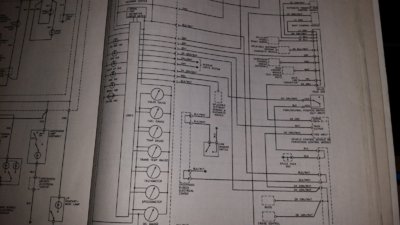
The VSS signal wire from the VCM PCM to the MBEC, then the cluster is DK GRN/WHT

(From my Haynes manual 24066 99-06 Silverado sierra suburban Tahoe Yukon denali avalanche).
 
OP
OP
Ryan Buck

Ryan Buck

Full Access Member
Joined
Mar 2, 2018
Posts
320
Reaction score
175
Location
Mesa Arizona
the vehicle speed wire you want to connect to is on the harness that connects to the back of the instrument cluster, exactly which one can vary depending on your year/make/model, I would say the safest best is to pull the dash cover off, unbolt the cluster and then go by a well known audio shop in your area and ask one of the install tech's which wire you should use, that way they can just point it out since it will all be accessible on the spot.
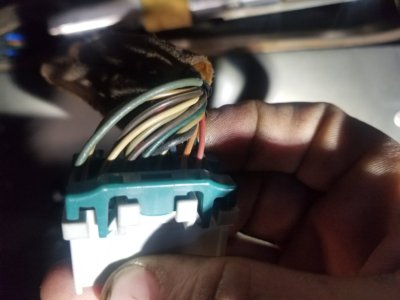
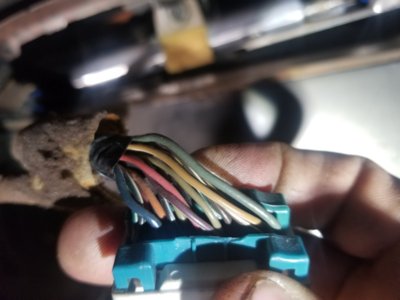
I have it all out already but I have read it's the grey wire or the green /white wire which has 2 of those!

20181028_010133.jpg 20181028_010142.jpg
 
OP
OP
Ryan Buck

Ryan Buck

Full Access Member
Joined
Mar 2, 2018
Posts
320
Reaction score
175
Location
Mesa Arizona
The VSS signal wire from the VCM PCM to the MBEC, then the cluster is DK GRN/WHT

(From my Haynes manual 24066 99-06 Silverado sierra suburban Tahoe Yukon denali avalanche).
Do you know which pin it is though bud? There's two dark green and white ones in there
 

adriver

Full Access Member
Joined
Aug 18, 2018
Posts
787
Reaction score
477
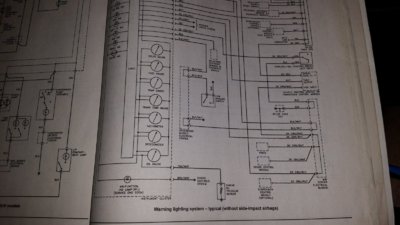
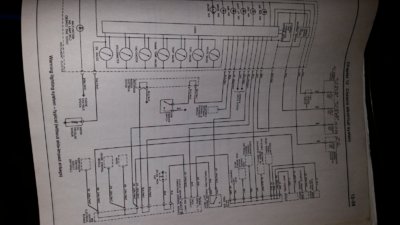
Here is the closest thing I can find.. One of the DK GRN/WHT wires is to the VSS input, one is to the Park/Netural position sensor switch.

Perhaps you could use a voltmeter to see if you get a reaction putting it into park neutral?

20181028_191224.jpg 20181028_193338.jpg 20181028_191215.jpg
 
OP
OP
Ryan Buck

Ryan Buck

Full Access Member
Joined
Mar 2, 2018
Posts
320
Reaction score
175
Location
Mesa Arizona
Here is the closest thing I can find.. One of the DK GRN/WHT wires is to the VSS input, one is to the Park/Netural position sensor switch.

Perhaps you could use a voltmeter to see if you get a reaction putting it into park neutral?

View attachment 210117 View attachment 210118 View attachment 210119
I know who to get ahold of from now on when I have a question about wiring that's for sure! You got it down packed on point. I didn't even see this before I went out and started working though LOL so I climbed up underneath unplugged the actual speed sensor wire from the back of the transfer case dark green tapped in spliced it together ran a new wire with new black tape and wire loom cleaned it all up under there then ran it up through the rubber boot where the e-brake cable goes through the cab. So now I know for sure I got it right LOL
 
OP
OP
Ryan Buck

Ryan Buck

Full Access Member
Joined
Mar 2, 2018
Posts
320
Reaction score
175
Location
Mesa Arizona
Funny thing is about a month ago I was up underneath there because the transfer case was running dry I'm making all kinds of noise and when I was inspecting it I found a plug that was not plugged into the transmission and it went to another one of those style sensors up top it was completely packed in with mud so I had to scrape it all out to plug it in but never noticed any difference one thing I am wondering is if it has something to do with the four-wheel drive because when you put it in 4-wheel drive and drive 10ft the service 4 wheel drive light used to come on and I couldn't get it off and back in the two wheel drive unless I shut the truck off and pulled the key open the door. So next time I'm driving I need to test it and see if it works proper now
 

Forum statistics

Threads
137,734
Posts
1,990,750
Members
102,722
Latest member
AdrienR
Back
Top