Onstar Wifi interference causing business phone system to drop calls

Disclaimer: Links on this page pointing to Amazon, eBay and other sites may include affiliate code. If you click them and make a purchase, we may earn a small commission.

Yukon Forum

TYF Newbie
Joined
Aug 23, 2018
Posts
14
Reaction score
1
I purchased a new Yukon 2017 last year with built-in WiFi. Sometime afterward we noticed intermittent static interference with our business phone system. Sometimes the static was bad enough it would drop the call. One day all of a sudden the static interference started and at the same time I noticed the Yukon's "WiFi Hotspot xxxx" show up in the wireless information. An employee had just drove the Yukon in the driveway. Turns out the OnStar WiFi was the causing our business phone system to fail. The intermittent part was only because the Yukon wasn't turned on all day. Every time we started the Yukon it would cause static on the phone until it drove away or was turned off.

We have never used OnStar. Not for the free trial period, not ever. We do not have an Onstar web account, nor have we ever used the cell phone app. For those of you that love OnStar GodBless, but it is not anything that we will ever be interested in.

I called OnStar and they claimed that since the infotainment center showed the WiFi was turned off the device would be disabled. When I asked... why does the "WiFI Hotspot xxxx" show up on my phone and laptop when we turn on the vehicle, and disappear after we shut the Yukon off then? They then told me to shut it off using my web account or app. When I reminded them that I did not have an account, they asked me to push the little button and they made some changes remotely. They told me that they had disabled the wireless and all was good, but unfortunately that was not the case. All they had done was change the wireless device to be hidden and then restricted access to the infotainment center only. This kept it from displaying the SSID on the phone and laptop, but then it showed up as a "hidden" network available instead. It unfortunately did not shutoff the wireless radio which was causing the issues. After this was explained they told me I would have to take it to the dealer.

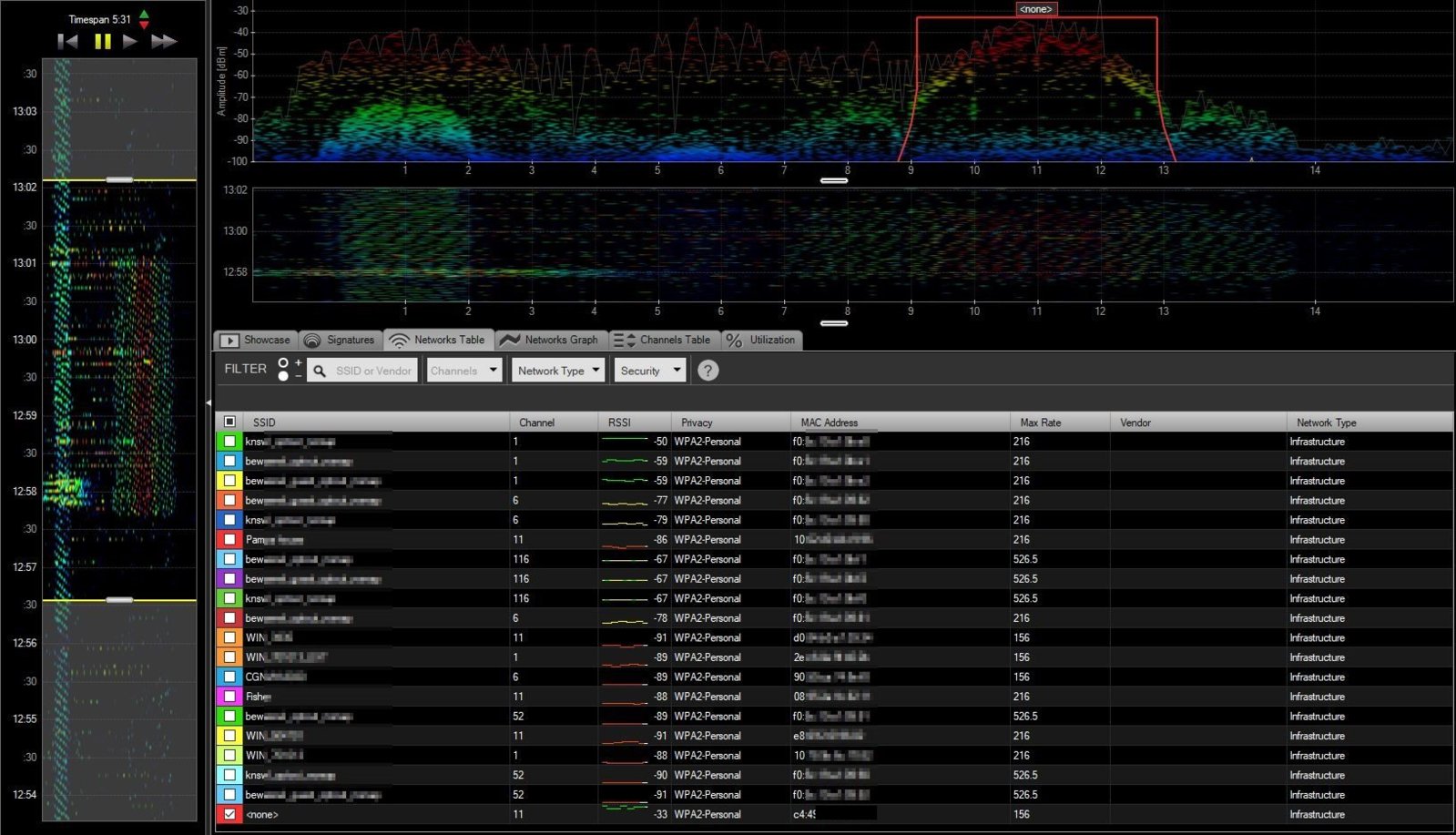
Trying to be helpful I got out the spectrum analyzer that looks at radio energy. I printed out captures of before the vehicle was started, while the Yukon was started, and after it had been turned off. The capture clearly showed the Yukon's WiFi running and a large amount of RF interference when ever it was started. Even with the overwhelming evidence that the radio was still on and causing interference the dealer offered little help.

Yukon Turned Off
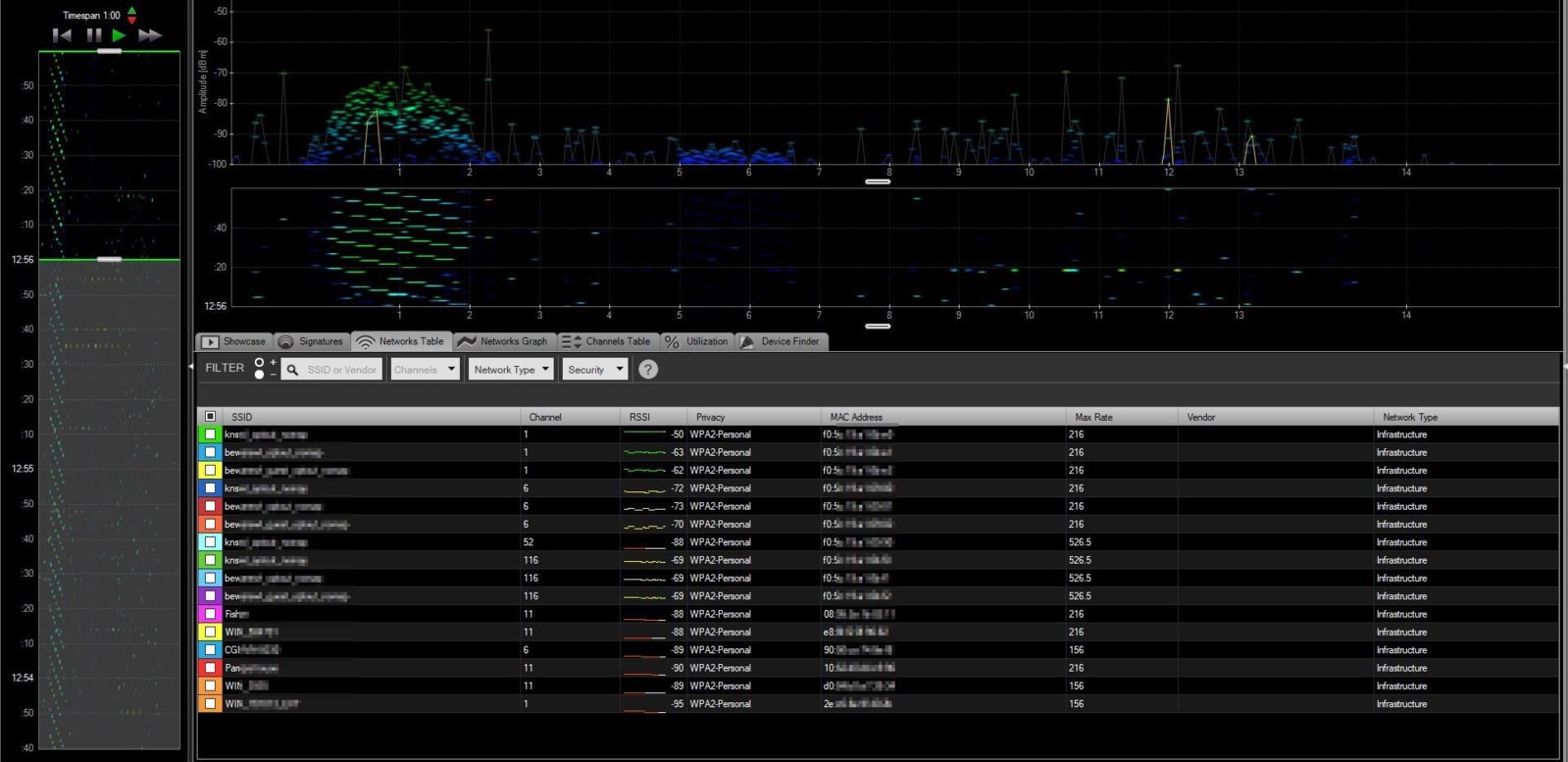
Control.jpg


Yukon Turned On

Bad.JPG


If anyone can give me some advice on what to do next it would be much appreciated. Replacing the phone system would not be a simple task. It is a business pbx that would cost thousands to replace. Also, this is not a WiFi issue in general. The WiFi test shows 20+ wireless networks in the area and we do not have a single issue with any of them. The phone issue only appears when the OnStar device is running. I don't think simply replacing the Onstar device would resolve anything since we have tested other OnStar devices and they all do the same thing. Typically a wireless device with nothing attached to would generate very little traffic, but for some reason All of the OnStar WiFi devices so far show a lot of activity and interference.

My questions are as follows

1. Since it is illegal for any device to cause undesirable interference with the 2.4GHz band, most wireless devices have the ability to be turned off. You can shut the wifi and bluetooth off on your cell phone, laptops have airplane mode, and etc.. Has anyone heard of the OnStar WiFi option being disabled? (Disabling WiFi in the infotainment center does not do this) This would be the best answer for me. Even though I will never use it, the next person to own it could turn it back on if they wanted to.

2. The only option they offered was to remove the Onstar device completely. I personally don't have any use for the services, but have concerns that this will impact my compass, navigation system, and cause errors to display on the dash. I did not spend 70k to drive around with nothing working and a bunch of errors. Does anyone know what pulling the OnStar is going to disable on the Yukon?

3. Could the WiFi OnStar device be pulled out and replaced with another? (without the WiFi option) This might possibly allow the compass, gps to still work?

Thanks!!!!!

 

Doubeleive

Wes
Supporting Member
Joined
Nov 7, 2017
Posts
30,500
Reaction score
47,889
Location
Stockton, Ca.
the only way to "truly" disable it is to unplug the module and it should not give you any errors that I know of it hasn't for others on older trucks, but there is only one way to find out, I am not sure where the module is located on your year in the past they have been located under the ac control, behind the glove box, and some I think in the rear quarter panel, you may have to google to find out where it is and then just unplug it and see how it goes, another person asked about this same thing before because he worked around explosives and the signal was a potential hazard so he had to have it unplugged, that's the only way too truly turn it off
 
OP
OP
Yukon Forum

Yukon Forum

TYF Newbie
Joined
Aug 23, 2018
Posts
14
Reaction score
1
It really surprises me that the wireless can not be turned off, but it is what it is I guess. I can think of a lot a reasons it should have the option of being shut off. The newer OnStar devices have been a pain to remove, but sounds like it is worth a try. My wife had a 2012 Acadia and OnStar scared the crap out of her so badly that she insisted it be removed. (That was back when an operator would just start talking to you over the system and take over your car) When I removed that one the dash filled with service code errors. I had to buy a third party device that jumped some pins to correct.

GM wants me to sign my life away before the removal and then pay them for the privilege. If the dealer removes it, will they be be doing anything other than pulling the vcim? For example will they reprogram/replace anything that would be better than me just removing it myself?
 

Doubeleive

Wes
Supporting Member
Joined
Nov 7, 2017
Posts
30,500
Reaction score
47,889
Location
Stockton, Ca.
It really surprises me that the wireless can not be turned off, but it is what it is I guess. I can think of a lot a reasons it should have the option of being shut off. The newer OnStar devices have been a pain to remove, but sounds like it is worth a try. My wife had a 2012 Acadia and OnStar scared the crap out of her so badly that she insisted it be removed. (That was back when an operator would just start talking to you over the system and take over your car) When I removed that one the dash filled with service code errors. I had to buy a third party device that jumped some pins to correct.

GM wants me to sign my life away before the removal and then pay them for the privilege. If the dealer removes it, will they be be doing anything other than pulling the vcim? For example will they reprogram/replace anything that would be better than me just removing it myself?
good question I don't know the answer to that, I would start with the simple stuff though like pulling the onstar fuse to see if it at least deactivates the wifi
https://www.wikihow.com/Deactivate-Onstar
 
Last edited:
OP
OP
Yukon Forum

Yukon Forum

TYF Newbie
Joined
Aug 23, 2018
Posts
14
Reaction score
1
Thanks for the info!

All the units I have pulled in the past have always had two antennas and that was before WiFi. The blue connector is the cellular antenna and the brown one was GPS. It would be my guess that neither the Bluetooth or WiFi have external antennas. You did bring up a good point regarding the fuse. I did have a dealer suggest pulling the fuse at one time, but the one he suggested did not work. The manual does not indicate which fuse the Onstar is on and when I looked into it several months ago, someone suggested the same fuse ran the infotainment center and I stopped looking any further. It is worth looking into before I rip out the dash! :)

Thanks!!!!
 

Doubeleive

Wes
Supporting Member
Joined
Nov 7, 2017
Posts
30,500
Reaction score
47,889
Location
Stockton, Ca.
looks like it may be right behind the radio, you may not have to disconnect all 3 to disable the wifi signal, it will be one or both of the lg module
 
OP
OP
Yukon Forum

Yukon Forum

TYF Newbie
Joined
Aug 23, 2018
Posts
14
Reaction score
1
That was my guess as well. It seems like I remember seeing it when I pulled out the dash out a while back.

Thanks for all your help!!!
 

Doubeleive

Wes
Supporting Member
Joined
Nov 7, 2017
Posts
30,500
Reaction score
47,889
Location
Stockton, Ca.
That was my guess as well. It seems like I remember seeing it when I pulled out the dash out a while back.

Thanks for all your help!!!
if the round antenna's don't drop the signal then I would pull 1 harness off at a time on the lg module until it disables it I would think it wouldn't give you any errors it just simply wouldn't allow the wifi to work., that way you can still have Bluetooth theoretically anyway.
 
OP
OP
Yukon Forum

Yukon Forum

TYF Newbie
Joined
Aug 23, 2018
Posts
14
Reaction score
1
I am not sure that the Bluetooth isn't part of our problem. We don't use Bluetooth so it would not be missed, but Bluetooth and WiFi both use the same 2.4GHz band. The above graph displays high interference on wireless channel 11 on the right side, but it also shows interference in the whole range. Wireless interference often has visual signatures that indicate what the culprit is. The hump/mounds are a clear signature of a WiFi network. However, some of the interference on the Yukon indicates a light signature of Bluetooth. Bluetooth interference looks more like an upside down saw blade with very long teeth. I didn't notice this at first until I started testing other OnStar devices. We personally own a new 2018 Equinox that my wife drives and on that device the Wifi interference is not quite as bad, but the entire range shows more excessive Bluetooth interference. Both vehicles will cause static on the phone system when running. It is possible the interference is being caused by Bluetooth instead which has been another fear. If the infotainment center device has a Bluetooth radio as well, we could have issues with the phone system after the Onstar device has been removed. I have no issues losing the OnStar features, but I would have zero tolerance to disable the entire infotainment center. No radio, backup camera, nav, and the rear dvd player would be very upsetting. You can shutoff the WiFi on the infotainment center, but I am pretty sure there is no option to shut off the Bluetooth.

I still can't believe that GM would not have an off switch for these radios!!!!! Someone needs to find the designer and kick them right square in the crotch as hard as they can! :)
 
Last edited:
OP
OP
Yukon Forum

Yukon Forum

TYF Newbie
Joined
Aug 23, 2018
Posts
14
Reaction score
1
I ran across several sites today that said they were able to disable the WiFi. They pretty much described my experience with OnStar word for word, but according to them, if they disabled the WiFi in BOTH their On-Line web account AND their mobile app the WiFi would turn off. Only problem is that I do not have either of these.

Anybody have an OnStar on-line account and mobile app willing to try and turn theirs off to see if it can be done?
 
Last edited:

dbbd1

Full Access Member
Joined
May 12, 2017
Posts
924
Reaction score
357
Yes, that is how I did it. In both. I still want to disconnect my onstar box though. I still have the green idiot light on my mirror and, every now and then, I get a message saying that I have "limited" service with onstar.
 
OP
OP
Yukon Forum

Yukon Forum

TYF Newbie
Joined
Aug 23, 2018
Posts
14
Reaction score
1
Thanks for the info... that is good to know! I have heard several mention that when they disabled the WiFi using the Onstar website it only placed the wireless connection in "Hidden" mode and was still active. It was only recently that I discovered others reporting that when they used the GM app in tandem it actually turned off the radio. Very frustrating if true with all the conversations I have had with OnStar, taking the Yukon to the dealer for an entire day, having the dealer talk to tech services, and none of them knowing or admitting it could be shut off?

I have seen several sites mentioning the "Limited Service" announcement. Most have said this can be disabled if you call OnStar. I guess they claim it can not to be turned off anymore, but if your persistent they will do it for you. I do not have this problem personally, but I passed on the free trial and have never activated the device.
 

Lt Belspur

Member
Joined
Sep 27, 2017
Posts
41
Reaction score
14
Location
Sarasota, Florida
Just my opinion,

I would look at you business phone system first. You may have a loose unshielded cable somewhere.

What happens when another Wi-Fi enabled vehicle enters your business.

Looking at your chart. How close was the vehicle to the other SSID'S?

Does this happen when a cell phone hotspot is active?
 
Last edited:
OP
OP
Yukon Forum

Yukon Forum

TYF Newbie
Joined
Aug 23, 2018
Posts
14
Reaction score
1
Just my opinion,

I would look at you business phone system first. You may have a loose unshielded cable somewhere.

What happens when another Wi-Fi enabled vehicle enters your business.

Looking at your chart. How close was the vehicle to the other SSID'S?

Does this happen when a cell phone hotspot is active?


Good suggestion, but I am sure it is not an issue of shielding. The spectrum analyzer displays high energy RF interference as soon as the vehicles are turned on. We have had the phone system for over a decade and our internal wireless system has been in place for 3-4 years. We have not had any issues with static until the OnStar WiFi devices came into the picture. The static occurs as soon as the vehicle is started or pulls in the drive, and goes away when it is turned off or leaves. We do not have any issues with the phone system unless the OnStar devices are running.

We only have two vehicles with the WiFi option and both are causing static on our phone. We are back from the road far enough we do not have issues with people driving by, and we are not really open to the public, so it is not an issue with customers stopping by. If we could simply turn off the OnStar WiFi radios that are not being used it would resolve our issue.
 
Last edited:
OP
OP
Yukon Forum

Yukon Forum

TYF Newbie
Joined
Aug 23, 2018
Posts
14
Reaction score
1
I thought I would write an update.

The good news is I was able to fix the 2018 Equinox WiFi interference by simply pulling the onstar fuse. It was awesome!!!! Wifi shut off and the next owner just needs to reinstall the fuse if they want to use the features in the future. It pleases me to see this. GM is not going to want to update security issues on a ten year old car. Today's vehicle electronics are now a security nightmare. I am happy to see if you don't use this feature, you can simply pull the fuse and not worry about updating something that is not needed.

The bad news is this did not work for the Yukon. Onstar/GM basically confirmed the wifi device can not be shut off. When the app is used... it will hide the wireless SSID which keeps your phone from trying to connect to it, but it does not shut off the radio. I tried pulling the onstar fuse, and it did kill the onstar, but my dash lit up with errors afterward. It appears pulling the fuse disables the air bags, stability control, and several other errors, and knocks out the compass. I am heading to the dealer tomorrow so they can try to kill the onstar, but sounds like it will be permanent and hard for the next owner to reconnect it. Wish me luck!!!!
 
Last edited:

Tahoe14

Full Access Member
Joined
Jun 10, 2014
Posts
2,068
Reaction score
1,345
Location
Central Fl
If you do a Google search you should be able to find out how to do it. I think is is behind the radio or glove box and you unplug the Onstar module.
 
OP
OP
Yukon Forum

Yukon Forum

TYF Newbie
Joined
Aug 23, 2018
Posts
14
Reaction score
1
I took the Yukon back to a different dealer today. The tech disabled the Onstar device as planned which did kill the WiFi signal. There were no error messages on the console afterward, such as the air bags and stability control appeared to be working. I left the dealership... and soon after noticed the compass displayed "cal" as in calibrate, and then about a half mile down the road the Navigation system displayed a "GPS" icon with a red x through it.

I took it back to the dealer and he said he would have to e-mail GM and see what they have to say about it. He offered to reconnect it in the meantime, but I told him to just skip it for now and we could deal with it later. I am really happy I did that now, because several strange issues have been resolved.

1. I had hardwired my old garmin GPS in the Yukon as the built-in nav sucks. The old Garmin worked great in the other vehicles, but it always had a hard time finding a gps signal in the Yukon. I assumed it was the windshield, as some are coated with metal which blocks the GPS signal. Often driving down the road it would say "GPS lost" and under the best circumstances, I would only get a couple bars on the GPS strength meter. After the On-Star device was disabled, the Garmin GPS displayed a 5 bar signal strength and has worked perfectly ever since.

2. I used to have to drive right up to the garage door before the operator would work. After the On-Star device was disabled, the operator will now open the garage door before turning into our long driveway.

3. We would have cell phone quality issues from time to time. Low signal strength, and static were some of the issues. The phone has great signal now and the calls are crystal clear.

4. The original business phone issues are completely gone now. We can leave the vehicles running all day and not a single issue with the phone system now.

I kind of expected the compass to break when they killed the Onstar. The navigation system still works, but right below the time in the upper right corner, there used to be the direction indicator. It now displays a big "GPS" icon with a red x going through it. It also displays the calibrate compass icon at the top. The navigation is usable, but is riddled with error messages. The compass on the dash display around the digital speedometer at first said "Cal", but the error has went away now and it just no longer displays the direction I am heading. I used the compass, but it is not a deal breaker and the positive out weights it missing, but I hope that we can figure out a way to rid the error messages on the infotainment center. I will probably live with the errors, but it does not seem like I should have to.

garmin.jpg
 
Last edited:

Forum statistics

Threads
137,686
Posts
1,989,610
Members
102,687
Latest member
JohanZ
Back
Top