Onstar whole system delete?

Disclaimer: Links on this page pointing to Amazon, eBay and other sites may include affiliate code. If you click them and make a purchase, we may earn a small commission.

Doubeleive

Wes
Supporting Member
Joined
Nov 7, 2017
Posts
30,501
Reaction score
47,902
Location
Stockton, Ca.
Definitely. Google is gathering much more info about you than your old Onstar ever will. How do you think they show you ads for things you only thought about?
everything we do is counted including what you watch on tv, also ad's are sent to you when you are around another person that has searched for something because it assumes you are associated, so if your friend was looking at Hawaii vacation packages you will see add's for the same. Camera's scan your license plate and record the time and date, it's randomly stored until a crime occurs then it is accessed to see if it was you or not. the list goes on and on and on. everything from how much you spend at the store to what music you listen to. Big money in all that data.
 

Doubeleive

Wes
Supporting Member
Joined
Nov 7, 2017
Posts
30,501
Reaction score
47,902
Location
Stockton, Ca.

B-train

Full Access Member
Joined
Sep 12, 2022
Posts
2,706
Reaction score
4,911
Send the 17 to me. I want to see if it's possible to upgrade our models to the newer lte OnStar module. It's for science, I'll pay shipping.
I only plan on pulling the SIM card when I get to it. From what I've researched, this appears to be the best way that won't cause glitches and/or codes from missing modules.
 

mikez71

Full Access Member
Joined
Mar 9, 2023
Posts
3,200
Reaction score
3,952

Older cars are un-hackable! Of course they can hotwire it... but they won't be doing it remotely!
 

koachdaddy

Member
Joined
Jun 11, 2023
Posts
56
Reaction score
33
Location
Space Coast, FL
Having previously disabled OnStar on a 2017 Colorado, I've been wanting to complete ever since acquiring my 2020 Tahoe and do not wish to get into a debate as to why.
In the Colorado, the 'black box' was behind the glovebox and contained three circuit cards and you had to do was remove the card attached to the OnStar antenna. I did, threw it in a static free bag, and never had an issue.
On this thread everyone is referring to a SIM card, and I envision a cell phone SIM card, not a circuit card...so kinda different IMO.
I haven't performed this yet cause I can't seem to find absolute detailed instructions, with pics, of exactly what needs to be done without all of the bells/whistles/lights that I do NOT wish to excite while possibly disabling the vehicle.
Can anyone please provide a solid link for this task?
 

persistent

Member
Joined
Nov 10, 2023
Posts
83
Reaction score
72
Having previously disabled OnStar on a 2017 Colorado, I've been wanting to complete ever since acquiring my 2020 Tahoe and do not wish to get into a debate as to why.
In the Colorado, the 'black box' was behind the glovebox and contained three circuit cards and you had to do was remove the card attached to the OnStar antenna. I did, threw it in a static free bag, and never had an issue.
On this thread everyone is referring to a SIM card, and I envision a cell phone SIM card, not a circuit card...so kinda different IMO.
I haven't performed this yet cause I can't seem to find absolute detailed instructions, with pics, of exactly what needs to be done without all of the bells/whistles/lights that I do NOT wish to excite while possibly disabling the vehicle.
Can anyone please provide a solid link for this task?
i just deactivated onstar and removed the onstar modem from a 2023 silverado and a 2020 tahoe. the process for removing the modem is very similar in both cases, but the location of the vcim (vehicle communication interface module) is notably different in the 2 vehicles. i hope this information can save others time, so they don't have to remove tons of trim in their car hunting for their vcim.

in both cases, you should first use the existing working onstar system to "deactivate" the system, which nominally disables onstar. press the onstar button, speak to a customer service person, and ask them to fully disable the onstar system in the vehicle. this should take 5-10 minutes per vehicle.

since it's not possible to tell whether the system is actually deactivated, you now need to access the vcim and disconnect the onstar + cellular modem, which attaches to the corresponding antennas. note there is no sim card to speak of, and you must remove the entire modem to ensure the transceiver is not sending. i suspect it's possible to retain the use of the onboard cellular link if you simply disconnect the onstar antenna lead, but i don't care about this option and remove the entire modem.

it is safest to disconnect the battery while performing this work to minimize risk of zapping electrical components, e.g. the vcim. use a 10 mm socket to loosen the negative terminal clamp in the engine compartment.

for the 2023 silverado, the vcim is just above the gas pedal and can be accessed by removing a single 7 mm screw that holds the foot ac duct in place and removing the duct segment. this screw is oriented backwards and is pretty annoying to remove. there are 2 black plastic retaining clips that need to be pushed to the side before you slide the vcim down. the vcim has 2 antenna leads, one brown and one purple, and a data connection. disconnect the cables that connect to the vcim. you will need to squeeze the antenna lead connectors while using a larger flat blade screwdriver or similar to apply upwards/outwards pressue on the connector in a few places by twisting it between the connector and the module. be gentle while doing this to avoid damaging the modem and the leads. once the vcim is disconnected, remove the 2 x T8 screws on the side of the unit near the antenna connectors and then slide the modem outwards, possibly using a flat blade screwdriver to get it started. store the modem and 2 screws somewhere in case you want to reconnect the modem in the future.

most of what i said applies to the 2020 tahoe as well, but the vcim is located above the glove box. the location of the vcim may vary depending on your trim kit, but i am simply trying to manage expectations here since i have not done this on any vehicles besides my own. empty your glove box, slide the clip that holds the retaining cable to the box out, press the sides of the glove box inwards, and rotate the glove box downwards. there is a panel now accessible that has 6 x T15 screws securing it. remove these screws and the panel to expose the vcim above it. similar to the silverado, press 2 black retaining clips and pull the vcim downwards. disconnect the cables per the process i described for the silverado. undo 4 x T10 screws on the disconnected vcim to expose the mainboard and the card for the modem. remove the modem card by undoing 3 x T10 screws, reassemble the vcim box without the modem, and reconnect the data cables.

my motivation for doing this work is that i'm a computer security expert who hates being tracked online and in person. it is surprising that information about the location of the vcim is so hard to come by. i spent roughly 4 hrs locating and removing the vcim in the silverado and 8-10 hrs for the tahoe (i removed all trim and center console to find the vcim). i hope this information allows others with the same or similar vehicles to avoid wasting hours of their life pulling off trim and looking for the vcim in their vehicles. with these instructions in hand, it should be possible to perform this process in roughly 1-2 hrs per vehicle.

since i have no use for it, i'm interested in fully disabling the wifi access point in the vehicle to reduce its attack surface. i would appreciate any pointers on how to go about doing this.

 

koachdaddy

Member
Joined
Jun 11, 2023
Posts
56
Reaction score
33
Location
Space Coast, FL
most of what i said applies to the 2020 tahoe as well, but the vcim is located above the glove box. the location of the vcim may vary depending on your trim kit, but i am simply trying to manage expectations here since i have not done this on any vehicles besides my own.

since i have no use for it, i'm interested in fully disabling the wifi access point in the vehicle to reduce its attack surface. i would appreciate any pointers on how to go about doing this.

Funny, I replaced the cabin air filter last week while leaning on the seat, I could only see straight ahead and never bothered to look up. Not sure what trim you have, but I have a Premier and hoping it's in the same location as I haven't done this yet due to fear of breaking plastic bits while in-search-of lol.

I plan on attempting this procedure, the reverse camera dimmer mod, and spark plug replacement either today or tomorrow and will report back. Also very interested in the wifi removal you mention and/or anything else that reduces the ability to be tracked/controlled.
 

mikez71

Full Access Member
Joined
Mar 9, 2023
Posts
3,200
Reaction score
3,952
I've seen a few articles mention XM radio can track you as well.. might be you need their 'connected vehicle services' though.
 

Just Fishing

Can't fix stupid
Joined
Aug 30, 2020
Posts
4,489
Reaction score
10,083
Location
Utah
Interesting topic.
I'm tempted to mess around with it a little myself.
Once a long time ago I forgot what car I was in and attempted to push the manual mirror dim that didn't exist in the vehicle and pushed onstar emergency button.
I always navigate those buttons carefully now. :jester:

But if the thing doesn't even work now, I might as well limit it's ability to send a signal out.

they also have these "Faraday Phone Sleeves" that they sell, if the module was small enough you could totally isolate it.
I'm not sure how well it would work with wires poking out, but it would at a minimum limit it's range. ;)


I'll put this on my "For science" list later down the road, but how to test it...

:hmmm2:
 

persistent

Member
Joined
Nov 10, 2023
Posts
83
Reaction score
72
Funny, I replaced the cabin air filter last week while leaning on the seat, I could only see straight ahead and never bothered to look up. Not sure what trim you have, but I have a Premier and hoping it's in the same location as I haven't done this yet due to fear of breaking plastic bits while in-search-of lol.

I plan on attempting this procedure, the reverse camera dimmer mod, and spark plug replacement either today or tomorrow and will report back. Also very interested in the wifi removal you mention and/or anything else that reduces the ability to be tracked/controlled.
i have the premier trim on my tahoe, so you are very likely to find it in the same place.
 

koachdaddy

Member
Joined
Jun 11, 2023
Posts
56
Reaction score
33
Location
Space Coast, FL
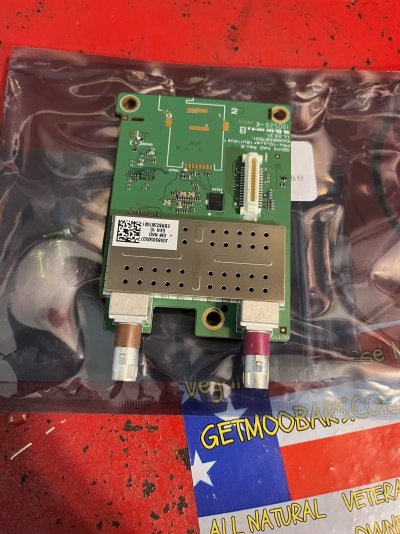
Ok, it was in the same location but I couldn't get the box out without removing the mounting frame which required additional dash parts removal. It was like wedged too tight for me to get it out.

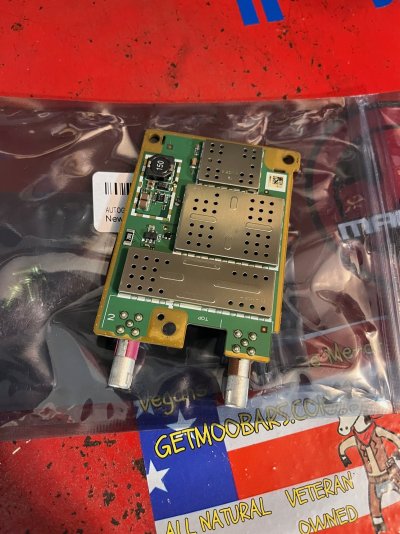
Anyway, circuit card has been removed but unlike my Colorado, there were two connections on this card; on burgundy and the other brown. I know the burgundy is for Onstart. Is the brown for XM radio?

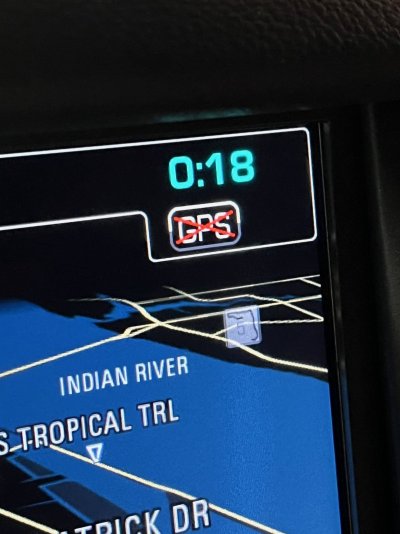
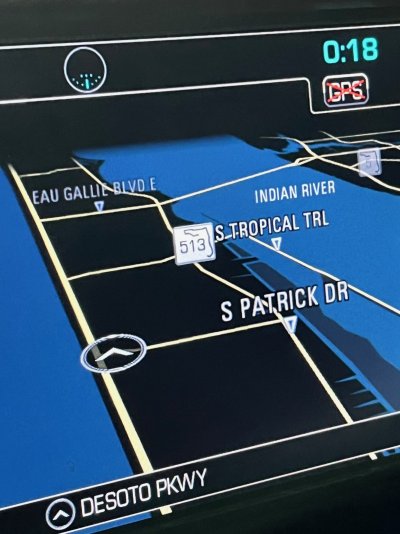
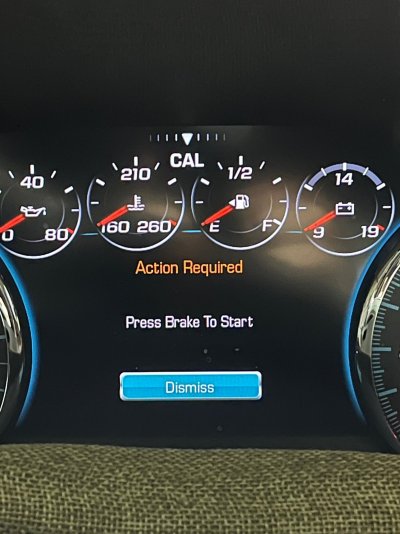
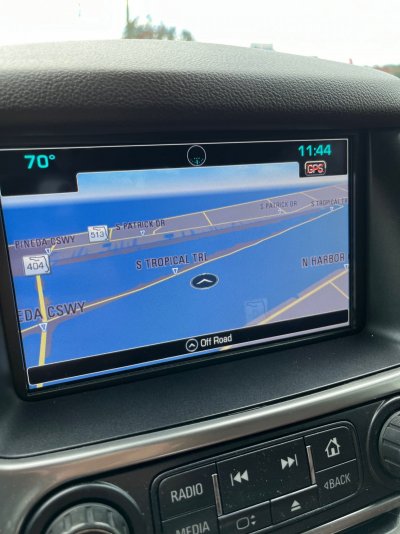
Currently shows CAL top center dash, GPS on NAV page has a red X thru it, but the Navigation is still operating by showing my movements on the map page. Is this due to my iPhone being connected and borrowed?
 

Attachments

  • IMG_6346.jpg
    IMG_6346.jpg
    211 KB · Views: 40
  • IMG_6347.jpg
    IMG_6347.jpg
    235.6 KB · Views: 33
  • IMG_6349.jpg
    IMG_6349.jpg
    350.3 KB · Views: 33
  • IMG_6345.jpg
    IMG_6345.jpg
    234.5 KB · Views: 38
  • IMG_6350.jpg
    IMG_6350.jpg
    343.1 KB · Views: 36

B-train

Full Access Member
Joined
Sep 12, 2022
Posts
2,706
Reaction score
4,911
There was a good video on YouTube about this, but I believe it was for up to 2014(?). There was a part about the module case it sits in, and the SIM card. If you remove the SIM card, the phone to onstar won't work for tracking via the cellular network. Then reassemble and hook everything back up. XM still works, Onstar no Bueno.

I plan on doing this to my 08 and 17 soon. Thanks for the info this far!
 

koachdaddy

Member
Joined
Jun 11, 2023
Posts
56
Reaction score
33
Location
Space Coast, FL
B-train, the circuit card is removed and everything is reassembled and working fine.

Just went back and reread the entire thread. Looks like the brown connection could be cellular instead of XM. Either way, my NAV is still tracking movements so onto the next level of detachment...
 

koachdaddy

Member
Joined
Jun 11, 2023
Posts
56
Reaction score
33
Location
Space Coast, FL
Update; I turned off my iPhone, then attempted to use Onstar, and finally tried to see what was available to include phone contacts. Nothing was working so I turned my phone back on and shortly thereafter I noticed that the 'speed' indication in my HUD was no longer there. Switched back to GM navigation and found myself over water lol...so I guess it has finally taken and no longer usable.
 

Attachments

  • over water.jpg
    over water.jpg
    276.3 KB · Views: 29

91RS

Full Access Member
Joined
Nov 15, 2009
Posts
2,846
Reaction score
2,293
Location
GA
I don’t really understand why you’re so worried about disabling Onstar when you want to use the GPS navigation (which tracks you) and have an iPhone (which tracks you).
 

koachdaddy

Member
Joined
Jun 11, 2023
Posts
56
Reaction score
33
Location
Space Coast, FL
Found the 'how-to' instructions for my 2015-2020 application on this thread and was simply sharing post removal experiences. I posted the same info on the 2015-2020 group as well, for enlightenment, and was met with the same responses that have been beat-to-death.

Chose a 2yr GM vehicle for various reasons. To do it again I'd purchase a Toyota, but that's a whole other discussion.

I understand that I posted the tracking aspect as an example, but this was simply because it hadn't completely shut off, from what I could see anyway. There are various reasons for the removal decision. People can do their own research and decide whether or not Onstar, and EVERTHING (not just tracking) that comes with, it is for them.

If you haven't read the fine print yet...it's definitely worth your time to make a better-informed decision, while you can, vs letting those dictate it for you. At the end of the day, it's all about choice- right?

For me and my choice; don't want/need Onstar and didn't sign-up for any of GM's 'safety' services...simple as that.
 

persistent

Member
Joined
Nov 10, 2023
Posts
83
Reaction score
72
For me and my choice; don't want/need Onstar and didn't sign-up for any of GM's 'safety' services...simple as that.

this is a very common pattern: telling people that feature X is for their "safety", when in reality it is done to surveil and control them.

other related examples: Find My feature on the iphone sends continuous gps coordinate data to apple, intel "anti theft" allows large organizations to control machines on remote, intel management engine allows for "people" to control machines on remote, search engines and social media routinely blacklist content for "safety", etc.

whether most people realize it or not, onstar - and every other default-enabled car monitoring system - is there to mine their location data and sell that data to interested 3rd parties. unless you fully disable the cellular transceiver used by such systems, you cannot even use your own vehicle without it being tracked, even if you leave your phone/devices at home.
 

Forum statistics

Threads
137,689
Posts
1,989,669
Members
102,689
Latest member
Woned2004
Back
Top