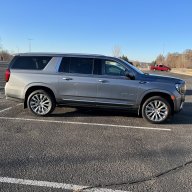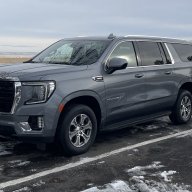
Resetting aver mi on 22 Tahoe

Disclaimer: Links on this page pointing to Amazon, eBay and other sites may include affiliate code. If you click them and make a purchase, we may earn a small commission.

luckylou

Member
Joined
Apr 19, 2022
Posts
48
Reaction score
11
Location
Rancho Santa Fe
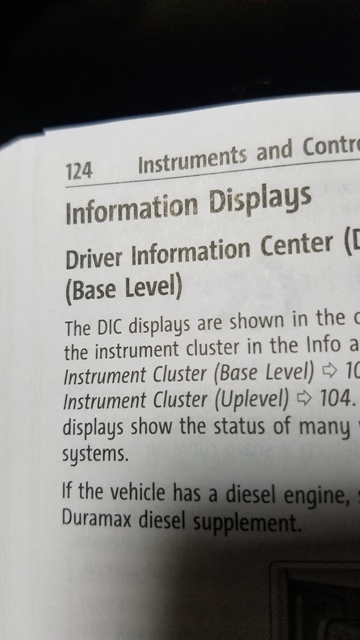
i cannot figure out how to reset average miles on my 22 High Country Tahoe. Dealer says to contact GM. GM says to contact dealer? Manual says to...well here is a pic. This same info shows up in numerous other places. Methinks GM needs to use someone to write their manuals whose first language is English.
I also don't know the difference between Base Level and Uplevel. While I am at it, ordered accessories online. Chevy sent me an email saying I could pick them up at the dealer in 2 days on July 26. 3 weeks later - still waiting? Dealer says to ignore the email it could take from 4 to 6 weeks.

manual1.jpg


So I go to the screen and push the roller (Tried just pushing it and holding it. Same result.) This what I get. No option to reset average miles. Manual says to push once to do distance and push and hold for mileage. When I push it or push and hold...same thing. I also don't understand the last sentence? I cannot find a reset in the menu unless they are talking about resetting everything?
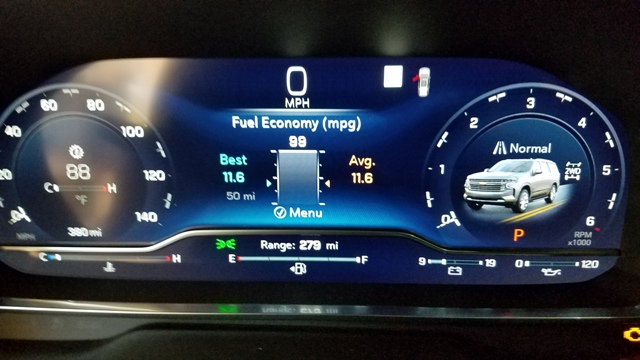
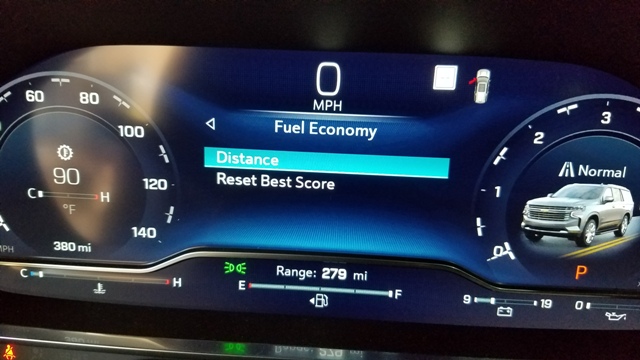
manual4.jpg


manual5.jpg


FYI I am driving it uncharacteristically for me waiting for it to get 500 miles on it and this is the best mileage I get around town.

I am also curious if anyone knows the difference between "Base Level" and "Uplevel"? I assume with a High Country loaded mine is Uplevel but no where is it explained and no one seems to know the difference??????
manual3.jpg


manual2.jpg
 

ChrisG

Member
Joined
Dec 27, 2021
Posts
36
Reaction score
16
Screen looks close but my RST screen to reset is a diff screen. I can get a pic if that would help u
 
OP
OP
luckylou

luckylou

Member
Joined
Apr 19, 2022
Posts
48
Reaction score
11
Location
Rancho Santa Fe
Screen looks close but my RST screen to reset is a diff screen. I can get a pic if that would help u
No. A pic wouldn't help. My screen is what it is. My service guy at the dealer has an RST as well and he said I was surely doing something wrong because he can reset it on his. I don't believe i am doing anything wrong. It is just different.
FYI - I called him 4 hours ago when he said he would go check it out on a vehicle and call me right back?
 

Jettix2

Member
Joined
Aug 6, 2018
Posts
74
Reaction score
66
Mine looks same

Yours is definitely the “Uplevel” cluster like mine.

I remember hitting “reset average” and it took a few miles before it did so. Mine is using a 50 mile rolling average right now, if I remember right
 

Jettix2

Member
Joined
Aug 6, 2018
Posts
74
Reaction score
66
FYI my best was 22.7 all Highway 65mph on the way home from dealer. Averaging around 18 mixed rural driving, 750 miles on it now. 2022 Suburban LT
 
OP
OP
luckylou

luckylou

Member
Joined
Apr 19, 2022
Posts
48
Reaction score
11
Location
Rancho Santa Fe
Mine looks same

Yours is definitely the “Uplevel” cluster like mine.

I remember hitting “reset average” and it took a few miles before it did so. Mine is using a 50 mile rolling average right now, if I remember right
I don't know what would happen if I were able to reset the average? If I reset it and I am sitting still? Maybe that is why it took yours a while? But it does not appear to even be an option. I reset the "Best" and it goes to whatever the average is. I reset the "Trip" and it goes to zero. What would be the readout on the average if I could reset it? Maybe I have to do it on the fly? I will wait to see what Bill @ the dealer has to say. Since they are now closed and over 5 hours has passed, I assume he is trying to find out. I assume he is not ready to admit that I was right without a fight???? I will update.
 

todayusay

Full Access Member
Joined
Aug 2, 2016
Posts
580
Reaction score
305
I went through all this mess a month or so ago - not the same issue but the same issue.

Our coolant light came on and I went through all the menus trying to find the actual "coolant temp"...nothing

Went to the manual, said on the "uplevel" cluster, the coolant temp should be listed, along with oil temp and oil pressure - none of the three were listed....

Asked the salesman about it why getting oil changed, he asked the techie salesman, then he called his regional rep that trains them on the vehicles...I literally talked to him on the phone out on the sales floor...all within 15 mins...nobody could answer the question why the coolant temp wasn't appearing in the cluster...or if our Z71 with the luxury package is considered the uplevel cluster

I then created a "case" with chevy - after three weeks and a couple phone calls, I gave up with no answers...their response was to check the manual....my response was that it isn't clear which trim level has the base vs uplevel cluster


My take is that the manual is a carryover from the previous years as the "base level" cluster appears to be the old analog cluster/gauges that you'd see on a base tahoe----which may still be a thing on a LS? It used to be on the base Z71 and the only way you'd get the digital cluster was if you had the premium off road package with air ride...now the new digital cluster is standard on the Z71
 

WalleyeMikeIII

Full Access Member
Joined
Feb 22, 2022
Posts
2,753
Reaction score
2,615
Location
Sunny and Snowy Minnesota
You cannot reset that Average...it is constantly resetting...it is the rolling average fuel economy of the past 25, 50, or 450 miles....whatever you select for distance.
The best score can be reset and will change when a new "high score" is hit in the indicated mileage range.
If you want a reset fuel economy, reset either trip 1 or trip 2, and it will calculate the fuel economy after the reset.

I agree, the manual is poorly written/wrong in this area.
I further agree that reporting any of these issues to GM is a nightmare...
You have the "uplevel" cluster.
 
OP
OP
luckylou

luckylou

Member
Joined
Apr 19, 2022
Posts
48
Reaction score
11
Location
Rancho Santa Fe
I do need to go look at that trip again. When I reset it I saw 3 things down there but didn't pay attention to what they are.

I first asked the salesman about resetting the Avg. He didn't know. Then I wrote a letter to Chevy customer service because that is what the manual or maybe it was the web site said to do if I had any questions. Guy called from the Philippines or somewhere. Said I needed to talk to service tech at dealer. Indicated that he or they would be contacting the dealer. Called my service guy to give him a heads up. He got upset that I had written letter to GM? Said I should always call him first. Maybe they get a demerit since I sent letter? Who am I supposed to ask? Alright. So it has been 24 hours since he said he would check another vehicle and get back with me? Apparently you are always supposed to go to the dealer. Waiting. I just want somebody at GM to tell me the manual is wrong. I know it is wrong.
 
OP
OP
luckylou

luckylou

Member
Joined
Apr 19, 2022
Posts
48
Reaction score
11
Location
Rancho Santa Fe
OK. Here's the deal. I was just told that the manual does not say that the Avg can be changed. Call me crazy but it clearly says it can. Anywho, YOU CANNOT RESET AVG MILEAGE on the "Fuel economy" screen no matter what the manual says, it is lifetime. Not much use to me?
However, it appears you can use the Trips to get an average MPG over a period of time and distance since the last reset which is what I am looking for. I haven't driven it since I reset Trip 1. It is reading 0. Trip 2 has miles driven since reset and MPG which appears to be the average for that distance.
Case closed!!!!!!!!
 

StephenPT

Full Access Member
Joined
Jan 16, 2022
Posts
1,249
Reaction score
1,263
Location
St. Helens, OR
OK. Here's the deal. I was just told that the manual does not say that the Avg can be changed. Call me crazy but it clearly says it can. Anywho, YOU CANNOT RESET AVG MILEAGE on the "Fuel economy" screen no matter what the manual says, it is lifetime. Not much use to me?
However, it appears you can use the Trips to get an average MPG over a period of time and distance since the last reset which is what I am looking for. I haven't driven it since I reset Trip 1. It is reading 0. Trip 2 has miles driven since reset and MPG which appears to be the average for that distance.
Case closed!!!!!!!!
It's not the "lifetime" fuel economy average, it's as others have stated "the rolling average fuel economy over the past distance displayed." Basically it's saying "Over the last 50 miles you averaged XX.X mpg, over the last 250 miles you averaged XX.X mpg, etc."

Trip 1 and trip 2 will give you the fuel economy since the last time you reset it. Personally I use trip 1 since last fuel up and trip 2 since last oil change. There's also the "drive summary" page which will show you the miles driven, fuel economy and time since you turned on the ignition.
 

WalleyeMikeIII

Full Access Member
Joined
Feb 22, 2022
Posts
2,753
Reaction score
2,615
Location
Sunny and Snowy Minnesota
It's not the "lifetime" fuel economy average, it's as others have stated "the rolling average fuel economy over the past distance displayed." Basically it's saying "Over the last 50 miles you averaged XX.X mpg, over the last 250 miles you averaged XX.X mpg, etc."

Trip 1 and trip 2 will give you the fuel economy since the last time you reset it. Personally I use trip 1 since last fuel up and trip 2 since last oil change. There's also the "drive summary" page which will show you the miles driven, fuel economy and time since you turned on the ignition.
The other confusing part is that if you use the display configuration and update either the left side or right side info to be Fuel Economy, I think it also uses that "rolling average." But it isn't very clear as to what it is displaying.
 
OP
OP
luckylou

luckylou

Member
Joined
Apr 19, 2022
Posts
48
Reaction score
11
Location
Rancho Santa Fe
The reason I said "Lifetime" is because that is what GM said when they explained that it could not be reset. Probably a brain fart on their part. The problem with the drive summary being of any use to me other than for a long ride is that it resets every time you turn off the ignition.
The thing about the different distances is that they only appear to update if they are active. Say you have 25 active and then you switch to 50 and drive 100 miles. It appears that when you go back to 25 it picks up with the info from when you left it. So it is not giving you info for the last 25 miles that you drove which is why I would like to be able to reset it. But I will just use the trips.
Also, I got the Brembos which is only the front brakes. I looked at the "Brake Pad Life" and there was just a line for the front brakes. The stock brakes have a sensor. The Brembos do not but that brake life is like t's on a bull as far as I am concerned. I am not getting a lot of brake dust from the Brembos as I thought I would. But then I have only had them for 200 miles?
I have just over 400 miles on the Tahoe and I am waiting like a good little boy until 500 but I have recently started to push it a "little bit" and the Chevy cat back is growling. Pretty tame though. I would call it a civilized growl but you can hear it especially with the window open. I am happy with it because it is a High Country but if you want to rattle some windows this is not the cat back for you.
 

Forum statistics

Threads
137,689
Posts
1,989,650
Members
102,689
Latest member
Woned2004
Back
Top