Glitch in 2022 Yukon HUD Software

Disclaimer: Links on this page pointing to Amazon, eBay and other sites may include affiliate code. If you click them and make a purchase, we may earn a small commission.

Pifemaster

TYF Newbie
Joined
Oct 11, 2021
Posts
29
Reaction score
19
I just traded in my 2021 Yukon Denali on a 2022 Yukon Denali and ran into an issue with the HUD software. Can anyone else confirm the same on a 2022?

When I change the speed limit display style from classic to the bar style (as shown in the attached image), it remains at the bar style until I shut the vehicle off. Then the next time I start the vehicle, it reverts back to the classic sign. On my 2021, I only had to set this once and it remained how I set it.
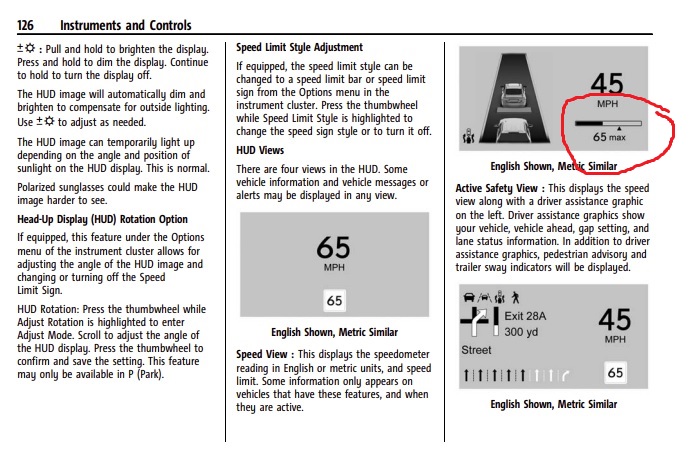
pic.jpg


Thank you,
Robert
 

Micahsd

Full Access Member
Joined
May 6, 2021
Posts
354
Reaction score
167
I’d probably see if there’s an option to reset all the settings to their defaults, then make the custom changes again and see if they stick at that point.

If the setting still doesn’t stick, maybe consult the dealer to see if there’s a software update or since it’s such a new vehicle, you might have to wait for a software update to be released.

Another quick thought…I think those settings stick with the key fob that’s being used…maybe make sure you’re always using the same fob. Or maybe that’s where the bug lies is with which fob is being used. Maybe try making the setting change starting the vehicle with the other fob and see if it sticks with that one.
 
OP
OP
P

Pifemaster

TYF Newbie
Joined
Oct 11, 2021
Posts
29
Reaction score
19
I’d probably see if there’s an option to reset all the settings to their defaults, then make the custom changes again and see if they stick at that point.

If the setting still doesn’t stick, maybe consult the dealer to see if there’s a software update or since it’s such a new vehicle, you might have to wait for a software update to be released.

Another quick thought…I think those settings stick with the key fob that’s being used…maybe make sure you’re always using the same fob. Or maybe that’s where the bug lies is with which fob is being used. Maybe try making the setting change starting the vehicle with the other fob and see if it sticks with that one.
I just checked at the dealer and as of Thursday, there were no software updates available yet. Regarding the key fob, I only use the same one, so I don't think that is the issue. My guess is that it is a bug that will need an update from GM at some point. I would just really like to know if anyone else with a 2022 sees the same issue. Then I would know it is not just an issue on my vehicle alone.
 

ltrain4

TYF Newbie
Joined
Jul 26, 2013
Posts
15
Reaction score
6
Finally got min, sorry for the delay (port held onto it for almost a week before the dealer got it).

Anyway, when I change mine it stays changed for the next time I start the car. So it’s definitely some glitch in your software. Not sure if they can reset it or not but good luck!
 
OP
OP
P

Pifemaster

TYF Newbie
Joined
Oct 11, 2021
Posts
29
Reaction score
19
Finally got min, sorry for the delay (port held onto it for almost a week before the dealer got it).

Anyway, when I change mine it stays changed for the next time I start the car. So it’s definitely some glitch in your software. Not sure if they can reset it or not but good luck!
Thank you very much for checking that.
 

Decreed_it

Member
Joined
Aug 26, 2021
Posts
33
Reaction score
19
Didn’t know this was a thing but also trying it in my 22 XL, will report back next startup (later today or tomorrow) for one more data point.
 

NYisles1

Full Access Member
Joined
Mar 16, 2016
Posts
274
Reaction score
162
My ‘22 does the same thing. I just removed speed limit from the hud altogether - something about seeing that sign format is annoying !
 

CoryS

Member
Joined
Aug 23, 2021
Posts
41
Reaction score
18
Finally got min, sorry for the delay (port held onto it for almost a week before the dealer got it).

Anyway, when I change mine it stays changed for the next time I start the car. So it’s definitely some glitch in your software. Not sure if they can reset it or not but good luck!
Can you walk me through how to change the speed limit indicator from the sign to the bar style? I have no option in the instrument cluster on my 2022 Yukon. Am I missing something? Thanks.
 

brianmmorgan

TYF Newbie
Joined
Feb 9, 2022
Posts
1
Reaction score
0
Just picked up my '22 Tahoe last week and it's doing the same thing. Led me to search to see if others are experiencing the same issue :(. Any other software glitches anyone has noticed? I also have an issue with Carplay. When answering a call while on the the phone, the audio auto switches to the phone and I have to grab the phone and switch sources.
 

Dewally

TYF Newbie
Joined
Feb 18, 2022
Posts
26
Reaction score
13
Location
Alabama
My new 22 Deanli does the same. I have removed the blank speed limit sign, only to have it return upon next startup.
 
OP
OP
P

Pifemaster

TYF Newbie
Joined
Oct 11, 2021
Posts
29
Reaction score
19
I signed into my Google account and all problems have resolved.
I am (to the best of my knowledge) signed in to my Google account and yet my HUD speed limit sign still reverts to the sign as opposed to the bar every time I restart the vehicle.
 

Kjwonta

TYF Newbie
Joined
Mar 9, 2022
Posts
1
Reaction score
0
Picked up my 2022 the other day and that has been my only issue so far as well. I want just the vehicle speed displayed, but every time I restart the vehicle it goes back to default showing the speed limit box.
 

WalleyeMikeIII

Full Access Member
Joined
Feb 22, 2022
Posts
2,753
Reaction score
2,615
Location
Sunny and Snowy Minnesota
I'm convinced there are numerous bugs in this Android based system...I haven't experienced the HUD issues yet, although I haven't tried to change my speed limit sign. That said, I have had several other glitches...the latest being random changes of the radio station, and what is displayed in the center of the cluster...

Had this in for a "service instrument cluster" message a week ago, dealer said GM had a bulletin out w/ about 25 pages of DTC's related to communication and display systems for "algorithmic based errors." According to him, all the codes (15) that my ride had stored were on the list to be ignored. "GM is working on a software fix, but don't have one yet."
 
Joined
Mar 16, 2013
Posts
73
Reaction score
16
Location
Michigan, Metro Detroit
I just traded in my 2021 Yukon Denali on a 2022 Yukon Denali and ran into an issue with the HUD software. Can anyone else confirm the same on a 2022?

When I change the speed limit display style from classic to the bar style (as shown in the attached image), it remains at the bar style until I shut the vehicle off. Then the next time I start the vehicle, it reverts back to the classic sign. On my 2021, I only had to set this once and it remained how I set it.

View attachment 355383

Thank you,
Robert
Thank you for posting about this issue - My 2022 den does the same exact thing and tried resetting with the key fob as well... and same results every time i restart the vehicle it default. Do you know what the fix is for this bug ?
 

Forum statistics

Threads
137,675
Posts
1,989,125
Members
102,675
Latest member
j_jerry79
Back
Top