2002 Tahoe Climate Control Lighting

Disclaimer: Links on this page pointing to Amazon, eBay and other sites may include affiliate code. If you click them and make a purchase, we may earn a small commission.

TwiztidPixel

Full Access Member
Joined
Jul 24, 2017
Posts
110
Reaction score
132
Location
Anderson, SC
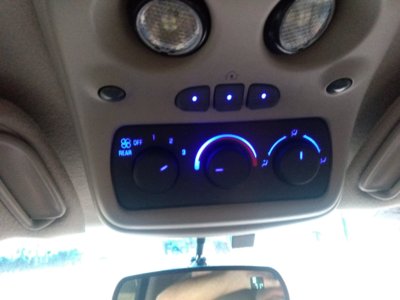
My climate control unit in the dash is completely dark at night. The amber lights for AC, defrost etc turn on when activated, but the back lighting is completely gone. Is it normal for all of the lights to just go at the same time?

I will admit, this is something I noticed when it started getting cooler as I don't use AC. So, I have no idea when this happened.

I checked any fuses that made sense and they're all good.

Does anyone know what bulbs go in this thing? I realize they're soldered in and some are different voltages and/or sizes.

 

ScottyBoy

Full Access Member
Joined
Jun 27, 2010
Posts
2,684
Reaction score
2,035
Location
Shreveport, La
There's a tiny bulb in each of the buttons along the bottom, those usually burn out first. Then in the main panel behind the three knobs, there's four light bulbs. But these light bulbs are wired in series (like old miniature Christmas lights) so when one bulb goes out, the other bulb is dead. They are wired in two sets of two. So if one bulb dies, you actually have two bulbs go dark. If you have one bulb in each series fail, then all four of the bulbs will go dark.
And @Tonyrodz , if you have the 03+ AC panel with the two "sliders" to adjust the temperature, then the bulbs in your panel are wired the same way, two sets if bulbs in series. The 03+ digital AC control is the only one that has each bulb with it's own positive and negative lead, not Daisy chained to another bulb. All 00-06 overhead rear AC controls are wired in series as well.
 

Tonyrodz

Resident Resident
Joined
Feb 16, 2012
Posts
33,211
Reaction score
51,476
Location
Central Jersey
There's a tiny bulb in each of the buttons along the bottom, those usually burn out first. Then in the main panel behind the three knobs, there's four light bulbs. But these light bulbs are wired in series (like old miniature Christmas lights) so when one bulb goes out, the other bulb is dead. They are wired in two sets of two. So if one bulb dies, you actually have two bulbs go dark. If you have one bulb in each series fail, then all four of the bulbs will go dark.
And @Tonyrodz , if you have the 03+ AC panel with the two "sliders" to adjust the temperature, then the bulbs in your panel are wired the same way, two sets if bulbs in series. The 03+ digital AC control is the only one that has each bulb with it's own positive and negative lead, not Daisy chained to another bulb. All 00-06 overhead rear AC controls are wired in series as well.
That' what I have. I wish I was easier then soldering. Like the old days, the bulbs just twisted in. Do you know what the number of the bulb is?
 
OP
OP
TwiztidPixel

TwiztidPixel

Full Access Member
Joined
Jul 24, 2017
Posts
110
Reaction score
132
Location
Anderson, SC
There's a tiny bulb in each of the buttons along the bottom, those usually burn out first. Then in the main panel behind the three knobs, there's four light bulbs. But these light bulbs are wired in series (like old miniature Christmas lights) so when one bulb goes out, the other bulb is dead. They are wired in two sets of two. So if one bulb dies, you actually have two bulbs go dark. If you have one bulb in each series fail, then all four of the bulbs will go dark.
And @Tonyrodz , if you have the 03+ AC panel with the two "sliders" to adjust the temperature, then the bulbs in your panel are wired the same way, two sets if bulbs in series. The 03+ digital AC control is the only one that has each bulb with it's own positive and negative lead, not Daisy chained to another bulb. All 00-06 overhead rear AC controls are wired in series as well.

Ah, it all makes sense now. I checked out your thread, looks like a pretty simple project. One more thing to accomplish over holiday break assuming I can find the bulbs.

Thank you!
 

ScottyBoy

Full Access Member
Joined
Jun 27, 2010
Posts
2,684
Reaction score
2,035
Location
Shreveport, La
That' what I have. I wish I was easier then soldering. Like the old days, the bulbs just twisted in. Do you know what the number of the bulb is?
Sorry, I do not know the part number on the bulbs. I don't ever replace the bulbs, I always just remove them and install LEDs in place of the bulbs. I have found a bulb from Radio Shack that replaces the small 12v bulb behind the temp sliders. It's an exact match, but it's a bit dimmer than the original.

IMG_20171221_173456080.jpg


Ah, it all makes sense now. I checked out your thread, looks like a pretty simple project. One more thing to accomplish over holiday break assuming I can find the bulbs.
Thank you!


Finding the bulbs will be tricky. I tried several times ordering bulbs made by "Eiko" which I thought would work based on the specs I read online. I just wasted my time and money because they we're WAY too bright, so bright that the AC control panel was getting hot! But the Radio Shack bulb I described above will work in the bottom buttons on the 00-02 AC panel, but slightly dimmer than the original stock bulbs.
 

drowssap

Full Access Member
Joined
Apr 15, 2017
Posts
265
Reaction score
289
Location
Colorado
This might sound dumb BUT....I have an overhead panel that is dark. I gave it a few good taps and they turned on!
 
OP
OP
TwiztidPixel

TwiztidPixel

Full Access Member
Joined
Jul 24, 2017
Posts
110
Reaction score
132
Location
Anderson, SC
I went ahead and just ordered some LEDs and resistors, gives me a reason to convert everything else inside lol.

Sent from my ZTE Axon 7 using Tapatalk
 
OP
OP
TwiztidPixel

TwiztidPixel

Full Access Member
Joined
Jul 24, 2017
Posts
110
Reaction score
132
Location
Anderson, SC
Well I went through the process of soldering all the LEDs in and got nothing. I'm not sure if I got the polarity wrong or what.
 

ScottyBoy

Full Access Member
Joined
Jun 27, 2010
Posts
2,684
Reaction score
2,035
Location
Shreveport, La
Yes, the polarity matters with LEDs. With regular old incandescent bulbs, polarity doesn't matter. But with the LEDs, you need to make sure that the polarity is right on ALL of the LEDs. If you have it wrong on just one of the LEDs in the series, then none of them will light up. The longer leg is usually the positive side of the LED.
 
OP
OP
TwiztidPixel

TwiztidPixel

Full Access Member
Joined
Jul 24, 2017
Posts
110
Reaction score
132
Location
Anderson, SC
Yes, the polarity matters with LEDs. With regular old incandescent bulbs, polarity doesn't matter. But with the LEDs, you need to make sure that the polarity is right on ALL of the LEDs. If you have it wrong on just one of the LEDs in the series, then none of them will light up. The longer leg is usually the positive side of the LED.

Yeah, just wasn't sure which pot was positive on the board. It seemed to have a + on the actual pot but maybe I was just seeing shit. I'm going to reverse them all and see what happens. I'm a little nervous about it because one of the traces was starting to come up off the board. These things ain't cheap to replace.

EDIT: Yep, she's a gonner. Gonna have to buy another one if I ever want lights. :flame:
 
Last edited:

ScottyBoy

Full Access Member
Joined
Jun 27, 2010
Posts
2,684
Reaction score
2,035
Location
Shreveport, La
Yeah, just wasn't sure which pot was positive on the board. It seemed to have a + on the actual pot but maybe I was just seeing shit. I'm going to reverse them all and see what happens. I'm a little nervous about it because one of the traces was starting to come up off the board. These things ain't cheap to replace.

EDIT: Yep, she's a gonner. Gonna have to buy another one if I ever want lights. :flame:

Don't tell me you got the board too hot and burned the tracers off the board!?
I can't tell you how many times I have had to repair that when someone destroyed the tracers like that. It's a *****, but it can be repaired by running tiny wires across the board to basically replace the tracers on the board.
 
OP
OP
TwiztidPixel

TwiztidPixel

Full Access Member
Joined
Jul 24, 2017
Posts
110
Reaction score
132
Location
Anderson, SC
Don't tell me you got the board too hot and burned the tracers off the board!?
I can't tell you how many times I have had to repair that when someone destroyed the tracers like that. It's a *****, but it can be repaired by running tiny wires across the board to basically replace the tracers on the board.
Nothing was burned, the traces delaminated as I was removing the original bulbs. It only takes a second to heat the solder. I replace capacitors on motherboards on a regular basis as a side job and I've never had this happen. I'm very annoyed to be honest. Having it lit isn't even that big a deal but I'm irritated that it came apart like it did.

Sent from my ZTE Axon 7 using Tapatalk
 

ScottyBoy

Full Access Member
Joined
Jun 27, 2010
Posts
2,684
Reaction score
2,035
Location
Shreveport, La
I guess I used the wrong words when I said "burned". But yes, when the board gets too hot the traces will lift right off easy as hell. I've ruined a few AC control panels myself like that. I've also learned that it's a LOT easier to damage it if you don't use a solder sucker to suck the melted solder off the bulb leads. Trying to heat the solder and push the bulb off the board is a good way to rip the tracers right off. I've learned that it worked best with a VERY hot iron and a solder sucker tool. Touch the tip of the iron and the solder is melted in about one second or even less, then quickly suck the solder up out of the joint while it's melted. If you hold the iron there for a few seconds waiting for the solder to melt, the heat just travels along the board and delaminates the copper tracers.
 
OP
OP
TwiztidPixel

TwiztidPixel

Full Access Member
Joined
Jul 24, 2017
Posts
110
Reaction score
132
Location
Anderson, SC
I guess I used the wrong words when I said "burned". But yes, when the board gets too hot the traces will lift right off easy as hell. I've ruined a few AC control panels myself like that. I've also learned that it's a LOT easier to damage it if you don't use a solder sucker to suck the melted solder off the bulb leads. Trying to heat the solder and push the bulb off the board is a good way to rip the tracers right off. I've learned that it worked best with a VERY hot iron and a solder sucker tool. Touch the tip of the iron and the solder is melted in about one second or even less, then quickly suck the solder up out of the joint while it's melted. If you hold the iron there for a few seconds waiting for the solder to melt, the heat just travels along the board and delaminates the copper tracers.

Well maybe I'll just let you have at it when I get a replacement, if you're willing. I would ship both ways and compensate you obviously. I normally like to "try again" but with this I'd rather have someone that's got experience get it right.
 

ScottyBoy

Full Access Member
Joined
Jun 27, 2010
Posts
2,684
Reaction score
2,035
Location
Shreveport, La
Well maybe I'll just let you have at it when I get a replacement, if you're willing. I would ship both ways and compensate you obviously. I normally like to "try again" but with this I'd rather have someone that's got experience get it right.

Sure thing. Just shoot me a PM when you are ready. I've done a lot of these for members on here and several other boards now. I can do pretty much every interior switchpanel on the interior of the 99-06 NBS trucks and SUVs. I've even repaired several panels that were damaged by people who didn't really know what they were doing, or it was their very first time soldering EVER. This is similar to what needs to be done to get the lights working again in your panel. Rewire it, and then solder a jumper wire to each LED.
IMG_20170303_191341325.jpg

IMG_20171129_170058346.jpg IMG_20170512_155556910.jpg
 
OP
OP
TwiztidPixel

TwiztidPixel

Full Access Member
Joined
Jul 24, 2017
Posts
110
Reaction score
132
Location
Anderson, SC
Well maybe I'll just send you my current unit and see if you can repair my FU, I'm sure it won't affect the driveability of the truck to have it missing for a while. I'll PM you in a few minutes.
 

Forum statistics

Threads
137,815
Posts
1,992,827
Members
102,795
Latest member
Drewphil
Back
Top