
You are using an out of date browser. It may not display this or other websites correctly.
You should upgrade or use an alternative browser.
You should upgrade or use an alternative browser.
Wiring harness help
- Thread starter magnahoe
- Start date
Disclaimer: Links on this page pointing to Amazon, eBay and other sites may include affiliate code. If you click them and make a purchase, we may earn a small commission.
loulblades
Full Access Member
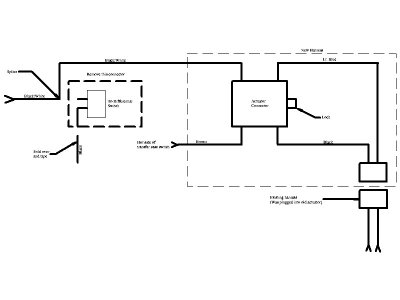
2 splices:
Disconnect battery
Cut off connector that goes to the diff switch.
Splice blk/wht wire from new connector to blk/wht wire that went to the switch connector.
Tape off other wire to old connector (I think it is black).
Splice in brown wire to hot side of transfer case switch (or some other IGN source).
There should be a 2 pin connector that plugs into the old actuator connector.
Oh yeah, reconnect battery.
Disconnect battery
Cut off connector that goes to the diff switch.
Splice blk/wht wire from new connector to blk/wht wire that went to the switch connector.
Tape off other wire to old connector (I think it is black).
Splice in brown wire to hot side of transfer case switch (or some other IGN source).
There should be a 2 pin connector that plugs into the old actuator connector.
Oh yeah, reconnect battery.
bsamoul
Hoe Enthusiast
Hey man let me know how it works. I'm still waiting for my wiring harness, I think it might show up tomorrow.
loulblades
Full Access Member
Not sure which side. I would guess the driver's side since the power is coming from the fuse box on the driver's side.
If you have a meter or light, you can check which side of the switch has power when the key is on and you are in 2WD. If you are in 4WD, it will have power on both sides because that is what provides power to activate the front diff actuator.
If you have a meter or light, you can check which side of the switch has power when the key is on and you are in 2WD. If you are in 4WD, it will have power on both sides because that is what provides power to activate the front diff actuator.
Hey man let me know how it works. I'm still waiting for my wiring harness, I think it might show up tomorrow.
brought it up to my dads friends shop he is going to do it tomorrow morning. It would be a pain without a lift. I ordered mine after I saw your links wonder how I got mine first?
bsamoul
Hoe Enthusiast
2 splices:
Disconnect battery
Cut off connector that goes to the diff switch.
Splice blk/wht wire from new connector to blk/wht wire that went to the switch connector.
Tape off other wire to old connector (I think it is black).
Splice in brown wire to hot side of transfer case switch (or some other IGN source).
There should be a 2 pin connector that plugs into the old actuator connector.
Oh yeah, reconnect battery.
Why two splices?? Nevermind, I am just running things in my head and realized I'd have another connecter going to nothing. I'm going to finish tomorrow, it took 1.5 hours and haven't been able to find that stupid brown wire, have to find a way to get to top of transfer case.
---------- Post added at 08:06 PM ---------- Previous post was at 07:28 PM ----------
also, do you stick the spacer thing in before you put the actuator on? i'm not sure what it's for
Last edited:

foreverfalcon40
Full Access Member
- Joined
- May 3, 2009
- Posts
- 2,082
- Reaction score
- 5
Wait...upgraded? Details.
loulblades
Full Access Member
Why two splices?? Nevermind, I am just running things in my head and realized I'd have another connecter going to nothing. I'm going to finish tomorrow, it took 1.5 hours and haven't been able to find that stupid brown wire, have to find a way to get to top of transfer case.
---------- Post added at 08:06 PM ---------- Previous post was at 07:28 PM ----------
also, do you stick the spacer thing in before you put the actuator on? i'm not sure what it's for
When you are done there will be a pin connector that goes to the diff switch that is not used anymore if that is what you are referring to ("...connector going to nothing").
Not sure what spacer you are referring to though.
yeah the spacer goes in before the actuator if it doesn't line up right use a screw driver to adjust it.
The updated harness is for a 96 (97?) made after JAN 1. I believe that it is the only way to replace the actuator in the diff because I couldn't find an old style one anywhere. They call it a upgrade because it isn't thermal so it engages faster. If your 4x4 works don't bother with the harness and new actuator.
The parts I got where
Doorman 600-600 (harness)
Doorman 600-101 (actuator)
Basmoul I'll crawl under it tonight and tell you where the brown wire goes.
The updated harness is for a 96 (97?) made after JAN 1. I believe that it is the only way to replace the actuator in the diff because I couldn't find an old style one anywhere. They call it a upgrade because it isn't thermal so it engages faster. If your 4x4 works don't bother with the harness and new actuator.
The parts I got where
Doorman 600-600 (harness)
Doorman 600-101 (actuator)
Basmoul I'll crawl under it tonight and tell you where the brown wire goes.
Last edited:
bsamoul
Hoe Enthusiast
I'm going to tackle it again in an hour and try to locate that brown wire on top of the transfer case. I need to pull the actuator off again though because I didn't put that spacer in.
bsamoul
Hoe Enthusiast
put it in...hear the actuator this time but the light still blinks 
put it in...hear the actuator this time but the light still blinks
You got more then me, my light comes on but now power to the front diff ( tires didn't spin in snow) The white plug next to the actuator sends the signal back to the cab make sure it is connected also could be the switch in the cab.
I'm willing to bet mine is the t case switch.
loulblades
Full Access Member
bsamoul
Hoe Enthusiast
You got more then me, my light comes on but now power to the front diff ( tires didn't spin in snow) The white plug next to the actuator sends the signal back to the cab make sure it is connected also could be the switch in the cab.
I'm willing to bet mine is the t case switch.
I replaced my switch last year in 08 and 4wd hasn't worked since then either, so I'm pretty sure my switch is fine.
When I hit the 4hi button, I do hear the actuator moving, so I know that has to work. I just don't actually engage 4 wheel drive because the light continues to blink..
SO that being said, what's left to test? The TCCM and the encoder motor right? From my understanding the TCCM is the little silver thing under the dash, and that does make a click when I hit the button, but I'm not sure if it's working correctly? Then there's the encoder motor, which I've heard is like $500 to replace, so I'm not sure if that would be a really good use of my money considering the truck is turning 14 this year.
loulblades or anyone else, do you have any input/suggestions?
Thanks!
loulblades
Full Access Member
I don't know if you used the diagnostics that I posted on an unmentioned other site (I would post it here but there is not enough room given for attachments).
If the actuator is engaging, that's an indication that the encoder is operating but may not be landing in the correct position. The encoder motor engaging turns on the transfer case switch which applies power to the front actuator.
Can you determine if there is power to the front wheels when the 4WD is engaged?
The blinking light is basically an indicator that the TCCM has not received feedback that the 4WD has properly engaged. This would happen if it didn't receive a signal from the encoder motor that it is in the correct position or the actuator is not sending engaged (black/white wire that you spliced in).
So to summarize,
1. encoder motor is not moving to the correct position (it is moving if the actuator is operating).
2. the encoder motor is not sending the feedback that it is in the right position (wiring from the encoder motor or the encoder output)
3. the actuator is not sending feedback that it engaged
4. the TCCM (the silver box on steering column) is acting up (I did replace mine at one time).
If you can verify that you actually have 4WD then you can most likely drop 1.
If the actuator is engaging, that's an indication that the encoder is operating but may not be landing in the correct position. The encoder motor engaging turns on the transfer case switch which applies power to the front actuator.
Can you determine if there is power to the front wheels when the 4WD is engaged?
The blinking light is basically an indicator that the TCCM has not received feedback that the 4WD has properly engaged. This would happen if it didn't receive a signal from the encoder motor that it is in the correct position or the actuator is not sending engaged (black/white wire that you spliced in).
So to summarize,
1. encoder motor is not moving to the correct position (it is moving if the actuator is operating).
2. the encoder motor is not sending the feedback that it is in the right position (wiring from the encoder motor or the encoder output)
3. the actuator is not sending feedback that it engaged
4. the TCCM (the silver box on steering column) is acting up (I did replace mine at one time).
If you can verify that you actually have 4WD then you can most likely drop 1.
bsamoul
Hoe Enthusiast
I don't know if you used the diagnostics that I posted on an unmentioned other site (I would post it here but there is not enough room given for attachments).
If the actuator is engaging, that's an indication that the encoder is operating but may not be landing in the correct position. The encoder motor engaging turns on the transfer case switch which applies power to the front actuator.
Can you determine if there is power to the front wheels when the 4WD is engaged?
The blinking light is basically an indicator that the TCCM has not received feedback that the 4WD has properly engaged. This would happen if it didn't receive a signal from the encoder motor that it is in the correct position or the actuator is not sending engaged (black/white wire that you spliced in).
So to summarize,
1. encoder motor is not moving to the correct position (it is moving if the actuator is operating).
2. the encoder motor is not sending the feedback that it is in the right position (wiring from the encoder motor or the encoder output)
3. the actuator is not sending feedback that it engaged
4. the TCCM (the silver box on steering column) is acting up (I did replace mine at one time).
If you can verify that you actually have 4WD then you can most likely drop 1.
I did take a paperclip and put them on pin 13 and the other one on the ground pin (forget which one) and nothing happened, so I figured there were not diagnostic codes in there.
I replaced my switch last year in 08 and 4wd hasn't worked since then either, so I'm pretty sure my switch is fine.
When I hit the 4hi button, I do hear the actuator moving, so I know that has to work. I just don't actually engage 4 wheel drive because the light continues to blink..
SO that being said, what's left to test? The TCCM and the encoder motor right? From my understanding the TCCM is the little silver thing under the dash, and that does make a click when I hit the button, but I'm not sure if it's working correctly? Then there's the encoder motor, which I've heard is like $500 to replace, so I'm not sure if that would be a really good use of my money considering the truck is turning 14 this year.
loulblades or anyone else, do you have any input/suggestions?
Thanks!
The cheapest I have seen the motor is $220 but Chinese parts. If I were you i would get my money back from amazon and put in posi-lok. It just replaces the electrical actuator with mechanical linkage. Maybe try the TCCM but I wouldn't bother with the encoder motor. Does the front drive shaft spin when 4x4 in engaged?
Link to posi-Lok you can get it on ebay for like $200 http://www.4x4posi-lok.com/app_chevy-k.html
Probably doing the switch Friday is it hard to do?
loulblades
Full Access Member
Link to posi-Lok you can get it on ebay for like $200 http://www.4x4posi-lok.com/app_chevy-k.html
From what I can see, this won't help if the transfer case isn't engaging.
Probably doing the switch Friday is it hard to do?
Replacing the switch is probably the easiest part of this thing.
Pop old switch out of the dash.
Unplug old switch
Plugin new switch
Pop switch back in dash
---------- Post added at 03:12 PM ---------- Previous post was at 03:05 PM ----------
I did take a paperclip and put them on pin 13 and the other one on the ground pin (forget which one) and nothing happened, so I figured there were not diagnostic codes in there.
Just to affirm, the ignition was off, the pins were shorted then the key was turned to Run?
bsamoul
Hoe Enthusiast
Yes, the ignition was off and I jumped them and put the key to run. Do I have to stick it further in? I just had it to where it stopped without having to push to go in the slot. Do I need to push it in?


