?s on adding factory nav

Disclaimer: Links on this page pointing to Amazon, eBay and other sites may include affiliate code. If you click them and make a purchase, we may earn a small commission.

noboundaries02

TYF Newbie
Joined
Oct 15, 2011
Posts
1
Reaction score
0
i just put in the stock gmc nav in my 07 yukon denali and i can not get the voice prompt to work and voice commands to work.i also have to wires left red c10 and a black c11 that came with the vss kit i have no idea where they go anything would help
 

ranorris2

The Coolest
Joined
Aug 31, 2011
Posts
554
Reaction score
3
Location
McKinney, TX
I can't help you, but I would also like to know the solution to his problem, I have a tahoe I added Nav to and i cant get voice commands to work either...
 

ChevyFreak

Full Access Member
Joined
Feb 8, 2011
Posts
245
Reaction score
9
Location
New York
That red and black wire are specifically for voice commands. They connect to the Onstar module. I will post general directions below. They are not my directions, but these are what I used when installing OEM navigation in my Tahoe -

--------------------------------------------------------------------------------------
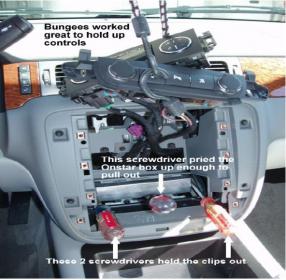
1. Using screwdrivers gently pry out the plastic side clips holding the Onstar box in place to release it. Use another screwdriver to lift up the front of the box so it can be pulled out. Note: The box will not come out very far.

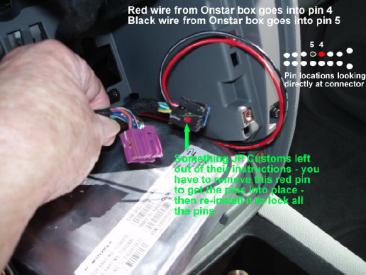
2. Select the VSS Kit GREY connector with the red (or white) & black wires with the female pins on the ends. This connector plugs into the back of the Onstar box. There will be an empty slot near the middle of the rear of the Onstar box. Note: Some VSS kits come with a red wire, some come with a white wire. They serve the same purpose, just a different color.

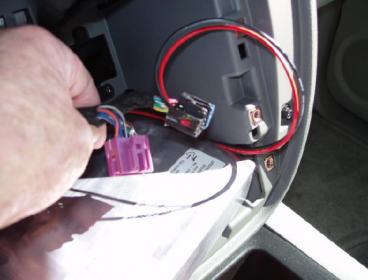
3. Slide the red (or white) wire with the female pin into the back of #1 connector pin 4. Slide the black wire with the female pin into the back of #1 connector pin 5. Note: Connector #1 is the black connector that plugs into the back of the navigation radio head unit.

4. Re-install the Onstar box.
--------------------------------------------------------------------------------------
Note: The pictures below correspond with the step number above.

I hope that helps! Let me know if you need any further explanation. Good Luck!! :Handshake:
 

Attachments

  • Step Number 1.jpg
    Step Number 1.jpg
    19.4 KB · Views: 44
  • Step Number 2.jpg
    Step Number 2.jpg
    19.7 KB · Views: 43
  • Step Number 3.jpg
    Step Number 3.jpg
    19.9 KB · Views: 42
  • Step Number 4.jpg
    Step Number 4.jpg
    14.6 KB · Views: 45

ranorris2

The Coolest
Joined
Aug 31, 2011
Posts
554
Reaction score
3
Location
McKinney, TX
I have those wires hooked up correctly and I still cannot give voice commands...the nav does give me directions through the onstar speaker but I cannot speak a destination...the system just keeps saying pardon....its very annoying lol
 

Forum statistics

Threads
137,734
Posts
1,990,800
Members
102,722
Latest member
AdrienR
Back
Top