
You are using an out of date browser. It may not display this or other websites correctly.
You should upgrade or use an alternative browser.
You should upgrade or use an alternative browser.
OEM fog light kit installation
- Thread starter 09Hoe
- Start date
Disclaimer: Links on this page pointing to Amazon, eBay and other sites may include affiliate code. If you click them and make a purchase, we may earn a small commission.
Goodinblack
I Like Tacos
Do you have the OEM kit?
GreatWhite
Member
I installed the OEM kit in my '09 Yukon. The lights themselves were a piece of cake. The switch module was actually easier than the instructions suggested - there are a couple of different trim arrangements - mine just popped out but yours may need some disassembly of the dash. The wiring harness wasn't too bad, but was a bit fiddly to thread through the various openings and the Christmas tree fasteners didn't seem to line up with available holes all that well. You will have to disassemble the underhood fuse box and pull one of the connector blocks off the bottom. The hot wire for the fog lights has to be inserted into the correct hole in the connector block (the illustration provided is technically incorrect - if you are doing this and need help, PM me and I'll go look up the drawing). None of it is too tough, but it does require some basic level of mechanical skill.
Packerfan52
TYF Newbie
- Joined
- Aug 22, 2012
- Posts
- 1
- Reaction score
- 0
Installing factory fog light kit on my 2007 Yukon
I will be installing my fog lights soon can you send me the drawing for the correct hole in the connector block.....Thanks
I will be installing my fog lights soon can you send me the drawing for the correct hole in the connector block.....Thanks
i will be installing my fog lights soon can you send me the drawing for the correct hole in the connector block.....thanks
bump

Heres a how to with some decent pictures....
http://chevyavalanchefanclub.com/cafcna/index.php/topic,126804.0.html
http://chevyavalanchefanclub.com/cafcna/index.php/topic,126804.0.html
I tried my hand with this kit, although the instructions are a bit confusing, I am confident I have the connector in the right spot and a good ground.
Can't get the lights to work, is there any other magic to this? Do I have to pay a gm fee?
Can't get the lights to work, is there any other magic to this? Do I have to pay a gm fee?


You're reviving a 4 year old thread and there's no pictures so how are we supposed to help you? Check your connections, check for power and ground at the light, etc. Hard to be of any more help.
Not sure that I have image embed skills. Here's a link https://lfjennings.app.box.com/file/239729081461
I can't see your pic or the ones in the link. The link says "photo not found" and yours has 'IMG" and a box with a square. The old thread is ok but remember Photobucket eliminated most folk's pictures a couple months ago. Probably should have just started a new thread but try re-posting some pictures and more info on the kit.
I can't see your pic or the ones in the link. The link says "photo not found" and yours has 'IMG" and a box with a square. The old thread is ok but remember Photobucket eliminated most folk's pictures a couple months ago. Probably should have just started a new thread but try re-posting some pictures and more info on the kit.
That just takes me to a place that asks for your login password for your account. Don't "embed" images, upload them. At the bottom of the screen, next to "Post Reply" , there's a box right there that says "upload a file" which allows you to point to the file location on your device. Or you can right-click a pic, copy it, then when you're typing a response you can right-click and paste it.Not sure that I have image embed skills. Here's a link https://lfjennings.app.box.com/file/239729081461
OK, now hopefully somebody who has installed the kit has a clue what to look for. I sure don't! Good luck.
sick1166
Full Access Member
- Joined
- Sep 26, 2011
- Posts
- 270
- Reaction score
- 27
you installed lights good ground. power to fuse box under hood,put in new switch headlight control with fog light control and done
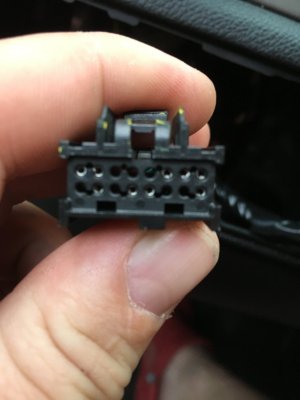
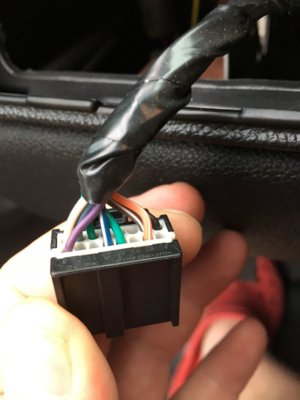 Yeah, I think I got all those steps, but doesn't work. It's a ssv if that makes a difference.
 The light on the dash isn't coming on either so I assume the computer isn't recognizing it.
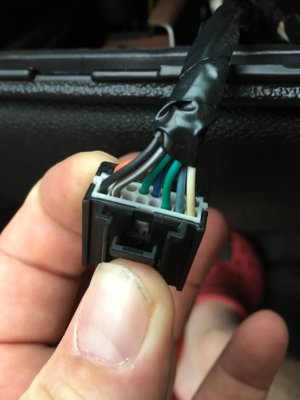
Here is a pic of the switch plug, I noticed not all the pins have wires to the harness.
08SSV
TYF Newbie
- Joined
- Feb 15, 2017
- Posts
- 3
- Reaction score
- 0
I have the same exact problem (also ssv) no power at the fuse either. Hopefully somebody can shed some light on this.
Tahoe_SSV
Member
I also would like to do this. My truck is 09 ssv also..I wish somebody would do a write up or video because this seems to be common thing people want to do and there is certainly a way to wire these up to factory switch.


