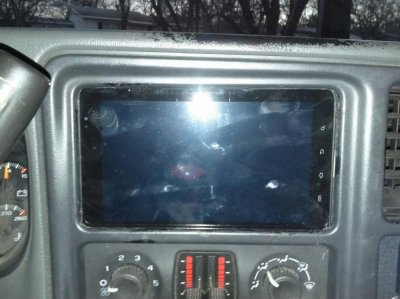
Indash Samsung Galaxy Tab Stereo DONE!

Disclaimer: Links on this page pointing to Amazon, eBay and other sites may include affiliate code. If you click them and make a purchase, we may earn a small commission.


mrmill

Member
Joined
Oct 3, 2012
Posts
80
Reaction score
0
Location
stafford
Hmmmm.....looks like the tab belongs there. I like it. This may be a better idea than the ipad1 im holding installed in my dash
 

Bigsteve04Ho

Full Access Member
Joined
Dec 31, 2011
Posts
129
Reaction score
16
I did the same install over a year ago. Pretty easy if you have the time

Sent from my Nexus S 4G using Xparent Skyblue Tapatalk 2
 

Bigsteve04Ho

Full Access Member
Joined
Dec 31, 2011
Posts
129
Reaction score
16
Sent from my Nexus S 4G using Xparent Skyblue Tapatalk 2
 

Attachments

  • uploadfromtaptalk1362731785417.jpg
    uploadfromtaptalk1362731785417.jpg
    90.5 KB · Views: 156

cdhayes2

Member
Joined
May 16, 2012
Posts
34
Reaction score
1
Location
Goshen, IN
I hate android, but that looks soooo good. Gonna have to get an 03-06 bezel and radio cage and make this happen!
 

Claymationzoo

Full Access Member
Joined
Aug 24, 2012
Posts
89
Reaction score
0
Location
Maryland
If I have a 01 hoe is all I need is a 03-06 dash bezel to fit this or will the heater controls be in the way still?


Sent from my iPhone using Tapatalk
 

99fever27

Member
Joined
May 13, 2009
Posts
38
Reaction score
0
has anyone figured out how to make a rear view camera compatible? How about the steering wheel controls?
 

vatahoelt

Full Access Member
Joined
Jun 1, 2009
Posts
1,015
Reaction score
13
Location
NoVa
has anyone figured out how to make a rear view camera compatible? How about the steering wheel controls?

only thing i can think of would be to get one of those home ip cameras and mount that somehow. then have an app to pull it up whenever you wanted to view it
 

Kenric

Member
Joined
Apr 25, 2013
Posts
74
Reaction score
0
Location
Howell, MI
Great job!

One thing people should know if they decide to do this with an iPad, regular or mini, is that you only get true GPS, like what an iPhone has, if you get a cellular equipped iPad. You don't have to actually activate and use the cellular radio, in fact, you can leave it powered off. You just have to pay the extra for the cellular option (can be AT&T or Verizon) in order to get the true GPS equipment.

The regular iPads look like they have location service but it is just based on WiFi routing and triangulation. It is completely worthless for turn by turn navigation.

You could, however, use a regular iPad with an external Bluetooth GPS receiver. Or, I have been able to use a rooted Android phone to act as Bluetooth GPS receiver for an iPad or laptop as well, but that can be a pain in the ass so I would not recommend it if you plan to use Nav a lot.

As far as I know, all Android based tablets are equipped with true GPS equipment, with or without a cellular option.

Also, unless you want to rely on a cellular link to provide the maps, you might consider buying a Nav app which uses maps that are downloaded to your iPad. I travel a lot to places that don't have cellular service and so I use Navigon and Sygic apps. With either of these, you do not need any cellular link, unless you want real time traffic and weather info in the apps.

Also, it is now possible to download a limited area map for off line use from Google for free. This can be useful if you know you are going somewhere without cell service. Or, of you mostly drive in the same area all the time.

In fact, even if you do use a cell phone or a cellular equipped tablet, if you use Google Nav in the same area a lot, like in a particular city, it is a very good idea to download the map for that area from Google. It can save quite a bit of data on your data plan to not have to always be downloading the maps for the same areas over and over each time you use Google Nav/Maps.
 
Last edited:

blaqout

King Yukon
Joined
Nov 6, 2009
Posts
233
Reaction score
1
Location
Indianapolis
That looks awesome! Definitely keeping this as an option! Double DINs w/out GPS are getting so cheap now a days, but the GPS option of that is what attracts me. As for a backup cam, if you're device is hooked up to wi-fi the IP camera was a good suggestion, but you could always get a replacement rearview mirror with a screen in it and wire the back up camera that way.
 

Doverpoint

Member
Joined
Dec 20, 2011
Posts
74
Reaction score
0
I did the same thing with my 2001 tahoe back in 2012: http://www.flickr.com/photos/8513985@N03/7538349042/in/photostream/

In the picture I was using a jvc head unit. I have since replaced it with a pioneer which had much better hands free phone quality.

The white wire on the left plugs into my Samsung Galaxy S3 phone, but at the time of this picture I was using an Iphone 4. The white wire connects to the USB port on the back of the head unit, which also provides charging for the phone.

The Galzxy Tab 2 7" pictured connects directly to the head unit via 3.5 cable. Sounds great. The power is supplied through a high amperage cig lighter that is buried in the dash. You have to use high amperage in order for the Samsung to charge.

Also, rooting the Tab allows you to better control over when the unit sleeps and wakes up.

Note to pre 2002 owners, you dont need to put in a double DIN bezel for this to work. I used my dremel and did a little trimming to make mine fit.

Internet feed is through my AT&T cell phone and works flawlessly. I get Netflix, Sling Box, Songza (which is great, btw), Pandora, email, engine diagnostics via bluetooth sender, weather radar (live radar feed is like power windows, once you have them you couldn't do without), this unit gives me expanded use of my radar detector, and many other functions.

This system is better than any stock system available, and certainly better than any other aftermarket stereo arrangement.
 

Forum statistics

Threads
137,719
Posts
1,990,340
Members
102,710
Latest member
cdhpc2

Latest posts

Back
Top