golfdad100
TYF Newbie
- Joined
- Sep 6, 2017
- Posts
- 5
- Reaction score
- 2
Disclaimer: Links on this page pointing to Amazon, eBay and other sites may include affiliate code. If you click them and make a purchase, we may earn a small commission.
Same thing is happening with mine, it started a few days ago. . I tried going to the nav menu and unchecking the box in Map View that says show radio but it still won’t work.Somehow I now have my radio channels show up at the bottom of my nav display and I can't get rid of them showing up there. I've checked the manuals and don't see anything about how to remove them from view. Any suggestions?
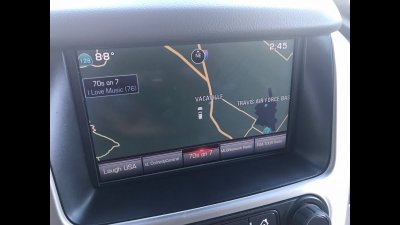
View attachment 233106
Thank you. That worked. Interesting, if you swipe up, it shows all of the saved stationsSwipe down on the row. It should go away.
Swipe down on the row. It should go away.