2015 HMI Unlock - Video in Motion

Disclaimer: Links on this page pointing to Amazon, eBay and other sites may include affiliate code. If you click them and make a purchase, we may earn a small commission.

OP
OP
T

tenbigblinds

Full Access Member
Joined
Mar 24, 2015
Posts
173
Reaction score
16
Sure I can scan in the instructions or attempt to take photos of each page. There is a significant amount of soldering work to be done as well which you will see. The instructions are fairly good though. The most expensive parts appear to be the apple cable and adapter. You MUST use the apple parts if you have an iPhone.

I will attempt to get the instructions uploaded this evening.


2015i Yukon SLT 5.3L
- Open Road (Nav & Rear Entertainment), Marimoto HID Upgrade, 24" Lexani Luxury Wheels, Pirelli Scorpion 305/35/24, WeatherTech Digital Fit, HMI (Video in Motion & Cell Mirroring) Upgrade, vLED Fogs/Plate/Backups/AirRaid Jr.... Looking to do more!

---------- Post added at 10:42 PM ---------- Previous post was at 10:38 PM ----------

The method "hosseface" used will work absolutely. But you are left with cables exposed, the A/C plug in use and such. This method is all internal and very clean. You can also plug any HDMI device into the port and it works as well. Apple TV, XBOX, Play Station and such. If you use the other method there is no plug for those external devices because it's in use by the cable.


2015i Yukon SLT 5.3L
- Open Road (Nav & Rear Entertainment), Marimoto HID Upgrade, 24" Lexani Luxury Wheels, Pirelli Scorpion 305/35/24, WeatherTech Digital Fit, HMI (Video in Motion & Cell Mirroring) Upgrade, vLED Fogs/Plate/Backups/AirRaid Jr.... Looking to do more!

---------- Post added at 12:28 AM ---------- Previous post was Yesterday at 10:42 PM ----------

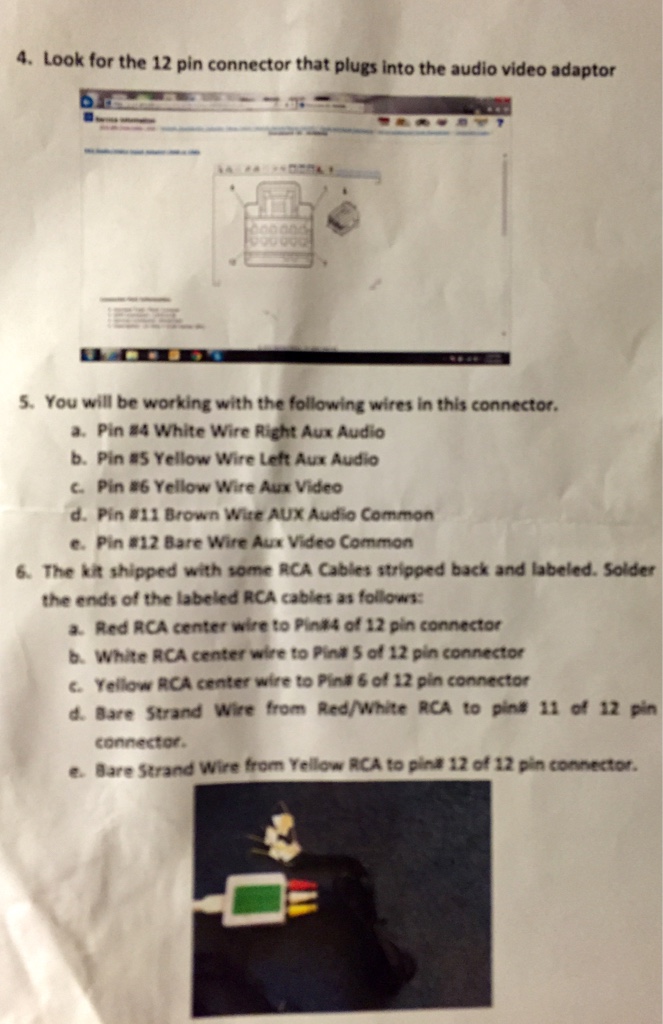
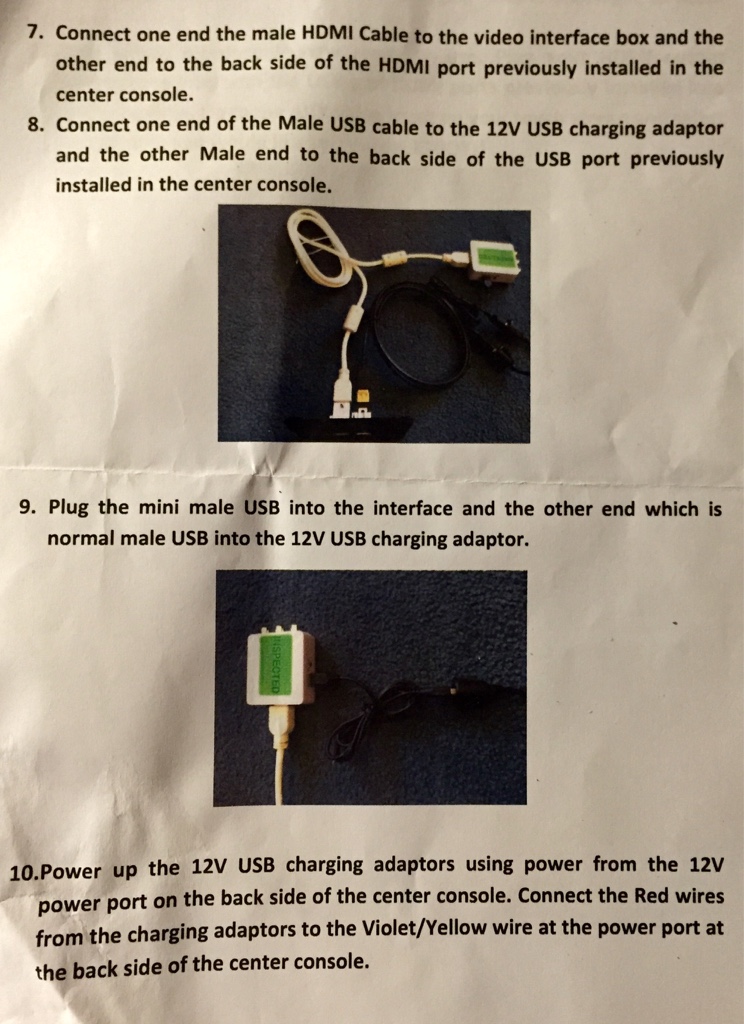
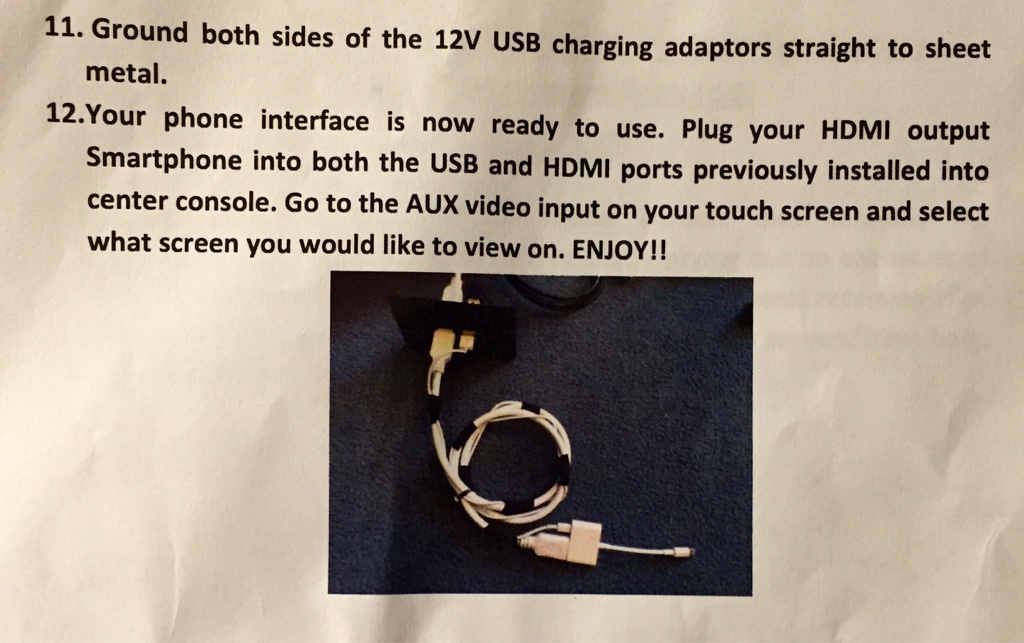
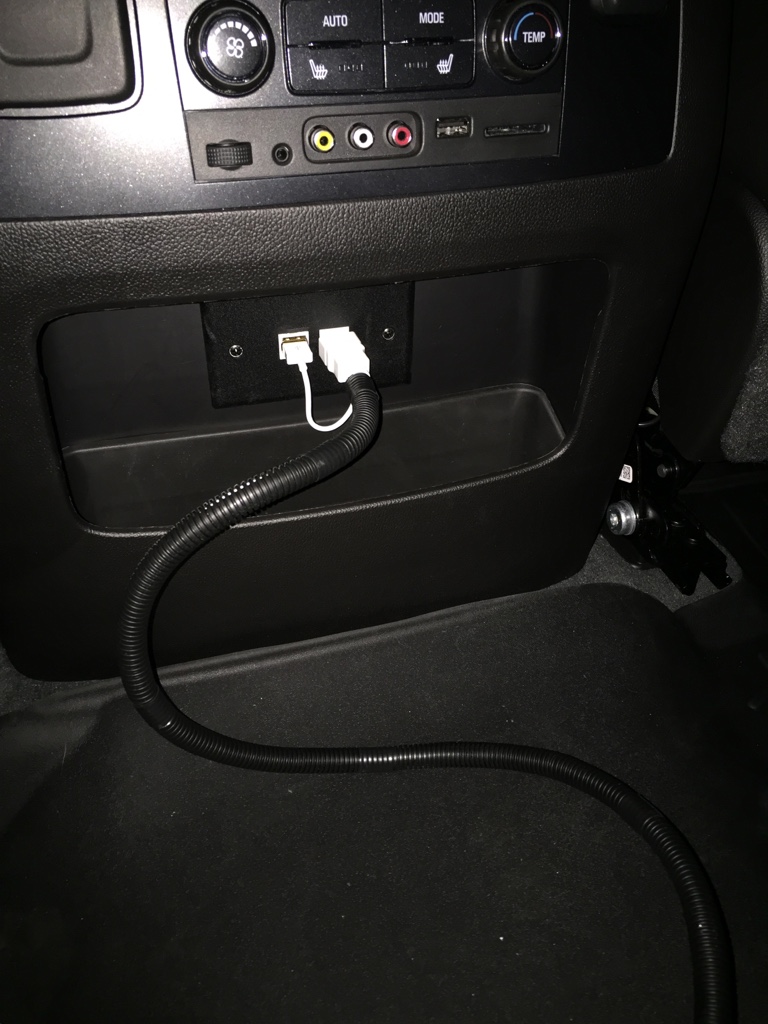
Here are the instructions and I did a little extra by wrapping the cable with a plastic tube and will probably dip the connectors and get rid of all the white totally.
2cc28fb61a24aa5905b109bbae57e3b9.jpg
f534ef791deec14db2912d4fbb8a608d.jpg
075780cd9c87d502f45391b529bc6a59.jpg
4845c8d6d7dc9d326b4d99ebd45d5fa6.jpg


2015i Yukon SLT 5.3L
- Open Road (Nav & Rear Entertainment), Marimoto HID Upgrade, 24" Lexani Luxury Wheels, Pirelli Scorpion 305/35/24, WeatherTech Digital Fit, HMI (Video in Motion & Cell Mirroring) Upgrade, vLED Fogs/Plate/Backups/AirRaid Jr.... Looking to do more!
 
OP
OP
T

tenbigblinds

Full Access Member
Joined
Mar 24, 2015
Posts
173
Reaction score
16
No problem!


2015i Yukon SLT 5.3L
- Open Road (Nav & Rear Entertainment), Marimoto HID Upgrade, 24" Lexani Luxury Wheels, Pirelli Scorpion 305/35/24, WeatherTech Digital Fit, HMI (Video in Motion & Cell Mirroring) Upgrade, vLED Fogs/Plate/Backups/AirRaid Jr.... Looking to do more!
 
OP
OP
T

tenbigblinds

Full Access Member
Joined
Mar 24, 2015
Posts
173
Reaction score
16
Looks like my HMI module will arrive in the morning by 1030. Here is a shot of the AppleTV running in the car using the mirror kit purchased via HDMI. As you can see, the converter is causing a green bar and flicker across the bottom. Hopefully he sends me a new one soon.
4ae33beb3ffcb6b35edc39b4aceb1a47.jpg


2015i Yukon SLT 5.3L
- Open Road (Nav & Rear Entertainment), Marimoto HID Upgrade, 24" Lexani Luxury Wheels, Pirelli Scorpion 305/35/24, WeatherTech Digital Fit, HMI (Video in Motion & Cell Mirroring) Upgrade, vLED Fogs/Plate/Backups/AirRaid Jr.... Looking to do more!
 

Lyon

Full Access Member
Joined
Aug 2, 2014
Posts
604
Reaction score
23
How challenging was the soldering? I've got that same kit from the same folks and have not installed it yet because I'm a little nervous about doing the soldering in the car. I'm considering taking it to someone to have that part done. I have very little experience soldering in general and have never done it in a confined space like the inside of a vehicle.
 
OP
OP
T

tenbigblinds

Full Access Member
Joined
Mar 24, 2015
Posts
173
Reaction score
16
It was not a problem at all. Once you remove the tape on the wiring harness, there is plenty of room to work. Just "tin" the wires before you attempt to solder. It's not an issue at all. Simple.


2015i Yukon SLT 5.3L
- Open Road (Nav & Rear Entertainment), Marimoto HID Upgrade, 24" Lexani Luxury Wheels, Pirelli Scorpion 305/35/24, WeatherTech Digital Fit, HMI (Video in Motion & Cell Mirroring) Upgrade, vLED Fogs/Plate/Backups/AirRaid Jr.... Looking to do more!
 
OP
OP
T

tenbigblinds

Full Access Member
Joined
Mar 24, 2015
Posts
173
Reaction score
16
Unit arrived today, install took about 20 minutes and works perfectly. Even has a cool sound associated with the startup splash screen. Overall very happy.... Just need them to send the replacement converter and I would rate as highly satisfied.

4025ac99d84a85ffc4a5745a278da9c3.jpg


2015i Yukon SLT 5.3L
- Open Road (Nav & Rear Entertainment), Marimoto HID Upgrade, 24" Lexani Luxury Wheels, Pirelli Scorpion 305/35/24, WeatherTech Digital Fit, HMI (Video in Motion & Cell Mirroring) Upgrade, vLED Fogs/Plate/Backups/AirRaid Jr.... Looking to do more!
 

PB&J

TYF Newbie
Joined
Apr 14, 2015
Posts
27
Reaction score
2
Two questions

Thanks for posting this information. I'm in the que at MVI for an unlocked module.

As for the iPhone mirroring

Two questions: Are the factory RCA jacks in the console now inoperative? What kind of 12v usb adapter did the supply and does it charge an iPhone?

btw I purchased a kivic one which mirrors the iPhone (but not all apps) and i get the green line along the bottom of the screen as well - so far no solution
 
OP
OP
T

tenbigblinds

Full Access Member
Joined
Mar 24, 2015
Posts
173
Reaction score
16
Wow that sucks with the green line. Yes the factory RCA jacks are still in tact and functional. I've used the HDMI port for my XBox and AppleTV both of which have the green line as seen below. They sent a 12v to 5v converter which is hardwired into the main 12V supply and grounded to the chassis. And yes... It charges while your phone or iPod is in use.

Apparently the company can't figure out the green line either... A shame they didn't tell me that up front or I would have waited. I guess at least I have an HDMI port in the car now so when a fix comes along I'm in good shape.

Photo of green line. This is playing from my iPhone using SlingBox App from my cable box at home. Notice I'm doing like 35MPH.
57370b8db1f048f7b0b27a24e6c0cf8f.jpg


2015i Yukon SLT 5.3L
- Open Road (Nav & Rear Entertainment), Marimoto HID Upgrade, 24" Lexani Luxury Wheels, Pirelli Scorpion 305/35/24, WeatherTech Digital Fit, HMI (Video in Motion & Cell Mirroring) Upgrade, vLED Fogs/Plate/Backups/AirRaid Jr.... Looking to do more!
 

PB&J

TYF Newbie
Joined
Apr 14, 2015
Posts
27
Reaction score
2
Green line is annoying. How did you get the full size picture on slingbox? Do you use the zoom feature? When I do anything to change picture size it shrinks to a quarter size and I have to restart the app.
 
OP
OP
T

tenbigblinds

Full Access Member
Joined
Mar 24, 2015
Posts
173
Reaction score
16
Zoom. Are you happy with SlingBox? My idea was to use it for watching sports while traveling.


2015i Yukon SLT 5.3L
- Open Road (Nav & Rear Entertainment), Marimoto HID Upgrade, 24" Lexani Luxury Wheels, Pirelli Scorpion 305/35/24, WeatherTech Digital Fit, HMI (Video in Motion & Cell Mirroring) Upgrade, vLED Fogs/Plate/Backups/AirRaid Jr.... Looking to do more!
 

PB&J

TYF Newbie
Joined
Apr 14, 2015
Posts
27
Reaction score
2
Slingbox is great - I had it set up in my 2009 ltz with lockpick and an iSimple cable. You had to have it on HQ for video out - good thing to have unlimited data.
Waiting for MVI upgrade in my 2015. I think the firewire connector is more problematic. In the 2009 I had the 30 pin (?) which was analog and did not need the HDMI converter. I'm not as happy with the Kivic version and may opt for the MVI mirroring. In any event without an HD screen and factory HDMI port in the car I don't ever expect to get a great picture. When I fire up sling box on my phone it tells me I could get better internet viewing by visiting slingbox.com on my home computer. I have not explored that option, although video out on the phone now seems to work on standard quality.
 
OP
OP
T

tenbigblinds

Full Access Member
Joined
Mar 24, 2015
Posts
173
Reaction score
16
Good input. The phone mirroring works flawlessly. Every app works, rotation works... It just flat out works. I just don't like the green line and the bounce. The guy at MVI hasn't said anything else yet about getting me another converter. He simply said that can't duplicate the problem on a bench but has had several people say it's an issue in the car. I can live with it for now. For me I have about 750 movies in iTunes so it would be nice to have the green line gone. The video in motion is nice and when a text comes in it stops and goes to that screen and then goes back to video. If you have a Nav route entered, it switches to Nav every time there is a turn then goes back to video. It works well.


2015i Yukon SLT 5.3L
- Open Road (Nav & Rear Entertainment), Marimoto HID Upgrade, 24" Lexani Luxury Wheels, Pirelli Scorpion 305/35/24, WeatherTech Digital Fit, HMI (Video in Motion & Cell Mirroring) Upgrade, vLED Fogs/Plate/Backups/AirRaid Jr.... Looking to do more!
 

PB&J

TYF Newbie
Joined
Apr 14, 2015
Posts
27
Reaction score
2
i wonder if a higher quality HDMI to RCA converter would help, although they all seem to run off 110v not usb. I am not sure how you would wire that into the car and most likely would not like it plugged into the 110 socket on the console. When i plug my old iPhone 4s (now an itouch) in with the rca cables- it's flawless. I think the green line is a direct result of the conversion. I would assume the video showing the mirroring on the MVI site uses the old style connector without an HDMI converter.
I'd be happy to use the 4s for slingbox and waze but it would chew through my wifi plan in a heartbeat
I'm not sure what the Kivic one uses to convert the signal since it is wireless, but the green line is there as well.
Have you tried putting movies on an SD card? This seemed like a strange option for GM to install, I'm intrigued by the idea, but the leg work to make this a viable option seems like too much work.
 
OP
OP
T

tenbigblinds

Full Access Member
Joined
Mar 24, 2015
Posts
173
Reaction score
16
Yes I've put them on a usb which is the same thing and they play fine.


2015i Yukon SLT 5.3L
- Open Road (Nav & Rear Entertainment), Marimoto HID Upgrade, 24" Lexani Luxury Wheels, Pirelli Scorpion 305/35/24, WeatherTech Digital Fit, HMI (Video in Motion & Cell Mirroring) Upgrade, vLED Fogs/Plate/Backups/AirRaid Jr.... Looking to do more!
 
OP
OP
T

tenbigblinds

Full Access Member
Joined
Mar 24, 2015
Posts
173
Reaction score
16
Woke up to another charge on my credit card from MVI. They claim its only an authorization to ensure my card is valid. What a crock of BS. I already paid them and shipped their module back same day. Beware of this fact before doing business with
them.
3617d859aa45a8523a7e32c51359d37b.jpg

28e7fc87f577f45951bb1a239d1ae445.jpg


2015i Yukon SLT 5.3L
- Open Road (Nav & Rear Entertainment), Marimoto HID Upgrade, 24" Lexani Luxury Wheels, Pirelli Scorpion 305/35/24, WeatherTech Digital Fit, HMI (Video in Motion & Cell Mirroring) Upgrade, vLED Fogs/Plate/Backups/AirRaid Jr.... Looking to do more!
 

jl449

Full Access Member
Joined
Nov 25, 2014
Posts
284
Reaction score
42
Location
Salinas, Ca.
Brandon
how did you gain access to the wire harness to solder the output of the video/audio? and where did you mount the HDMI to AV convertor box?
 
OP
OP
T

tenbigblinds

Full Access Member
Joined
Mar 24, 2015
Posts
173
Reaction score
16
Pop the back console off and it's right there. The converter box is so small I stuck it in there with double sided 3M tape. You could just leave it hanging anywhere


2015i Yukon SLT 5.3L
- Open Road (Nav & Rear Entertainment), Marimoto HID Upgrade, 24" Lexani Luxury Wheels, Pirelli Scorpion 305/35/24, WeatherTech Digital Fit, HMI (Video in Motion & Cell Mirroring) Upgrade, vLED Fogs/Plate/Backups/AirRaid Jr.... Looking to do more!
 

photios

Member
Joined
Apr 15, 2015
Posts
33
Reaction score
4
I have been following this thread as I'm about to take delivery of my new 2015i Tahoe LT tomorrow.

I have been driving a Honda Pilot Touring model with nav unlock, and an hdmi to RCA converter plugged into my composite inputs in the back of my main console, which is practically the same setup on the Tahoe. I have a composite cable plugged into the outputs, and that cable goes into my main console which just like in the Tahoe, is big and whose lid acts as an arm rest. That cable plugs into the converter box. The converter box has an HDMI input. I have a short HDMI cable going from the converter box plugging into an apple HDMI / lightning (lightning digital AV adapter). From there I have a lightning extension cable going out to my iPhone. All the cables, converter box, lightning AV adapter (other than the initial composite going out from the rear console) are all tucked away in the main storage console compartment. Only the extension cable can be seen coming out of the center main console. Great thing about this, which is the main reason I'm posting is that the converter box is powered by USB... and hopefully that will solve the green line issues that you are experiencing.

I'm also hoping that this set up will work just as great on my new Tahoe, and that I'll be able to mirror my phone to my main screen once I get the unlock. I'm posting some links below.

1) For the converter box on Amazon:

http://www.amazon.com/gp/product/B00DSSCBZ8/ref=oh_aui_detailpage_o06_s00?ie=UTF8&psc=1

2) Some photo bucket photos from a pilot user who is the one who initially came up with the setup I'm using. You'll notice in the pictures that he's using 45 degree inserts for the RCA composite cable (which I'm using as well) to make a cleaner cable extruding from the back of the console.

http://s1345.photobucket.com/user/13Pilot/library/NavTool/NavTool set up for iPhone 5?sort=3&page=3


I'm wondering about the HMI nav/video unlock... Is it a device that goes behind the head unit? Do I have to pull the head unit, and send my device to the vendor for reprogramming? I'm a little confused how this works. Also, I see no instructions for installation on their website. Is installation difficult to do?

Thank you!
 

Forum statistics

Threads
137,809
Posts
1,992,717
Members
102,794
Latest member
Drewphil
Back
Top