Playing Video in 2017 Tahoe LT w/MYLINK & Nav

Disclaimer: Links on this page pointing to Amazon, eBay and other sites may include affiliate code. If you click them and make a purchase, we may earn a small commission.

latemodelsedan

TYF Newbie
Joined
Aug 9, 2017
Posts
6
Reaction score
0
hey, guys. im new here and hoping to find some help. just some background, im currently on my third tahoe in a row. its a 2017 LT with the luxury and signature packages which obviously includes bose and mylink. heres the problem, in my previous 2015 LT (without nav) i was able to play mp4 video on my mylink system via usb flash drives but now with the newer model i cant. seems weird to me that chevy would take this capability away. thing is, if you were to reach out to anyone at a dealership or even chevy directly none of them even know that this capability existed at all. everyone ive spoken to about it has told me neither my previous nor current model support video playback via usb but clearly they dont know what theyre talking about because i played videos in my 2015 for three years!

the problem i initially had with the 2015 was that vids had to be converted to appropriate specs in order to play. in other words, i couldnt just transfer them as they were to my flash drive and play them. i had to use handbrake with a pre-configured formula i found online to get them to play. but now, with or without that conversion they dont play at all. just hoping maybe someone out there can help with this. i did a quick search prior to posting and it didnt yield any results. thanks for reading.
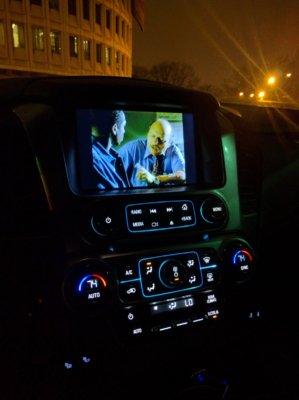
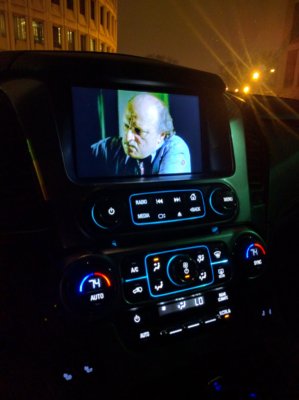
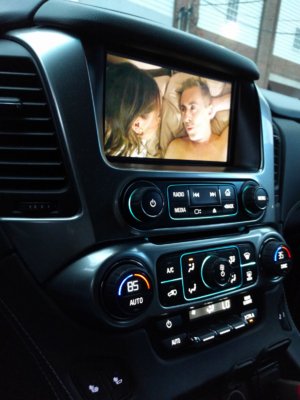
IMG_20151227_024414.jpg IMG_20151227_024432.jpg IMG_20151230_072048.jpg
 

16blkltz

Full Access Member
Joined
Jan 17, 2017
Posts
279
Reaction score
222
In the comments of the following youtube video, the guys says they took away the video playback feature in 2017 models:
 
OP
OP
L

latemodelsedan

TYF Newbie
Joined
Aug 9, 2017
Posts
6
Reaction score
0
I haven't done this before...but am interested. Have you seen this: http://www.gm-trucks.com/forums/top...nk-infotainment-playable-video-formats/page-2

ive seen similar threads. its just confusing as hell because even chevy and its employees (at least the ones we can directly communicate with) had no idea that this was possible. no one believed me until i actually showed them proof. as far as dealerships saying chevy took the feature away, im also gonna say that they probably really dont know what theyre talking about because again, most of them had no idea it was possible at all.
 

Nav792

TYF Newbie
Joined
Jul 22, 2017
Posts
24
Reaction score
11
Location
Orlando, FL
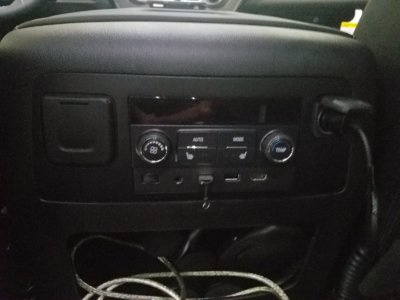
i have a 17" Tahoe LT and am able to play mp4 via usb stick plugged into rear...Just works , did not have to do anything special.
 
OP
OP
L

latemodelsedan

TYF Newbie
Joined
Aug 9, 2017
Posts
6
Reaction score
0
i have a 17" Tahoe LT and am able to play mp4 via usb stick plugged into rear...Just works , did not have to do anything special.
Thanks for replying. I have a couple of questions for you though. What packages do you have with your LT? Also when you say you plug the flash drive into the "rear" where specifically are you referring to? As far as I know I only have 5 USB ports and they are all in the front. please clarify what youre saying.
 
Last edited:

Nav792

TYF Newbie
Joined
Jul 22, 2017
Posts
24
Reaction score
11
Location
Orlando, FL
Thanks for replying. I have a couple of questions for you though. What packages do you have with your LT? Also when you say you plug the flash drive into the "rear" where specifically are you referring to? As far as I know I only have 5 USB ports and they are all in the front. please clarify what youre saying.
I have Luxury package and Sun, Entertainment & Destinations package. I use the USB port on the back of the middle console. I also have a lighting I ng to HDMI connector which NY daughter uses to watch Netflix in the back.
 

16blkltz

Full Access Member
Joined
Jan 17, 2017
Posts
279
Reaction score
222
Ok...I've tried to play an MP4 (gopro video) from a USB flash drive connected to rear USB port (2nd row - behind center console), but basically said no supported file found. It did see the USB drive though. It just didn't recognize the MP4 file.

So, either something different in 2017 models (I have 2016 LTZ), or Nav702 just got lucky with the way your MP4 files were setup. I just need to figure out what that setup is.
 
OP
OP
L

latemodelsedan

TYF Newbie
Joined
Aug 9, 2017
Posts
6
Reaction score
0
I have Luxury package and Sun, Entertainment & Destinations package. I use the USB port on the back of the middle console. I also have a lighting I ng to HDMI connector which NY daughter uses to watch Netflix in the back.
at this point i have to assume this package allows for it. it just defies logic that chevy would take the time and effort to take away a useful feature like this. im gonna keep trying to see if i can figure it out though. thanks for the info though. i initially overlooked your reply!

for anyone who's interested in how i got videos to play in my 2015 tahoe ive attached the guide i used to configure my video files.
 

Attachments

  • Playing Videos on the 2014 Silverado.pdf
    943.5 KB · Views: 53

GTPprix

Senior Member
Joined
Feb 8, 2014
Posts
637
Reaction score
43
Location
Metro Detroit, MI
at this point i have to assume this package allows for it. it just defies logic that chevy would take the time and effort to take away a useful feature like this. im gonna keep trying to see if i can figure it out though. thanks for the info though. i initially overlooked your reply!

for anyone who's interested in how i got videos to play in my 2015 tahoe ive attached the guide i used to configure my video files.
It’s gone from all 2017 hmi based vehicles. This was even noted in the new model guides at release..... like I said the hmi unlock from mvi will restore this.
 

CND17 BURBAN

Member
Joined
Jun 28, 2017
Posts
59
Reaction score
26
I have a 2017 Premier were the screens drop down from the ceiling (Rear Seat Entertainment Package).
I have played MP4 file right off two USB stick when plugged into the back of the center console.
My kids love it cause I can store a lot of videos on each 128GB USB stick.
I also found out you can play a different movie on each drop down screen.
It can be two MP4 files from the same USB stick or one from each USB sticks.

GM Took away USB / SD Video Playback capabilities on all NON RSE (Rear Seat Entertainment) vehicles in 2017.
 
Last edited:

Guiseppe83

TYF Newbie
Joined
Nov 29, 2020
Posts
6
Reaction score
1
Location
Youngstown, Oh
anyone have input on organizing the mp4 files on the rear usb drives to allow access. im able to get them to play in loop, but not able to choose movies in a "directory/menu"
 

Forum statistics

Threads
137,753
Posts
1,991,222
Members
102,740
Latest member
JeffK
Back
Top