USB PORTS

Disclaimer: Links on this page pointing to Amazon, eBay and other sites may include affiliate code. If you click them and make a purchase, we may earn a small commission.

Realife3

TYF Newbie
Joined
Apr 7, 2024
Posts
13
Reaction score
5
I have a 2022 Tahoe. When I put a flash drive in either of the USB ports it says no USB found. The vehicle has google built in, not sure if that has anything to do with it. I have tried several different flash drive with different formats, all give same results.
 

Micahsd

Full Access Member
Joined
May 6, 2021
Posts
354
Reaction score
167
Could be a size limitation (if you’re using a 2TB flash drive maybe try something smaller such as a 256 GB). It probably can only play certain types of media formats such as .mp3 or .m4a. I’d also make sure it’s formatted FAT32.

My wife has a 2020 Traverse but its infotainment system is the Gen3 or older version. For hers I just have a 256 GB flash drive formatted as FAT32 with .mp3 files on it.
 

Fless

Staff member
Moderator
Joined
Apr 2, 2017
Posts
16,283
Reaction score
33,660
Location
People's Republic of Colorado
Verify that your USB drive is MSC compatible.

1712972349034.png


OP
OP
Realife3

Realife3

TYF Newbie
Joined
Apr 7, 2024
Posts
13
Reaction score
5
Could be a size limitation (if you’re using a 2TB flash drive maybe try something smaller such as a 256 GB). It probably can only play certain types of media formats such as .mp3 or .m4a. I’d also make sure it’s formatted FAT32.

My wife has a 2020 Traverse but its infotainment system is the Gen3 or older version. For hers I just have a 256 GB flash drive formatted as FAT32 with .mp3 files on it.
Thanks for the reply, however, along with the size of the flash drive...128 mb, 16 gigs, 32 gigs and a 128 gigs and different formats of music files. There is still no change. I need someone who has Google Built-in with there vehicle who has been able to play a flash drive.
 
OP
OP
Realife3

Realife3

TYF Newbie
Joined
Apr 7, 2024
Posts
13
Reaction score
5
Verify that your USB drive is MSC compatible.

View attachment 426002

Thanks for your reply. After reading the link, this sounds more like a computer situation than a vehicle situation. i just bought a brand new 128 gig flash drive and the same thing is happening. i wish someone who has Google Built-In as there main source in the vehicle would chime in and let me know if they are able to play a flash drive in the ports. Once again this is a 2022 Tahoe.
 

trckrhntr

TYF Newbie
Joined
Feb 26, 2024
Posts
22
Reaction score
25
Location
Northern-Lower Michigan

trckrhntr

TYF Newbie
Joined
Feb 26, 2024
Posts
22
Reaction score
25
Location
Northern-Lower Michigan
I only play music off a USB flash drive in my 2023 Tahoe. The experience is pretty terrible (compared to other cars I have owned), but it is functional.

Here is the drive I use:

IIRC it is NTFS formatted.

** Edited I had forgotten I switched drives not too long ago. Current drive is now the link. **

I will add: when I test drove the car I used the stick in it. The car recognized it at first, but threw an error, I didn't catch fully, about format. After I clicked the "Eject" link on the error screen, it took a full power cycling of the car with no stick installed to get it to be recognized again...

I wish I had caught the error message.
 
OP
OP
Realife3

Realife3

TYF Newbie
Joined
Apr 7, 2024
Posts
13
Reaction score
5
I only play music off a USB flash drive in my 2023 Tahoe. The experience is pretty terrible (compared to other cars I have owned), but it is functional.

Here is the drive I use:

IIRC it is NTFS formatted.

** Edited I had forgotten I switched drives not too long ago. Current drive is now the link. **
Thanks for your reply. My question to you is, do you have the Google Built-in feature on your vehicle? This is the different from the other vehicles which just use the My Chevy Link connection. I noticed on a 2024 that the Google Built-in feature was removed and back to My Chevy Link.
 

Joseph Garcia

Elite Member
Supporting Member
Joined
Aug 2, 2018
Posts
10,285
Reaction score
14,892
As stated earlier in this thread, the USB drive must be formatted as a FAT32 format, and not an NTFS format (which most computers use today). Plug your USB drive into your computer, format it to FAT32, and then load your .mp3s onto it, and it should work.
 
OP
OP
Realife3

Realife3

TYF Newbie
Joined
Apr 7, 2024
Posts
13
Reaction score
5
As stated earlier in this thread, the USB drive must be formatted as a FAT32 format, and not an NTFS format (which most computers use today). Plug your USB drive into your computer, format it to FAT32, and then load your .mp3s onto it, and it should work.
Believe me when i say " I wish it was that simple". I have tried all formats and none work. Even went to dealer to have them take a look at it, no luck. It has something to do with this Google assistant built-in. That is my guess. When at the dealer lot, we went to two different Tahoe's, a 2024 which did not have the Google feature; flash drive worked with no issues and a 2022 Tahoe that had the Google built-in, did not read the same flash drive, go figure....
 
OP
OP
Realife3

Realife3

TYF Newbie
Joined
Apr 7, 2024
Posts
13
Reaction score
5
I have a 2022 Tahoe. When I put a flash drive in either of the USB ports it says no USB found. The vehicle has google built in, not sure if that has anything to do with it. I have tried several different flash drive with different formats, all give same results.

I really need someone who has a vehicle that has the Google Built-in feature to chime in. Would like to know if the USB port are doing the same.
 

trckrhntr

TYF Newbie
Joined
Feb 26, 2024
Posts
22
Reaction score
25
Location
Northern-Lower Michigan
Thanks for your reply. My question to you is, do you have the Google Built-in feature on your vehicle? This is the different from the other vehicles which just use the My Chevy Link connection. I noticed on a 2024 that the Google Built-in feature was removed and back to My Chevy Link.
I have the Google Assistant built-in. It is useless once you cancel OnStar.
 

iamlegion

Full Access Member
Joined
Jan 5, 2024
Posts
130
Reaction score
90
Nowhere in this thread have you specifically said the drive format, size, and file formats you used. Stop repeating “I need XYZ” and try and provide the specifics.

Have you taken it to a dealer? Have you verified in writing the drive supports MSC standard?
 
OP
OP
Realife3

Realife3

TYF Newbie
Joined
Apr 7, 2024
Posts
13
Reaction score
5
Nowhere in this thread have you specifically said the drive format, size, and file formats you used. Stop repeating “I need XYZ” and try and provide the specifics.

Have you taken it to a dealer? Have you verified in writing the drive supports MSC standard?
If you would have read the previous replies, you would have noticed that all of what you have mention were stated, including taking the vehicle to the dealer....Once again all avenues have been researched with no results. Thanks for your reply.
 

StephenPT

Full Access Member
Joined
Jan 16, 2022
Posts
1,252
Reaction score
1,266
Location
St. Helens, OR
I have a ‘22 Yukon XL (Google based infotainment) and I use this flash drive plugged into the USB port below the climate controls.


I did not do any formatting, just drag and drop music from the laptop to the drive and plugged it in. It took the Yukon a few minutes to index the drive, but now everything works just fine and I never unplug the drive because it’s so slim profile and doesn’t get in the way.
 
OP
OP
Realife3

Realife3

TYF Newbie
Joined
Apr 7, 2024
Posts
13
Reaction score
5
I have a ‘22 Yukon XL (Google based infotainment) and I use this flash drive plugged into the USB port below the climate controls.


I did not do any formatting, just drag and drop music from the laptop to the drive and plugged it in. It took the Yukon a few minutes to index the drive, but now everything works just fine and I never unplug the drive because it’s so slim profile and doesn’t get in the way.
Thanks for that info, I will give that flash drive a try and report back to you.
 

Fless

Staff member
Moderator
Joined
Apr 2, 2017
Posts
16,283
Reaction score
33,660
Location
People's Republic of Colorado
If you would have read the previous replies, you would have noticed that all of what you have mention were stated, including taking the vehicle to the dealer....Once again all avenues have been researched with no results. Thanks for your reply.

I may have missed it, but the only mention of formats is "I have tried all formats;" it's not clear if you mean music file formats or the flash drive OS format. Just trying to clarify what you've said so we understand what's been tried.
 

iamlegion

Full Access Member
Joined
Jan 5, 2024
Posts
130
Reaction score
90
I may have missed it, but the only mention of formats is "I have tried all formats;" it's not clear if you mean music file formats or the flash drive OS format. Just trying to clarify what you've said so we understand what's been tried.
Yep, that’s what I tried to point out. OP has the vibe “I’m super smart, just trust me bro” but can’t get audio to play. My 70 year old dad managed this with no problem.
 

trckrhntr

TYF Newbie
Joined
Feb 26, 2024
Posts
22
Reaction score
25
Location
Northern-Lower Michigan
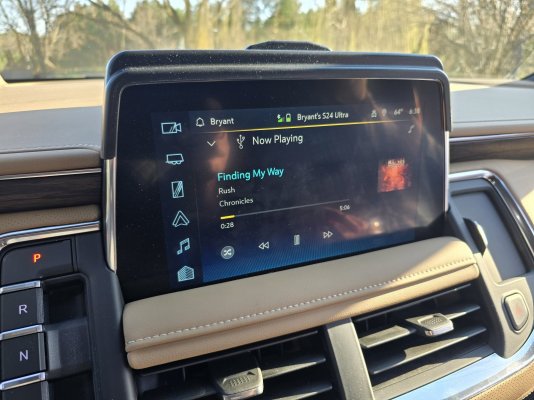
My "radio" is shown attached below. It has the Google Assistant built-in, but it is now disabled because it won't function unless I subscribe to a service in my owned car.

I have all my music in mp3 format.
The stick is the one I linked previously.
The stick is plugged in to the USB-C port under the climate controls.
The stick is file format NTFS.
If the stick is unplugged, it can take the system quite some time to recognize it once I've plugged the stick back in.

--------
Issues with using a USB stick for music in these "premium" cars:
There is no way to search/play a specific song via voice command (from the stick).

If two songs have the same title, only 1 of them will ever play, despite the songs being in distinct folders.

I have about 3,000 songs on the stick. The manual scrolling locks up after a few hundred.
 

Attachments

  • 20240414_183855.jpg
    20240414_183855.jpg
    284.3 KB · Views: 29

ZKWBQD

Full Access Member
Joined
Sep 29, 2022
Posts
292
Reaction score
244
I have a 2022 Tahoe. When I put a flash drive in either of the USB ports it says no USB found. The vehicle has google built in, not sure if that has anything to do with it. I have tried several different flash drive with different formats, all give same results.
Google could be related. I deleted all things Google from my vehicle. Now the USB flash drive works fine.
 

Forum statistics

Threads
137,715
Posts
1,990,292
Members
102,707
Latest member
rossida

Latest posts

Back
Top