Tmorr325's Tahoe Build

Disclaimer: Links on this page pointing to Amazon, eBay and other sites may include affiliate code. If you click them and make a purchase, we may earn a small commission.

OP
OP
T

Tmorr325

TYF Newbie
Joined
Aug 19, 2017
Posts
28
Reaction score
62
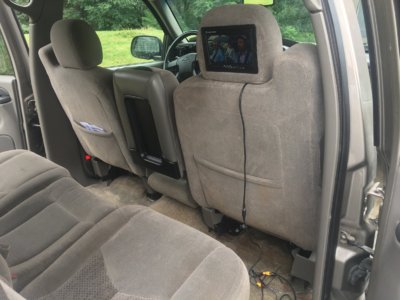
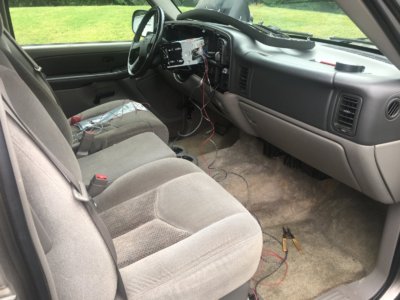
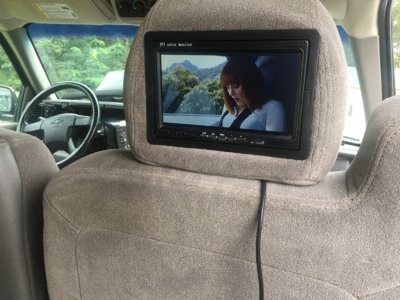
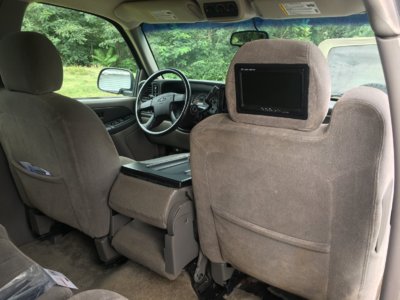
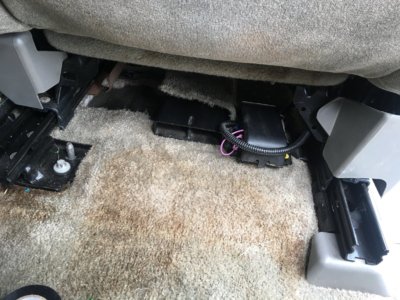
All wires will be tucked and ran once the other monitor arrives. I'll be running the wires down to where the factory connections are. That way if I ever need to remove the seats, everything is in one location to disconnect.
 
OP
OP
T

Tmorr325

TYF Newbie
Joined
Aug 19, 2017
Posts
28
Reaction score
62
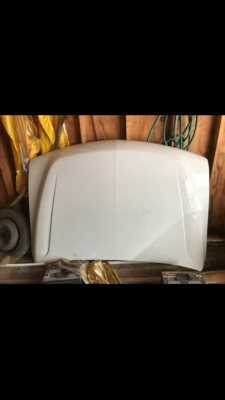
Searching CL, I found an HD hood for $80. Hoping to pick it up next weekend.

IMG_0453.PNG
 
OP
OP
T

Tmorr325

TYF Newbie
Joined
Aug 19, 2017
Posts
28
Reaction score
62
Man O'Man! I'm sure you just made a bunch of grown men cry!! $80? What a bargain! It's gonna look badass on there.

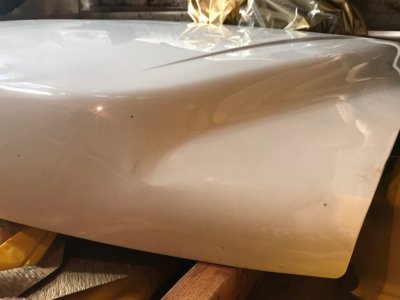
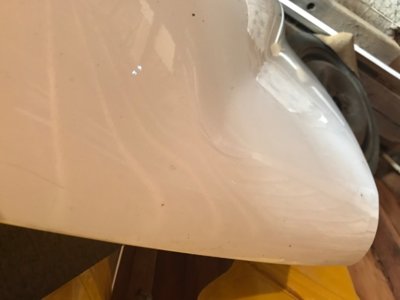
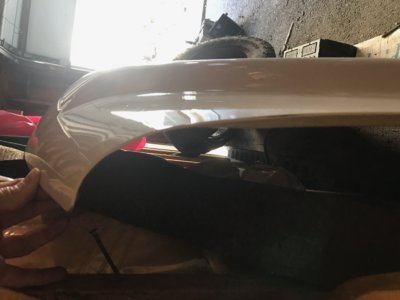
The drivers corner is slightly bent. Good thing I can do body work. I need to sand it down and spray it to match anyway. This will be sprayed with my gun as it would be badly zebra striped if it was done with spray cans.
 

Rocket Man

Mark
Supporting Member
Joined
Dec 25, 2014
Posts
26,679
Reaction score
52,949
Location
Oregon
The drivers corner is slightly bent. Good thing I can do body work. I need to sand it down and spray it to match anyway. This will be sprayed with my gun as it would be badly zebra striped if it was done with spray cans.
Yeah well you'd probably make a bunch of grown men cry if you painted a HD hood with spray cans too.
 
OP
OP
T

Tmorr325

TYF Newbie
Joined
Aug 19, 2017
Posts
28
Reaction score
62
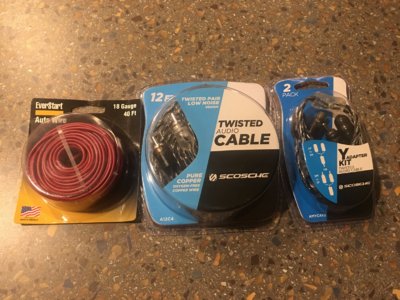
Picked up the wiring needed for the rear monitors. Still waiting for the second one to arrive. But in the meantime I'm going to get this one finished as well as run the wires for the driver side.

IMG_0468.JPG
 

Rocket Man

Mark
Supporting Member
Joined
Dec 25, 2014
Posts
26,679
Reaction score
52,949
Location
Oregon
Just give it to me, ill buy an nbs for it lol


Sent from iPhone 7 plus using Tapatalk Pro
I just made your number of likes the same as your number of posts (1263). Congrats.
 

Tonyrodz

Resident Resident
Joined
Feb 16, 2012
Posts
33,210
Reaction score
51,476
Location
Central Jersey
OP
OP
T

Tmorr325

TYF Newbie
Joined
Aug 19, 2017
Posts
28
Reaction score
62
How exactly is the monitor hooked up? To the head unit to play dvd's? If so, how'd you do it? Just by plugging rcas behind and running them to the monitor? Looks good.

The headunit has a video output on the back. I connected a RCA Y adapter to the output to split the signal for both monitors. I then tapped a constant 12v power to run the power wire along with the video cable. The wiring then runs along the underside of the dash and door sills with the factory harness. Both are then fed up into the seat and connected to the monitor. For whatever reason, the monitor did not require a ground. There is a ground wire, however I think it may only be needed if you're using them as back up camera monitors. Any video that is played on the headunit can now be output to the rear monitors.

 

Rocket Man

Mark
Supporting Member
Joined
Dec 25, 2014
Posts
26,679
Reaction score
52,949
Location
Oregon
The headunit has a video output on the back. I connected a RCA Y adapter to the output to split the signal for both monitors. I then tapped a constant 12v power to run the power wire along with the video cable. The wiring then runs along the underside of the dash and door sills with the factory harness. Both are then fed up into the seat and connected to the monitor. For whatever reason, the monitor did not require a ground. There is a ground wire, however I think it may only be needed if you're using them as back up camera monitors. Any video that is played on the headunit can now be output to the rear monitors.

Shouldn't that be a switched power so the monitors aren't powered up all the time? I realize they won't have a video signal but it seems they would still be turned on.
 

Tonyrodz

Resident Resident
Joined
Feb 16, 2012
Posts
33,210
Reaction score
51,476
Location
Central Jersey
The headunit has a video output on the back. I connected a RCA Y adapter to the output to split the signal for both monitors. I then tapped a constant 12v power to run the power wire along with the video cable. The wiring then runs along the underside of the dash and door sills with the factory harness. Both are then fed up into the seat and connected to the monitor. For whatever reason, the monitor did not require a ground. There is a ground wire, however I think it may only be needed if you're using them as back up camera monitors. Any video that is played on the headunit can now be output to the rear monitors.
So you're going to run two monitors?
 
OP
OP
T

Tmorr325

TYF Newbie
Joined
Aug 19, 2017
Posts
28
Reaction score
62
Shouldn't that be a switched power so the monitors aren't powered up all the time? I realize they won't have a video signal but it seems they would still be turned on.

The monitors themselves have an on/off button. Wired this way, the monitors can be used for gaming, movies, etc without the vehicle being on. For example tailgate parties or car shows. Also, it allows the monitor to retain the settings such as tint and brightness.
 
OP
OP
T

Tmorr325

TYF Newbie
Joined
Aug 19, 2017
Posts
28
Reaction score
62
Picked up the hood. Little damage on the corner. Not bad other than cracked paint. Won't even notice after its resprayed. For $80, I call it a win.

52622508383__EDC0AB32-BE80-45EB-B97D-F988679B52E5.JPG 52622511408__4711ECC5-F34D-4B6C-88D6-4344FE64EFD7.JPG 52622515666__8B44FDF4-B2BB-4A0B-8BD1-5E0BC5DD868A.JPG
 

Forum statistics

Threads
137,812
Posts
1,992,749
Members
102,794
Latest member
Drewphil
Back
Top