6.2L L94 & 6L80 into my 1992 Blazer

Disclaimer: Links on this page pointing to Amazon, eBay and other sites may include affiliate code. If you click them and make a purchase, we may earn a small commission.

OP
OP
N

Nak

Full Access Member
Joined
Aug 15, 2013
Posts
185
Reaction score
10
Yep, the L94 is DBW, and you have to keep that to retain DOD. And I already told your Mom... :jester:

Anyways, you'll want to get a factory shop manual--NOT chilton or Haines--and study up on the systems for your vehicle. You need to know what you're keeping and what you need to keep it. You'll need the wiring diagrams in the manual to help figure that out and to figure out how to strip your wiring harness of what you don't need. Hell, it'll take a while to just to figure out what you need to keep. I spent more time on wiring & figuring out wiring than everything else put together...

Be ABSOLUTELY sure you don't need a circuit before you cut it out. Keep in mind you may be able to use a circuit for something else. Write down any changes you make immediately. You'll be making so many changes there's no way you'll remember them all down the road. Write down part numbers you use as you use them. That'll make life WAY easier down the road.

 

Steveman2000

TYF Newbie
Joined
Jun 13, 2015
Posts
12
Reaction score
0
Location
Southern Minnesota
So I'm assuming this is the manual I actually want http://www.diyrepairmanuals.com/proddetail.asp?prod=95ChvTaS&gclid=CJCe0t6068YCFQYvaQodUY0MIg

And yeah wiring is gonna be a pain... even with an electrician for a father. (He REALLY doesn't want me changing "his" truck haha) Where did you get that special marine wire from by the way? Minnesota winters are brutal on vehicles... especially mine since it's parked outside 24/7. My parents get the garage and I'm on the street lol

Also, since I've never been to Oregon, maybe I'll just borrow my dad's Yukon and trailer my Tahoe out to you sometime instead :p that way you have all your tools too hahahaha...
 
OP
OP
N

Nak

Full Access Member
Joined
Aug 15, 2013
Posts
185
Reaction score
10
That looks like part of the manual. I looked on ebay and found a couple of auctions. I'm not sure how many of the four manuals you need. Here's an auction with all four manuals: http://www.ebay.com/itm/1995-Chevy-...oks-/161600057826?hash=item25a01d31e2&vxp=mtr You can also get the manuals online through www.alldatadiy.com It's also extremely helpful to have the manuals for the vehicle the new motor & trans are out of.

I get my wiring supplies both from West Marine and Amazon. I like the Ancor brand wire & terminals. Along with that I use adhesive backed heat shrink. The wire is tinned and of much higher quality than you can find in auto parts stores or Radio Shack. All the connections I do are waterproof. That keeps the corrosion down to an extremely low level. It might be overkill if you won't keep the car for longer than six or seven years though. You could use regular wire with the marine grade terminals & adhesive heat shrink. That would cut your costs by a bunch and still be pretty durable. Marine grade wire ain't cheap, but I plan on keeping my rig another 25 years. I spent $700+ on wiring, but I'll never have a wiring problem regardless of what I put the truck through.
 

Steveman2000

TYF Newbie
Joined
Jun 13, 2015
Posts
12
Reaction score
0
Location
Southern Minnesota
I'm keeping this truck until I die (hopefully not soon) It's my first vehicle ever and so it has extra sentimental value. Did you keep your stock ECU for anything? Or did you manage to get the LS brain box to work everything you needed?

Also out of curiosity how much of the front end did you take off the truck, like the grille and radiator and such...which leads to my next question. Are you keeping and reusing the old radiator or upgrading to something else? I know you've got efans, controlled by the ECU as well? I'm sorry to keep bombarding you with questions lol.
 
OP
OP
N

Nak

Full Access Member
Joined
Aug 15, 2013
Posts
185
Reaction score
10
No worries on the questions. :)

The '92 ECU only controls the engine, and maybe the clutch on the torque converter--I don't remember for sure about the latter. Anyways there's nothing left in the truck it controlled. Stuff like AC etc was still all manual in '92. That made for an easy swap. Even the ABS is completely separate from the ECU.

I just realized I posted no pics of the actual engine install! I'll get those in along with pics of the sub-systems I haven't posted yet. The grill and radiator both came out, The AC condenser stayed in. I dropped the engine in separate from the trans. The 6L80 torque converter has to be rotated a few times while pushing it in to place. The first time it feels like it's in place is misleading. It actually seats in deeper two separate times.

I had upgraded the radiator about a year ago, so i left it. It's pretty easy to plumb everything in to the stock '92 radiator. You use upper and lower hoses from a 2012 Yukon. The heater return port by the radiator cap I plumbed to the top of the 2012 coolant surge tank. you need a 1/2" to 5/8" adapter to do this. The coolant bleed port at the front of the motor gets plumbed to this line as well. I used the 2012 Heater return hose that also has a tee off to the bottom of the coolant surge tank. The hot heater hose needs an adapter as the '92 hot side of the heater is different from the 2012 port out to the heater. All of this ends up with the coolant system being exactly as designed in the 2012 set up. That's superior to plumbing the bleed to the water pump--as is commonly done in swaps--as air is more efficiently removed from the coolant which in turn increases cooling efficiency.
 
Last edited:

Steveman2000

TYF Newbie
Joined
Jun 13, 2015
Posts
12
Reaction score
0
Location
Southern Minnesota
Hey Nak, I'm just kinda curious how your swap and everything is going! It's been almost 2 months so I'm assuming that everything is working well, and that you might be ready to post some photos? Maybe even a video? ;) haha if nothing else, how has your custom gauge idea been working out? Let us know! :Get him!:
 
OP
OP
N

Nak

Full Access Member
Joined
Aug 15, 2013
Posts
185
Reaction score
10
Hey Steveman!

Yeah, It's been a hectic summer! The Blazer is running phenomenally well. :) So much better than the 350. Quiet, except loud at full throttle, smooth, gobs and gobs of power, great gas mileage. I'll post up again in the next few weeks with video & photos. I've learned quite a bit as I worked out the details of getting her running perfect and I'll post all of that up.

I'm going to start a new thread on the electronic dash. I'm using it as my main cluster right now, but it's just mounted on a bracket. I'll fab up a permanent mount this winter. There's a lot I've learned about how to go about setting one of these up as a primary dash. Most people use them as a secondary display, so I've had to do a bit to get it right. The software developers have heeded a few of my suggestions, and the next version should be much better as a primary display. Meanwhile, the cost is much less than Dakota Digital and the display is gorgeous. (I've improved it from what I posted.) If you have the fabrication skills I think this is a great alternative to mechanical/stock gauges.
 
OP
OP
N

Nak

Full Access Member
Joined
Aug 15, 2013
Posts
185
Reaction score
10
Well it's been a couple of months... The truck is running outstanding. I switched mufflers to a different Dynomax VT; simply outstanding sound now. Very quiet until you get on it and then a very nice roar. I'll post part numbers soon; suffice it to say that the Dynomax application chart is wrong. Even their tech support says so. Anyways, I switched to the mufflers specified for single exhaust for a 6.2L. The sound is just perfect with my dual exhaust.

I've got a lot to post; there's a lot I've learned and I want to put it up here for the next guy to use. It's been a hectic summer, but the rains are coming and I'll have time to post again soon.


Here's the video of starting her up for the first time. It took a bit of time and she ran pretty rough for a few minutes. After that though, she ran just great! I'll get a 0 - 60 video up soon along with some pics of my fan control setup and cooling plumbing.

https://youtu.be/sULYU3LII5E
 
OP
OP
N

Nak

Full Access Member
Joined
Aug 15, 2013
Posts
185
Reaction score
10
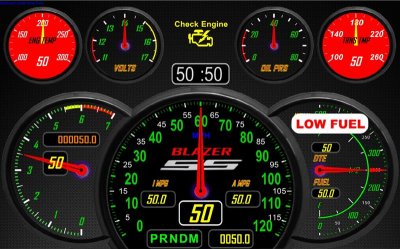
Here's the latest version of my dash. Needle positions and numbers are random and nonsensical in these screen shots. The upper four gauges turn red individually when out of safe operating limits. The crosshatch pattern over the speedo and the red push button top center appear if the connection is lost to the ECM. Pushing the button initiates a connection attempt immediately, or one will be made automatically in 30 seconds. The low fuel warning appears at and below 3 gallons fuel remaining. 0 Gallons displayed is when the engine dies due to fuel starvation, no reserve, no guessing exactly how much fuel is left. Touching the upper half of the speedo switches to Metric. Touching the A MPG window resets average MPG. DTE (Distance To Empty) is based off fuel remaining and Average MPG displayed. Touching the Trip Odometer resets that to 0. The large digit on the left of the tach is the commanded gear. I removed Engine Oil Temp because there is no sensor--it's calculated by the ECM. Inaccurate because I have a large oil cooler the ECM doesn't know about. "V4 Mode Active" appears above the clock--along with a blue light right below the "I MPG" window--when DOD kicks in.

It's running off of a Bluetooth connection now, but will be hard wired off of a USB connection when I mount the cluster permanently. The USB connection is faster--smoother needle movement and faster connections--and more reliable. The Samsung Tab S 10.5 is easily visible under all lighting conditions including direct sunlight with these colors. It is especially attractive under moderate and lower light levels.

Anyways, that's it so far! I'll include a video later.
 

Attachments

  • Dash 1 (Custom).jpg
    Dash 1 (Custom).jpg
    85.4 KB · Views: 58
  • Dash 2 (Custom).jpg
    Dash 2 (Custom).jpg
    91.2 KB · Views: 52
OP
OP
N

Nak

Full Access Member
Joined
Aug 15, 2013
Posts
185
Reaction score
10
need more gauges and data output.

Not sure if you're being serious or sarcastic... :)

Anyways, I've come to this design because it's what I can take in in a single glance. The clock is a different color, because it helps me ignore it unless I'm specifically looking for the time. The four upper gauges all point to 12:00 if they are at normal operating condition. The speedometer can also be taken in at a glance along with the upper four gauges. On highways around here I expect to see slightly left of vertical. On the freeways I expect to see slightly right of vertical. The blue light right below Instant MPG allows me to take in V4 Mode and I MPG in a single glance. Important because I'm tuning when V4 mode kicks in for optimum mileage and driveability. Large warning lights catch my attention and draw my eyes right to the gauge. Likewise, when the gauge goes to a warning condition a digital readout is added to the gauge so I know exactly what's going on.

The fuel gauge is calibrated as close as I could get it. Above 26 gallons all you know is that it's above 26 gallons. (The sender tops out at 26.5 gallons usable fuel.) Below that it's dead on accurate on level ground. if my gauge says 12.6 gallons, it takes 17.4 gallons to fill it up. The tank holds 31.5 gallons, of which 1.5 gallons is unusable. I know, because I filled the tank bit by bit and read the sensor readings with HPTuners when new. Zero gallons on the gauge leaves 1.5 gallons in the tank, but the pump can't draw at that level so we consider that to be zero. Topped off is 31.5 gallons - the unusable 1.5 gallons leaves a capacity of 30 gallons.

I guess gauges and their proper display are important to me as reading them instantly is important to what I do for a living. A properly designed gauge cluster allows you to glance down, look back outside immediately and interpret what you saw while looking outside. This design allows me to do just that. That's why information is grouped and displayed the way it is. Making changes and seeing how well it worked while driving allowed me to fine tune the design.

I will be adding more data, but it will be accessed via touch. I'll have multiple screens available with instruments like inclinometers, STFTs and LTFTs, injector pulse width, performance readouts, etc. The idea will be that off road you'll select a dash that is tailored to driving off road, the same for on the track or towing.
 

SunlitComet

OBS Jedi-Do Good
Joined
Sep 30, 2010
Posts
16,206
Reaction score
188
Location
unknown at this time.
both. i always like to have more sensor data. that way i can catch a glitch the moment it happens and also allows me to perform immediate diagnosis.
 
OP
OP
N

Nak

Full Access Member
Joined
Aug 15, 2013
Posts
185
Reaction score
10
both. i always like to have more sensor data. that way i can catch a glitch the moment it happens and also allows me to perform immediate diagnosis.

Too much info and you can't absorb it without taking your mind off the road. Of course, it's easy to put warnings in the background with this dash... What data would you add?
 
OP
OP
N

Nak

Full Access Member
Joined
Aug 15, 2013
Posts
185
Reaction score
10
Tranny temp is already there--upper right, as is ECT in the upper left. . MAF, MAP, and Fuel Flow will be on the diagnostic page when needed. By tracking I MPG and A MPG you know all of those are good. If "I MPG" drops off suddenly for the conditions hit the diagnostic page for in depth readings. Engine load and torque will be on both the "Tow" page and the "Track" page. TPS I had up initially while tuning V4 mode. Good for that, but pretty much useless day to day. It'll be on the diagnostics page, but it doesn't tell you a lot with DBW. The ECM is going to put the throttle where it wants it. You don't command throttle position with your foot, you command power output. The ECM decides how best to deliver that power. It can vary cam timing, spark timing, fuel flow, v4 mode, and even throttle position to deliver the power requested.

BTW, fuel flow is calculated not measured. It could be very misleading trying to diagnose a problem using fuel flow. What I do is track "A MPG" per tank. compare at fill up to verify. If the numbers match, you're good. if they don't you have a problem. I'll be adding a "fuel used" readout to simplify that. If "Fuel Used" added to "Fuel" remaining = 30, you're good. If it drifts, you have a problem. That's one of the reasons I calibrated my fuel tank precisely. Of course, I also like knowing precisely how much fuel I have. :)
 

SunlitComet

OBS Jedi-Do Good
Joined
Sep 30, 2010
Posts
16,206
Reaction score
188
Location
unknown at this time.
ect or the temp from the sensor that feed the oem dash gauge? i know abot the calculated reading i just really did not want to type all the crap out. i expect most people here now would understand how that stuff works with all the info i put into this site. in other words i think you guys are smart enough to know what i meant. and it sounds like you have more data available so that is good. oh and ignition timing is another one to have. the fuel flow i use not just to measure flow but also see coasting deactivation kick in and out.
 
OP
OP
N

Nak

Full Access Member
Joined
Aug 15, 2013
Posts
185
Reaction score
10
ect or the temp from the sensor that feed the oem dash gauge? i

??? I assume by ECT you mean Engine coolant Temperature? So yes, the upper left gauge shows the stock sensor. All of the gauges show what the ECM is seeing, as the ECM is supplying the data. "I MPG" shows the DFCO kick in as well, and is useful for other things too.

Anyways, the neat thing is that Flat panel dashes can be customized for whatever layout and data the user wants to see. I want to see "I MPG", so that's in my dash. You want Fuel Flow? You can have your dash show that instead. Everybody gets what they want. That flexibility just can't be found in a standard dash--OEM or aftermarket.
 

SunlitComet

OBS Jedi-Do Good
Joined
Sep 30, 2010
Posts
16,206
Reaction score
188
Location
unknown at this time.
been wanting to ask how fast does this dash boot up? if it is not as fast as turning the key on that is a big turn off as you can't monitor start up. also do the needles move as fast and smoothly as the real thing?
 
OP
OP
N

Nak

Full Access Member
Joined
Aug 15, 2013
Posts
185
Reaction score
10
Great question!!! Bluetooth is not fast enough. It's too slow to connect, too slow for the needles. really, the needles are completely usable, but a little too notchy to be attractive. USB solves these issues. Too many wires for hanging on a bracket, but once it's permanently mounted, no problem with the wires behind the cluster hidden in the dash. I use "Autosleeper" to start up and shut down the dash. When permanently mounted it will power up the dash as soon as you open the door, so it will be near as fast as regular gauges. Still not fast enough for my tastes though. I'll be including a mechanical idiot light for oil pressure. If the light goes out, you're safe to wait a few seconds for the gauges. If it doesn't go out, shut her down! Oil pressure is the only thing on startup that is critical for the first few seconds, so this approach should work fine. Plus, that gives you redundant oil pressure monitoring at all times.

That's why I'm going to start a separate thread on Flat panel gauge clusters. There's an awful lot to consider when going to this for a primary display. Far too much for this thread; it really needs it's own thread. Anyways, maybe leave your input till I start that thread? Your questions and answers will be invaluable in that thread, as a lot of people may use it as a reference for similar endeavors. This thread thread is really about swapping LS motors into the best Blazers ever made! :)
 

Forum statistics

Threads
138,110
Posts
1,999,334
Members
103,036
Latest member
Durobans
Back
Top