02 Yukon Headlamp Switch Question

Disclaimer: Links on this page pointing to Amazon, eBay and other sites may include affiliate code. If you click them and make a purchase, we may earn a small commission.

02 Yukon Guy

TYF Newbie
Joined
Dec 21, 2018
Posts
24
Reaction score
6
I have a 2002 GMC Yukon XL 2500 SLT. Is there any way to be able to override the headlamp switch? As of now, I don't really know what the switch is there for, as you cannot turn off the headlamps no matter where the switch is moved to. I'd like to be able to turn off headlamps and have only parking lights on, and to also be able to turn ALL lights off with switch. Thanks in advance for any help.
 

Jeff Groves

Retired Demo Expert. I don't need to run anymore!
Joined
Mar 26, 2019
Posts
533
Reaction score
558
Location
Nevada, Ohio
When necessary, you may turn off the Automatic
Headlamp System and the Daytime Running Lamps
(DRL) feature by following these steps. When the
system is turned off, the headlights will not
automatically come on when it becomes dark outside.
1. Turn the ignition to RUN.
2. Press the DOME OVERRIDE button four times
within six seconds. After the fourth press of the
button, a chime will sound informing you the system
is off. The system will revert back to the automatic
mode when the ignition is turned off and on again.
3. To return to the automatic mode, push the DOME
OVERRIDE button four times within six seconds
(the chime will sound), or turn the ignition off and
on again.

I'd think some custom work would be needed to do exactly what you want.
 

Fless

Staff member
Moderator
Joined
Apr 2, 2017
Posts
16,398
Reaction score
33,919
Location
People's Republic of Colorado
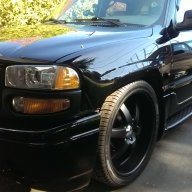
Look like this @02 Yukon Guy?

1S1995__ra_p.jpg
 

JetBlackNali

Full Access Member
Joined
Jul 22, 2012
Posts
100
Reaction score
114
Location
Vancouver Canada
When necessary, you may turn off the Automatic
Headlamp System and the Daytime Running Lamps
(DRL) feature by following these steps. When the
system is turned off, the headlights will not
automatically come on when it becomes dark outside.
1. Turn the ignition to RUN.
2. Press the DOME OVERRIDE button four times
within six seconds. After the fourth press of the
button, a chime will sound informing you the system
is off. The system will revert back to the automatic
mode when the ignition is turned off and on again.
3. To return to the automatic mode, push the DOME
OVERRIDE button four times within six seconds
(the chime will sound), or turn the ignition off and
on again.

I'd think some custom work would be needed to do exactly what you want.


You guy's and gals are lucky. This feature doesn't work on Canadian vehicles.
 

Doubeleive

Wes
Supporting Member
Joined
Nov 7, 2017
Posts
30,579
Reaction score
48,077
Location
Stockton, Ca.
Hmm. Not working here.
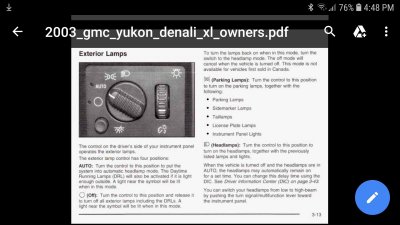
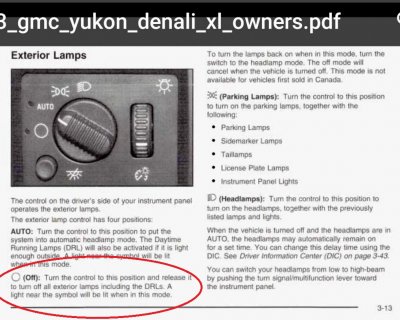
after you have started the truck just bump the light switch to off once, then the led will light up in the off position, it will stay that way until you either cycle the key or turn the lights back on, it's the same procedure 03-14 at least.
 

Doubeleive

Wes
Supporting Member
Joined
Nov 7, 2017
Posts
30,579
Reaction score
48,077
Location
Stockton, Ca.
nevermind i see now where it shows not for vehicles first sold in Canada, I wonder if you purchased a replacement light switch from the states if it would work then?

2003aaa.JPG
 

JetBlackNali

Full Access Member
Joined
Jul 22, 2012
Posts
100
Reaction score
114
Location
Vancouver Canada
nevermind i see now where it shows not for vehicles first sold in Canada, I wonder if you purchased a replacement light switch from the states if it would work then?

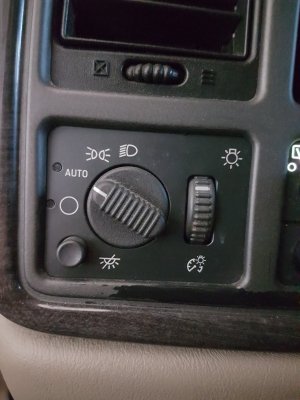
Never tried that. Went and had a look at my switch. I dont think there is a led in the off position. When I'm visiting buddies in Washington will have to pick one up and try it.

20190510_172038.jpg
 

Forum statistics

Threads
137,809
Posts
1,992,726
Members
102,794
Latest member
Drewphil
Back
Top